
Nota Store Analytics For WooCommerce Wordpress Plugin - Rating, Reviews, Demo & Download

Plugin Description
WooCommerce tells you what you sold. Nota Store Analytics tells you what you kept.
Enter what your products cost you and what your payment and shipping providers charge, and the plugin calculates the net profit of every order, including the ones you already have. Then it shows where that profit comes from.
Profit, not just sales
- A dashboard with net profit, margin, net revenue and orders for any date range, compared with the previous period or the same period last year
- A chart of revenue and profit over time, and a breakdown from revenue to profit: product cost, payment fees, shipping cost
- Your most and least profitable products
- A Profit column in the WooCommerce orders list
Products
- A report with every product, its variations and its categories: units, net sales, refunds, cost, profit and margin
- A profit page for every product, with its own chart
- A cost field on every product and variation, in quick edit, bulk edit and the product CSV import and export
- A list of products that still need a cost, with a category filter and bulk entry
- Cost rules: give the products of a category an estimated cost as a percentage of their price, until you enter a real one
- Cost history: every change of a cost is kept, and you can correct a cost for the past; the orders since then are recalculated
- A one-time import of costs from WooCommerce’s own Cost of Goods Sold or from Cost of Goods for WooCommerce by WPFactory
Where the profit comes from
- Channels: profit by channel, source and campaign, built on the order attribution WooCommerce already records
- Ad spend: enter what you spend on Google, Meta, TikTok and other ads by hand or import the daily campaign report as a CSV file. The dashboard then shows net profit after ad spend, and the Channels report shows the spend, the return on ad spend (ROAS) and the profit after ad spend of every channel, source and campaign
- Visits and conversion rate (optional, off until you turn it on): a cookieless counter of visits to your shop, with the conversion rate on the dashboard and by channel, source and campaign
- A weekly summary email (optional, off until you turn it on): last week’s profit, revenue, orders, ad spend, visits and conversion rate, your best products and channel, each compared with the week before
- Customers: new and returning customers, a list of customers with their lifetime profit, cohorts, and a page for every customer
- Geography: profit and shipping by country, state and city, with a world map; shipping you charged compared with what it cost you
- Every report can be downloaded as a CSV file
Built to be right
- The cost of a product is recorded on the order when it is placed, so changing a cost later does not rewrite past profit.
- Refunds are counted on the day they are made, like WooCommerce’s own reports. Net revenue matches WooCommerce’s net sales.
- Orders in other currencies are converted to your store currency. When CURCY or WooPayments stored the exchange rate on the order, that rate is used. Otherwise you can enter the rates yourself, or turn on automatic daily rates from the European Central Bank.
- When a cost or an exchange rate is missing, the plugin says so instead of guessing.
- Works with High-Performance Order Storage and with the older order storage.
Your data stays on your site
The plugin stores everything in your own WordPress database. There is no account to create. The only request it can make to another server is the optional download of exchange rates, described under External services; it is off by default.
The optional visitor counter, which is off until you turn it on, stores daily totals by channel, source and campaign. It stores no IP address, no page address, no user agent and no visitor identifier, uses no cookie, and sends nothing to another server. To stop one browser from flooding the counter, a salted hash of the address is kept for two minutes in a temporary record and then discarded.
Customers are recognised by a keyed digest of their billing email. The plugin keeps no customer name or email of its own; names and emails you see are read from your orders.
More about the plugin: wp-nota.com/store-analytics
External services
The plugin works without contacting any other server. There is one optional exception.
European Central Bank exchange rates
If you turn on “Automatic daily rates” under Store Analytics, Settings, Rates, the plugin downloads the euro foreign exchange reference rates published by the European Central Bank. It uses them to convert orders in other currencies to your store currency at the rate of the order’s day.
This feature is optional and off by default. Nothing is downloaded until you turn it on, and turning it off stops the downloads.
- What is downloaded: the public rate files
eurofxref-daily.xmlandeurofxref-hist-90d.xmlfrom https://www.ecb.europa.eu/stats/eurofxref/ and, once,eurofxref-hist.xmlwhen you have foreign-currency orders older than 90 days. - When: when you turn the setting on, and then once a day.
- What is sent: an ordinary request for a public file. Nothing about your site, your store, your customers or your orders is sent. The European Central Bank’s server sees your server’s address, as any web server does.
-
Source: the reference rates are published by the European Central Bank. Rates page: https://www.ecb.europa.eu/stats/policy_and_exchange_rates/euro_reference_exchange_rates/html/index.en.html
-
Terms of use (disclaimer and copyright; it asks that the data is credited to the European Central Bank as the source): https://www.ecb.europa.eu/services/disclaimer/html/index.en.html
- Privacy statement: https://www.ecb.europa.eu/services/data-protection/privacy-statements/html/ecb.privacy_statement_website.en.html
Source code
The plugin’s PHP, JavaScript and CSS are plain, unminified source files; there is no build step.
The one generated file is features/assets/world-map.js, the country outlines of the Geography map. It is produced from Natural Earth’s 1:110m “Admin 0 – Countries” data (public domain, https://www.naturalearthdata.com/downloads/110m-cultural-vectors/) by the script tools/build-world-map.js, which is included in the plugin. To regenerate it, download the GeoJSON of that dataset and run node tools/build-world-map.js <path to ne_110m_admin_0_countries.geojson> from the plugin’s folder (it needs Node.js and nothing else).
Credits
- Exchange rates: European Central Bank (optional download).
- Country outlines on the Geography map: Natural Earth, public domain.
Screenshots
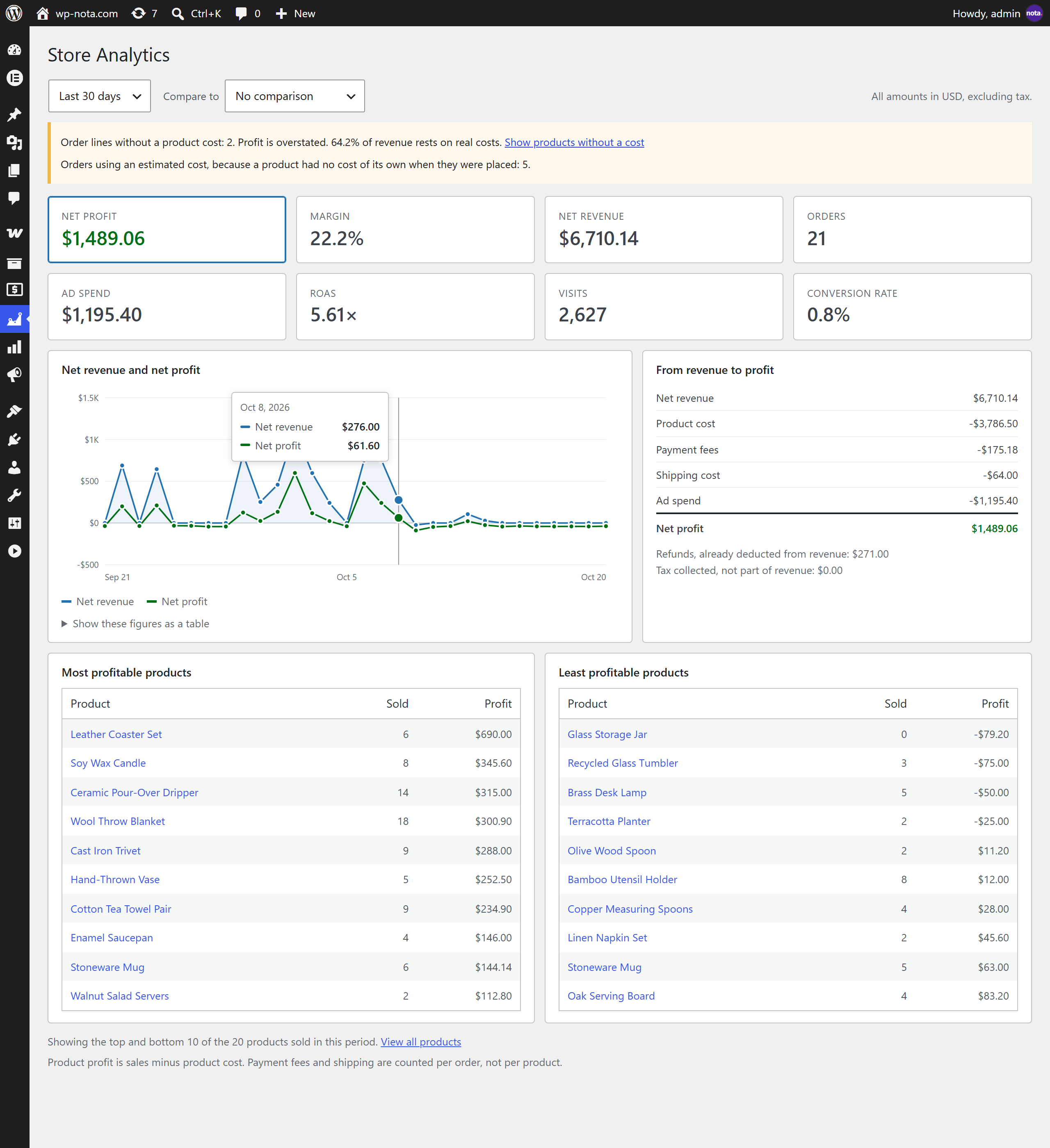
Dashboard: net profit, margin, revenue and orders, with the path from revenue to profit
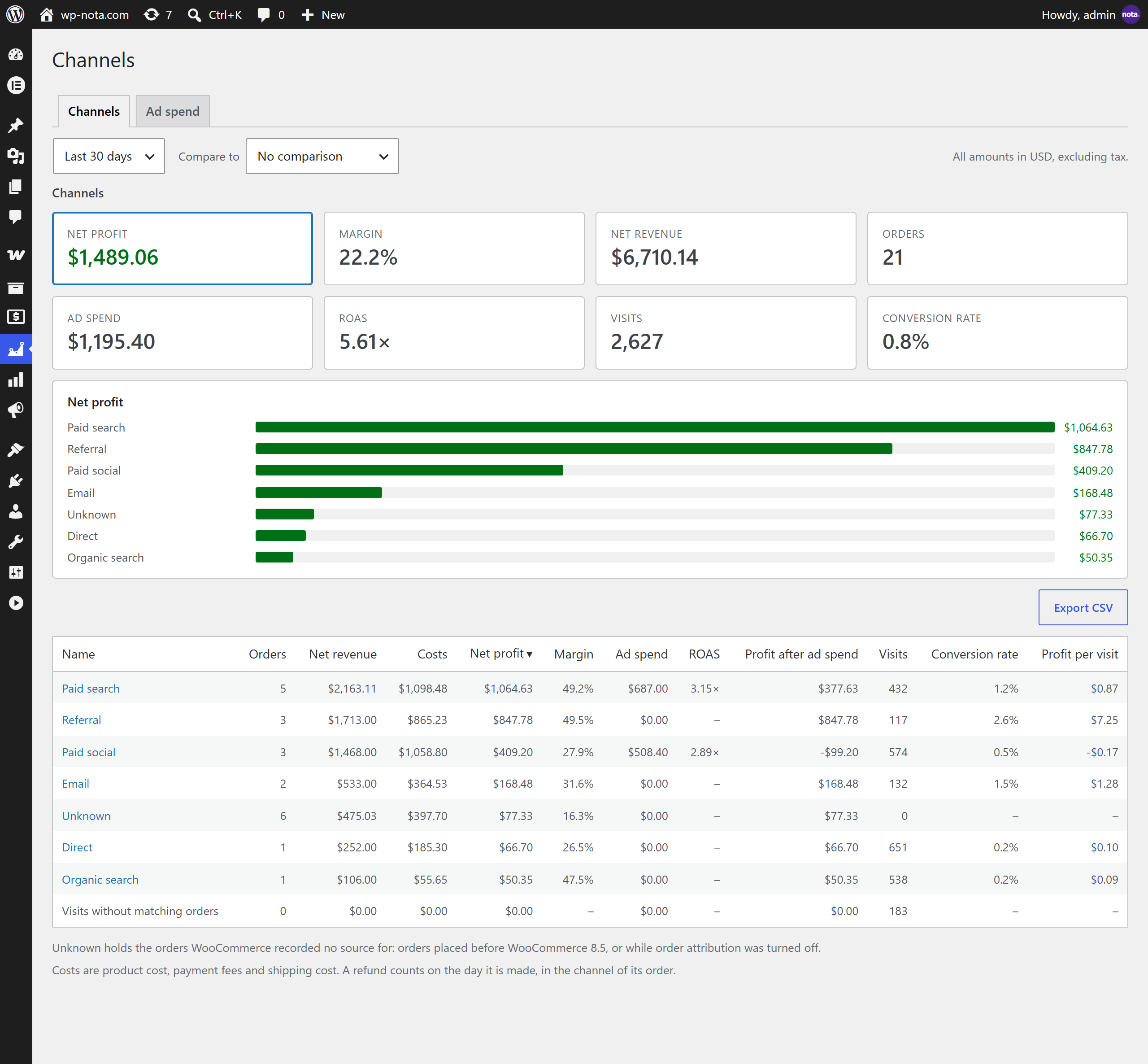
Channels: profit by channel, source and campaign
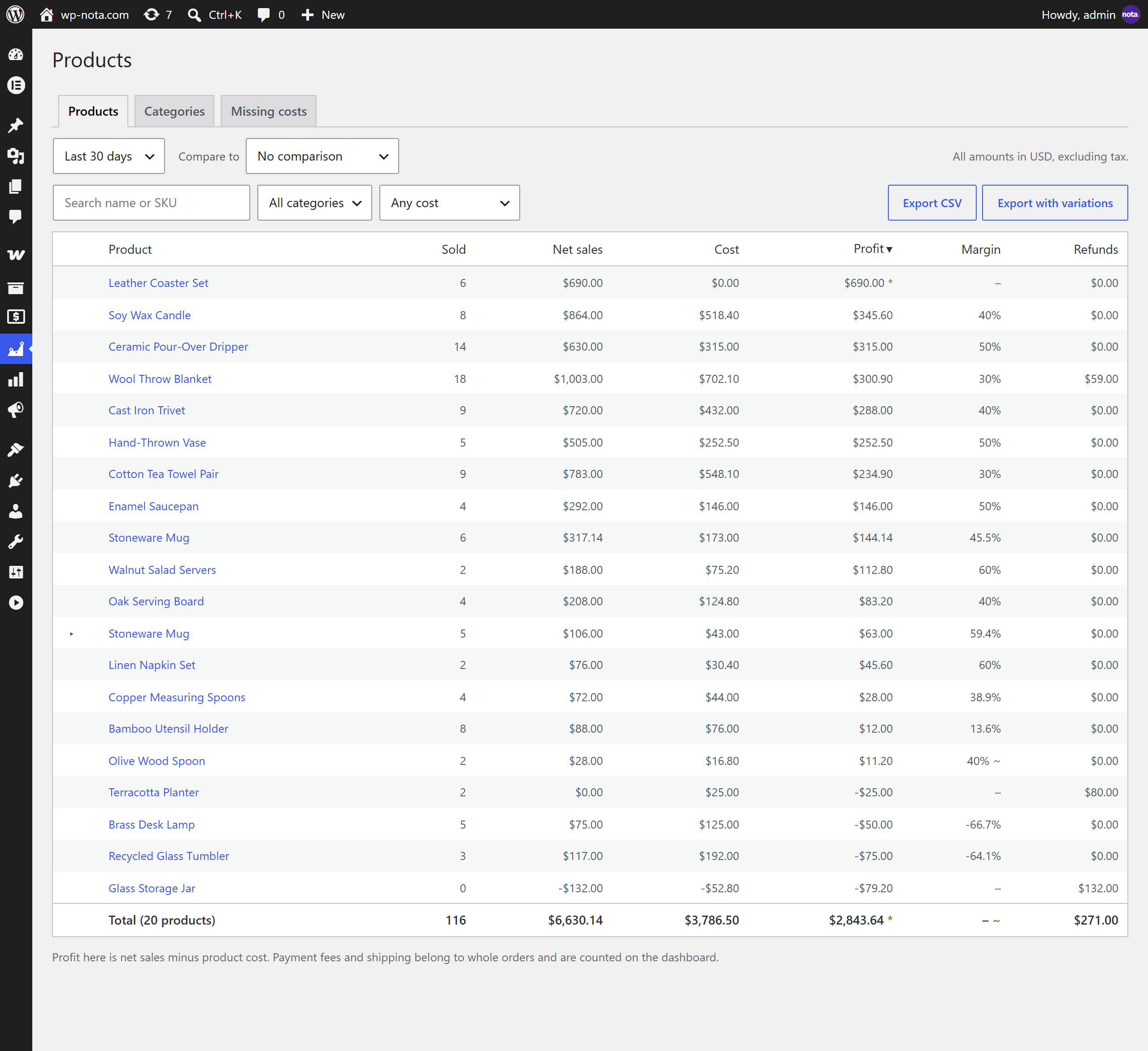
Products report: units, sales, cost, profit and margin of every product
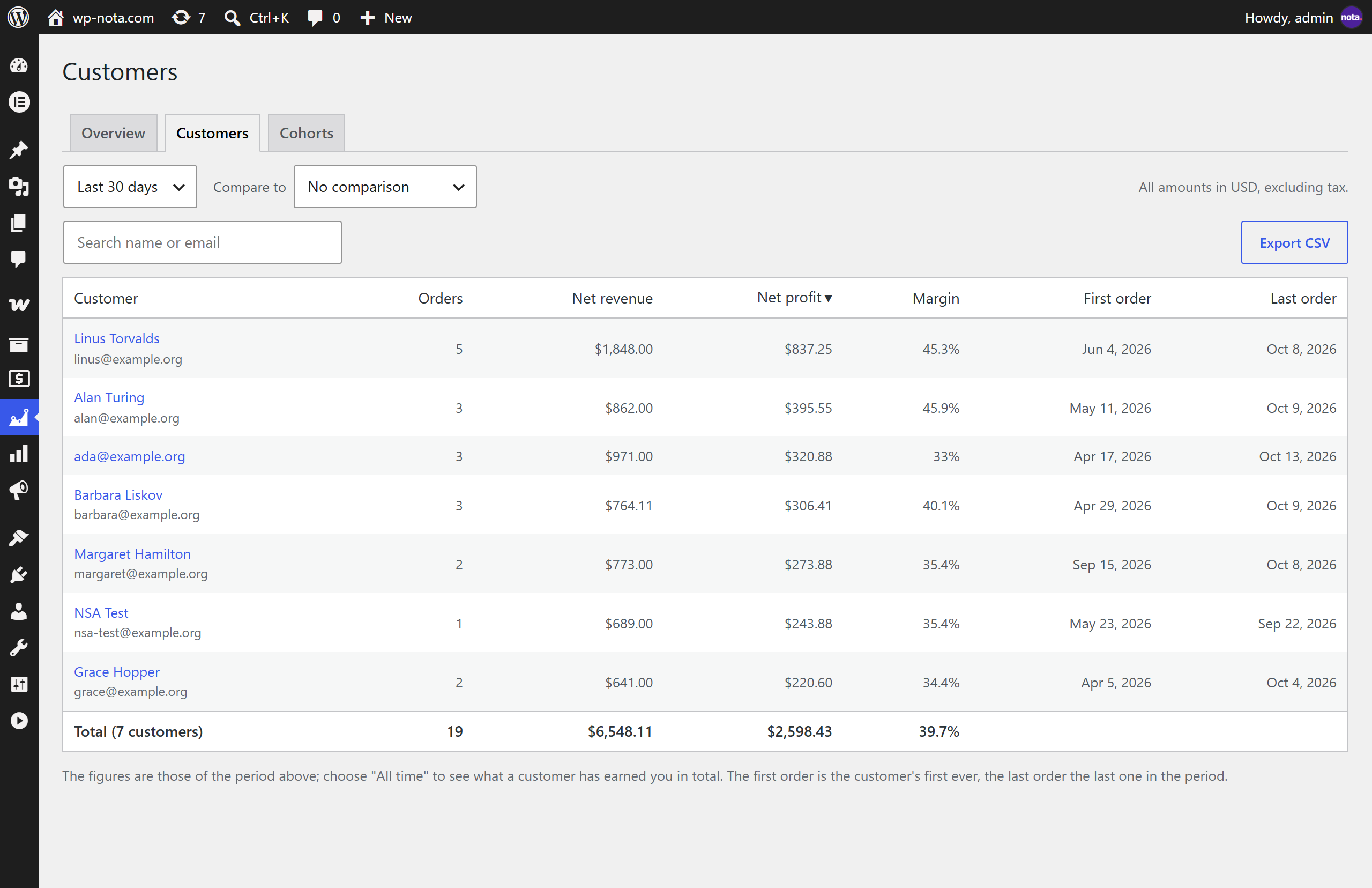
Customers: lifetime profit of every customer
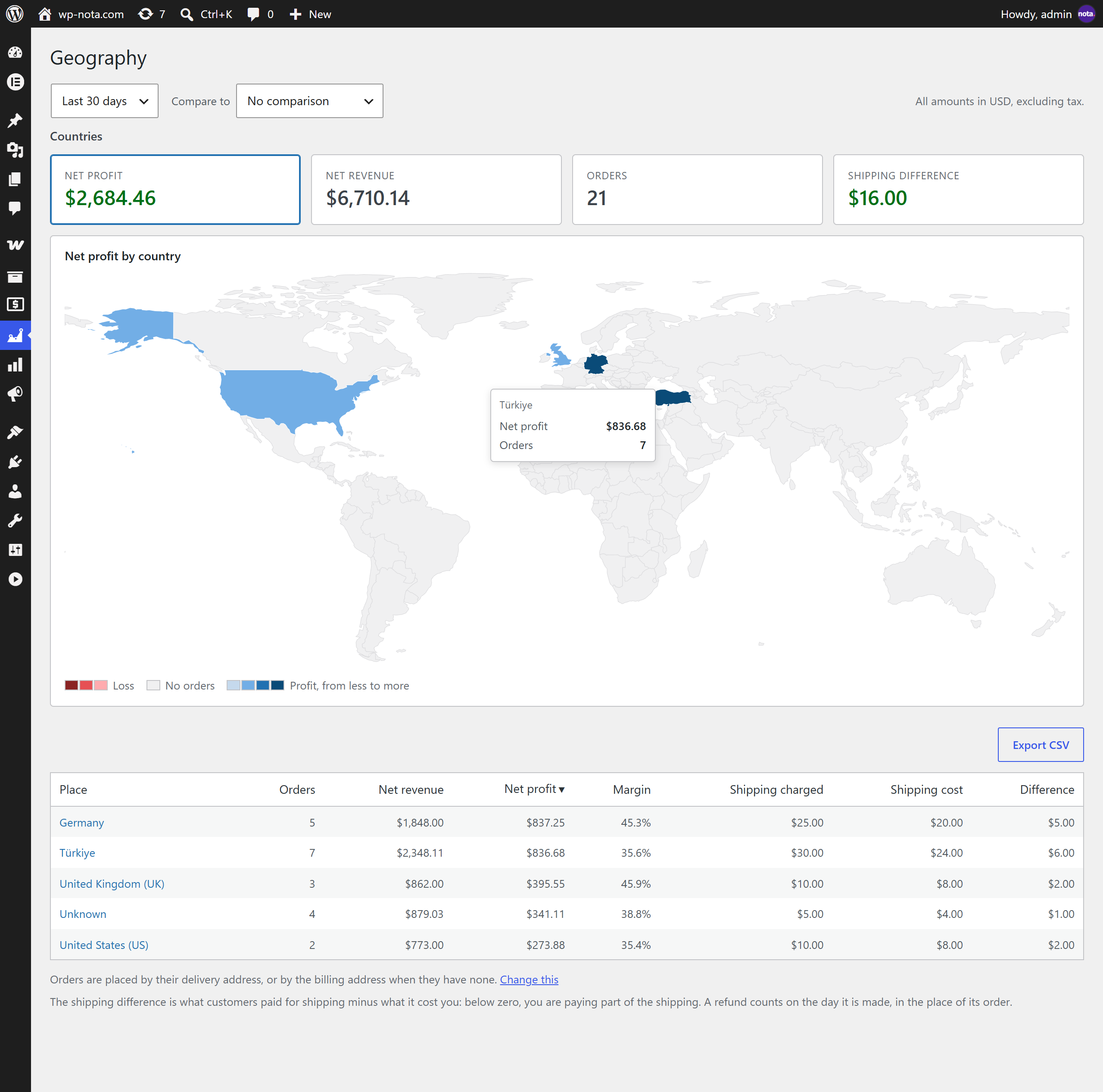
Geography: profit by country on a world map

Profit of a variable product, with its variations and its cost history
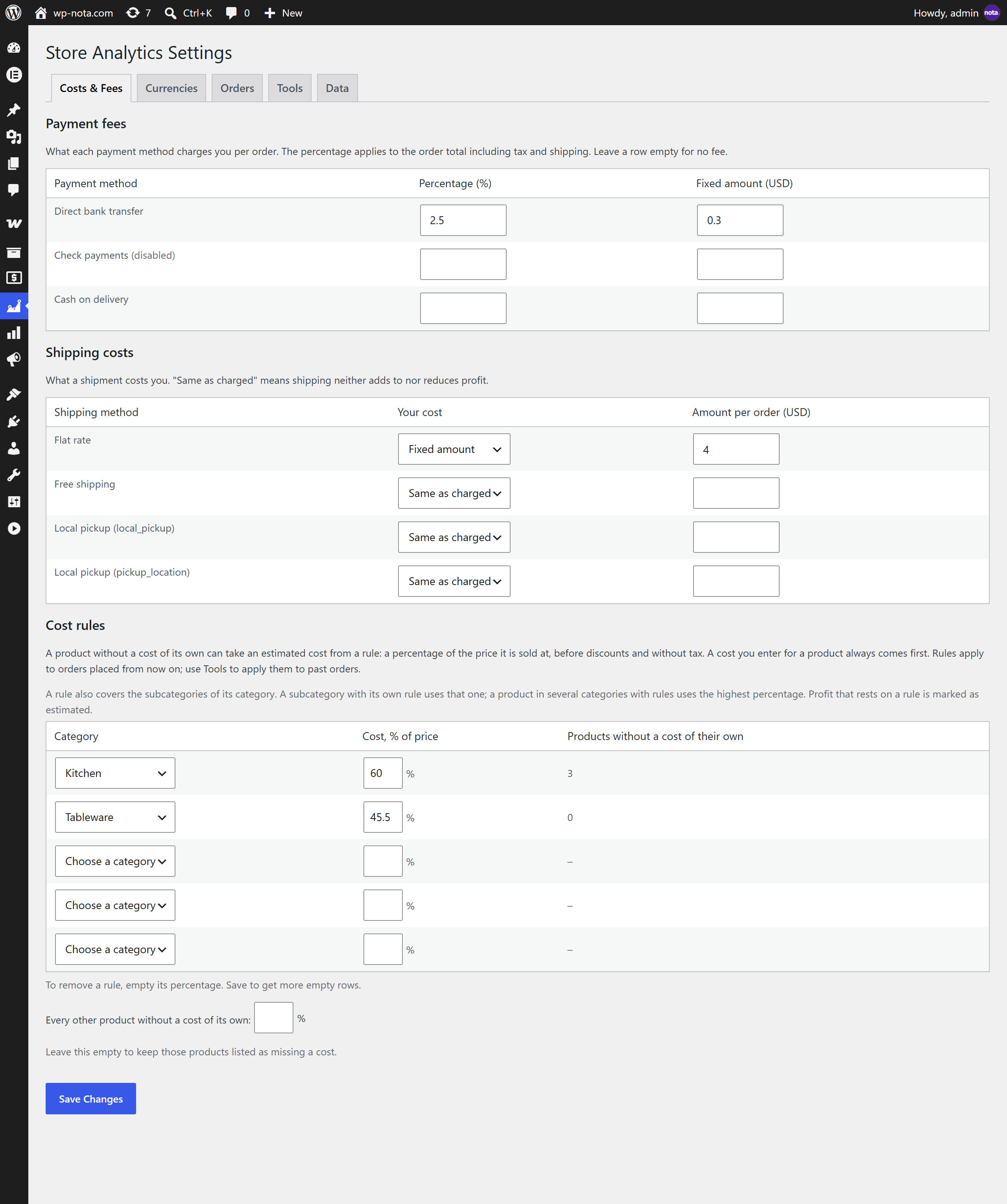
Settings: payment fees, shipping costs and cost rules
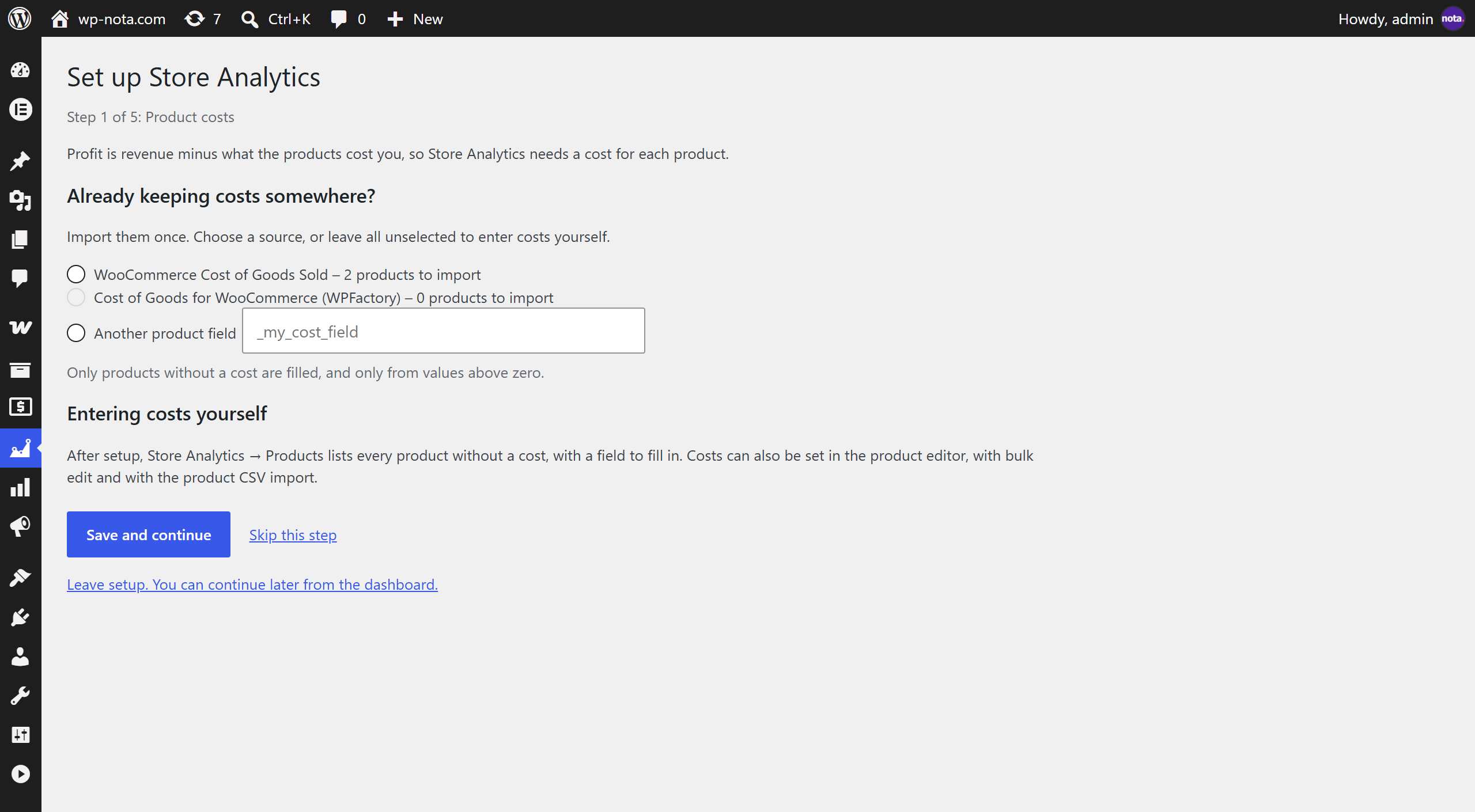
Setup wizard: import costs you already keep elsewhere


