OliForge Country Select For Contact Form 7 Wordpress Plugin - Rating, Reviews, Demo & Download
Plugin Description
OliForge Country Select for Contact Form 7 provides a custom country_select form tag for Contact Form 7. This Free edition includes global and per-field country filtering; reusable saved country lists are reserved for the Pro edition.
Features:
* Search countries by translated name or ISO alpha-2 code.
* Locally bundled SVG flags with no CDN or remote API dependency.
* Animated toggle chevron and selected-country flag.
* Administrator settings for enabling or disabling countries globally.
* English, German, Spanish, French, Ukrainian and Russian country names.
* Automatic language selection from the current WordPress locale.
* Per-field language overrides.
* Stable ISO alpha-2 values for email, CRM, webhook and database integrations.
* Server-side validation against the administrator-approved allowlist.
* Keyboard navigation, accessible native select fallback and RTL-ready layout.
* Developer filters for country data, translated names and allowed countries.
* Minified production CSS and JavaScript.
* Per-field include, exclude, preferred-country and default-country controls.
* Support for id, class, tabindex, autocomplete, aria-* and data-* form-tag attributes.
* Placeholder can be selected again to clear the field; required fields then fail validation correctly.
* Mail-tag output shows the full translated country name with its ISO code, e.g. Ukraine (UA); submitted values used by integrations remain the plain ISO code.
Credits: the bundled SVG country flags come from the flag-icons project (https://github.com/lipis/flag-icons) by Panayiotis Lipiridis, licensed under the MIT License. The license text is included in the plugin as LICENSE-FLAG-ICONS.txt.
Form Tag Usage
Required field:
[country_select* your-country placeholder “Select a country”]
Optional field:
[country_select your-country]
Language overrides:
[country_select* your-country language:en]
[country_select* your-country language:de]
[country_select* your-country language:es]
[country_select* your-country language:fr]
[country_select* your-country language:uk]
[country_select* your-country language:ru]
Advanced examples (separate several ISO codes with a vertical bar “|”; Contact Form 7 does not accept commas inside tag options):
[country_select* country id:country class:form-control tabindex:5 autocomplete:country language:de]
[country_select country include:UA|PL|DE|FR]
[country_select country exclude:RU|BY]
[country_select country preferred:UA|PL|DE default:UA]
[country_select country default:auto]
The default:auto option uses the region part of the current WordPress locale when available, for example uk_UA => UA.
Settings
Open Settings > OliForge Country Select.
Available display languages:
* Automatic — follows the current WordPress locale.
* English.
* Deutsch.
* Español.
* Français.
* Українська.
* Русский.
All countries are enabled by default. Administrators may search, select all, clear all or enable countries individually.
Developer API
Translate an ISO code after the plugin has initialized:
OliForge_CF7_Country_Select::translate_country_name( ‘UA’, ‘uk’ );
OliForge_CF7_Country_Select::translate_country_name( ‘UA’, ‘ru’ );
Available filters:
oliforge_country_select_countries
Filters the canonical ISO code => English fallback country array during initialization.
oliforge_country_select_country_name
Filters one translated country name. Arguments: $name, $code, $language.
oliforge_country_select_allowed_countries
Filters the final enabled ISO code => translated name array. Arguments: $allowed, $language.
For every country_select field, the submitted data available via WPCF7_Submission::get_posted_data() also includes a “{field-name}_name” entry holding the translated country name, alongside the canonical ISO code kept under the field’s own name. Use it in webhooks, CRM connectors or custom mail hooks that read submitted data directly, instead of the Mail template’s [field-name] mail-tag.
Screenshots

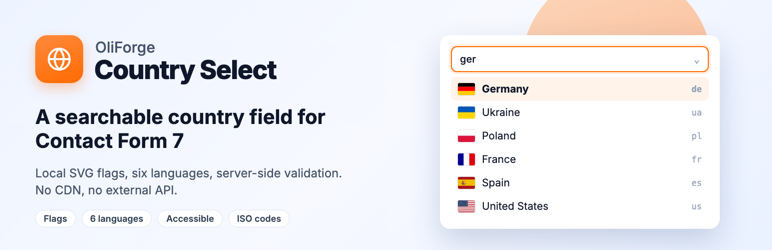
The country selector in a Contact Form 7 form: searchable dropdown with local SVG flags.

Type a name or ISO code to filter the list instantly.

Settings page: choose the name language and enable or disable countries globally.