
Operanse – Store Monitoring For WooCommerce Wordpress Plugin - Rating, Reviews, Demo & Download

Plugin Description
Operanse watches a WooCommerce store from the inside and tells you, unprompted, when something stops working: the site goes down, scheduled tasks stall, subscription renewals fail, payments or checkout break, a form or integration stops. It learns what is normal for your store, so a quiet Sunday night does not look like an outage.
The plugin connects your site to the Operanse service at operanse.com. It does nothing until an administrator creates an account and pairs the site. Before that it records nothing and sends nothing.
The plugin is read-only. It never changes your content, orders, settings, other plugins or files outside its own buffer. There is no code in it that writes to your store on Operanse’s behalf.
Plans
- Watch (free): uptime checks every five minutes from our servers, plus fixed checks: the store no longer able to take an order (no payment method switched on, the checkout, cart or shop page unpublished, everything out of stock), scheduled tasks (Action Scheduler) falling behind, failed scheduled actions, and subscription renewals failing. Alerts by email and a weekly report. One site.
- Monitor and Insight (paid, with a 14-day trial): incidents measured against your store’s own normal, the dashboard’s other tabs, and more alert channels. Insight adds host resources and AI-assisted incident reviews.
When you pair, you choose the trial or Watch. The plugin does the same work on every plan; what the service keeps, learns from and alerts on is decided by the service. Nothing in the plugin is locked, limited or switched off by your plan.
What the plugin reads on your site
After pairing, on every plan, the plugin reads:
- WooCommerce activity through WordPress and WooCommerce hooks: orders created and paid, payment outcomes, webhook deliveries, form submissions, and whether WordPress handed outgoing mail to your mailer. It records counts, statuses, gateway and plugin slugs and timings, never customer details. When Stripe refuses a payment or renewal, it records Stripe’s short reason codes (for example
insufficient_fundsorresource_missing), never Stripe’s message, the customer, the card or the amount. - Changes on your site, and who made them: plugins, themes and WordPress itself; saves of WooCommerce, payment gateway, shipping, tax, permalink, site-address, caching and SMTP settings (the setting’s name and which of its fields changed, never a value); a product’s status, price or stock status changing (not the amount); the cart, checkout, my-account and shop pages’ status and whether their content changed (never the content); roles. Each change names the WordPress user id, the role and the path it came in by (wp-admin, REST, WP-CLI, cron), never a login, a display name or an email address.
- Your WooCommerce webhooks: each one’s topic, status, the host it delivers to (not the rest of its URL) and how many deliveries in a row have failed. Never its name, secret or payload.
- Request timings for a small sample of requests (2 % by default): route type, duration, status code.
- Plugin source structure (discovery): it parses the PHP files of your active plugins and theme for structure only — hook names, REST routes, scheduled hooks, external domains called, database table names, class and function names. It never reads
wp-config.phpor.envfiles and never sends source code. For each page a form is placed on, it also records the page’s id, title and address on your site (for example “Checkout” and/checkout/), the same title and address any visitor sees. - The PHP error log (the tail since the last read, at most 1 MB per run). Each line is redacted on your site before it is buffered.
- Host resources:
/procand cgroup files (CPU, load, memory), free disk space,SHOW GLOBAL STATUSandSHOW GLOBAL VARIABLESfrom your database, PHP OPcache status, and the PHP-FPM pool’s counts (busy and total workers, how often it was full, requests served), read from FPM’s own status on a sampled request and on Operanse’s signed uptime check.
It never collects names, email addresses, postal addresses, phone numbers, IP addresses, card data, cookies, request headers or checkout form bodies.
Remote requests are not remote code
Operanse can ask the plugin a question, for example “how many scheduled actions failed in the last hour?”. Each request names one of a fixed list of read-only capabilities implemented in this plugin (such as get_action_scheduler_summary, get_order_state, get_recent_operational_errors, get_site_inventory) and carries parameters, which the plugin validates. A request never carries code, and the plugin has no capability that writes, runs SQL, runs PHP or shell commands, or changes an option. Requests are signed with a key created at pairing.
Your site’s speed
The plugin never contacts Operanse during a visitor’s request. Events go to a local buffer and a scheduled task uploads them later, so Operanse being slow or unreachable cannot make your site slow or unreachable. Every part of the plugin fails open: an error inside it is logged locally and never breaks WordPress or WooCommerce.
External services
This plugin connects to the Operanse API (https://api.operanse.com), run by JES WEB PTY LTD, to monitor your store. It is required for the plugin to do anything; without an account the plugin is inactive.
Nothing is sent before an administrator pairs the site from Settings Operanse (or wp operanse pair). Pairing sends a one-time pairing code, your site URL and the plugin, WordPress and PHP versions.
After pairing, the plugin sends a heartbeat every five minutes: plugin, WordPress and PHP versions, the site URL, whether WP-Cron is running, the state of the plugin’s local buffer, and the counts behind the fixed checks (Action Scheduler past-due and failed counts, the age of the oldest past-due action, and renewal orders created and failed in the last six hours), and whether the store can take an order: how many payment methods are switched on, whether the checkout, cart and shop pages are published (their status word, such as draft or trash), how many products are published and how many are not out of stock, and when each was last seen working. The heartbeat carries counts and status words only: no order or customer details, page titles or ids.
It also sends, on every plan:
- telemetry events as described under “What the plugin reads”: counts, statuses, slugs, durations, Stripe’s reason codes for a refused payment and redacted error messages;
- a discovery snapshot: your plugins, theme and versions, the structural summary of their source (hook names, routes, scheduled hooks, external domains, table and class names — not the code), and the id, title and address of each page a form is on;
- the answers to the read-only requests described above.
On Watch the service stores what the plugin sends, as on the paid plans, and keeps it for 30 days. It uses it to improve Operanse; it is not used to alert you on Watch, and the paid tabs stay locked. The plugin itself behaves the same on every plan.
Operanse also contacts your site: our servers request your home page and a status URL (/?wc-api=operanse-probe, which answers only when the site is paired) to check uptime. If you choose the optional direct-inbound connection mode, Operanse sends signed requests to the REST route operanse/v1/read; by default the plugin polls instead and no inbound route is used.
Data is processed under the Operanse Terms of Service and Privacy Policy. The providers that process it on our behalf are listed on the Sub-processors page.
Screenshots
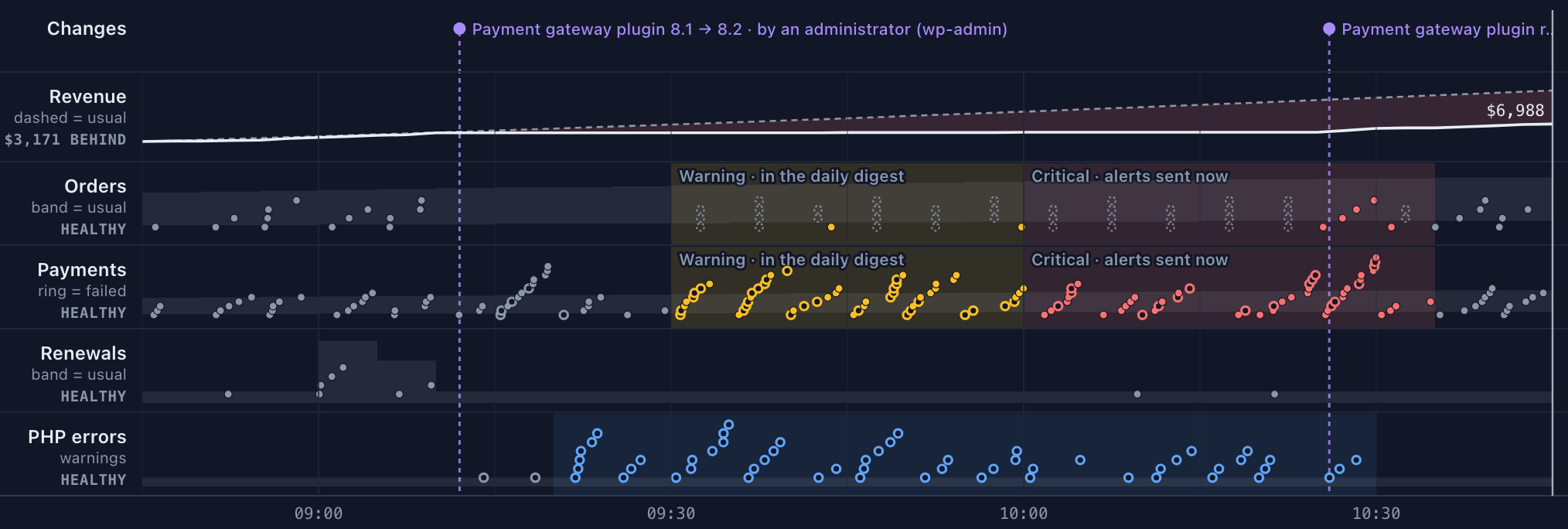
Playback in the Operanse dashboard: a store’s morning replayed against its own normal. A payment gateway update, payments failing, a warning, then a critical alert, and recovery after the rollback (example store, not real data).
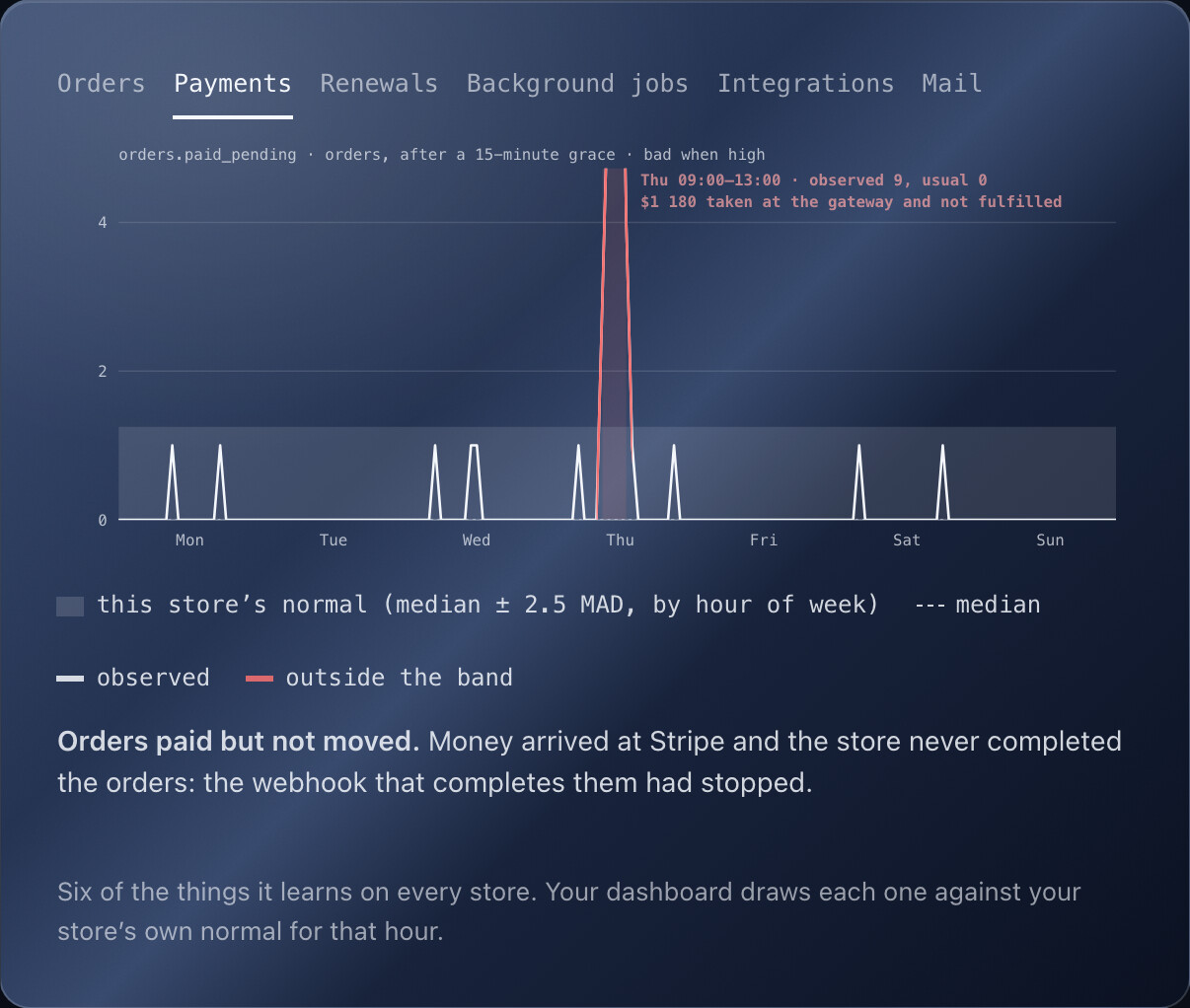
Each metric is drawn against the store’s learned normal for that hour of the week. Here, orders paid at Stripe but never completed leave the band (example store).

An alert email: what changed, the store’s usual range, an estimate of what it is worth, and what Operanse did not verify (example store).
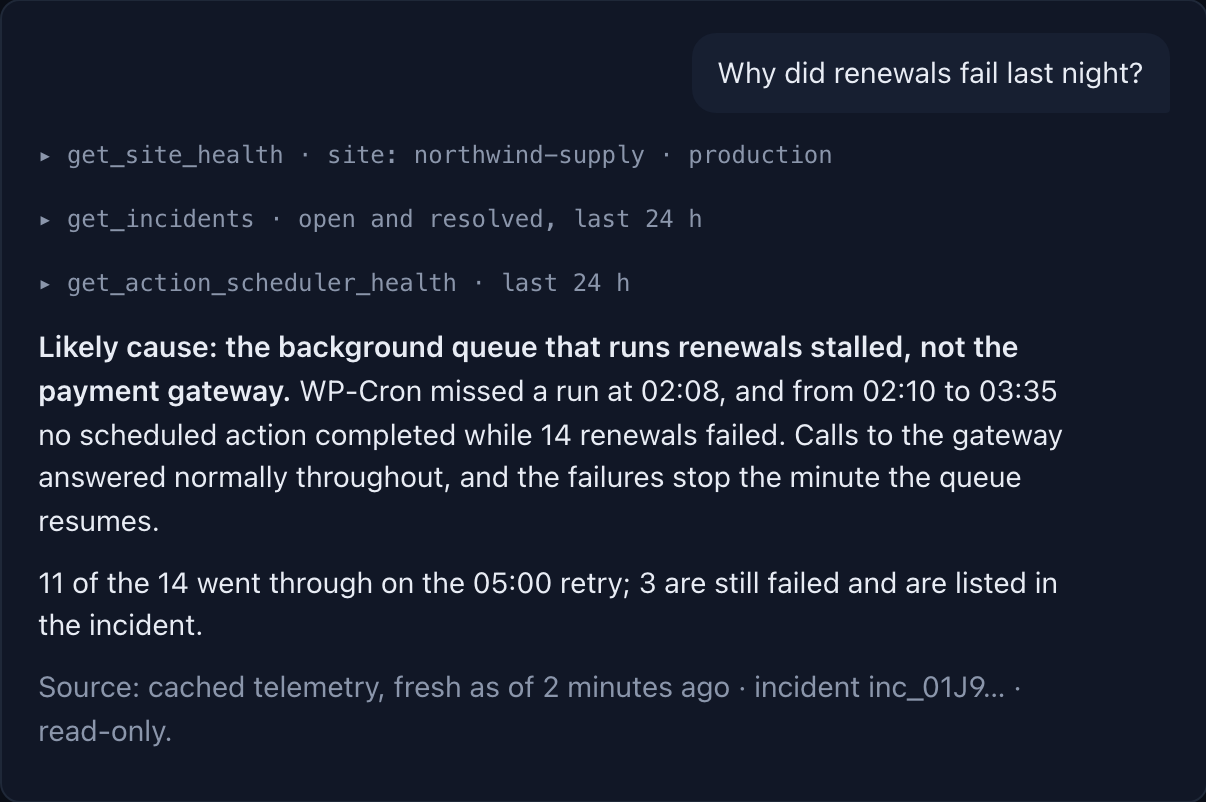
Asking your own AI assistant about your store over Operanse’s read-only MCP connection (example store).


