Opportify Fraud Protection Wordpress Plugin - Rating, Reviews, Demo & Download
Plugin Description
Opportify Fraud Protection stops fake sign-ups, form spam, bot submissions, and fraudulent leads on every WordPress form — silently, in real time, without friction for real users.
Unlike CAPTCHA, which annoys genuine visitors, Opportify works invisibly in the background. It analyzes over 100 signals per submission — behavioral patterns, device fingerprints, email risk, IP reputation, VPN and proxy detection — and scores each one so you can automatically allow, flag, or block it.
Who This Is For
WordPress site owners and marketers tired of spam flooding their contact forms, fake leads cluttering their CRM, or bots registering fake accounts.
WooCommerce store owners who need to stop fraudulent checkouts, fake account registrations, and disposable email sign-ups before they cause damage.
Developers and agencies who want an API-backed, code-configurable fraud layer with per-integration control, risk metadata on entries, and support for version-controlled config files.
Security and operations teams who need explainable risk scores (not black-box verdicts) with per-submission breakdown of contributing factors.
Why Not Just Use CAPTCHA?
CAPTCHA hurts conversion rates for real users and is routinely bypassed by modern bots. Opportify takes a different approach: it observes behavioral signals before the form is even submitted, analyzes every signal simultaneously at the moment of submission, and delivers a risk verdict your site can act on — all in under a second, with no puzzles, no friction, and no false positives for legitimate visitors.
What It Detects
- Disposable and temporary email addresses
- High-risk and known-fraud email domains
- VPN, proxy, Tor exit node, and datacenter IP addresses
- Bot and automated browser behavior
- Device fingerprint anomalies
- Geographic and velocity anomalies
- Mismatched or suspicious behavioral signals
Risk Levels
Every submission receives a score and one of five plain-language risk levels:
- Lowest and Low — Healthy submissions. Genuine users, clean signals.
- Medium — Caution. Worth a closer look, but not necessarily fraudulent.
- High and Highest — Risky submissions. Likely spam, bots, or fraud. Block or flag automatically.
Per-Integration Actions
For each supported form plugin, you can independently configure what happens at each risk level:
- Allow — Submission proceeds normally
- Flag — Submission proceeds, but risk score, level, and contributing factors are saved as metadata (visible in WP Admin with a Risk column added to comments, users, and orders)
- Block — Submission is rejected with a customizable error message
Supported Form Integrations
- WordPress Comments
- WordPress User Registration
- WooCommerce Checkout
- WooCommerce Account Registration
- Contact Form 7
- WPForms
- Gravity Forms
- Elementor Pro Forms
- Ninja Forms
- Fluent Forms
- Forminator
- Formidable Forms
- Mailchimp for WordPress (MC4WP)
Supported Newsletter & CRM Integrations
- Brevo (formerly Sendinblue)
- Email Subscribers
- FluentCRM
- Kit (formerly ConvertKit)
- MailerLite
- MailPoet
- Newsletter
Key Features
- Real-time fraud and spam detection on every form submission
- Client-side behavioral fingerprinting via the Opportify JS SDK (loads automatically, no configuration needed)
- Server-side AI analysis via the Opportify Fraud Protection API
- 5-level risk scoring with explainable contributing factors
- Per-integration configuration — different rules for contact forms vs. registrations vs. checkouts
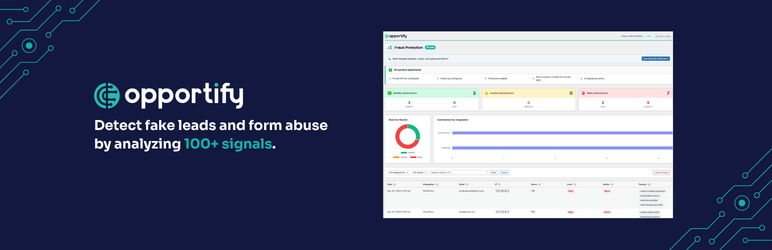
- Reports dashboard with risk distribution charts, submission log, and health checklist
- Risk metadata columns in WP Comments, Users, and WooCommerce Orders list tables
- Config file support (
opportify-config.php) for DevOps, Bedrock, Trellis, and staging pipelines - Skip admins option to avoid false positives during development and testing
- Automatic log cleanup via WP-Cron (configurable retention, default 90 days)
- Compatible with WP Rocket, LiteSpeed Cache, W3 Total Cache, Autoptimize, and other caching plugins
- Translated into 10 languages: German, Spanish, French, Italian, Japanese, Dutch, Polish, Portuguese (Brazil), Russian, and Simplified Chinese
How It Works
- The Opportify JS SDK loads silently in your site header. It collects behavioral signals — mouse movement, keystroke timing, scroll depth, device entropy — and generates a session fingerprint.
- When a form is submitted, the SDK attaches a behavioral token to the submission automatically.
- The Opportify PHP SDK sends the submission to the Fraud Protection API for analysis: email risk, IP intelligence, device signals, behavioral correlation, and more.
- Based on your configured thresholds, the plugin allows, flags, or blocks the submission — instantly.
No CAPTCHA. No user friction. No separate configuration per form.
Reports Dashboard
The plugin’s Reports page gives you a clear view of your site’s submission health:
- Health checklist — confirms your API keys, connection status, and active integrations at a glance
- Risk distribution chart — donut chart showing the split between Healthy, Caution, and Risky submissions
- Submissions by integration — bar chart showing which forms receive the most risk
- Submission log — filterable table with date, integration, email, IP, score, risk level, action taken, and contributing factors
- Dashboard link — access detailed trend analysis and advanced filters in the Opportify Dashboard
External Services
This plugin connects to two Opportify services:
- Fraud Protection API (
https://api.opportify.ai) — analyzes each submission server-side using your private API key. Data sent: email address, IP address, and behavioral signals from the JS SDK. - JS SDK CDN (
https://cdn.opportify.ai) — loads the client-side behavioral telemetry script using your public key. The client-side behavioral telemetry script is an integral component of the Opportify fraud detection service: it collects behavioral signals (typing cadence, mouse movement, device entropy, automation indicators) that are correlated server-side with the fraud analysis. Loading it from the Opportify CDN is a service integration, not a decorative asset — the plugin automatically fetches the latest script version from the CDN manifest and injects it into your site header.
Please review Opportify’s Privacy Policy and Terms of Service before activating the plugin. By activating, you agree to the transmission of submission data to Opportify’s API for fraud analysis.
Support
For questions, feedback, or assistance, visit https://www.opportify.ai/contact-us.
Screenshots

Reports page — risk distribution charts, health checklist, and submission log

Settings page — General tab with API credentials and global protection settings

Settings page — Integrations tab with per-integration risk action configuration

Submission log — filterable table with risk level badges and contributing factor pills