
OpsGate Wordpress Plugin - Rating, Reviews, Demo & Download

Plugin Description
OpsGate is a hybrid WordPress site operations and alert automation platform.
The OpsGate WordPress plugin connects a WordPress site to the OpsGate platform so the site can participate in evidence-backed triage, reports, alerts, history, and operational visibility.
The plugin is a compact site companion and connector. It is not a second full dashboard. Deeper account, report, alert, billing, portfolio, and agency management happens in the OpsGate web console according to the site’s plan.
OpsGate helps answer one practical question:
What is the condition of this site right now, why is it in that condition, and where do I need to act?
What OpsGate provides
- Public/external checks for Free sites.
- Connected WordPress triage for Starter and higher plans.
- Evidence-backed posture summaries.
- Site-scoped reports and history.
- Alert routing according to plan limits.
- Operational visibility for site owners, operators, and agencies.
- Hybrid plugin + web console workflows for Pro and Agency plans.
Tier model
Free:
External/public checks only. Free does not require connected plugin credentials and does not imply authenticated WordPress inventory, plugin, theme, PHP/runtime, or update-posture truth.
Starter:
Plugin-led connected triage for one connected site, with limited reports and alert routing according to the active plan.
Pro:
Hybrid plugin + web console operations for deeper site triage, reports, alerts, activity, and settings according to Pro limits.
Agency:
Hybrid multi-site and portfolio operations for agencies managing multiple WordPress sites.
Product surface model
The installed WordPress plugin is the local connector and site companion.
The OpsGate web console is the management layer for account, billing, reports, alerts, portfolio, activity, and deeper operations.
This separation keeps the plugin site-scoped and avoids exposing broad account or portfolio controls inside every connected WordPress admin.
Privacy and authority model
OpsGate uses the OpsGate API and canonical backend records as the source of truth for connected site identity, triage runs, reports, alerts, and plan limits.
The plugin does not act as the authority for plan entitlement, run truth, report truth, or alert truth.
External Services
This plugin connects your WordPress site to the OpsGate platform, a software-as-a-service operated by Cyber Eclipse (Québec, Canada), to provide site assessment, reporting, alerting, and operational visibility. This section discloses the external communication the plugin performs, in accordance with the WordPress.org Plugin Directory Guidelines.
OpsGate platform (api.opsgate.ca / mcp.opsgate.ca)
This is the only external service the plugin contacts directly. It is the service that performs and stores the site assessment, reports, alerts, and plan entitlements; the plugin is a connector to it.
- Data transmitted: your site address; and, for connected (Starter and higher) plans after you complete pairing, technical WordPress configuration data — plugin and theme inventory (names, versions, update status), rate-limited PHP error summaries (containing no site-visitor data), and aggregate WooCommerce order-volume counts (containing no order or customer details). Free public checks transmit only your site address and public signals; no authenticated inventory is collected.
- When data is transmitted: when you run a public check or connected scan, when the plugin refreshes site status, and when it checks for plugin updates (update metadata is served from the OpsGate platform).
- Account requirement: connected plans require an OpsGate account and a pairing step; free public checks do not require an account.
- Terms of Service: https://opsgate.ca/terms
- Privacy Policy: https://opsgate.ca/privacy
Sub-processors used by the OpsGate platform
The plugin does not contact any of these services directly. The OpsGate platform uses them on its own servers to deliver the Service; they are listed here for transparency because your data may reach them through OpsGate. Their use, the data involved, and the applicable jurisdictions are described in full in the OpsGate Privacy Policy (https://opsgate.ca/privacy).
- Stripe — payment processing for paid plans. Data: billing details you enter at checkout. When: only during subscription signup or management. Terms: https://stripe.com/legal | Privacy: https://stripe.com/privacy
- Anthropic — optional AI-generated report summaries. Data: your site’s assessment findings (no site-visitor data). When: only when an AI summary is generated for a connected scan. Terms: https://www.anthropic.com/legal/consumer-terms | Privacy: https://www.anthropic.com/legal/privacy
- WPVulnerability and the NIST National Vulnerability Database (NVD) — vulnerability intelligence. Data: plugin/theme names and versions from your inventory, to look up known advisories. When: during a connected scan. WPVulnerability: https://www.wpvulnerability.net/ | NVD: https://nvd.nist.gov/developers/terms-of-use
- RDAP domain registries — domain-expiry lookups. Data: your site’s domain name only. When: during a scan that checks domain/SSL expiry.
Alert delivery channels (optional, you configure them): if you choose to receive alerts through a messaging channel, you paste that channel’s destination (for example a Discord or Slack webhook URL such as https://discord.com/api/webhooks/…, or a Telegram bot token and chat_id) into OpsGate. The plugin only stores the destination you provide; it does not itself contact the channel. The OpsGate platform performs the actual delivery when an alert fires, sending only the alert content you have configured. Channels supported this way include Telegram (https://telegram.org/privacy), Slack (https://slack.com/trust/privacy/privacy-policy), Discord (https://discord.com/privacy), Microsoft Teams (https://privacy.microsoft.com/privacystatement), Amazon SNS (https://aws.amazon.com/privacy/), and Twilio/WhatsApp (https://www.twilio.com/legal/privacy). No alert channel is contacted unless you configure one.
By installing and connecting this plugin, you acknowledge that site data is transmitted to the OpsGate platform as described above and governed by the linked Terms of Service and Privacy Policy.
Screenshots
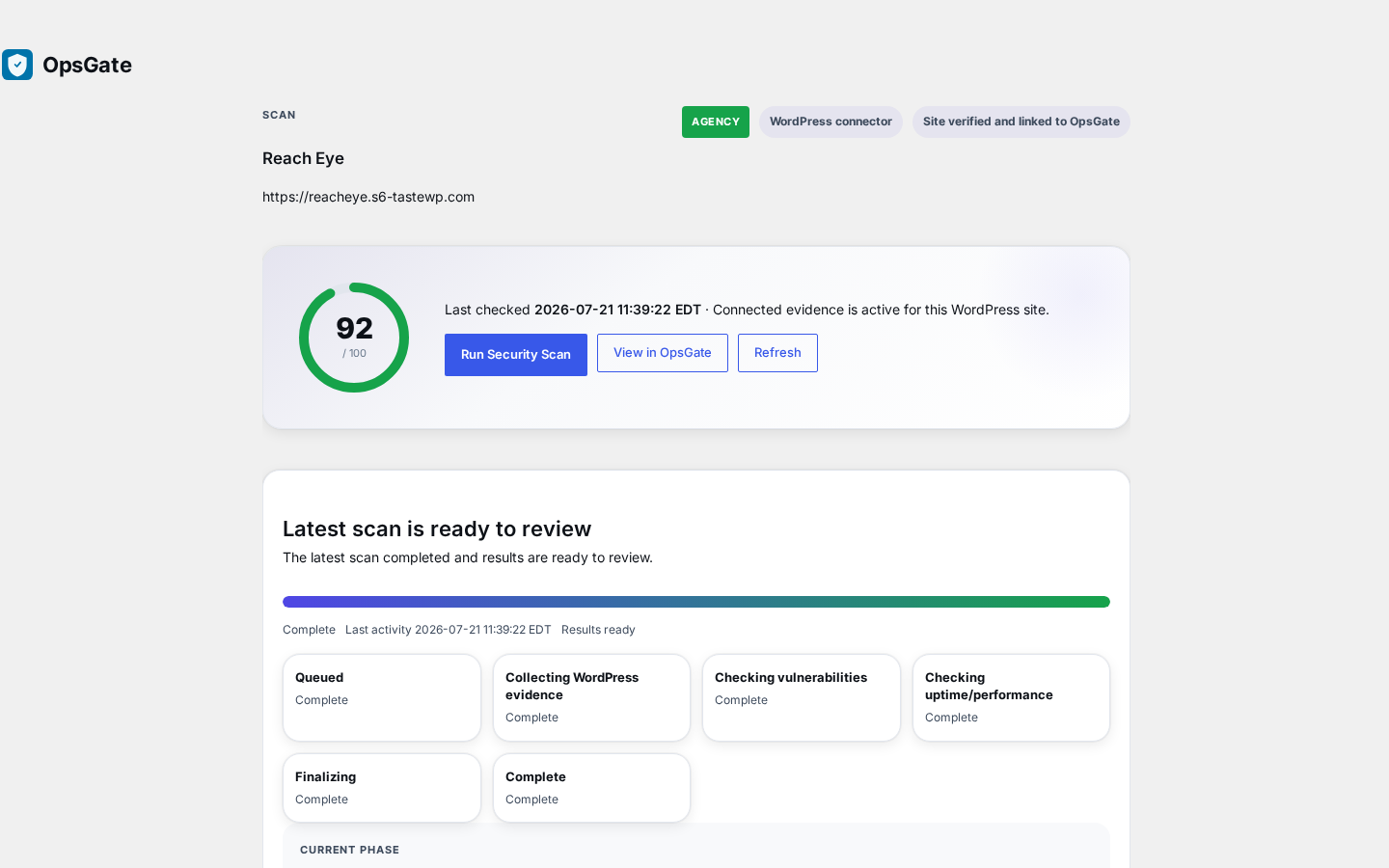
OpsGate compact WordPress companion surface in the WordPress admin.
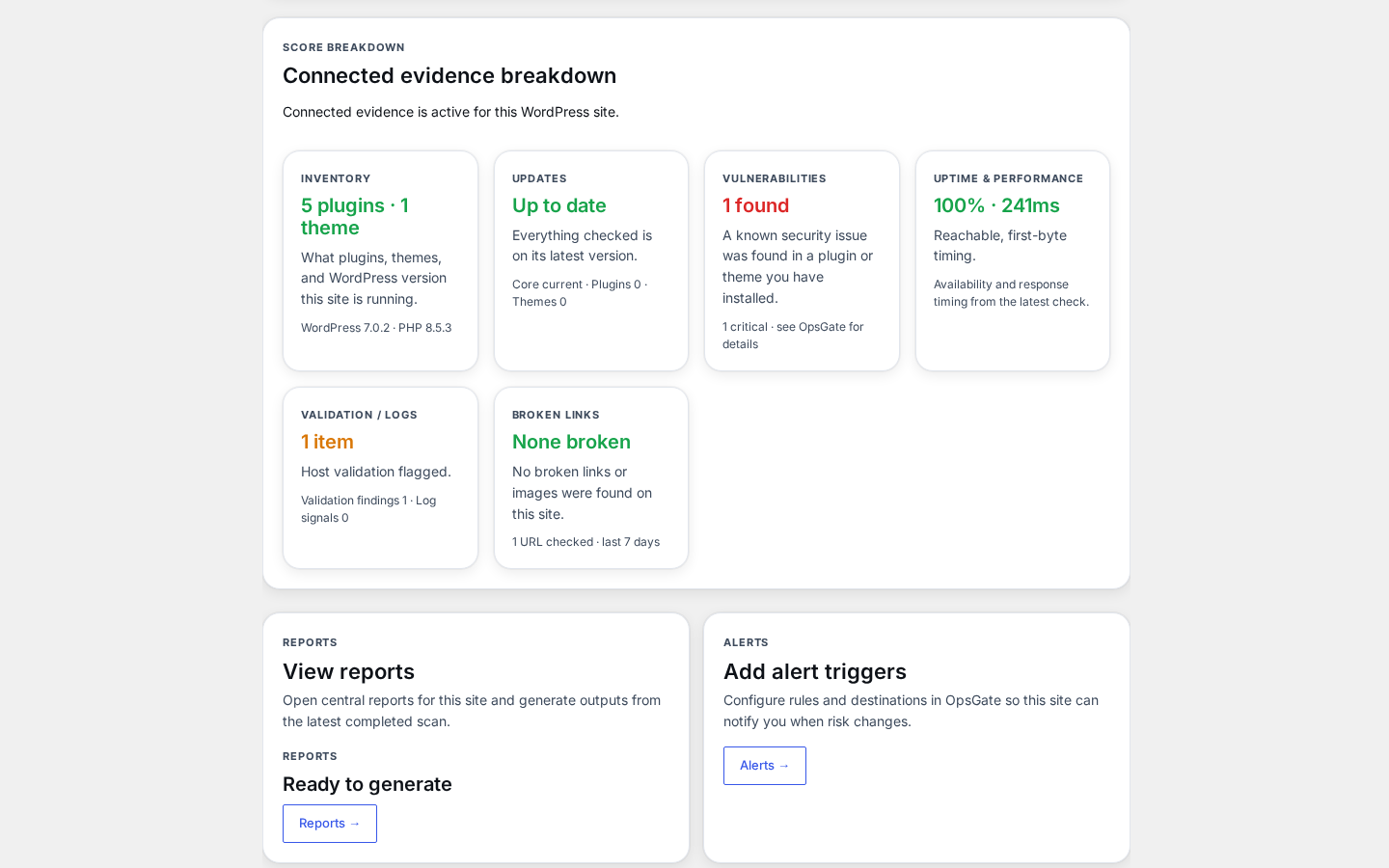
Connected site evidence breakdown: inventory, updates, vulnerabilities, uptime and performance.
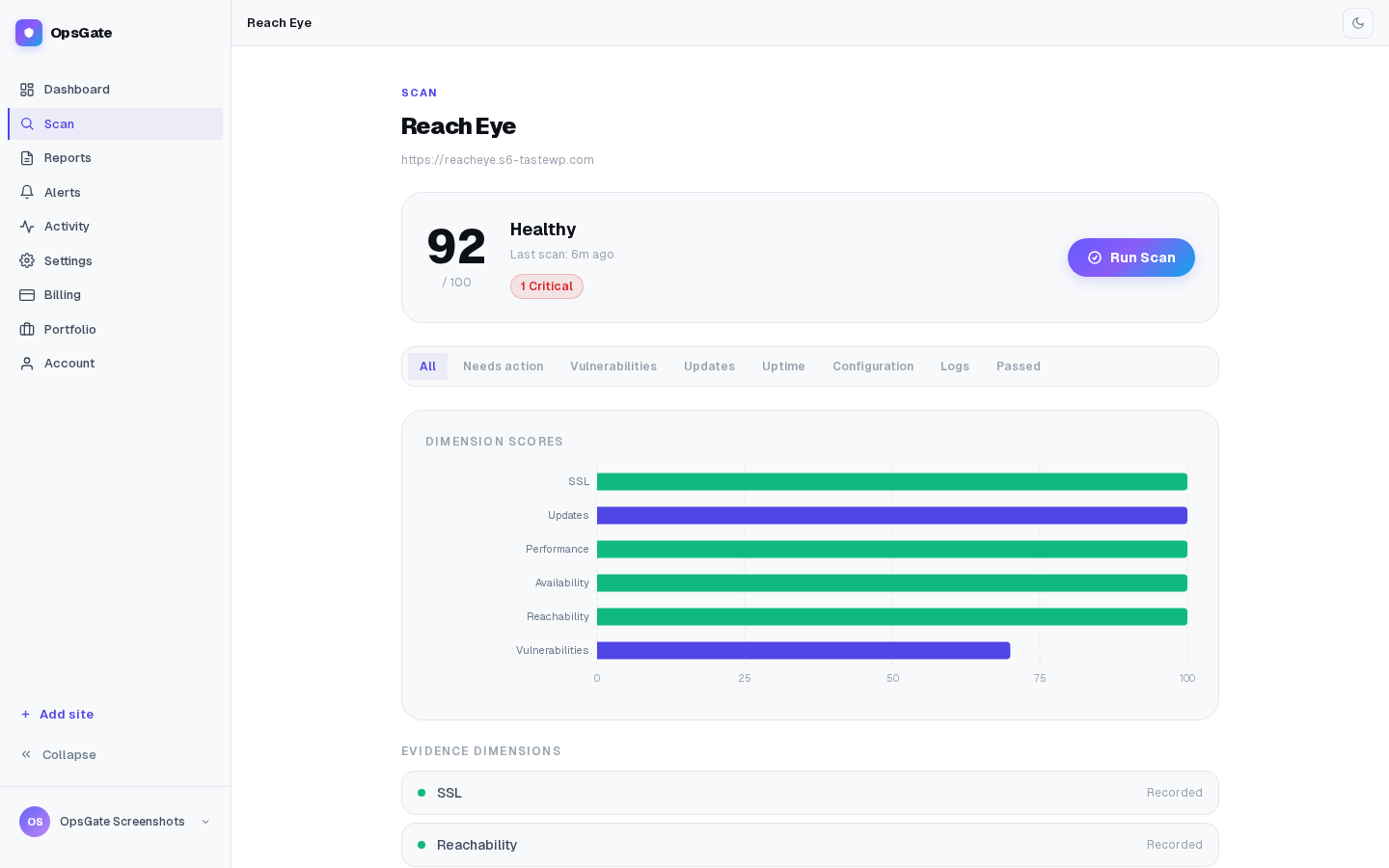
Evidence-backed scan summary with per-dimension scores and recorded evidence.
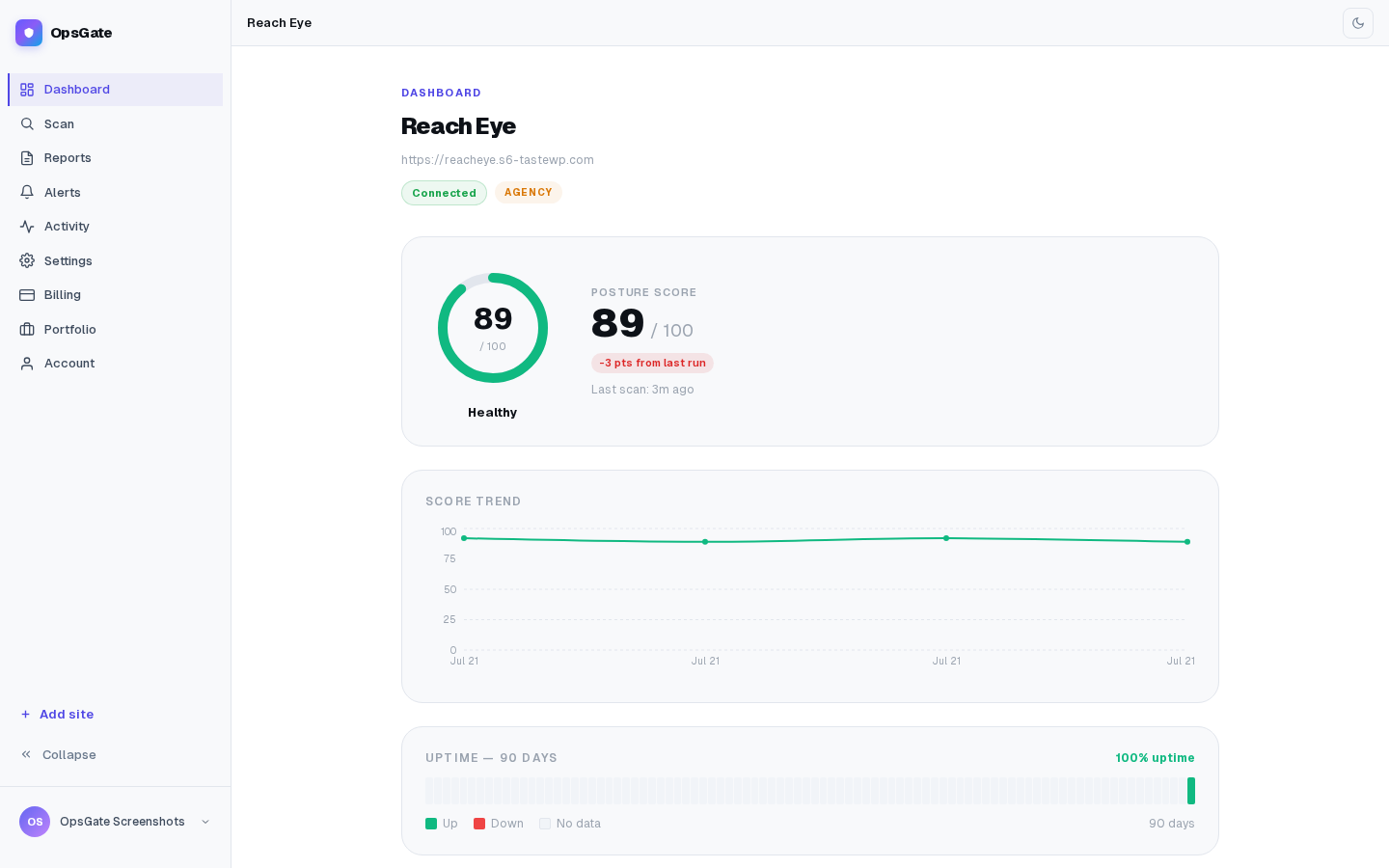
OpsGate web console overview for a connected site.
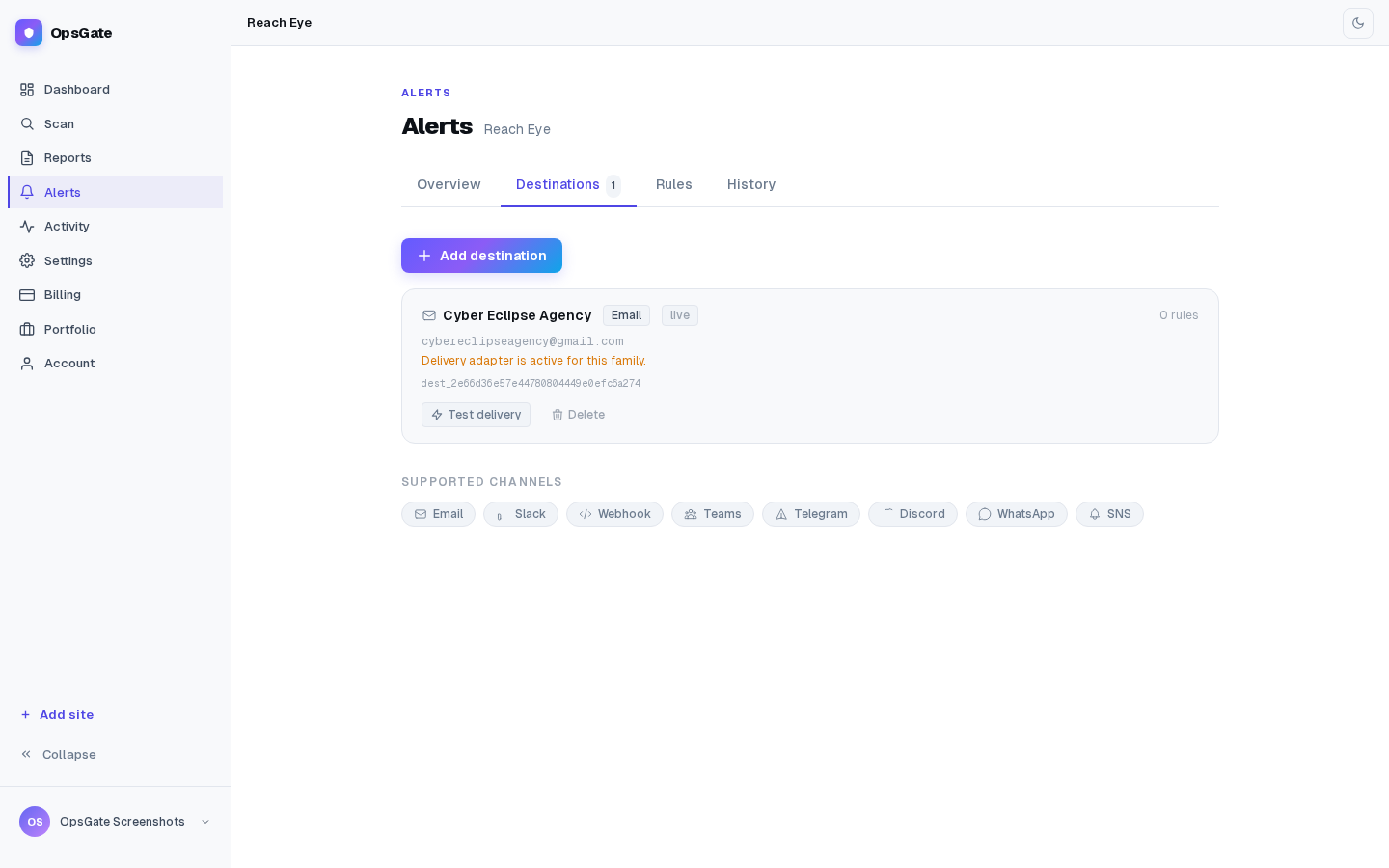
Alert destinations and supported delivery channels.
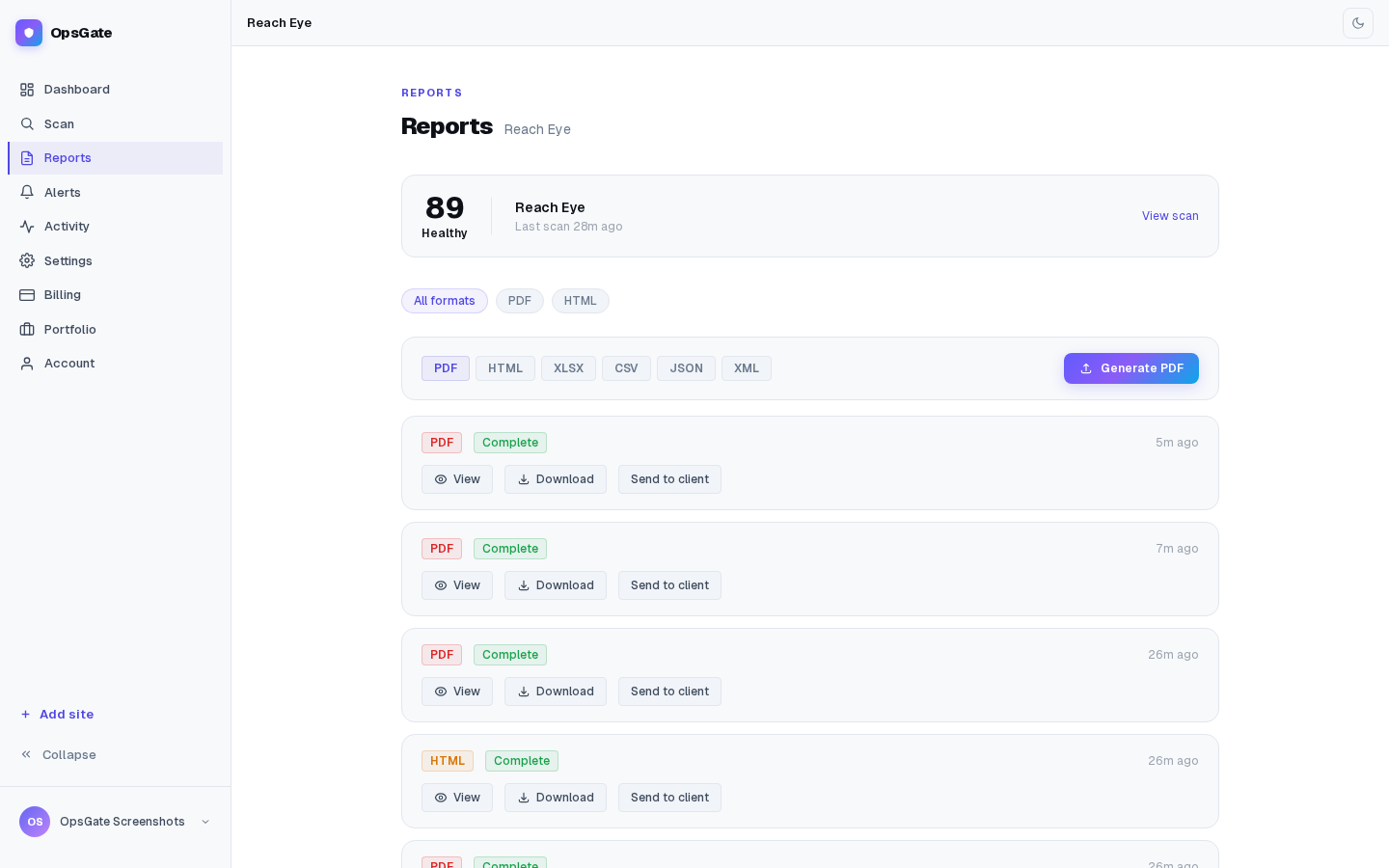
Client-ready report generation with tier-aware output formats.
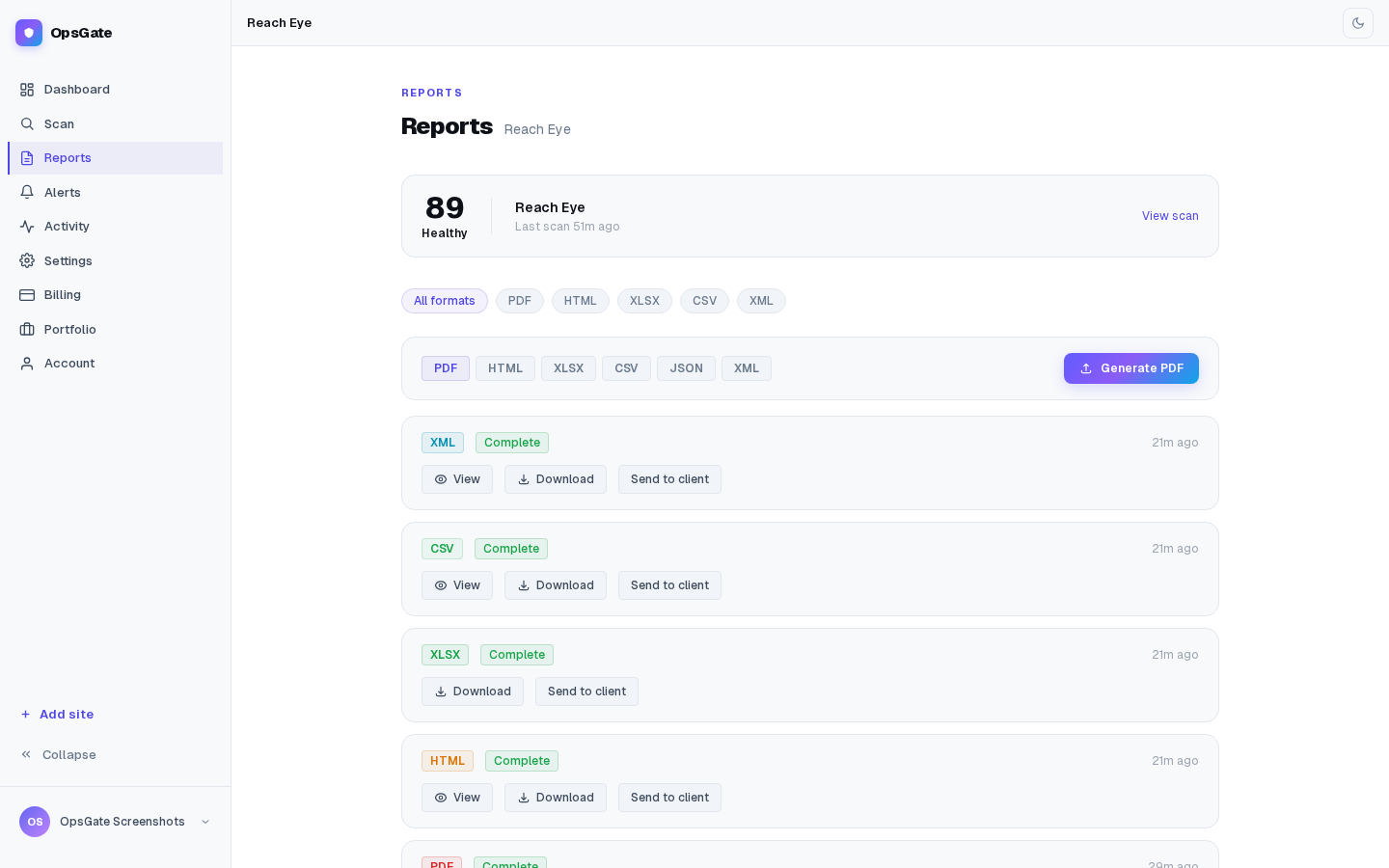
Generated report history with per-format downloads for a connected site.


