Opuswerk Filter Landing Pages For WooCommerce Wordpress Plugin - Rating, Reviews, Demo & Download

Plugin Description
Shoppers often search for something specific, such as “grey velvet sofas”. Your shop already
has that page: the Sofas category with the colour filter set to grey and the material filter
set to velvet. To a search engine, though, it is just a filter address. It carries the
category’s heading and the category’s text, and most SEO plugins give it a canonical that
points back to the plain category. It does not rank on its own.
This plugin turns the filter combinations you pick into real landing pages, at the address
the filter already produces. You keep your filters, and no new URL is created.
How it works
Open a category in your shop, set the filters and click “Make this a landing page” in the
toolbar, or paste the address under Products, Filter landing pages. Write a heading and an
intro text; a text below the products, a title and a description for search results are
optional. Publish. Whoever then opens that filter combination, through a link, a filter
click or a search result, sees your heading and text, and search engines see a page whose
canonical points to itself.
What it does
- Gives each landing page its own H1, intro text, text below the products, title and meta
description, and hides the category description on that page. - Prints a self-referencing canonical and
index, followon landing pages, through Yoast
SEO or Rank Math, or on its own when no SEO plugin is active. - Leaves every other filter combination exactly as it was.
- Recognises a combination in any form: values in any order, with or without the operator
argument, from the classic filter widget or the Product Filters block. It stores one
canonical form and uses it everywhere: in the canonical tag, the links and the robots.txt
lines. - Refuses what cannot be a landing page and says why: price, rating, stock or search
arguments, a second results page, a duplicate of an existing landing page, a combination
without products. A combination with very few products gets a warning. - Lists the landing pages under Products, with category, filters and product count.
- Adds a “Popular filters” block of links to the landing pages on their unfiltered category
page, so that search engines find them. - Shows a robots.txt block to copy: filter addresses disallowed, and an
Allowline for
each landing page that matches its exact address. The plugin does not write robots.txt
itself. - Makes the WooCommerce Product Filters block reload the page in categories that have
landing pages, so that a shopper who filters into one sees its heading and text. In other
categories the block keeps filtering without a reload. - Clears the cache of a changed landing page and its category in WP Rocket and LiteSpeed
Cache. Other caches can listen to an action. - Works with page builders through the shortcode
[opusflp_landing part="intro"], with the
partsh1,intro,bottomandlinks. - Offers the WP-CLI commands
wp opusflp listandwp opusflp check <url>.
Which shops it is for
Shops that filter with WooCommerce’s own filters: the “Filter Products by Attribute” widget,
the Product Filters block, and themes that reuse their addresses, such
as ?filter_color=grey. Landing pages are built on product categories and product
attributes. Filter plugins that write addresses of their own are not read in this version.
SEO plugins
Tested with Yoast SEO (free) and Rank Math. With either of them, the plugin hands its
canonical, title, description and robots values to the SEO plugin, so each tag appears
exactly once. Without an SEO plugin, the plugin prints them itself. When another SEO plugin
is active, for example SEOPress, All in One SEO or The SEO Framework, the plugin prints
nothing in the page head, to avoid a second canonical, and says so in one dismissible
notice. Headings, texts and links still work.
For shops in Germany, Austria and Switzerland
Filter pages (Filterseiten) and faceted navigation (Facettennavigation) are where a shop’s
most specific searches land, such as a colour or a material within a category. A complete
German translation is available, in the formal (Sie) and the informal (du) form. WordPress
loads it from translate.wordpress.org. Until the language pack is published there, German
shops see the English admin screens. The texts of the landing pages are yours, in any
language.
What it deliberately does not do
It does not phone home and does not require an account. It does not touch filter addresses
that are not landing pages: no noindex, no redirect, no new canonical. It does not write
robots.txt or an XML sitemap. Landing pages are built on product categories, not on brands,
tags or the shop page.
For developers
Read another filter address format with the opusflp_dialects filter, support an SEO plugin
with opusflp_seo_adapters, and a cache with opusflp_cache_adapters or the
action opusflp_purge_urls. Choose which landing page a request shows with opusflp_match,
change the canonical address with opusflp_canonical_url, and set the product count below
which a page counts as thin (default 3) with opusflp_thin_threshold. The
actions opusflp_landing_saved and opusflp_landing_deleted fire after a change. The full
list is in the plugin’s source.
Screenshots
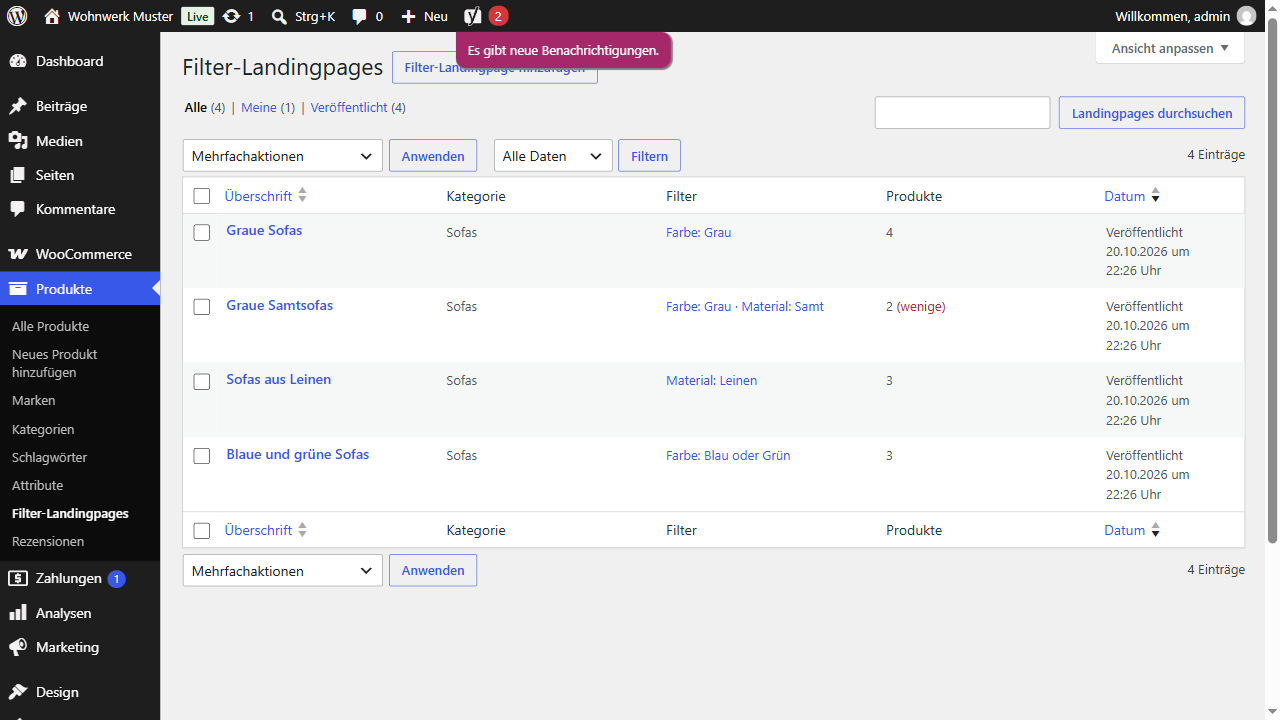
The landing pages under Products, with category, filters and product count.

Editing a landing page: the pasted address, its canonical form, the product count and the robots.txt line.
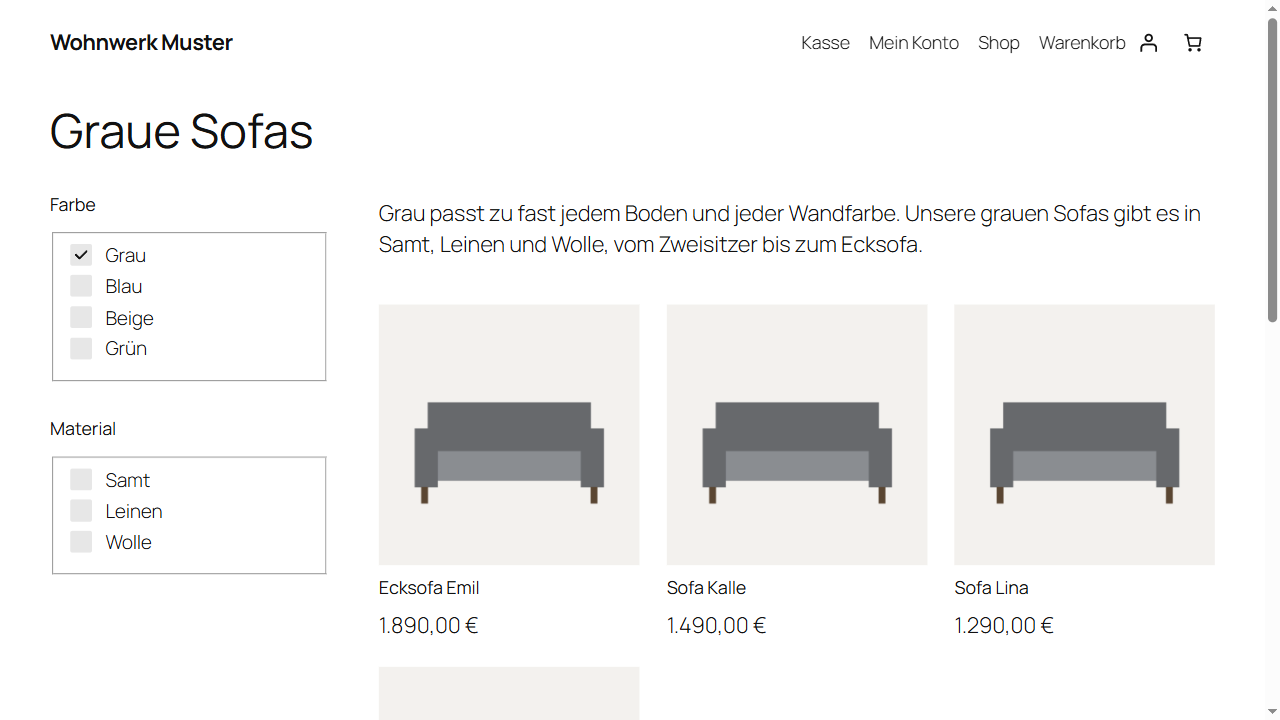
A landing page in the shop: its own heading and intro text above the filtered products.
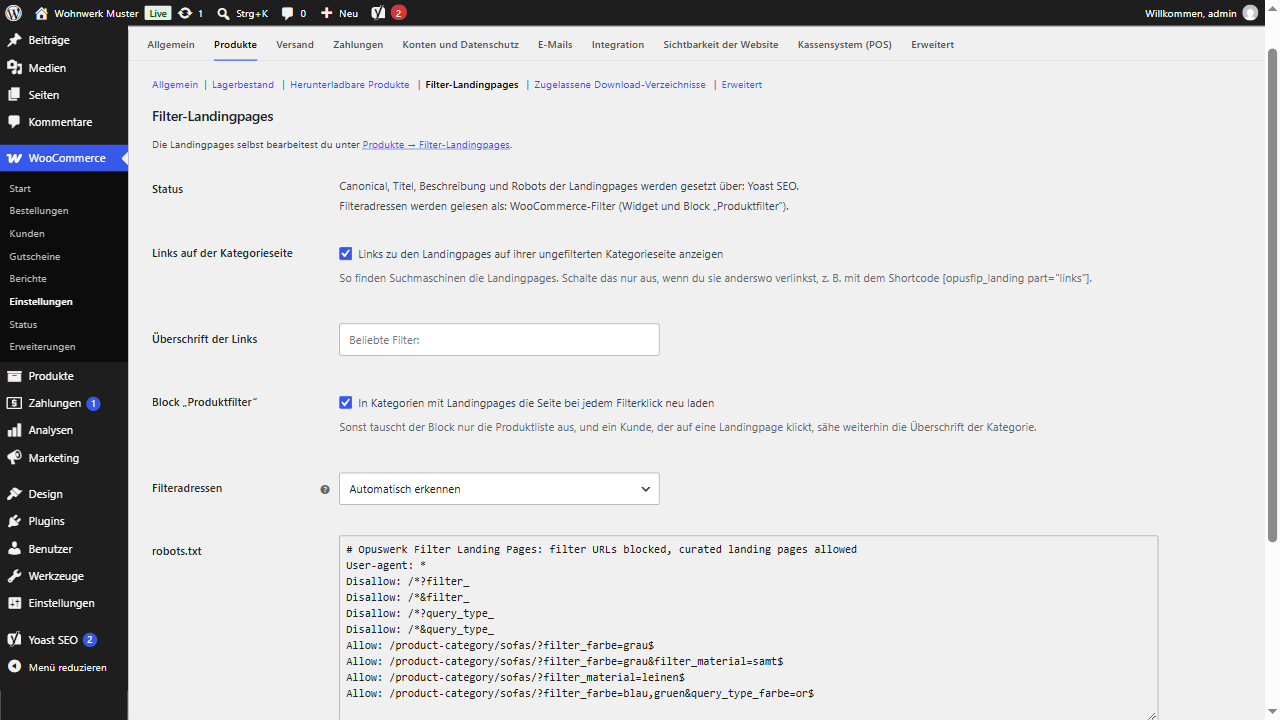
The settings section under WooCommerce, Settings, Products, with the robots.txt block to copy.
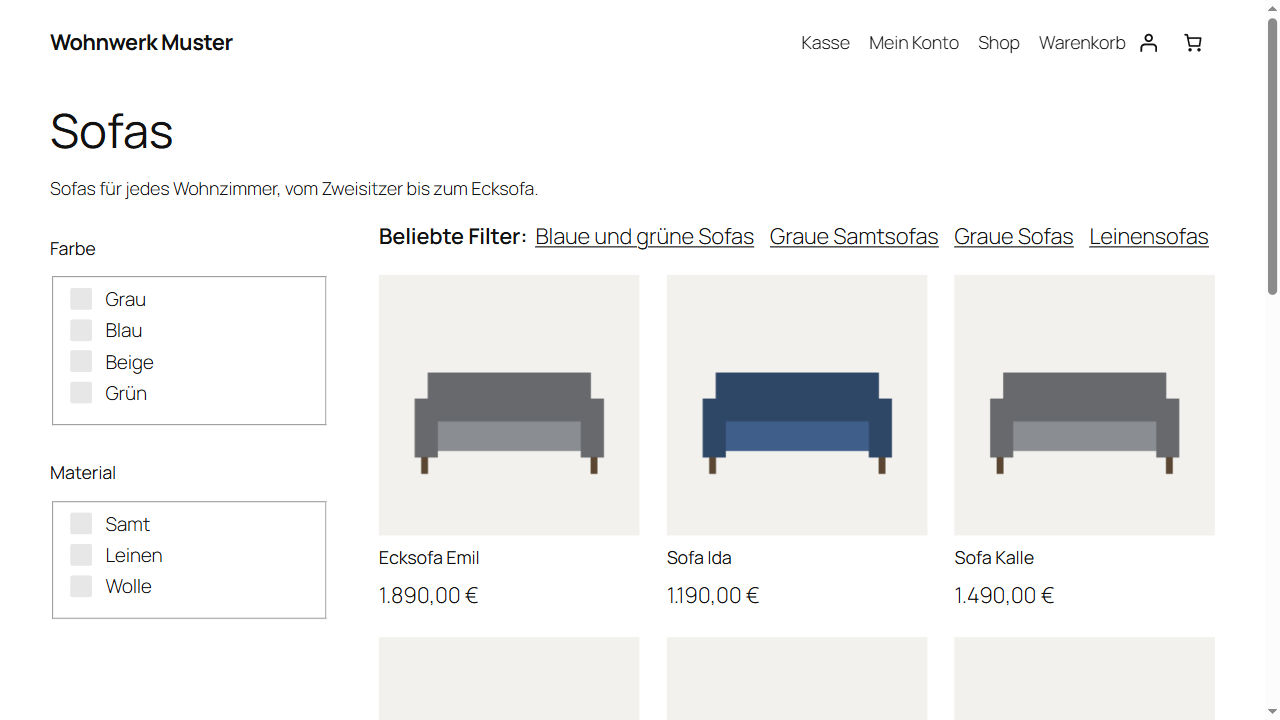
The unfiltered category page with the “Popular filters” links to its landing pages.