Page Speed Benchmark Wordpress Plugin - Rating, Reviews, Demo & Download

Plugin Description
Page Speed Benchmark measures how long WordPress takes to build each page on your server, and shows you where that time goes: database queries, outgoing HTTP calls, or PHP and rendering. Set a redline, a time no page should take longer than, and see at a glance which pages are over it and why.
Before you change something, run a benchmark. Make the change, run again, and compare the two snapshots page by page. No guessing whether that new plugin, query fix or cache setting actually helped.
🆘 Support
Some slowness happens on your server, before the first byte of the page leaves it: an account page waiting 600 ms on a payment API, or a plugin running the same query 300 times to build an order list. For logged-in users that time is rarely cached.
Page Speed Benchmark records it. Every sampled page load keeps its server time, its database queries with the file that ran each one, and every outgoing HTTP call with its time and status. The Overview puts every page against your redline, slowest first, and names what takes the most time on each.
Everything runs inside your own WordPress site. Nothing is sent to an outside service.
🚀 Key Features
- Redline at a glance: every page against the time you set, slowest first, with how many pages are over it
- Cause first: each page’s bar names its biggest cost, such as “HTTP 820 ms” or “DB 590 ms”, and shows how far past the redline it runs
- Where the time goes: the median split into database, outgoing HTTP and PHP and rendering
- Slowest queries: the ten slowest per page, with the theme or plugin file that ran each one
- Repeated queries: spot the N+1 pattern, the same query run over and over on one page
- Outgoing HTTP calls: URL, method, status and time of every external request made while building the page
- On-demand runs: load the pages you pick a number of times and watch every load finish
- Before and after snapshots: compare two runs page by page, with time, queries and SQL time side by side
- Real-visit sampling: one in every N requests from logged-in users is measured, 1 in 5 by default
- CSV export of the Overview
- Settings that save as you change them: drag the redline and see which pages would be marked slow
- Nothing added to your front end: the plugin loads only on its own admin screen
⚙️ How it works
- Sampling: one in every N requests from logged-in users is measured (1 in 5 by default). Visitors who are not logged in are never measured, and unsampled requests do no extra work.
- Query timing: for a request it is measuring, the plugin turns on WordPress’s
SAVEQUERIESso each query’s time and caller are logged. Other requests are left alone. If yourwp-config.phpsetsSAVEQUERIEStofalse, the plugin respects it and records query counts only. - Outgoing HTTP: calls made through the WordPress HTTP API while building the page are timed with their URL, method and status.
- On-demand runs: pages are loaded from your own site, one at a time, as the administrator who started the run. A background worker carries long runs on, so they work even where WP-Cron is disabled.
- Live updates: through the WordPress Heartbeat API, off by default and on by themselves while a run is in progress.
- Storage: samples and runs are kept in two database tables of your own site. Nothing is sent to an outside service.
Support
- 🆘 Free support: the WordPress.org support forum
Privacy Policy
Page Speed Benchmark does not send data to any outside service and does not use cookies of its own.
When real-visit recording is on, a sampled request from a logged-in user stores the page path, the template file, the user ID and timing measurements in your site’s database. These records are deleted automatically after the retention period you set (30 days by default), and all of them are removed when the plugin is deleted if the administrator has switched on “Delete all data when the plugin is deleted”. The plugin adds suggested wording for this to your site’s privacy policy guide under Settings > Privacy.
Screenshots

Overview: every page against your redline, with where its median time goes
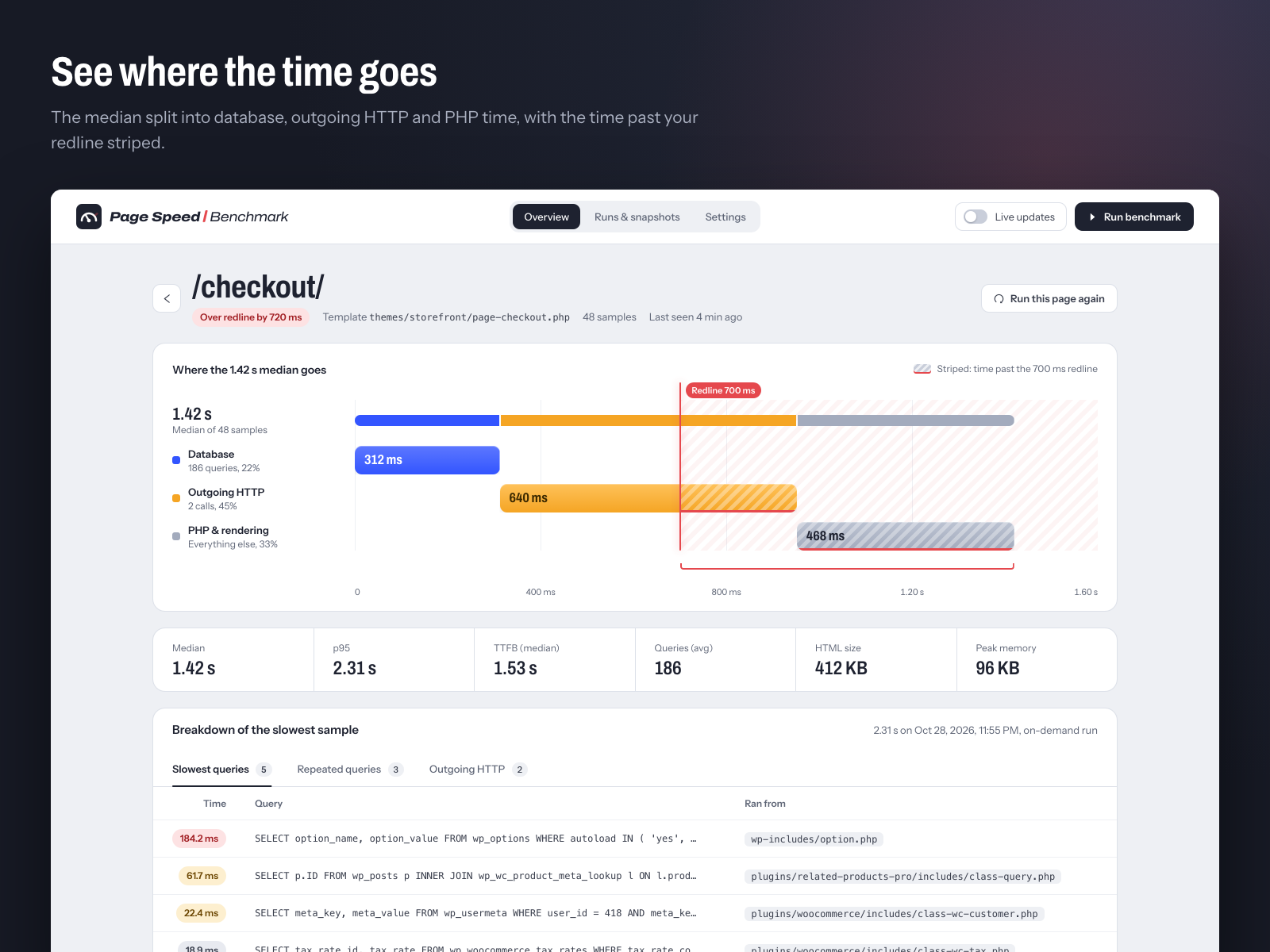
Page detail: the median split into database, outgoing HTTP and PHP time, with the time past the redline striped

The slowest sample’s queries, the file that ran each one, repeated queries and outgoing HTTP calls

Runs & snapshots: a benchmark in progress, one bar per load, and before/after comparison

Settings: drag the redline and see which pages cross it; every change saves on its own