Pasporto – Digital Product Passport (DPP) Wordpress Plugin - Rating, Reviews, Demo & Download
Plugin Description
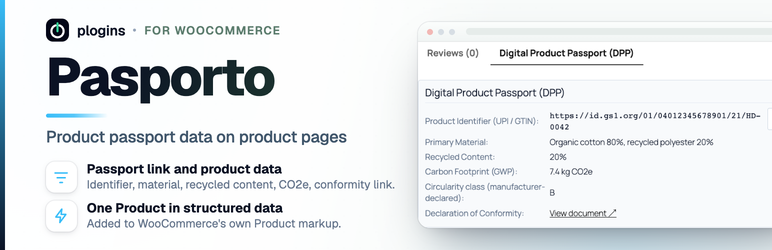
Pasporto adds a Digital Product Passport (DPP) section to WooCommerce product pages: a link to the product’s passport, its unique product identifier and the sustainability data you enter for each product.
Why a shop may need this: under Regulation (EU) 2024/1781 (ESPR), a product needs a digital product passport where a delegated act for its product group requires one (Article 9(1)). Dealers, which includes shops selling at a distance (Article 2, point 55), shall ensure that the passport is easily accessible for customers and potential customers, as set out in Article 9(2), point (e), and specified in the applicable delegated acts (Article 31(2)). The economic operator placing the product on the market provides dealers with a digital copy of the data carrier or the unique product identifier (Article 10(3), point (a)), or a webpage link on request (Article 10(3), point (b)). Which data a passport holds is also set in the delegated acts (Article 9(2), point (a)).
For batteries, Regulation (EU) 2023/1542 requires a battery passport from 18 February 2027 for LMT batteries, industrial batteries with a capacity above 2 kWh and electric vehicle batteries (Article 77(1)).
Pasporto does not create a passport, and it does not check your data against any delegated act. It shows the link and data you enter.
- Passport section on the product page: shown either under the product summary or in its own “Digital Product Passport (DPP)” tab.
- Product fields: unique product identifier (GTIN, GS1 Digital Link or other), passport URL, primary material, recycled content percentage, carbon footprint (kg CO2e), a manufacturer-declared circularity class and a link to the EU declaration of conformity.
- Passport link: a button that opens the product’s passport in a new tab.
- Structured data: the same data is added as
additionalPropertyentries to the Product markup WooCommerce already prints, so search engines read one Product, not two. - No external calls: everything runs on your server. No tracking, no third-party service, no external scripts.
- WooCommerce compatibility: declares compatibility with High-Performance Order Storage (HPOS) and the Cart and Checkout blocks. Pasporto does not touch orders or checkout.
Documentation and links
- Documentation – plogins.com/pasporto/docs/
- Plugin page – plogins.com/pasporto/
- Source code – github.com/wppoland/pasporto
- Bug reports and feature requests – GitHub issues
Reporting a security issue: email hello@wppoland.com under our coordinated disclosure policy. We confirm within two business days, assess within five, and patch a critical issue within seven days of confirming it.
Translations
Pasporto is fully translatable and ships the pasporto.pot template. Translations are delivered by WordPress.org language packs from translate.wordpress.org.
Screenshots

The Digital Product Passport (DPP) tab on a product page, with the identifier, material data, declaration of conformity link and a button that opens the passport.

The passport fields in the General tab of the product data box.

The settings screen under WooCommerce > Product Passport (DPP): display on or off, and tab or product summary placement.