
Patcherly Wordpress Plugin - Rating, Reviews, Demo & Download

Plugin Description
For a limited time, new Patcherly accounts include a 30-day trial of the full Pro plan — no credit card required. Cancel anytime. After the trial you can stay on the free Personal plan or subscribe. Sign up at Patcherly.com.
Patcherly watches your WordPress or WooCommerce site for PHP errors, alerts you as they happen, and uses AI to draft a fix. You decide what gets patched and when — nothing changes on your site without your say-so, unless you deliberately turn on auto-apply (available on paid plans).
Your visitors keep browsing while you fix issues in minutes instead of firefighting overnight.
How it works
Connect — Activate the plugin and click Connect with Patcherly. A secure browser flow pairs your site with your account — no API keys to copy or paste.
Monitor — Choose which log files to watch. New errors show up in wp-admin and in your Patcherly dashboard.
Review — Each error is analyzed and a focused fix is proposed, with a confidence score.
Apply safely — Approve a fix and the connector backs up the affected file(s) on your own server first, then applies the patch. If the site fails its health check afterward, the original is restored automatically.
Stay in control — You can roll back any patch manually, any time. Auto-analyze and auto-apply are optional, plan-dependent, and configured in your Patcherly dashboard.
Built to be safe
- You’re always in the loop. AI drafts the fix; you choose whether and when it ships, unless you’ve opted into auto-analyze / auto-apply.
- Privacy by design. No personal or sensitive data ever leaves your server — no database, media library, or user data. Patcherly only ever sees a sanitized error message, stack trace, and a short snippet of code around the fault line.
- Nothing is final. Every patch is tested, with automatic rollback if it fails a health check — and you can also roll back manually, any time.
- Enterprise-grade connection. The plugin talks to Patcherly over a secure, audited pairing and API layer — not long-lived secrets pasted into wp-config.
Full detail: Security overview · Privacy Policy · WordPress connector help
Patcherly in wp-admin
- Home — pairing status, 30-day metrics preview, recent audit events, and collapsed connector status
- Settings — advanced options, collected site context, and diagnostics
- Errors list with severity, status, and one-click actions
- Optional Emergency Rescue — keeps monitoring and rollback working even if a bad update stops the main plugin from loading
- Path exclusions so sensitive folders are never touched
- Pre-apply backups, stored on your server only
This plugin is a lightweight connector. Full settings, error history, team access, and billing live in your Patcherly dashboard. For low-confidence fixes, manual confirmation may still be required even with auto-apply turned on.
Patcherly.com · Dashboard · Help Center · Terms of Service · Contact · Discord community · Source on GitHub
External services & privacy
This plugin connects to Patcherly, a hosted service run by Shambix. The API lives at api.patcherly.com; your account and dashboard are at app.patcherly.com. A connection is required for monitoring and patching — before pairing, the plugin only shows local settings and diagnostics.
Pairing. Click Connect with Patcherly on the Home page to start a secure browser-based flow. The only optional call before pairing is Refresh under Connector status on Home, which just checks that Patcherly is reachable — nothing about your site content is sent until pairing completes.
No phone-home before pairing. Nothing is sent on install, activation, deactivation, theme switches, or normal page loads. After pairing, the connector reports errors from logs you’ve chosen to monitor, and only acts on what you approve — or what your plan’s auto-apply settings allow.
What’s sent, per error or patch action:
- Error message, stack trace, file path, and line number from monitored PHP logs
- A short code excerpt around the error — never full theme, plugin, or upload directories
- Basic site metadata: site URL, WordPress/PHP/plugin versions, connector identity
- Authentication material identifying your paired site
Secret-looking values are sanitized on your server before anything is sent. Patcherly is built around Privacy by Design and is GDPR-compliant — see the Privacy Policy for the full picture.
AI processing. Sanitized excerpts may be processed by large language models to suggest a fix. Providers are contractually barred from using your content to train general-purpose models; results go only to your Patcherly account.
Backups stay local. Pre-apply file backups live only in the connector’s folder on your server — Patcherly never receives or stores them. You control how long you keep them; deleting them limits manual rollback for those specific fixes.
Account. A free account is required to pair and use the service — sign up here. Terms of Service · Privacy Policy.
Source code. GPLv2-or-later, developed at github.com/Patcherly-Official. If you’d like to support development and the free Personal plan, GitHub Sponsors is open.
Screenshots
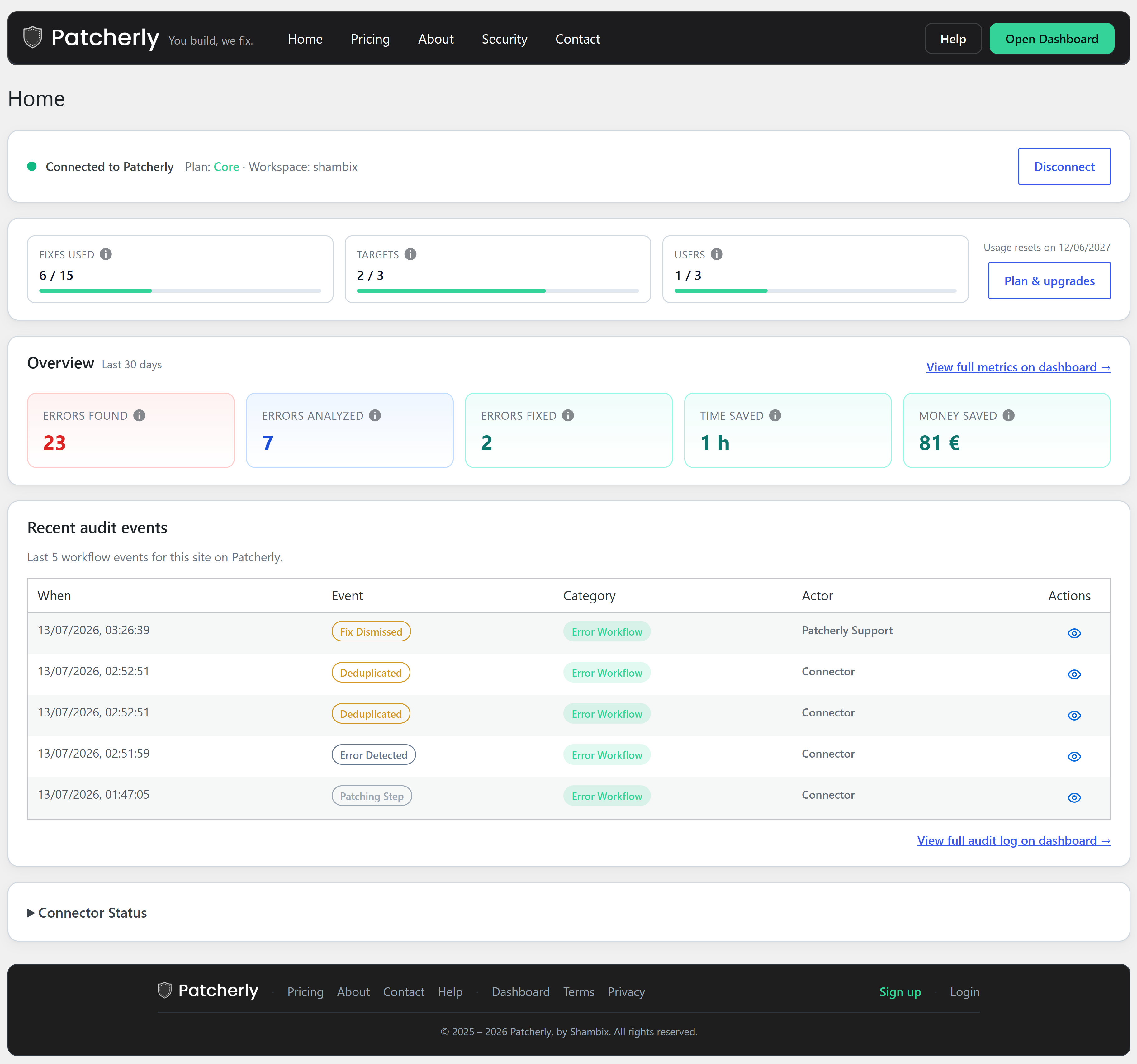
Patcherly Home in wp-admin — connection status, usage, 30-day metrics, recent audit events, and connector status.
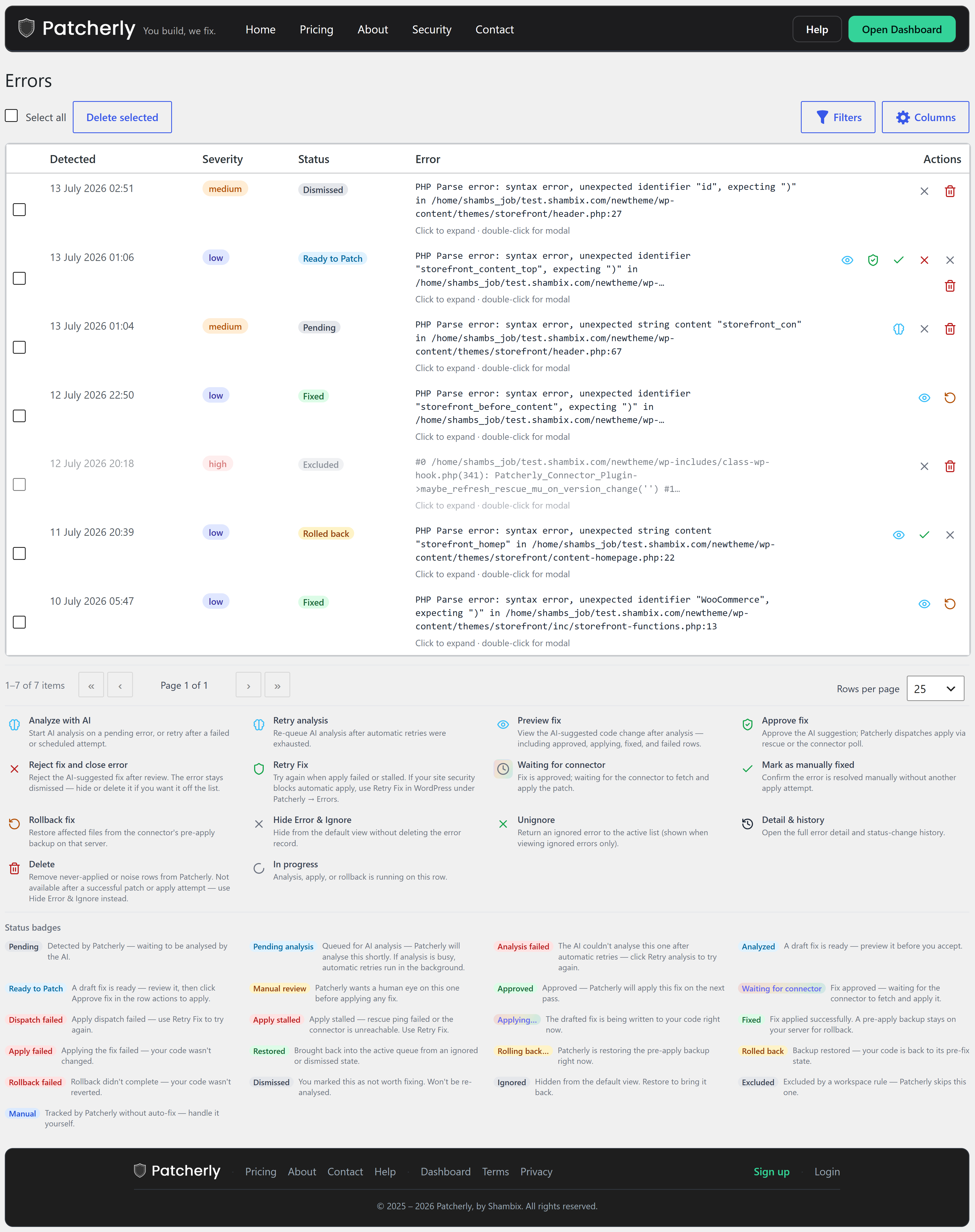
Errors list in wp-admin — live error stream with severity, occurrence count, and the “Generate fix” action.
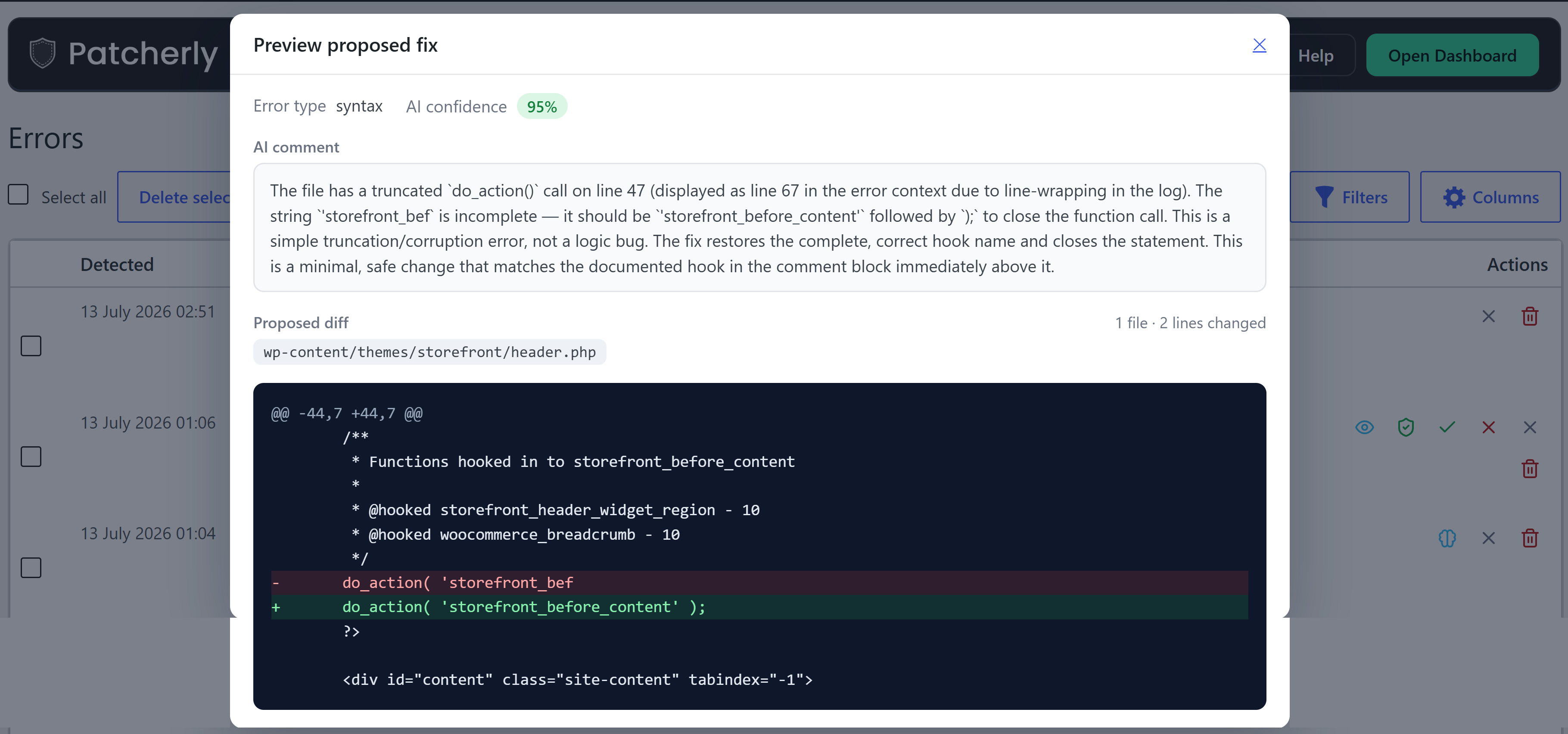
Patch review and apply — AI-generated patch preview, confidence score, and apply / rollback controls.


