
Patrons Tips Wordpress Plugin - Rating, Reviews, Demo & Download
Plugin Description
Patrons Tips is a free patronage system for artists and content creators (like Patreon, Tipeee, Buy Me A Coffee, Ko-Fi, etc.) that settles on your website.
It allows your audience to financially support your work!
- Set up membership tiers and define their restricted content.
- Customize and publish your patronage page.
- Patrons subscribe to access this exclusive content and become part of your special community!!
Patrons Tips is fully integrated with WooCommerce to collect online payments.
Try this patronage tool live on the demo website, or generate a temporary site to test the backend!
Main features
★ Patron tiers
- Create unlimited membership levels
- Customize your tiers with your own titles, descriptions, images et prices.
Think about what could interest your fans to make your reward system: early access, exclusive work, being part of your very special members, being credited on your videos, posts, etc.
★ One-off and recurring payments with WooCommerce
- Receive unique one-time payments using WooCommerce
- Receive automatic monthly recurring payments, through one of the supported extensions :
- WooCommerce Subscriptions by WooCommerce (paid)
- Subscriptions for WooCommerce by WP Swings (free)
- Flexible Subscriptions by WP Desk (free)
Automate a regular income to focus on your core activity and passion.
★ Content restriction
- Restrict certain content categories and tags (posts, medias and products) to your patrons only
- Define which patronage level gives access to which content
- Restricted content is automatically unlocked for one month as soon as the patron subscribes to an eligible tier
★ Customizable sales page
- A landing page with a familiar interface is automatically created
- Customize it completely by following the recommendations to encourage your patrons to support you
★ Patron area
- A page dedicated to your patrons in order to manage their patronage (integrated to “My account” with WooCommerce)
- Your patrons can see their current status, patronage history and a list of unlocked rewards
★ Customize your website with Blocks and Shortcodes
- Display a patron counter, subscription form, patron list, modular post/media/product lists, image of the month, etc. thanks to the many supplied blocks and shortcodes.
★ Translation ready
- Multilingual support with WPML and Polylang
- Available in English and French. You can also help us translating Patrons Tips in your language.
The best inside
- API for developers (PHP actions and filters, JS actions).
- Support WP privacy tools for exporting and erasing your patrons’ personal data
See the full list of features here.
More features with Patrons Tips Pro
Patrons Tips Pro allows you to restrict your content to patrons of the month of their publication.
If you published a restricted post/image/product in July 2025, then only people who were patrons in July 2025 will be able to see it. Newcomers will never have the permission to see it.
This way, you will no longer give access to all the content you have created to the first person who comes along.
This feature protects your work and increases its value and is exclusive to Patrons Tips Pro, no other patronage system offers it.
Patrons Tips Pro also includes many features:
- Restrict posts, medias and products by tier to patrons of the month of publication
- Restrict the availability of one or more tiers to offer limited premium rewards
- Display monthly stretch goals (number of patrons or amount of money) to encourage more backers to contribute
- Manually add patrons from the back office
- Manually manage your patrons’ history, you can change, revoke and subscribe patrons to any tier, any month
- Patrons can choose their own nickname which will be displayed in patron lists
- Give your patrons annual badges to reward their loyalty and make them feel special
- Send automatic reminder emails when a patronage expires (with WooCommerce)
Purchase Patrons Tips Pro here.
How is Patrons Tips different from crowdfunding platforms such as Patreon or Tipeee?
- Patrons Tips is free: there are neither fees nor commissions on sales.
- Patrons Tips is independant: you and your patrons are not locked into a platform and its terms (pricing, features, policies, etc.) for life.
- Patrons Tips settles on your website : customize your site and its features using WordPress plugins.
This plugin is perfect for… you ?
This sponsorship system was specifically created to meet the needs of most independant creators:
- Artists (painters, cartoonists, photographers, 3D artists…)
- Video makers (youtubers, streamers…)
- Authors (reporters, writers, bloggers…)
- Musicians (composers, singers, instrumentalists…)
- Performers (humorists, dancers, circus artists…)
- Podcasters (hosts, interviewers…)
- Cosplayers (tailors, models…)
- Developers (video games creators, web developers…)
- Craftspeople (plush makers, ceramists, jewelers…)
- Advisers (speakers, experts…)
- Sportspeople (athletes, coaches…)
- and maybe you!
If you want to be financially supported for your creative work, then you should give it a try!
We are listening
Patrons Tips is the result of a collaboration between an artist and a developer.
We will be happy to provide help and support:
- Take a look at our documentation
- Contact us at contact@patronstips.com (French and English)
Requirements
- WordPress: 6.7 or later
- PHP: 7.0 or later
- MySQL: 5.7.22 or later (or MariaDB 10.5.4 or later)
- WooCommerce: 8.8 or later
- Patrons Tips can be used without WooCommerce
Screenshots

Become a patron to unlocked exclusive content.

A provided page to make your patronage attractive and get new patrons.

All your tiers at a glance.

Create your tiers and fill in a title, image, description and price. These informations are used in the patronage form.

Associate your tiers with WooCommerce products to get online payments (recommended).

Patrons Tips supports subscription plugins to earn recurring revenue!

Restrict content by categories and tags. Includes posts, products and media.

Only patrons with sufficient tier can see restricted content.

Restricted posts and products content is replaced with an explanatory message. Content is visible when unlocked.

All your patrons at a glance.

Filter and export your patrons if you need to send newsletters with your favorite email tool, send offline rewards, etc.

Get your patrons details and patronage history.

Patrons can see and manage their patronage in the patron area. It is integrated in the My account page if used with WooCommerce.

All unlocked content is gathered in a “Rewards” section.

Patronage history keeps track of past contributions.
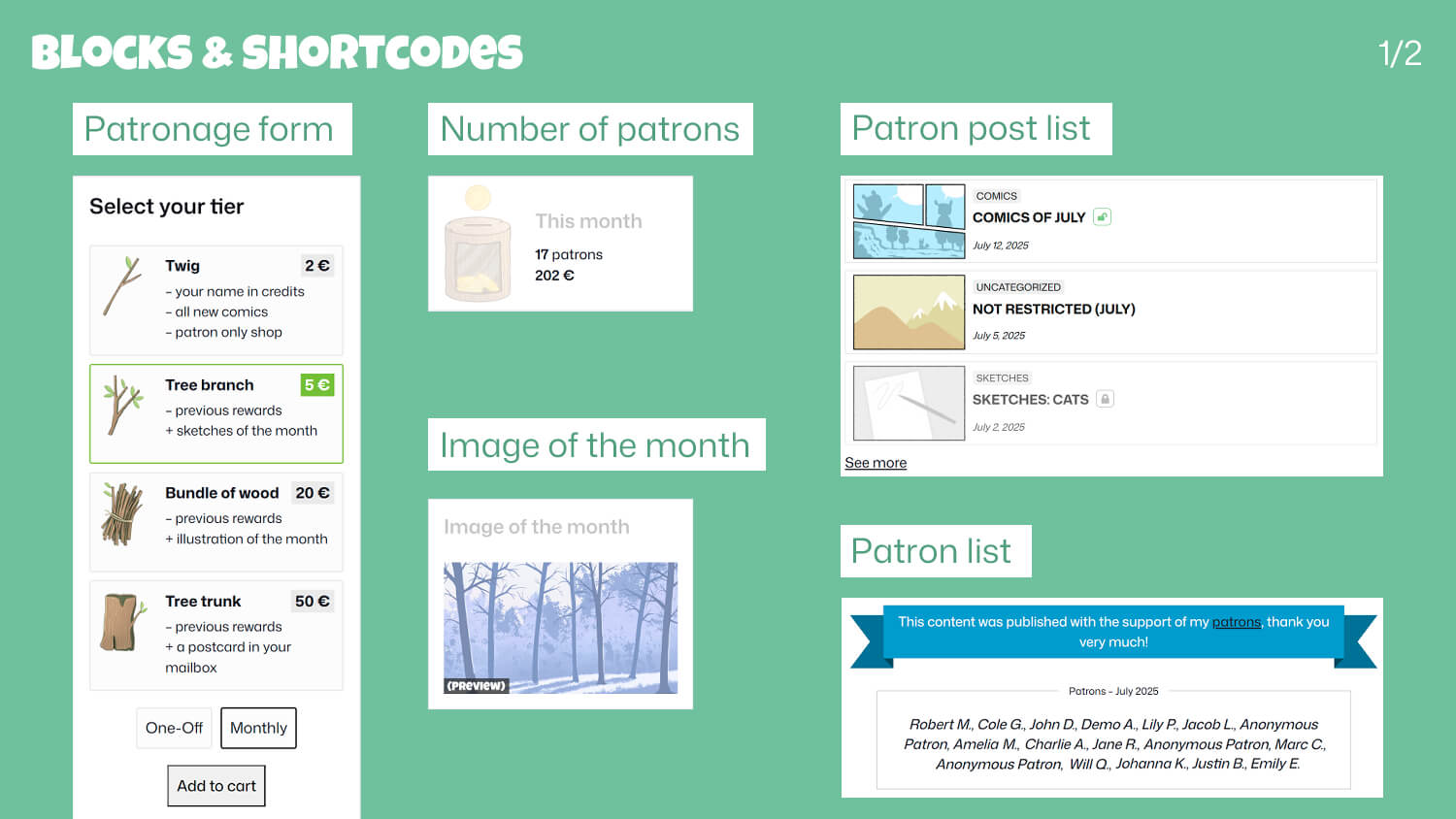
Use our many Blocks and Shortcodes to display patronage related content anywhere on your website. (1/2)

Use our many Blocks and Shortcodes to display patronage related content anywhere on your website. (2/2)

Patron Post List: display a filtered list of posts, products and/or media by categories and restriction.

(PRO) Restrict content according to month of publication. Only people who were patrons at that time can see it. New patrons won’t be able to unlock it.

(PRO) Manually add new patrons. Manage their history: change, revoke, subscribe patrons.

(PRO) Reward loyalty with annual badges displayed in patrons lists.

(PRO) Additional features: tiers availability, monthly goals, patrons nicknames, email reminder.


