PAY.JP For WooCommerce Wordpress Plugin - Rating, Reviews, Demo & Download

Plugin Description
PAY.JP for WooCommerce integrates the PAY.JP v2 Payment Widgets into your WooCommerce store, enabling you to accept credit card payments and PayPay payments securely and easily.
Raw card data never touches your server. The PAY.JP payments.js widget handles card entry entirely in a PCI DSS compliant iframe, keeping your integration simple and your compliance scope minimal.
Key Features
Credit Card Payments
- Embedded PAY.JP v2 Payment Widgets (no redirect, PCI DSS compliant)
- Save cards to customer accounts for faster repeat checkout
- Full and partial refunds directly from the WooCommerce order screen
PayPay Payments
- Embedded PayPay widget via PAY.JP v2 Payment Widgets
- Seamless in-page payment experience
- Full and partial refunds directly from the WooCommerce order screen
Subscriptions
- WooCommerce Subscriptions compatible for automatic recurring billing
- Saved card via PAY.JP Setup Flow powers subscription renewals
Developer & Store Friendly
- Block Checkout (WooCommerce 8.3+) and Classic Checkout both supported
- HPOS (High-Performance Order Storage) compatible
- Multisite compatible
- Test mode / Live mode toggle — no code changes required
- Webhook processing for
payment_flow.succeeded,payment_flow.payment_failed, andrefund.createdevents - Clean uninstall — removes all plugin data and options on deletion
How It Works
- The checkout page loads the PAY.JP payments.js widget from PAY.JP’s CDN.
- The customer enters card details (or selects PayPay) entirely within the secure widget.
- PAY.JP returns a Payment Flow ID to your server — raw card data never reaches WordPress.
- WooCommerce processes the order and the plugin completes the payment via the PAY.JP v2 API.
Requirements
- WordPress 6.9 or later
- WooCommerce 9.0 or later
- PHP 8.3 or later
- A PAY.JP account (free to register)
External Services
This plugin connects to the following external services. By using this plugin you agree to their respective terms and privacy policies.
1. PAY.JP API
Used to create and manage Payment Flows, process payments, issue refunds, and manage saved payment methods.
- Endpoint:
https://api.pay.jp/v2 - When called: At checkout when a payment is initiated, on order completion, on refund, and during webhook processing.
- Data sent: Payment Flow ID, order amount, currency, and (for saved cards) PAY.JP Customer ID. Raw card numbers are never sent to your server or to the API directly from WordPress.
- Privacy Policy: https://pay.co.jp/privacy
- Terms of Service: https://pay.jp/legal/tos
2. PAY.JP payments.js (CDN)
The PAY.JP payments.js script is loaded from PAY.JP’s CDN to render the secure card entry and PayPay widget on the checkout page. This is the standard PCI DSS compliant integration method (equivalent to Stripe.js for Stripe).
- Script URL:
https://js.pay.jp/payments.js - When loaded: On any checkout page where PAY.JP is an available payment method.
- Data handled: Card details entered by the customer are tokenized entirely within this script and its iframe — they are never accessible to your WordPress site.
- Privacy Policy: https://pay.co.jp/privacy
- Terms of Service: https://pay.jp/legal/tos
Screenshots
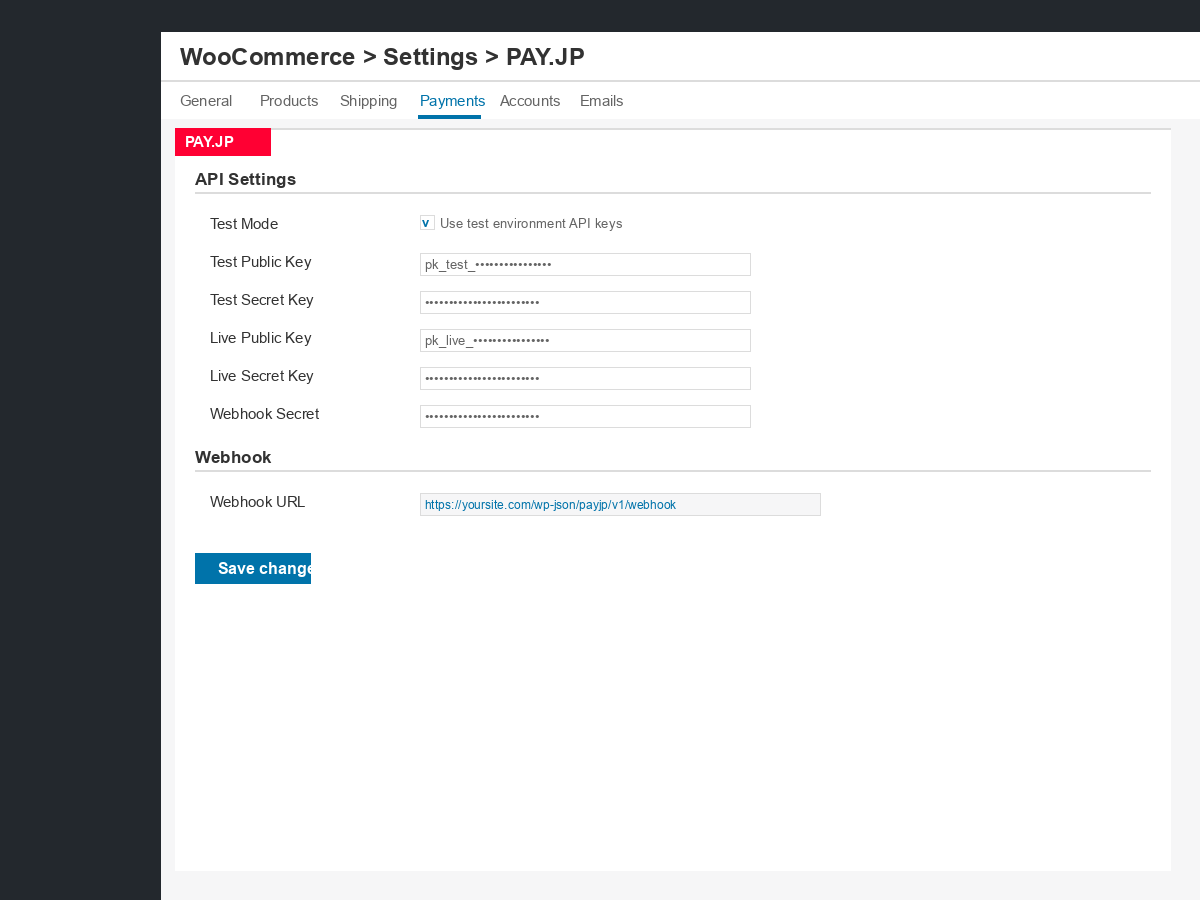
PAY.JP unified settings page — configure API keys, test/live mode, and webhook secret.