PCP Linkflow Engine Wordpress Plugin - Rating, Reviews, Demo & Download
Plugin Description
PCP Linkflow Engine gives you complete control over every URL on your WordPress site. Whether you need to remove the /product/ prefix from WooCommerce products, add a custom base to a taxonomy, or restructure your page URLs — this plugin handles it all from a clean, modern admin interface.
No code required. Changes take effect immediately with automatic rewrite rule flushing.
🔑 Key Features:
Post Type URL Control
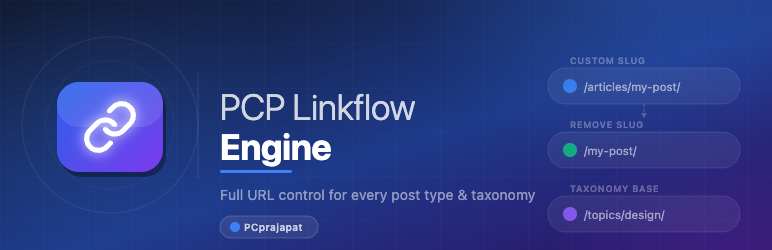
– ✏️ Set a custom slug for any public post type (e.g. /shop/ instead of /product/)
– 🗑️ Remove the slug entirely — serve products, posts, or CPTs at root level (e.g. /jacket/ instead of /product/jacket/)
– 📄 Full support for hierarchical post types like Pages (e.g. /pages/about/team/)
– 🛒 WooCommerce compatible — works correctly with the shop page, product archives, is_product(), and all WooCommerce template hooks
Taxonomy URL Control
– ✏️ Set a custom base for any public taxonomy (e.g. /topics/ instead of /category/)
– 🗑️ Remove the base entirely — serve term archives at root level (e.g. /clothing/ instead of /product-category/clothing/)
– 🌳 Full support for hierarchical taxonomies — sub-terms work correctly (e.g. /clothing/accessories/)
– ✅ Correct is_tax(), admin bar links, and taxonomy templates when base is removed
Developer Friendly
– 🔌 Filter hooks: pcplfe_post_type_slug, pcplfe_taxonomy_slug, pcplfe_permalink_structure, pcplfe_remove_post_type_slug, pcplfe_remove_taxonomy_slug
– 🌐 REST API — read and write settings via /wp-json/pcplfe/v1/
– 📦 Import / Export — back up and restore all settings as JSON
– 🧩 PSR-4 autoloaded OOP architecture under the PCPLFE namespace
Modern Admin UI
– 🎨 Clean, Tailwind-inspired design with toggle switches
– 📑 Tabbed settings for Post Types and Taxonomies
– 🔄 POST Redirect GET pattern — no duplicate saves on refresh
– 💾 Active tab preserved across saves and page refreshes
REST API
PCP Linkflow Engine exposes a REST API under the pcplfe/v1 namespace. All endpoints require the manage_options capability.
Authentication
Use WordPress Application Passwords (WordPress 5.6+). Generate one at Users Your Profile Application Passwords, then pass it with every request:
-u "your-username:xxxx xxxx xxxx xxxx xxxx xxxx"
Endpoints
GET /wp-json/pcplfe/v1/settings
Returns all saved post type and taxonomy settings.
curl -u "admin:xxxx xxxx xxxx xxxx xxxx xxxx"
  https://yoursite.com/wp-json/pcplfe/v1/settings
Example response:
{
  "post_type_settings": {
    "post": { "enabled": true, "custom_slug": "articles", "remove_slug": false }
  },
  "taxonomy_settings": {
    "category": { "enabled": true, "custom_base": "topics", "remove_base": false }
  }
}
POST /wp-json/pcplfe/v1/settings
Save post type and taxonomy settings from a JSON body.
curl -u "admin:xxxx xxxx xxxx xxxx xxxx xxxx"
  -X POST
  -H "Content-Type: application/json"
  -d '{
    "post_type_settings": {
      "post": { "enabled": true, "custom_slug": "articles", "remove_slug": false }
    },
    "taxonomy_settings": {
      "category": { "enabled": true, "custom_base": "topics", "remove_base": false }
    }
  }'
  https://yoursite.com/wp-json/pcplfe/v1/settings
GET /wp-json/pcplfe/v1/permalink?post_id=X
Returns the custom permalink record for a given post ID.
curl -u "admin:xxxx xxxx xxxx xxxx xxxx xxxx"
  "https://yoursite.com/wp-json/pcplfe/v1/permalink?post_id=123"
Example response:
{
  "post_id": 123,
  "post_type": "post",
  "default_permalink": "https://yoursite.com/articles/hello-world/",
  "custom_permalink": "https://yoursite.com/my-custom-slug/",
  "record": { "permalink": "my-custom-slug" }
}
POST /wp-json/pcplfe/v1/permalink
Save a custom permalink for a specific post. Send an empty permalink value to remove the override.
curl -u "admin:xxxx xxxx xxxx xxxx xxxx xxxx"
  -X POST
  -H "Content-Type: application/json"
  -d '{
    "post_id": 123,
    "post_type": "post",
    "permalink": "my-custom-slug"
  }'
  https://yoursite.com/wp-json/pcplfe/v1/permalink
To remove a custom permalink override:
curl -u "admin:xxxx xxxx xxxx xxxx xxxx xxxx"
  -X POST
  -H "Content-Type: application/json"
  -d '{
    "post_id": 123,
    "post_type": "post",
    "permalink": ""
  }'
  https://yoursite.com/wp-json/pcplfe/v1/permalink
Screenshots

Post Types tab — enable post types, set custom slugs, or remove slugs entirely using toggle switches.

Taxonomies tab — enable taxonomies, set custom bases, or remove bases with a single toggle.

Import / Export page — back up and restore all settings as a JSON file.

REST API page — view all available endpoints, parameters, and example curl requests.