
Plainseek | AI Product Search For WooCommerce Wordpress Plugin - Rating, Reviews, Demo & Download

Plugin Description
Plainseek: AI Product Search for WooCommerce
Plainseek replaces the WooCommerce search with a fast search that understands plain language.
A shopper types “red wedding dress under $50”. Plainseek searches for wedding dresses, keeps only the red
ones, and keeps only those under $50. It shows what it understood as chips the shopper can remove: Red and
Under $50.
The search works on your own server, with no API key. AI features are optional. You connect your own AI provider account
only if you want them.
How Plainseek reads a search
Plainseek reads a search before it runs it. Words that match your store become filters. The rest is searched as text.
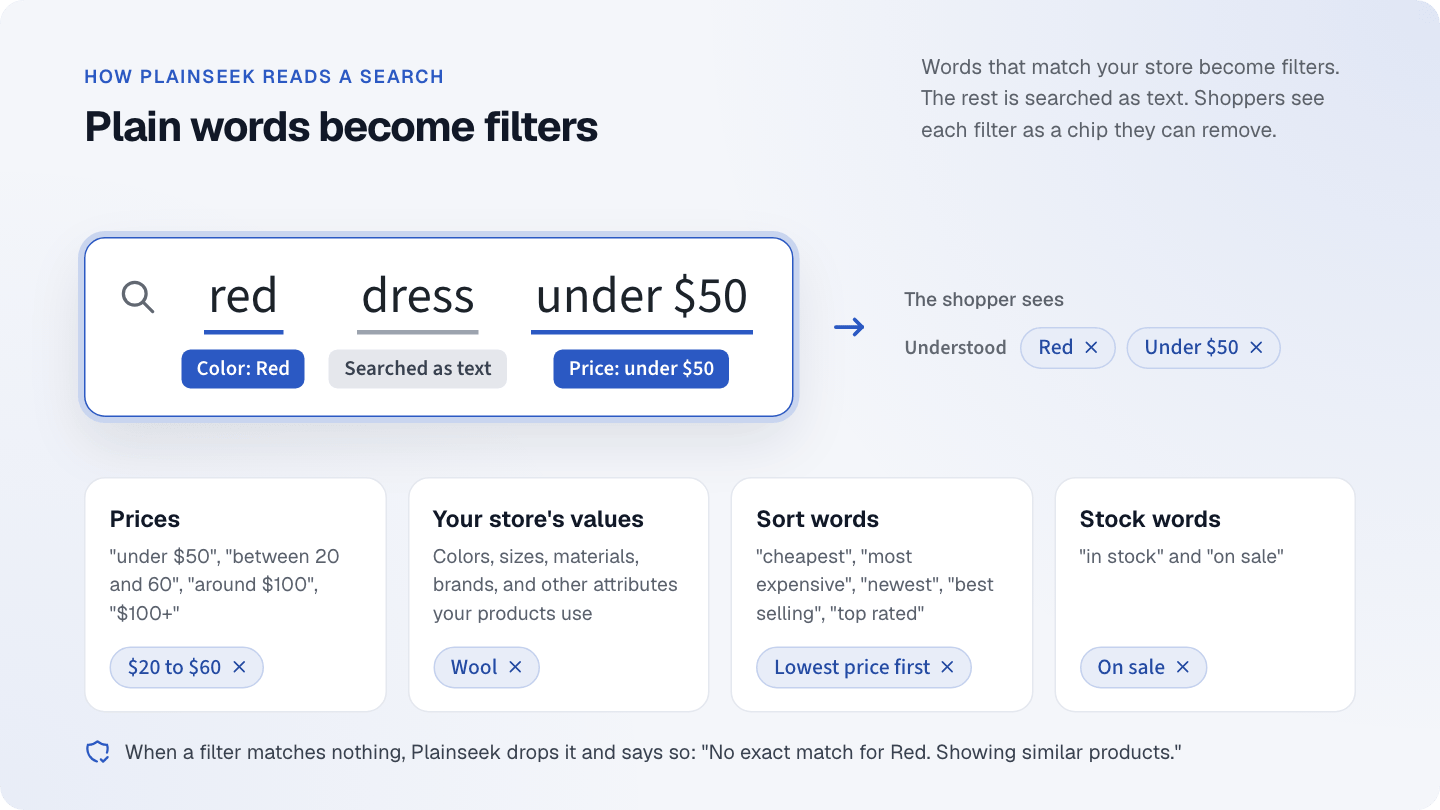
In “red dress under $50”, “red” becomes a color filter and “under $50” becomes a price filter. “dress” is searched as
text. The shopper sees each filter as a chip they can remove.
- Prices: “under $50”, “below 50”, “over 100”, ”$100+”, “between 20 and 60”, “around $100”.
-
Your store’s own values: colors, sizes, materials, brands, and other attributes. Only values your
products use. - Sort words: “cheapest”, “most expensive”, “newest”, “best selling”, “top rated”.
- Stock words: “in stock”, “on sale”.
- Typos: “weding dersses” finds wedding dresses, and the results say “Showing results for wedding dress”.
- Singular and plural: “dresses” finds “dress”.
- Synonyms: “couch” finds sofas.
When a filter matches nothing, Plainseek drops it and says so. For example: “No exact match for Red. Showing similar
products.” Shoppers do not see an empty page.
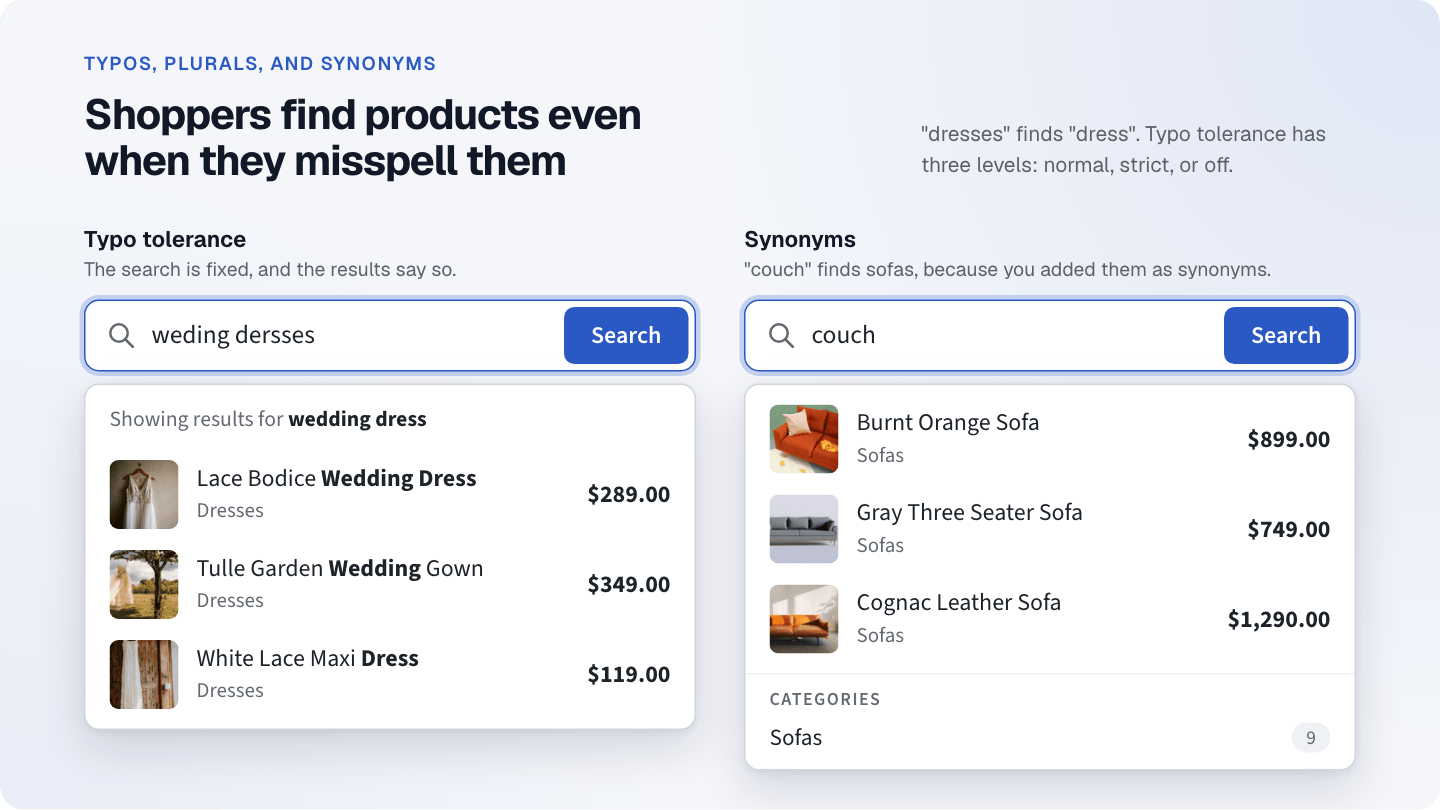
Left: “weding dersses” is fixed to “wedding dress”, and the results say so. Right: “couch” finds sofas, because “couch”
and “sofa” are synonyms.
Features that work without AI
Live search bar
- Results appear while the shopper types, with product images, names, prices, and categories.
- Shows what Plainseek understood as removable chips.
- Recent and popular searches when the search bar is empty.
- Works with the keyboard only: arrow keys, Enter, and Escape.
- Choose the accent color, corner radius, size, and placeholder. The preview uses your real products.
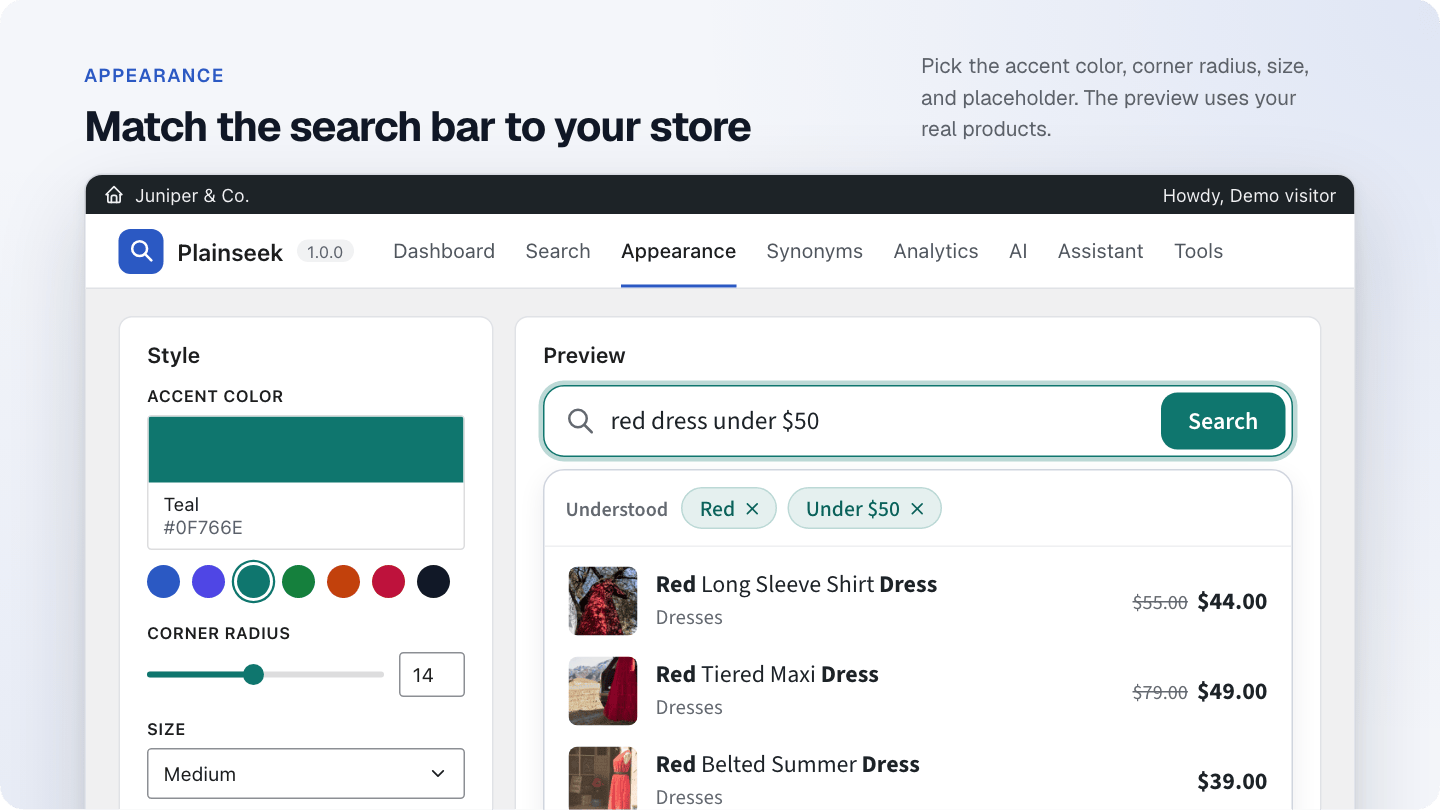
The Appearance screen. Pick the accent color, corner radius, and size. The preview on the right shows your own
products.
Search results page
- Pressing Enter opens the normal WooCommerce search results page.
- Plainseek chooses and orders the products. Your theme shows them with its usual shop templates.
- Works with block themes and classic themes.
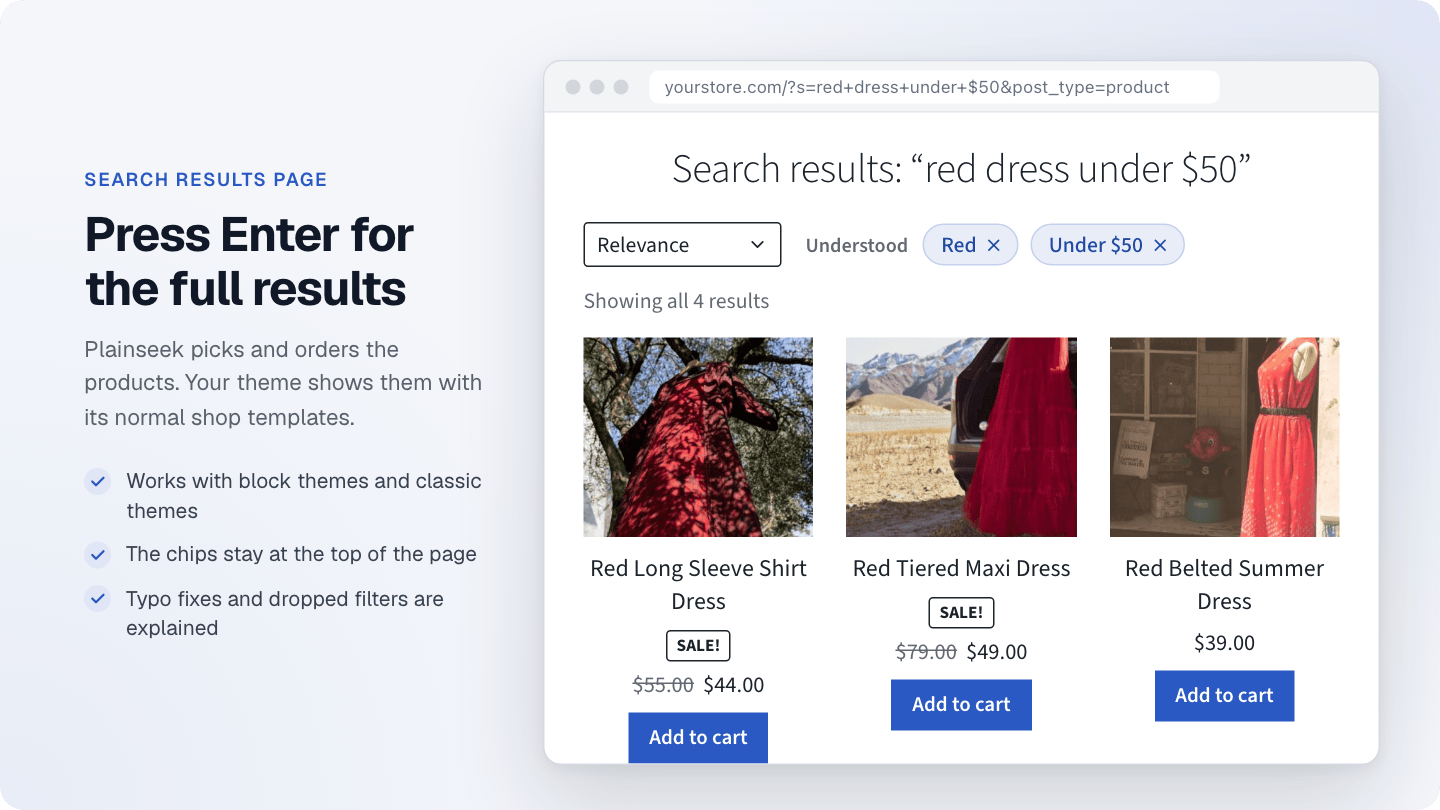
The search results page. Plainseek picks and orders the products, and your theme shows them. The chips stay at the top
of the page.
Ranking
-
Set how much a match in each field counts: name, SKU, categories, brands, attributes, tags, short description, and
description. - Optional boost for best sellers and top rated products.
- Optional push down for out of stock products.
- Three typo tolerance levels: normal, strict, or off.
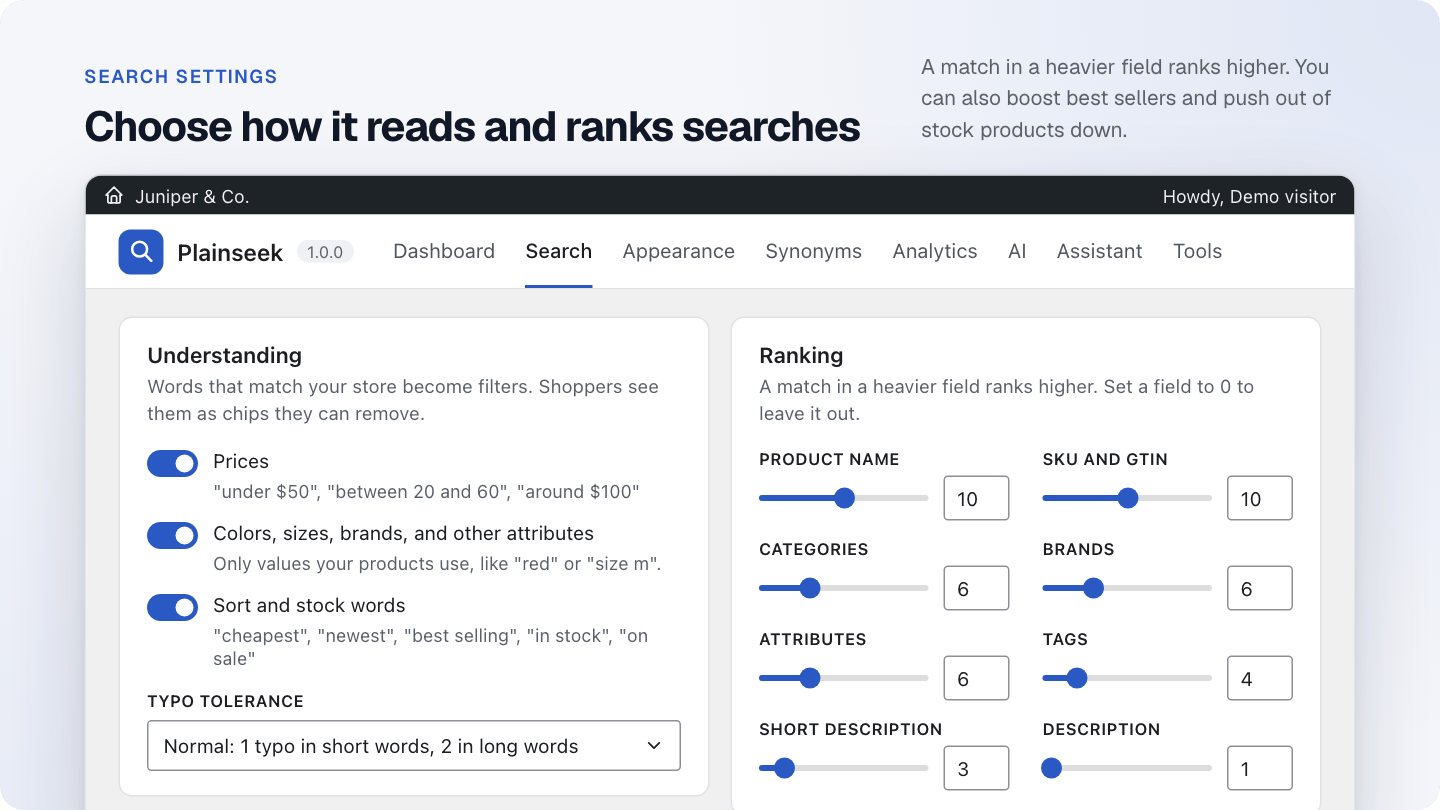
The Search screen. Turn each kind of filter on or off, set the typo tolerance, and give each product field a weight.
Synonyms
- Two-way groups: “sofa, couch, settee” all find each other.
- One-way groups: “laptop” also finds “notebook”, but not the reverse.
- Words and short phrases both work. Changes apply right away.
- Import and export as a CSV file.
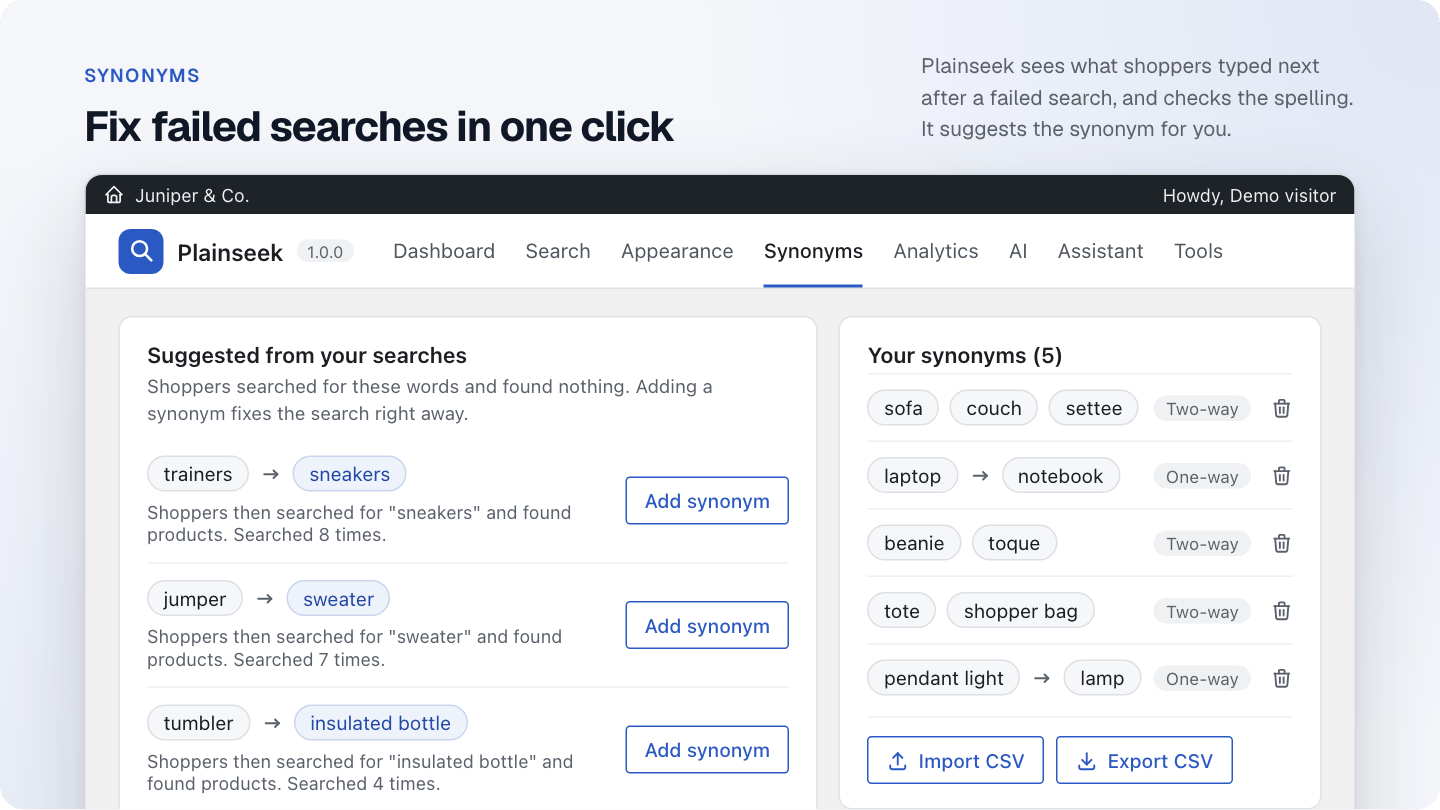
The Synonyms screen. On the left, Plainseek suggests synonyms from searches that found nothing. On the right are your
synonym groups, with CSV import and export.
Search analytics
- Number of searches, searches with no results, and searches that led to a click.
- A daily chart.
- Top searches, searches with no results, and the most clicked products.
-
Suggested synonyms: Plainseek sees what shoppers typed next after a search with no results, and checks
for spelling. One click adds the synonym and fixes the search. - Export searches as a CSV file.
-
No IP addresses and no user accounts are stored. Bots and store managers are not counted. You choose how long data is
kept, from 30 days to 3 years.
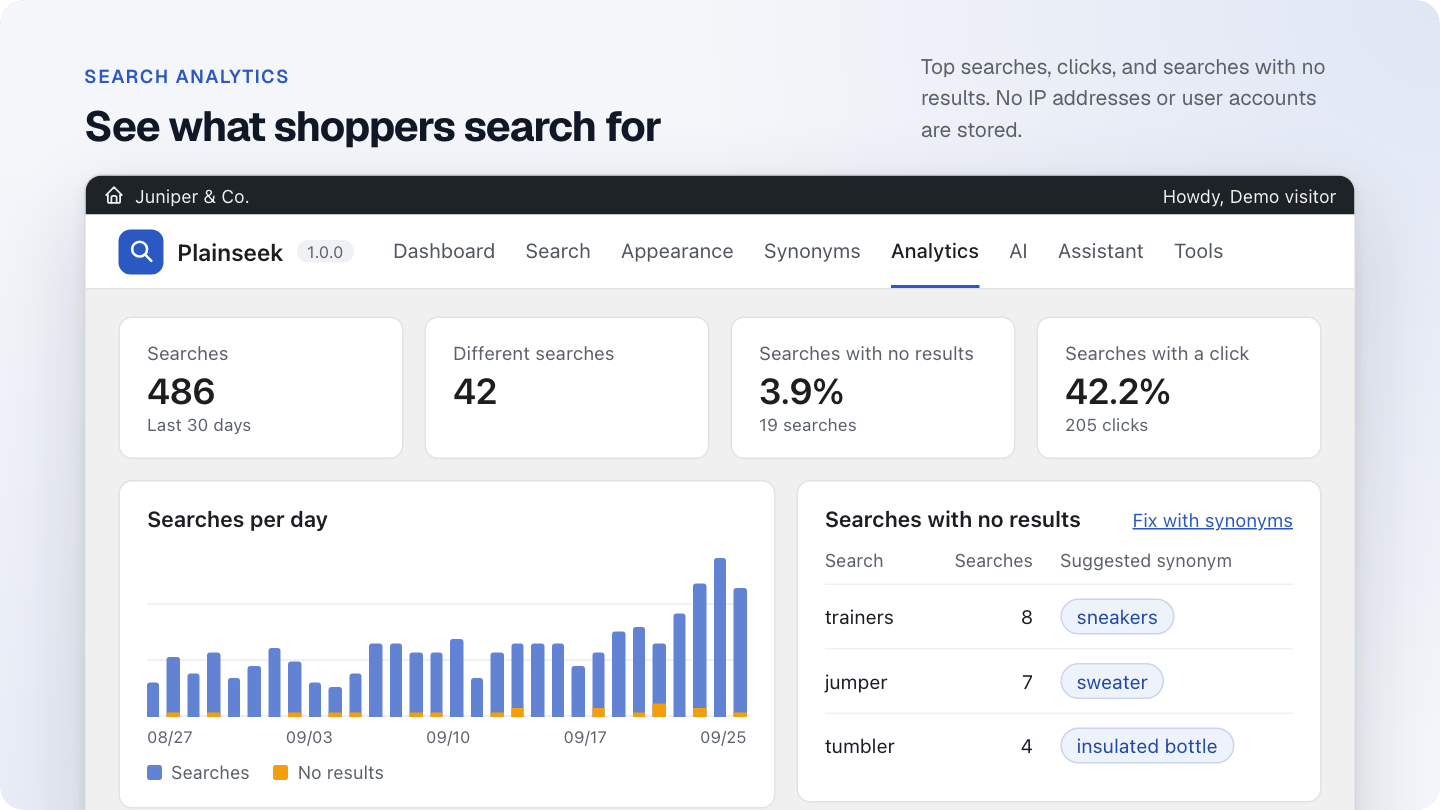
The Analytics screen. See the number of searches, the share with no results, and the share with a click. The table lists
searches that found nothing, with a suggested synonym for each.
Optional AI features
Plainseek does not include or resell any AI service. You connect your own account with an AI provider and pay the provider
directly. AI features are off until you turn them on.
-
Search by meaning: “something for a beach wedding” finds sundresses and sandals, even when the product
text does not contain those words. - Long questions: a chat model turns a long question into a short search.
- Blend control: a slider sets how much results favor exact words or meaning.
- Fast: keyword results appear at once. AI-refined results replace them when the shopper pauses.
Shopping assistant
- A chat window where shoppers ask for products and ask about shipping, returns, and payment.
- Opens from a floating button, from an “Ask the assistant” row in the search bar, or both.
-
Shows real product cards with prices, stock, and an add to cart button from WooCommerce. It can only recommend products
Plainseek found, so it cannot invent a product or a price. -
Answers store questions only from the pages you pick and your WooCommerce shipping zones. If the answer is not there, it
says it is not sure and points to your contact page. - The conversation stays in the shopper’s browser tab. It is not stored on your server.
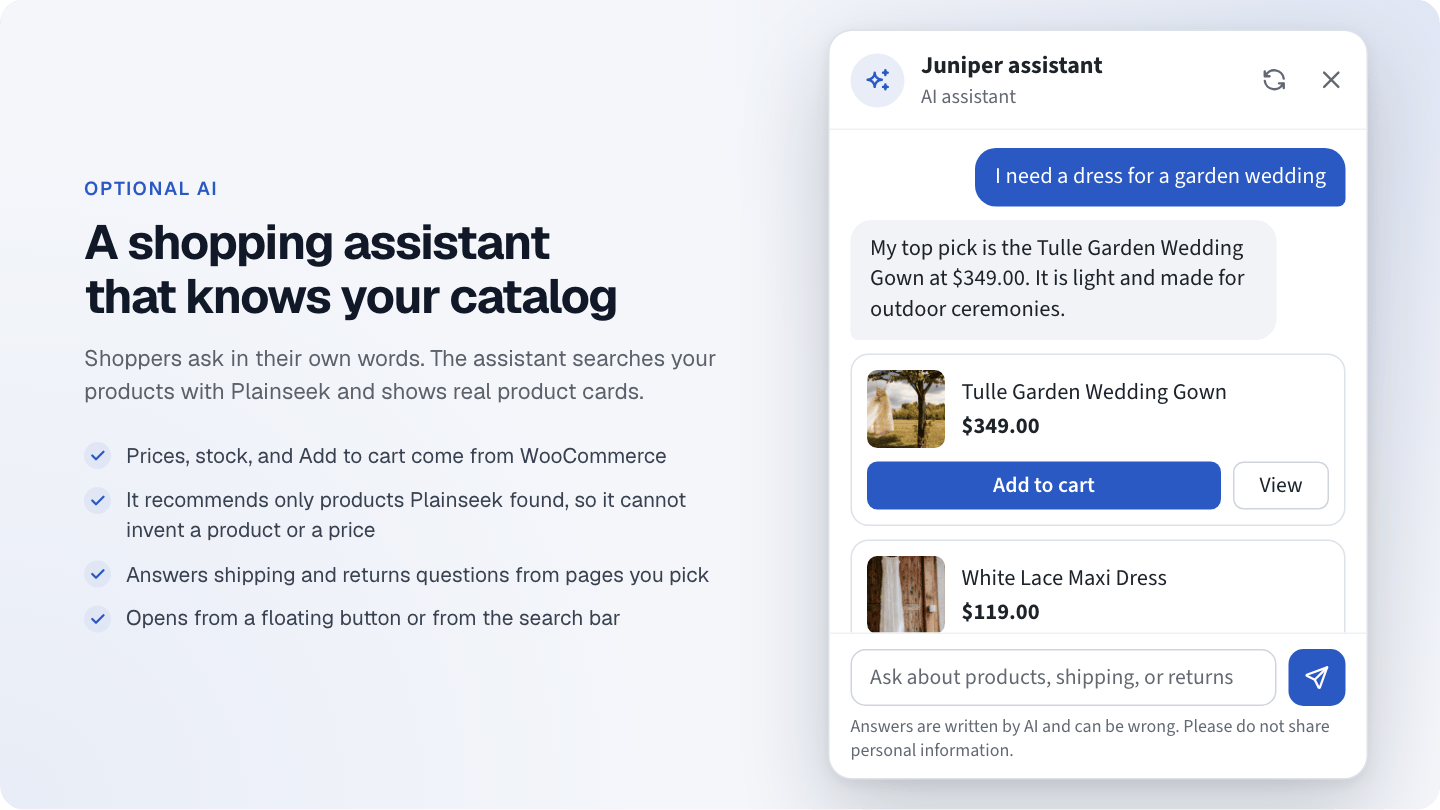
The shopping assistant. A shopper asks for a dress for a garden wedding. The assistant answers with real product cards,
with prices and an Add to cart button from WooCommerce. (In the live demo, the assistant uses scripted replies.)
Supported AI providers
OpenAI, Google Gemini, Anthropic Claude, Mistral AI, Cohere, Voyage AI, Together AI, DeepSeek, xAI Grok, Groq, OpenRouter,
Azure OpenAI, Ollama (on your own server), and any OpenAI-compatible API.
Search by meaning and the chat model are two separate settings, so you can use a different provider for each.
Privacy and cost control
- Before you turn on AI, the AI screen shows exactly what is sent, to which provider, and when. You confirm it first.
- Customer names, email addresses, orders, addresses, IP addresses, and account data are never sent.
- Turn AI off at any time. Nothing is sent after that.
- API keys are stored encrypted with your site’s secret keys.
- Each product is sent once, and again only when its text changes. Searches are cached for 30 days.
-
Set a limit on AI requests per day, and on AI searches per visitor per minute. When the limit is reached, search keeps
working with keywords. - The AI screen shows the estimated catalog size in tokens and the requests used today.
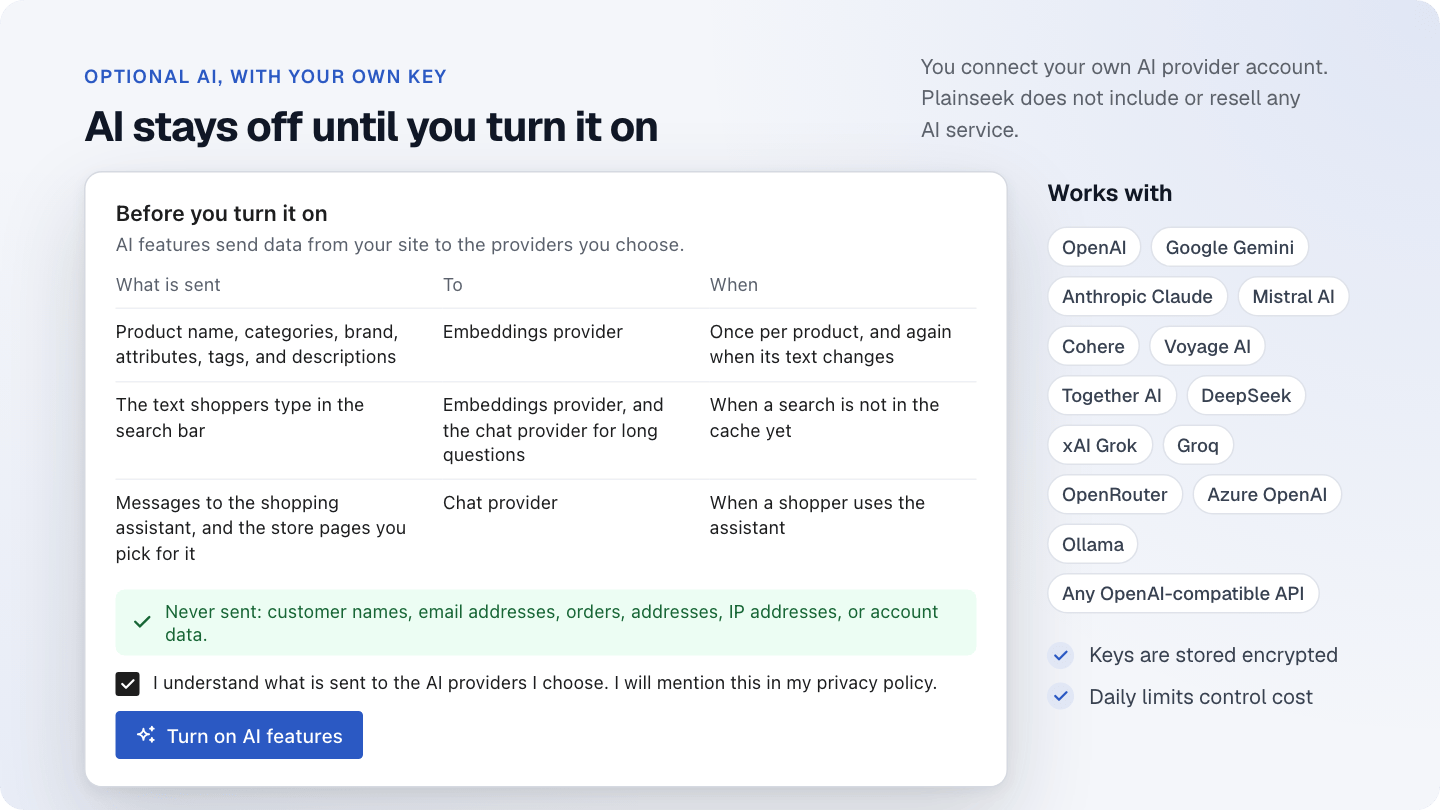
Before you turn on AI, the AI screen shows what is sent, to which provider, and when. You confirm it, then turn AI
on.
Where the search bar appears
- Replaces your theme’s search form, the core Search block, and the WooCommerce product search. You can turn this off.
- Plainseek Search block for the block editor and the Site Editor.
- [plainseek] shortcode, with placeholder, size, and button options.
- Plainseek Search widget for Elementor.
Built for large catalogs
- Plainseek keeps its own search index, so search does not slow down as the catalog grows. Tested with 20,000 products.
- Products are indexed in the background with Action Scheduler. The index updates by itself when you add or edit a product.
- Prices, stock, and sales are read from WooCommerce’s own lookup table, so search never shows an old price.
- Search results are cached and cleared when products change.
- WPML and Polylang: each shopper searches only products in their language.
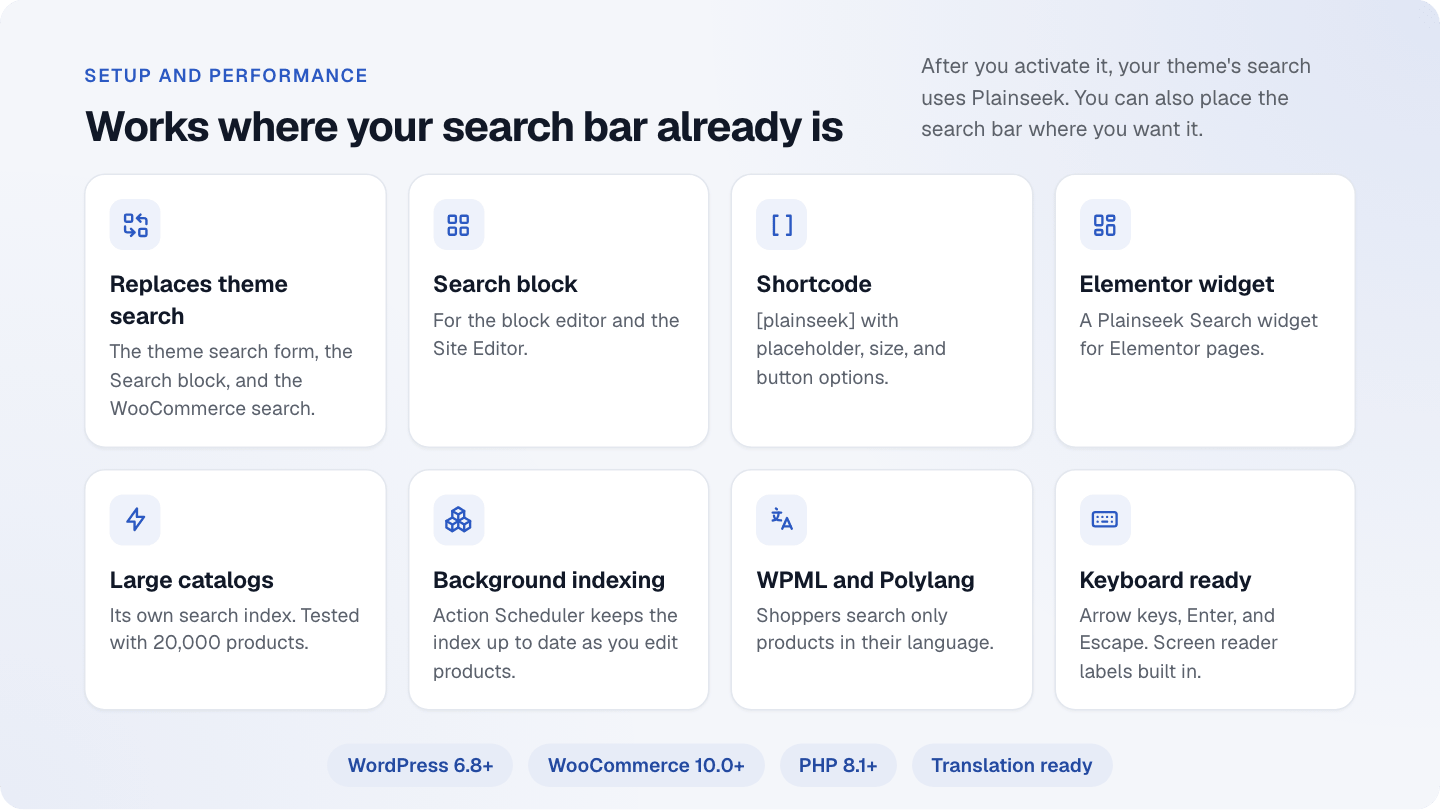
Plainseek replaces your theme search. You can also add the search bar with a block, a shortcode, or an Elementor widget.
It keeps its own index for large catalogs and works with WPML and Polylang.
Admin screens
- Dashboard: index progress, a “Try it” box, and a summary of searches.
- Search: what Plainseek understands, typo tolerance, ranking, and the search bar results.
- Appearance: colors, size, and placeholder, with a live preview.
- Synonyms: groups, suggestions, import, and export.
- Analytics: charts, lists, and CSV export.
- AI and Assistant: providers, models, limits, and store pages.
- Tools: rebuild the index, clear the cache, export and import settings, and system status.
Deactivating the plugin never deletes data. Your data is deleted with the plugin only if you turn that option on.
For developers
-
Filters to add custom fields to the index, change field weights, include or exclude products, and change the assistant’s
instructions. - Actions for indexing, rebuilds, and searches.
- CSS custom properties to style the search bar and the assistant from your theme.
- A REST API endpoint for search.
- Translation ready, with a .pot file.
Requirements
- WordPress 6.8 or newer
- WooCommerce 10.0 or newer
- PHP 8.1 or newer
- AI features only: an account with an AI provider
What you get
- The installable plugin file: plainseek.zip
- Documentation in HTML, also online
- License files and third-party credits
Support
Use the Support tab on this page. Please include the System status from Plainseek > Tools.
Changelog
1.0.0 – 2026-09-25
First release.


