
Plugnition Order Tags For WooCommerce Wordpress Plugin - Rating, Reviews, Demo & Download

Plugin Description
Plugnition Order Tags for WooCommerce helps store managers organize WooCommerce orders using customizable tags and labels.
Assign color-coded tags such as “Priority”, “Wholesale”, “Fraud Review”, “Packed”, “VIP”, or “Awaiting Pickup” directly to orders and quickly identify important workflows from the WooCommerce Orders screen.
The plugin is lightweight, easy to use, and integrates naturally into the WooCommerce admin interface.
Features
- Create unlimited custom order tags
- Assign multiple tags to orders
- Color-coded labels for better visibility
- Quick filtering by tags
- Clean WooCommerce admin integration
- Lightweight and fast
- HPOS compatible
- No coding required
Example Use Cases
- Mark priority orders
- Organize wholesale customers
- Highlight orders requiring manual review
- Track packing or fulfillment stages
- Tag local pickup orders
- Identify VIP customers
- Separate B2B and retail orders
Need more power? Upgrade to Pro
Take order tags to the next level, and apply or remove tags across multiple selected orders in a few clicks:
Plugnition Order Tags for WooCommerce Pro
Why Use Plugnition Order Tags for WooCommerce?
Managing WooCommerce orders becomes increasingly difficult as stores grow.
Plugnition Order Tags for WooCommerce helps your team quickly identify, organize, and process orders more efficiently using a simple visual tagging system directly inside WooCommerce.
Whether you run a small store or a high-volume operation, order tags can significantly improve workflow clarity and reduce fulfillment mistakes.
Lightweight by Design
This plugin is built with performance and simplicity in mind:
- No unnecessary bloat
- Native WooCommerce admin styling
- Fast and optimized
- Easy setup
Support
Need help or have questions?
Screenshots
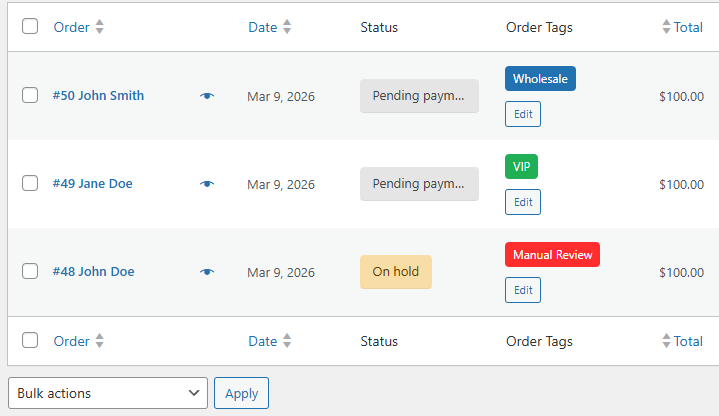
WooCommerce orders list with color-coded order tags
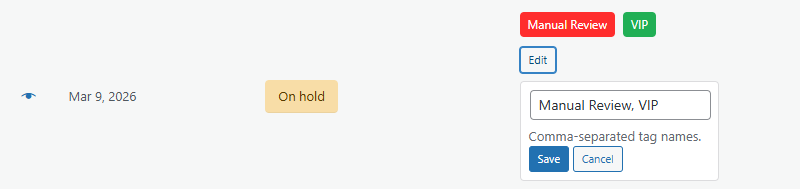
Assigning tags to an order
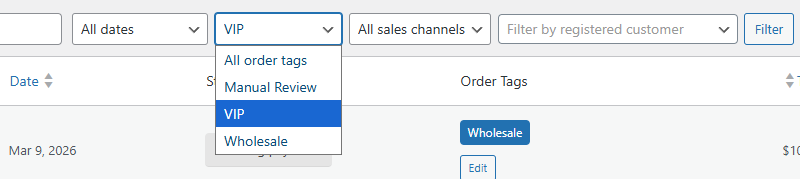
Filtering WooCommerce orders by tags


