Plugova Form Studio Wordpress Plugin - Rating, Reviews, Demo & Download
Plugin Description
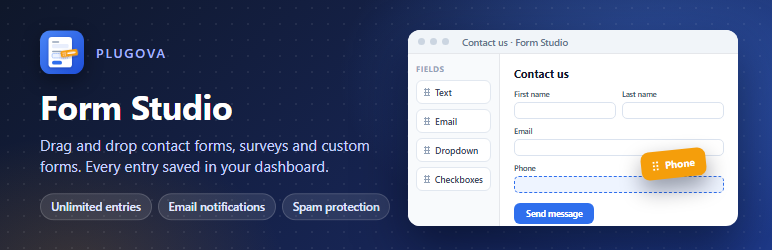
Plugova Form Studio is a drag and drop form builder for WordPress. Make a contact form, a feedback survey, a quote request or any custom form in a few minutes, keep every entry in your dashboard, and get an email each time someone sends one.
Why Plugova Form Studio
- Every entry is saved, in the free plugin. Unlimited forms and unlimited entries, with search, read and unread, trash and “resend notification” on each entry. You never depend on an email arriving.
- Spam protection that works on cached pages. A hidden honeypot and a minimum fill time stop most bots without bothering visitors, and forms keep working behind page caches (LiteSpeed, WP Rocket, Cloudflare): when a cached page’s security token has expired, the form gets a fresh one and sends again by itself. Add Google reCAPTCHA v2 or v3 for more.
- A modern builder. Drag fields in, see the form as visitors will, and change labels, placeholders, required fields and field sizes in place.
- No surprises. No ads in your dashboard, no tracking, no account to create. Features of the optional Pro add-on are clearly marked.
Contact form and form builder features
- 13 fields: single line text, paragraph, email (with confirmation), name, phone, number, dropdown, multiple choice, checkboxes, consent (GDPR) checkbox, hidden, section heading and HTML block.
- Ready-made templates: contact form, feedback survey and blank.
- Email notifications to you and to the person who filled in the form, with smart tags such as {all_fields}, {field:3}, {form_title}, {user_email} and {query:utm_source} for campaign tracking.
- After sending: a thank-you message, another page, or any URL.
- Form block for the block editor, and the [formstudio id=”123″] shortcode for classic pages, widgets and page builders.
- Import and export forms between sites.
- Translation ready; accessible markup with labels and error messages tied to their fields.
Plugova Form Studio Pro
The optional Form Studio Pro add-on adds conditional logic, multi-step forms, file uploads, Stripe payment forms, address, date, website and rating fields, CSV export of entries, entry notes and more templates. The free plugin is complete on its own and never stops working.
External services
The plugin can use one anti-spam service, Google reCAPTCHA. It is not used until you add its keys in Form Studio Settings and choose it in a form’s settings.
Google reCAPTCHA
Checks that a form is filled in by a person. On pages showing a form that uses reCAPTCHA, the visitor’s browser loads https://www.google.com/recaptcha/api.js, which Google uses to assess the visit. When the form is sent, your site sends Google the reCAPTCHA response token, your secret key and the visitor’s IP address (to https://www.google.com/recaptcha/api/siteverify) to verify it.
Google Terms of Service and Privacy Policy.
Developer hooks
Actions
- formstudio_loaded( $plugin )
- formstudio_register_fields( $registry ) –
$registry->add( new My_Field() ), My_Field extends FStudio_Field. - formstudio_after_submission( $entry_id, $form, $values, $ctx )
- formstudio_payment_completed( $entry_id, $payment, $form, $ctx )
- formstudio_delete_entry( $entry, $form )
- formstudio_enqueue_form( $form ), formstudio_builder_enqueue( $form )
- formstudio_admin_menu( $cap ), formstudio_admin_notices_print()
- formstudio_entry_main_after( $entry, $form ), formstudio_entry_side_after( $entry, $form )
Filters
- formstudio_capability, formstudio_is_pro, formstudio_upgrade_url
- formstudio_form_before_render, formstudio_form_pages, formstudio_pages_header, formstudio_js_config, formstudio_hidden_inputs, formstudio_field_attributes
- formstudio_visibility( $visible, $form, $values ) – which fields are shown (conditional logic).
- formstudio_validate_field, formstudio_validation, formstudio_spam_check
- formstudio_process_payment( null, $form, $ctx, $posted ) – return null or a payment result.
- formstudio_entry_values, formstudio_notification, formstudio_notification_attachments, formstudio_confirmation, formstudio_email_html
- formstudio_smart_tags, formstudio_smart_tag_value
- formstudio_sanitize_field, formstudio_sanitize_settings, formstudio_default_form_settings
- formstudio_settings_schema, formstudio_settings_defaults, formstudio_settings_saved
- formstudio_templates, formstudio_builder_data, formstudio_builder_settings_schema
- formstudio_entries_columns, formstudio_entries_column, formstudio_entries_views, formstudio_entries_bulk_actions, formstudio_entry_action, formstudio_entry_buttons, formstudio_entries_page_actions, formstudio_transaction_url
- formstudio_client_ip
JavaScript
- Builder:
window.FormStudioBuilder.addFilter / addAction(preview, optionSections, settingsSections, settingsSection, notificationSchema, notificationCard, confirmationCard, multipleConfirmations, fieldDeleted). - Front end:
window.FormStudio.on( name, fn )(init, change, check, focus, beforeSend, response, needsAjax). Forms fire a bubblingformstudio:submittedevent;window.formstudioInit()sets up forms added later.
Screenshots

The drag and drop form builder: add fields from the left, arrange them on the form, and edit each one in Field options.

The contact form on a page (Twenty Twenty-Five theme).

Every entry is saved in your dashboard, with unread entries marked, search and bulk actions.

One entry with all its answers, the page it came from, and buttons to mark it read, resend the emails or trash it.

All your forms with their shortcodes and entry counts.

Start from a blank form or a ready-made template.

Spam protection: a honeypot and time trap on every form, plus optional Google reCAPTCHA v2 or v3.