PMT PostGrid For Block Editor With Elementor Support Wordpress Plugin - Rating, Reviews, Demo & Download
Plugin Description
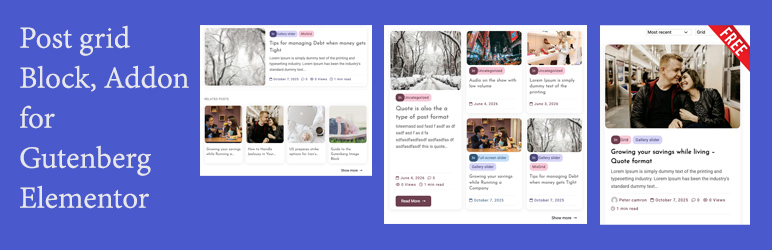
PMT PostGrid for block editor with elementor support adds a live, configurable post grid to your site — as a block-editor block, an Elementor widget, or both. Both builders share the same underlying render function, so a grid built in one looks identical to a grid built in the other, and every setting behaves the same way regardless of which editor you use.
Three layouts
- Design 1 — a standard responsive grid (2-6 columns, any number of posts).
- Design 2 — a golden-ratio featured layout: one large featured post alongside a 2×2 grid of four smaller posts.
- Design 3 — a stacked list, each post split into an image and content column at the golden ratio, with an optional alternating image side.
Query controls
- Filter by category, author, or hand-pick specific posts by title.
- Exclude specific posts from the results.
- Order by date or comment count.
- Set columns and post count (Design 1).
- A live, front-end category dropdown lets visitors instantly switch which category is shown, with no page reload.
Content controls
- Toggle featured image, excerpt (with adjustable word length), tags, and category badge independently.
- Auto-colored category badges — each category is assigned a distinct color automatically, no configuration required.
- Optional “Read more” button and an optional main section title, both independently configurable.
- Reorder each card’s elements (image, category, title, excerpt, meta, tags) via a simple drag-to-reorder list.
Style controls
- Column and row spacing, image corner radius, card corner radius.
- Full box-shadow control (offset, blur, spread, color, inset).
- Optional card border (width, style, color).
- Title font size, with an automatic scale for the smaller cards in Design 2.
- Left/center/right text alignment.
“Show more” button
Automatically appears when there are more matching posts than the grid currently displays, linking to the relevant category archive (or your site’s main blog page) in a new tab.
Built to stay in sync
Every setting is wired through shared PHP functions rather than duplicated per builder or per layout, so a fix or feature added in one place applies everywhere — Design 1, Design 2, Gutenberg, and Elementor can’t drift out of sync with each other.
Developer hooks
This plugin fires several apply_filters() hooks, so themes and other plugins can extend or override its behavior without editing its files directly (changes to plugin files are lost on update; filters aren’t).
pmtpofob_post_grid_args
Filters the fully-merged settings array before anything is rendered — runs before the design is even dispatched, so it can change $args['design'] itself or override any individual setting. Fires once per grid instance, covering every design and both builders.
apply_filters( 'pmtpofob_post_grid_args', array $args )

add_filter( 'pmtpofob_post_grid_args', function( $args ) {
    $args['showExcerpt'] = true; // Force excerpts on, site-wide.
    return $args;
} );
pmtpofob_post_grid_query_args
Filters the WP_Query arguments right before the query runs — add a meta_query, a tax_query, restrict/expand post types, etc.
apply_filters( 'pmtpofob_post_grid_query_args', array $query_args, array $args, string $design )

add_filter( 'pmtpofob_post_grid_query_args', function( $query_args, $args, $design ) {
    $query_args['meta_key']   = 'featured';
    $query_args['meta_value'] = '1';
    return $query_args;
} );
pmtpofob_post_grid_card_html
Filters a single rendered card’s HTML before it’s returned. Fires for every card, in every design.
apply_filters( 'pmtpofob_post_grid_card_html', string $html, int $post_id, string $variant, array $args )

$variant is `'full'` (Design 1 / Design 2's Column A), `'simple'` (Design 2's Column B), or `'row'` (Design 3).
pmtpofob_post_grid_category_color
Filters the color pair (array( 'bg' => '#hex', 'fg' => '#hex' )) used for a category’s badge, meta text, tags, and Read more button. Override the auto-rotated palette with your own brand colors.
apply_filters( 'pmtpofob_post_grid_category_color', array $color, int $term_id )

add_filter( 'pmtpofob_post_grid_category_color', function( $color, $term_id ) {
    if ( 5 === $term_id ) { // Your "News" category's term_id.
        return array( 'bg' => '#FFE0E0', 'fg' => '#8A1F1F' );
    }
    return $color;
}, 10, 2 );
pmtpofob_post_grid_output
Filters the complete rendered output of a grid instance right before it’s returned — the entire thing: wrapper, header, dropdown, every card, Show more button.
apply_filters( 'pmtpofob_post_grid_output', string $html, array $args, string $design )
pmtpofob_post_grid_structured_data
Filters the schema.org ItemList array before it’s serialized to JSON-LD — add/remove fields, or return an empty array to suppress it entirely for a specific instance.
apply_filters( 'pmtpofob_post_grid_structured_data', array $schema, array $items )
Screenshots

Design 1 — standard responsive grid.

Design 2 — golden-ratio featured layout.

Block editor settings panel (Gutenberg).