
Preflight Handoff Audits Wordpress Plugin - Rating, Reviews, Demo & Download
Plugin Description
Preflight Handoff Audits helps WordPress builders and agencies review a site while it is being built and before it is handed to a client.
Run a scan, review the highest-risk pages, use Build Mode during the project, open Fix Coach when you need help locating an issue, and generate the Handoff Report before delivery.
The plugin scans published pages and posts, plus WooCommerce products when WooCommerce is active. It reports review items such as short content, placeholder content, missing or repeated H1 headings, placeholder links, unfinished CTAs, internal links that may need review, WooCommerce checkout/store configuration risks, images without alt text, builder modules that may need cleanup, form readiness risks, client access and security readiness checks, performance and SEO handoff readiness checks, deployment readiness checks, and layout patterns that can create mobile review risks.
Preflight Handoff Audits is not an SEO plugin, not a performance optimizer, not an accessibility compliance tool, not a vulnerability scanner, and not an auto-fix plugin. It guides the builder, but it does not rewrite the site.
Core promise: Find layout, content and handoff issues before your client does.
Features
- Manual pre-handoff scan from the WordPress admin.
- Build Mode for day-to-day review while the site is still in progress.
- Fix Coach helper that opens supported editor or builder views with page-specific issue context.
- Handoff Report with Internal and Client views for final review.
- Manual Handoff Checklist for setup, content, builder/layout, forms, WooCommerce, deployment, client access, and launch day tasks.
- Published page and post scanning.
- Product scanning when WooCommerce is active.
- Content checks for placeholder copy, short pages, H1 usage, placeholder links, and image alt text.
- Link & CTA Readiness checks for demo, staging, placeholder, missing, unpublished, admin-only, attachment-page, and likely mismatched CTA targets.
- WooCommerce Readiness checks for required store pages, payments, shipping, tax settings, products, transactional emails, and checkout account/privacy settings.
- Client Access & Security Readiness checks for administrator account review, registration/default role risks, debug/config exposure, search visibility, SSL/URL basics, environment type, and cached pending updates.
- Performance & SEO Readiness checks for search visibility, site icons, SEO plugin presence, SEO titles/descriptions, cache/CDN plugin presence, large image risks, image metadata, sitemap/robots basics, and homepage configuration.
- Forms Readiness checks for handoff risks in Contact Form 7, WPForms, Elementor Forms, and Divi Contact Form modules.
- Conservative unidentified HTML form detection for manual review.
- Divi and Elementor checks for common builder handoff issues.
- Mobile risk checks for negative margins, large fixed widths, and large custom padding.
- Deployment readiness checks for common site-wide go-live blockers.
- Preflight score from 0 to 100.
- Severity filters and issue counts.
- Forms filter when form findings exist.
- Links & CTAs filter when link findings exist.
- WooCommerce filter when WooCommerce findings exist.
- Access & Security filter when access or security readiness findings exist.
- Performance & SEO filter when performance or SEO readiness findings exist.
- AJAX batch scan progress in the WordPress admin.
- Scan history comparison for score changes, new findings, resolved findings, and still-open items.
- Report summary for incomplete manual handoff tasks.
How It Helps During a Build
Preflight is designed for the working part of a project, not only the final hour before launch.
Use Build Mode after each scan to see what needs attention next:
- Today’s build focus.
- Pages to finish.
- Progress since the previous scan.
- Repeated patterns that can be fixed in one pass.
When a row has a Fix action, Preflight opens the supported editor or builder view and shows Fix Coach with the relevant page context. Fix Coach can help you locate the issue, but the builder remains in control of the actual edit.
Handoff Workflow
- Run a Preflight scan from the WordPress admin.
- Review the Overview and Build Mode tabs.
- Fix the highest-risk pages first.
- Use Findings filters and search to group similar work.
- Complete the manual Handoff Checklist.
- Open the Handoff Report.
- Use Internal view for your team and Client view for cleaner delivery notes.
- Copy the summary or print/export the report as needed.
Privacy and Data Handling
Preflight Handoff Audits runs inside your WordPress admin. Scan checks are read-only and do not send scan data to an external service.
The plugin stores its own scan results, scan history, and manual checklist state in WordPress options so the admin screens and Handoff Report can show the latest review. It does not submit public forms, send emails, create orders, rewrite content, optimize images, purge caches, change SEO settings, or modify WooCommerce products.
Limitations
Preflight is a review tool. It does not prove that a site is launch-ready, accessible, secure, fast, or optimized. It highlights common handoff risks so a builder can review them.
Some checks depend on what WordPress, the active theme, plugins, and supported builders expose in stored or rendered content. Always perform a manual review before delivery.
Screenshots
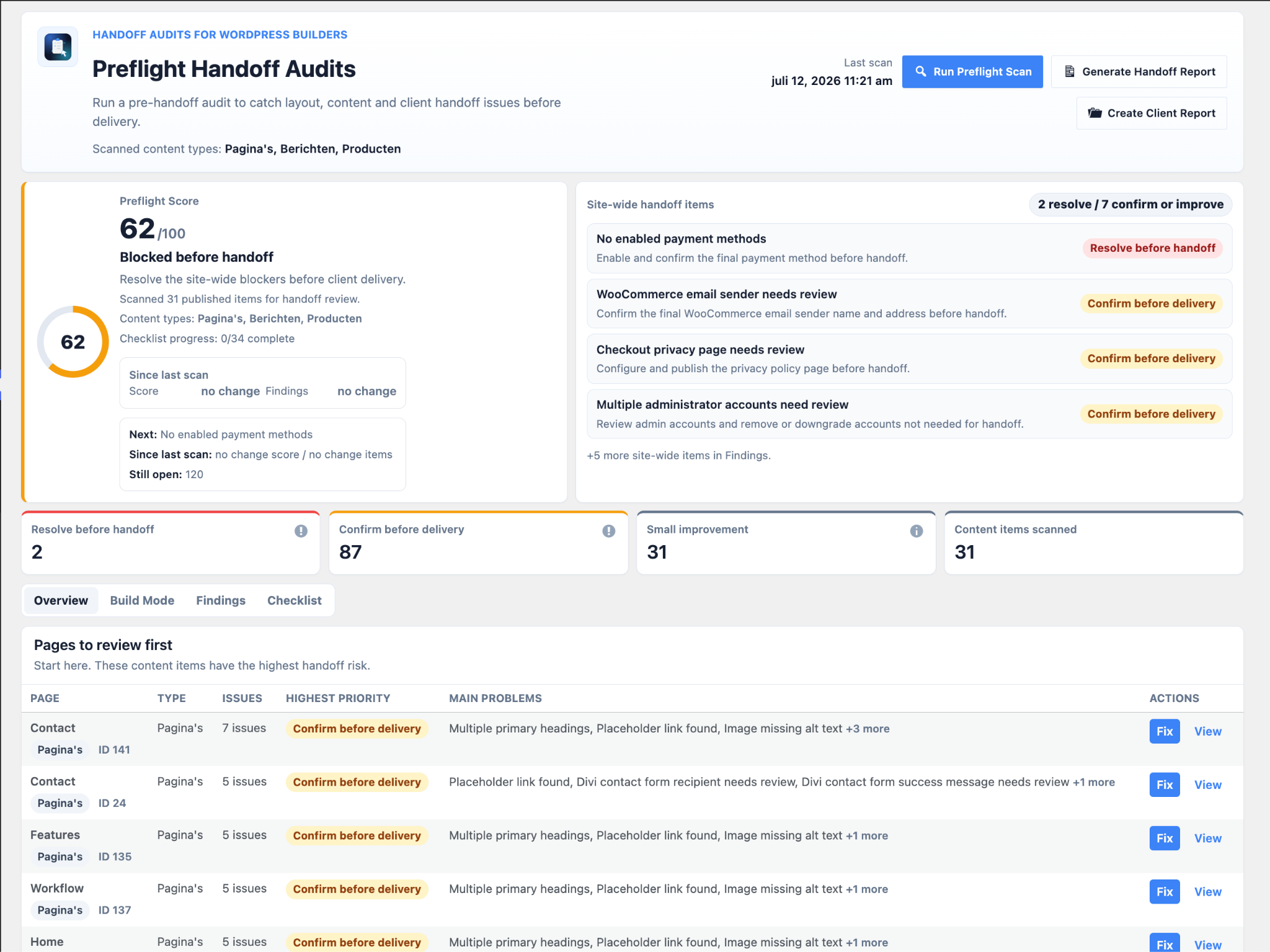
Overview dashboard with the Preflight score, site-wide blockers, handoff priorities and pages to review first.

Build Mode showing the next issues to fix, pages to finish and progress since the previous scan.

Fix Coach providing issue-by-issue guidance directly alongside the WordPress page builder.

Findings view with severity filters, categories, recommendations and direct Fix or View actions.

Handoff Checklist for manually confirming final delivery tasks and tracking completion progress.

Internal Handoff Report with audit status, score, findings, build progress and checklist details.

Client Report with a focused client-facing action plan and recommended handoff improvements.


