Quick Migrate Wordpress Plugin - Rating, Reviews, Demo & Download

Plugin Description
🚀 Your Whole Migration Toolkit, In One Screen
SPINX Quick Migrate puts the jobs you run during a WordPress site operation on one admin screen:
- Export a portable archive of your site (database + the files you choose).
- Back up the database before you make a risky change.
- Find & Replace URLs and server paths across the database, including serialized WordPress data, without corrupting it.
Everything runs on your own server. Quick Migrateneeds no account, has no build step and does not call any external service.
🛡️ Built for Data Safety Under Interruption
Migrations can run for minutes or hours on shared hosting with short time limits, unstable networks and browser tabs that get closed. Quick Migrateis designed for that:
- Every long operation can be paused, resumed and recovered.
- Risky changes are prepared in a working copy first and switched in all at once at the end.
- If something fails or you cancel, the working copies are removed and your live site is left as it was.
✨ Why Choose SPINX Quick Migrate?
- One Screen, Three Core Jobs: Export, Backup and Find & Replace live on one guided Migrate tab. Pick an operation tile and only the panels for that job appear.
- Serialization-Safe Rewrites: Plugin settings, WooCommerce data and page-builder layouts keep working after a URL change, because Quick Migraterecalculates stored string lengths.
- Staged, All-at-Once Switch: Find & Replace changes copies of your tables, checks each copy and then swaps them all in one step.
- Pause, Resume, Cancel, Retry: You control every job, and a job keeps running if you reload the page.
- Reusable Profiles: Save a configuration once and run it again with one click, from the browser or from WP-CLI.
- 100% Local & Private: No phone-home, no analytics and no third-party services.
📦 Features at a Glance
🗂️ Site Export
Creates one downloadable ZIP that holds the database (database-<timestamp>.sql), the file components you selected and a manifest.json export summary.
- Database: all tables or only the tables you select, with an optional post-type filter.
- Advanced row filters: exclude spam comments, WordPress transients and post revisions.
- Media Uploads: all files, only files changed since the last operation, or files modified after a date you pick.
- Themes / Plugins: all, active only, selected, or all except the ones you select.
- Must-Use Plugins: the whole
mu-pluginsfolder. - WordPress Core Files: the core files, without
wp-content/and withoutwp-config.php(it holds your database password and security keys). - Exclusion patterns: 35 sensible defaults plus your own path patterns (
wp-content/backup*), filename patterns (*.log) and folder or file names (node_modules). - Automatic download: the ZIP downloads when the job finishes and the server copy is then removed. The completion line shows the real final ZIP size.
💾 Database Backup
- Back up all tables or a selected subset.
- Save it as a plain
.sqlfile or a compressed.sql.gzfile. The compression level runs from Fast to Smallest, and the default is Balanced (level 6). - The backup downloads automatically and is then deleted from the server, so nothing is left behind.
🔁 Find & Replace
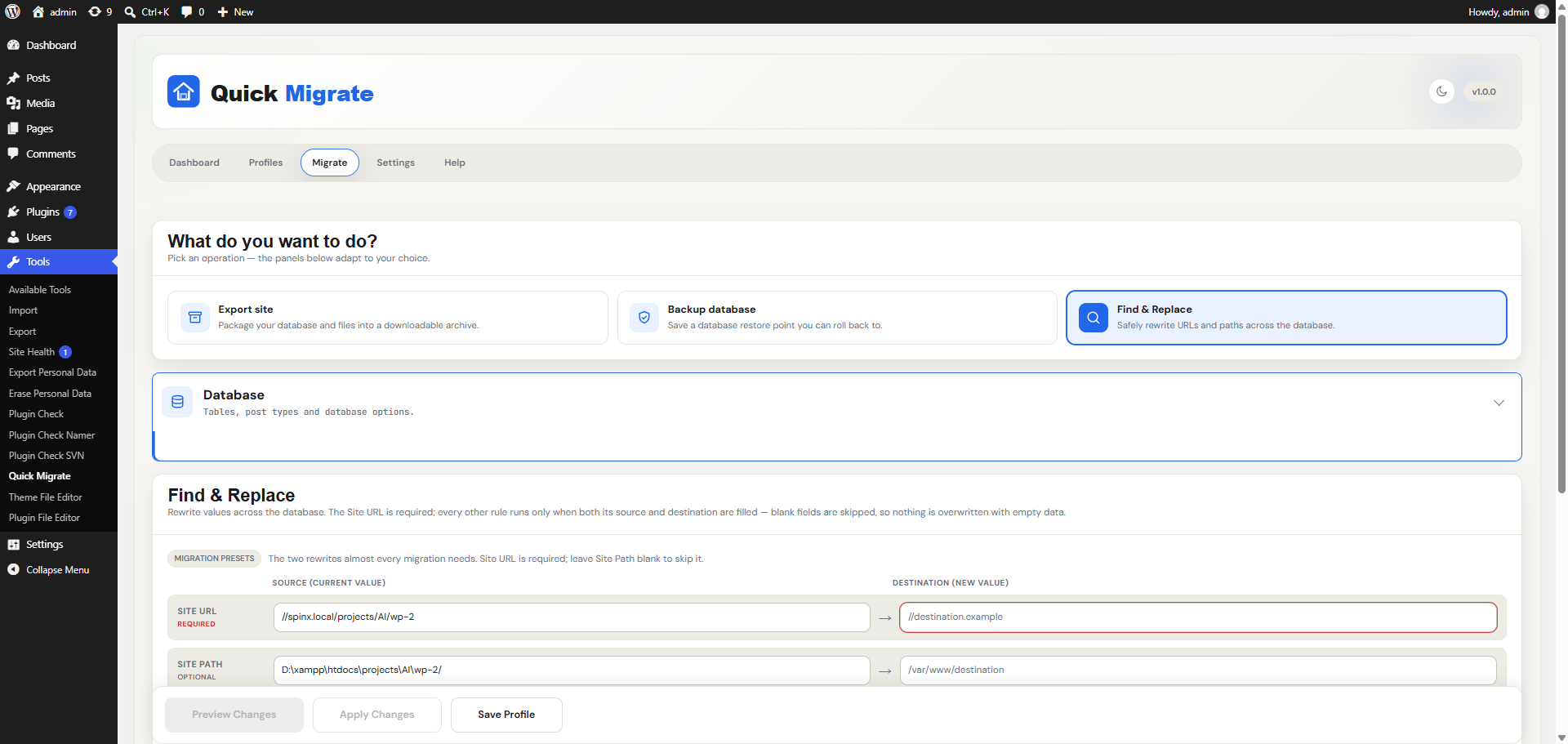
- Site URL rule (required), Site Path rule (optional) and any number of custom rules.
- Preview first: see the affected tables and columns with before/after samples before anything is written.
- Pre-flight backup: choose no backup, all prefixed tables, only the tables being migrated (the default), or tables you pick by hand.
- Incomplete or empty rules, tables without a primary key and tables with no text columns are skipped automatically.
- Temporary tables are cleaned up automatically if the run is cancelled or fails.
📁 Profiles & Recent Configurations
- Save Export, Backup and Find & Replace settings as a named profile.
- Load a profile with one click, update an existing profile, rename it, or create a new one. Duplicate names are blocked.
- Your last 10 unsaved configurations are kept automatically. You can change how many are kept. Use Save As to turn one into a permanent profile.
📊 Dashboard
- Active jobs, the last operation with a colored status label, and the recent activity table.
- A storage meter for backups and exports that turns orange at 75% and red at 90%.
- Quick-action tiles to start an Export, Backup or Find & Replace, or to manage profiles, plus a first-run tour.
📝 Audit Log
A permanent record of every operation: who ran it, what was run, when it started and finished, how long it took, the result and any error message.
⌨️ WP-CLI Support
Run export, backup, find-replace and profile from the command line with wp spinx-qm. This helps when a browser can’t stay open, or on hosts where the site can’t send requests to itself.
⏯️ Stay in Control of Every Long Operation
Every export, backup and Find & Replace runs in a live progress popup. The popup shows the percentage, the current item, the bytes processed, the elapsed time and a checklist for each component.
- Pause: stops after the current small batch, and the elapsed clock freezes. You can pause safely at any point.
- Resume: continues from the last checkpoint. Paused time is not counted.
- Cancel: stops immediately, cleans up any partial output and leaves your live site as it was.
- Retry: appears after a failure so you can run the operation again.
- Reconnect: close the tab if you need to. The job’s state lives on the server, so when you reopen Quick Migratethe popup reattaches to the running job.
Pause and Cancel take effect between batches, usually within a second or two. They also work on servers with aggressive caching.
🔄 How Find & Replace Protects Your Data
- Preview: see exactly which tables and rows would change.
- Back up: a pre-flight backup becomes your rollback file. If this backup fails, nothing has been changed.
- Copy: working copies of the selected tables are created.
- Replace: the rewrites are applied to the copies only.
- Verify & switch: each copy is checked for the right number of rows, then all copies replace the live tables in one atomic step. If a check fails, the changes are rolled back and live data is untouched.
- Complete: you see the number of replacements and rows, plus a button to download your backup file. The backup stays on the server for 24 hours and is then removed automatically.
🔒 Privacy & External Services
Quick Migratedoes not contact any external server. It does not phone home, collects no analytics and bundles no third-party services.
Exports, backups and log entries stay on your own site. The audit log stores the name, email, role, IP address and browser of the user who ran each operation. This data is kept in your own database for accountability and troubleshooting, and it is never sent anywhere. It is included in WordPress’s Export Personal Data and Erase Personal Data tools (erasing anonymizes the entries), and Quick Migrateadds a suggested paragraph to the Privacy Policy Guide.
💡 Best For
- Agencies and developers moving sites between local, staging and production.
- Site owners who want a database backup before an update or a risky change.
- Anyone changing a domain, switching to HTTPS or moving a site to a new server path.
- Teams on shared hosting with short PHP time limits, where long jobs need to pause and resume safely.
- Engineers who prefer to script migrations with WP-CLI and saved profiles.
🛠️ For Developers
Filters
spinxqm_required_cap: the capability required to use the plugin (defaultmanage_options, ormanage_network_optionson multisite).spinxqm_trust_proxy: useHTTP_X_FORWARDED_FOR/HTTP_CLIENT_IPwhen recording the IP address in the audit log (defaultfalse).spinxqm_storage_limit: the storage soft limit, in bytes, for the dashboard storage meter (default 100 GB).spinxqm_storage_retention: how long, in seconds, export and backup files may stay on the server before the daily cleanup removes them (default 24 hours).spinxqm_batch_size,spinxqm_chunk_bytes,spinxqm_max_insert_bytes,spinxqm_gzip_level,spinxqm_process_timeout,spinxqm_process_memory_limit,spinxqm_job_ttl,spinxqm_fr_use_staging: throughput and safety tuning for limited hosts.
REST API
Endpoints are registered under the spinxqm/v1 and spinxqm/v2 namespaces. They serve the plugin’s own admin screen, and each one requires the plugin capability (manage_options, or manage_network_options on multisite; filterable) and a valid REST nonce.
Credits
Quick Migratebundles the DM Sans and JetBrains Mono fonts, both licensed under the SIL Open Font License 1.1 (see assets/fonts/).
Screenshots

Dashboard with active jobs, last operation, storage used, quick actions, and recent activity

Migrate tab: Export site, choosing the database and files to bundle into a downloadable archive

Migrate tab: Backup database, with all tables or only the tables and post types you select

Migrate tab: Find & Replace with migration presets to safely rewrite URLs and paths, previewing before you apply
Profiles screen showing how profiles work, plus saved profiles and recent configurations ready to load
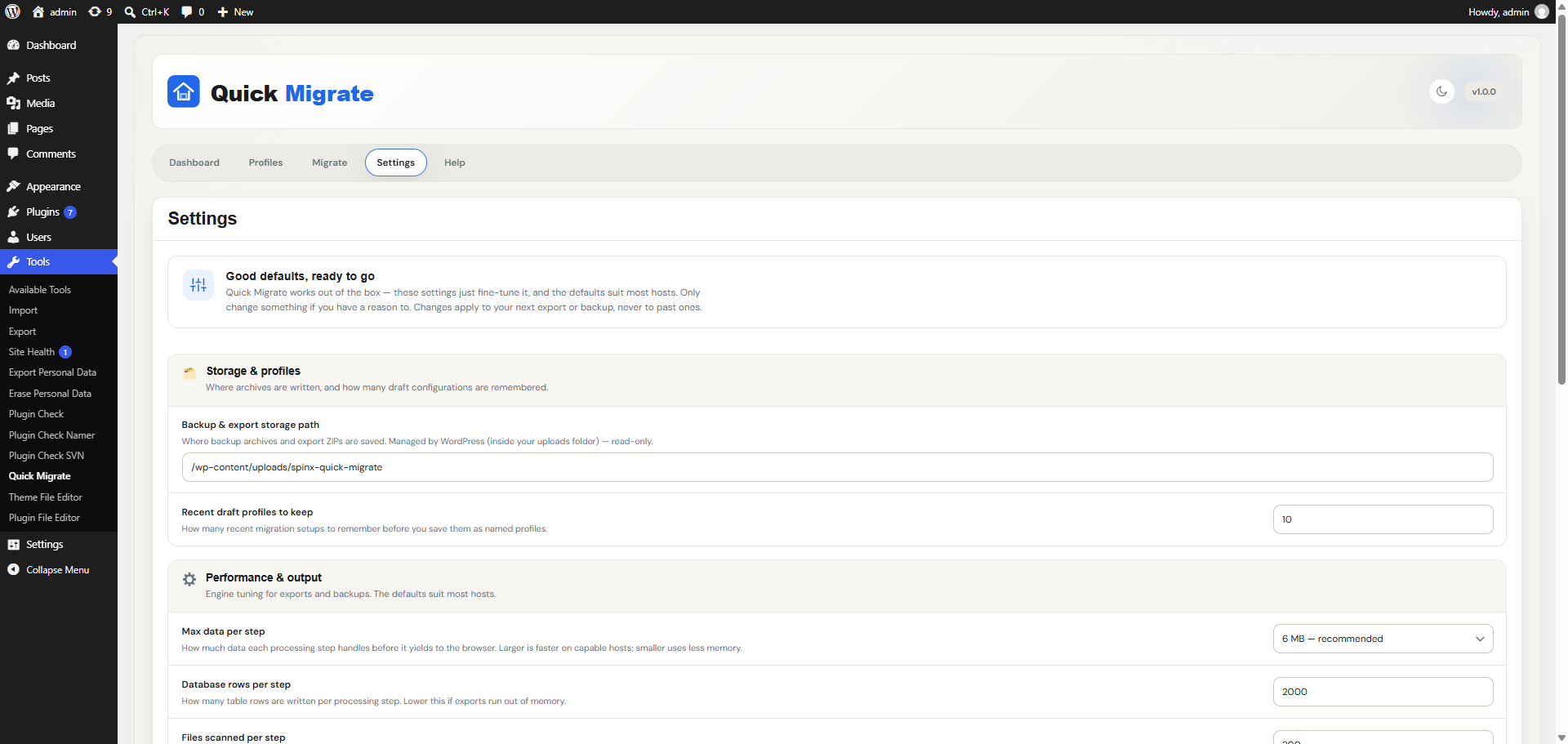
Settings screen with the storage path, recent draft profiles to keep, and performance options

Help screen with the tools at a glance and guides for the Migrate tab, profiles, WP-CLI, data safety, and troubleshooting