
Rentbaik Wordpress Plugin - Rating, Reviews, Demo & Download
Plugin Description
Rentbaik turns your WordPress site into a booking system for a vehicle rental business – a scooter shop in Bali, a bike rental in Amsterdam or a small car rental anywhere in the world.
It works with any theme and does not need a page builder or WooCommerce. When WooCommerce is active, customers can also pay with any WooCommerce payment method.
For your customers
- Search by pick-up and return time and see which vehicles are free, with the total price.
- Book in three simple steps: dates vehicle and extras contact details and payment.
- Pay the way you offer: at pick-up, by bank transfer, with a QR code (for example QRIS, PromptPay or DuitNow), or online with any WooCommerce payment method.
- Send the booking to your WhatsApp with one tap.
- Check a booking later with the booking number and email or phone.
For you and your staff
- Fleet by plate number: each vehicle model has one or more units with plate number, odometer and status (ready, on rent, in service, inactive).
- Prices per hour, day, week and month. A few hours never cost more than a day, and long rentals automatically use the cheaper weekly or monthly price.
- Rental rules: 24-hour or calendar days, late-return grace, minimum and maximum rental, a gap between rentals for cleaning, tax (included or added) and a security deposit.
- Opening hours and closed dates: pick-ups and returns are only possible when you are open.
- Extras such as helmets, raincoats, child seats or a driver – per rental or per day, with stock.
- No double bookings: availability is checked per unit with database locks.
- Bookings screen: create bookings for phone, WhatsApp and walk-in customers with live price, record payments and deposits, hand over and take back vehicles, export to CSV.
- Dashboard: today’s pick-ups and returns, late returns, a month calendar with every rental and a timeline per unit (plate number); drag a booking to change its dates or unit, and click a date for the day agenda, fleet status and income compared with the previous period.
- Customer photo at pick-up, stored in a private folder with random file names and shown only to logged-in staff. Apache and LiteSpeed block the folder automatically; on nginx one server rule is needed and Rentbaik warns you until it is in place (see FAQ).
- Emails for new bookings, confirmations, pick-up and return reminders and thank-you messages.
- Rental Manager and Rental Staff roles for your team.
Works everywhere
- Any currency, number format, date and time format and week start.
- Translation ready.
- Three style modes: Rentbaik style, Minimal (layout only), or Follow my theme (no plugin CSS at all).
- Theme developers can override every template from
yourtheme/rentbaik/. - Assets are loaded only on pages that show Rentbaik.
Shortcodes
[rentbaik_search]– pick-up and return search form[rentbaik_vehicles]– vehicle list (attributes:type,category,limit)[rentbaik_booking]– booking form (attribute:vehicle= vehicle ID)[rentbaik_account]– “My booking” lookup
The pages Rentals, Book a rental and My booking are created for you when the plugin is activated.
External services
Rentbaik itself does not send any data to other servers. Its only request goes to your own site, to check that the private folder for customer files is blocked (see the FAQ). It only shows two kinds of links. Nothing is sent until a person clicks one of them, and then the link opens in that person’s browser.
WhatsApp (wa.me), by WhatsApp LLC / Meta
- What it is for: the “Send this booking to us on WhatsApp” button on the booking confirmation page (for customers, only when you enter your WhatsApp number and turn it on) and the “WhatsApp customer” button on a booking in the admin (for staff).
- What is sent and when: only when the button is clicked, the browser opens https://wa.me/ with the phone number to chat with and a ready-made message about the booking (booking number, vehicle, pick-up and return date and time, pick-up place, price). The person can still change or cancel the message in WhatsApp before sending it.
- WhatsApp terms of service: https://www.whatsapp.com/legal/terms-of-service – privacy policy: https://www.whatsapp.com/legal/privacy-policy
Google Maps, by Google LLC
- What it is for: the “Open in maps” link next to a pick-up place, shown only when you enter the latitude and longitude of a location.
- What is sent and when: only when the link is clicked, the browser opens https://www.google.com/maps with the coordinates of that location. No map, script or image is loaded from Google on your site.
- Google terms of service: https://policies.google.com/terms – privacy policy: https://policies.google.com/privacy
The optional WooCommerce payment option uses the WooCommerce plugin installed on your own site. Any service used there belongs to the WooCommerce payment method you installed and is described by that plugin.
Privacy
Rentbaik stores the details customers enter when they book (name, email, phone, where they stay, notes), the payment receipts customers upload, and, if staff add one, a photo of the customer at pick-up. This data stays in your WordPress database and uploads folder. Rentbaik adds a suggested text to your privacy policy and supports the WordPress personal data export and erase tools.
Screenshots
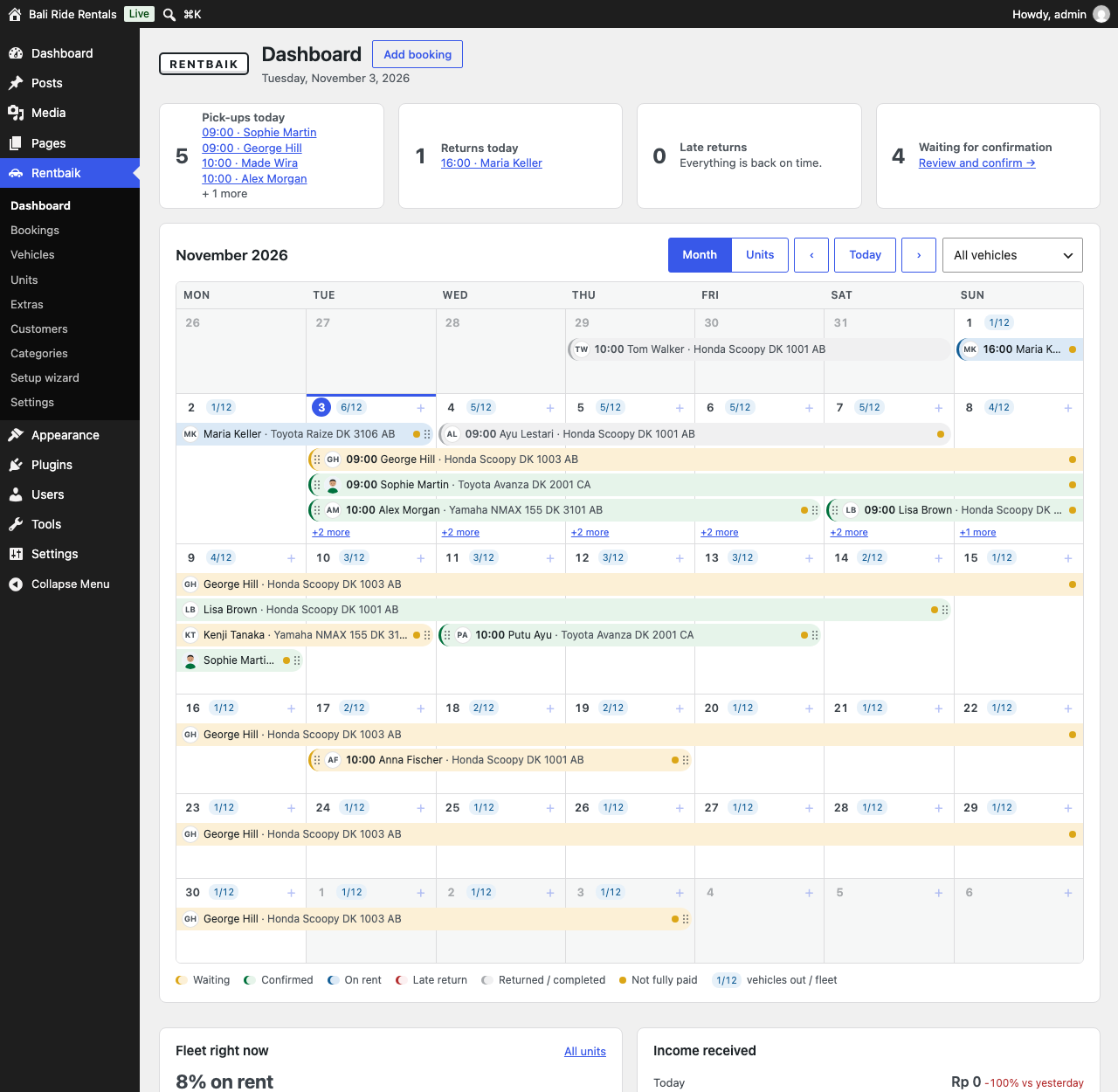
Dashboard: today’s pick-ups and returns, late returns and the month calendar. Drag a booking to change its dates.
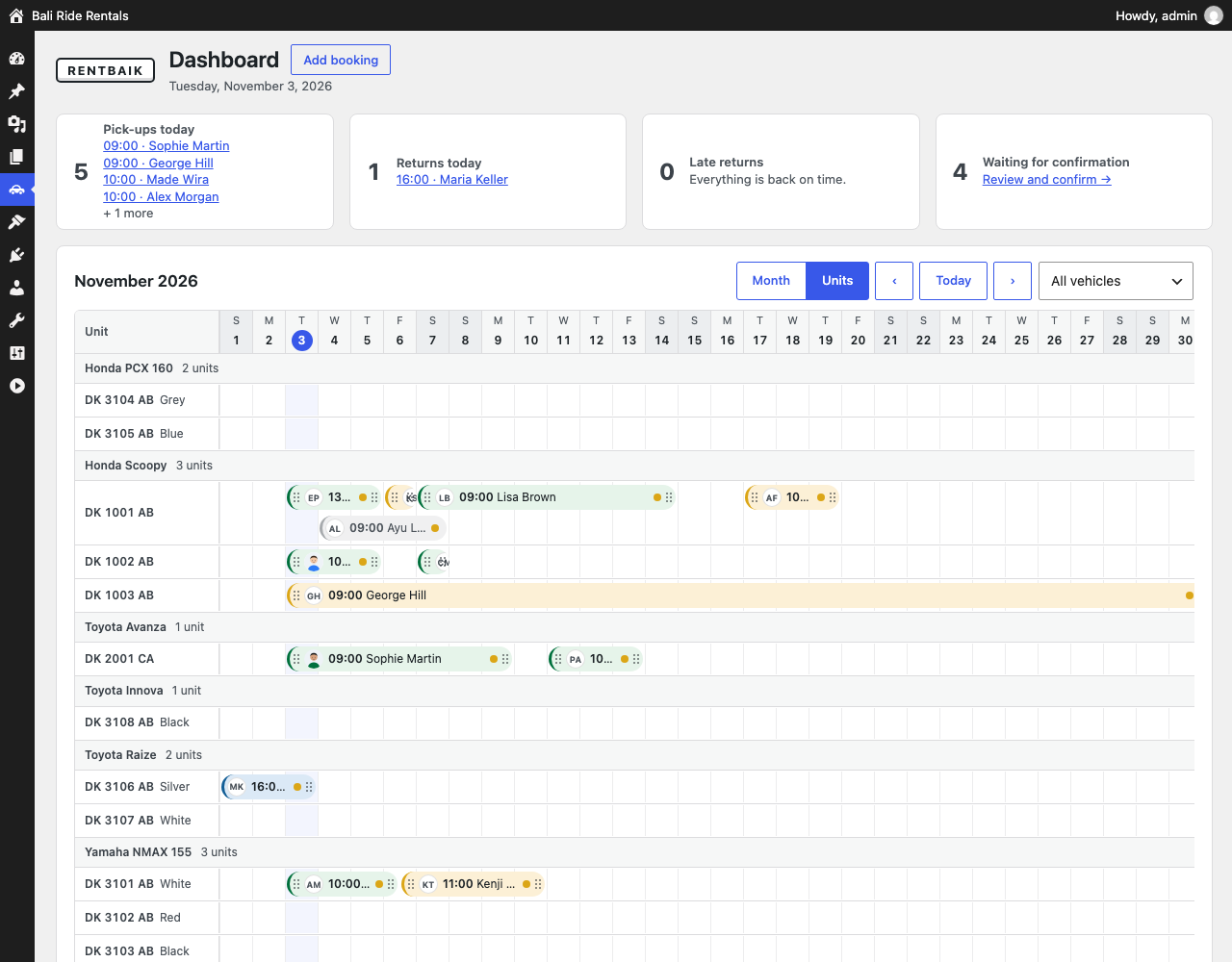
Units timeline: every plate number on its own row. Drag a booking to another unit or other dates.

Booking details next to the calendar: customer, rental, payment, deposit and history.

New booking form for staff (phone, WhatsApp or walk-in) with live price.

Vehicle model with specifications, prices and its units.
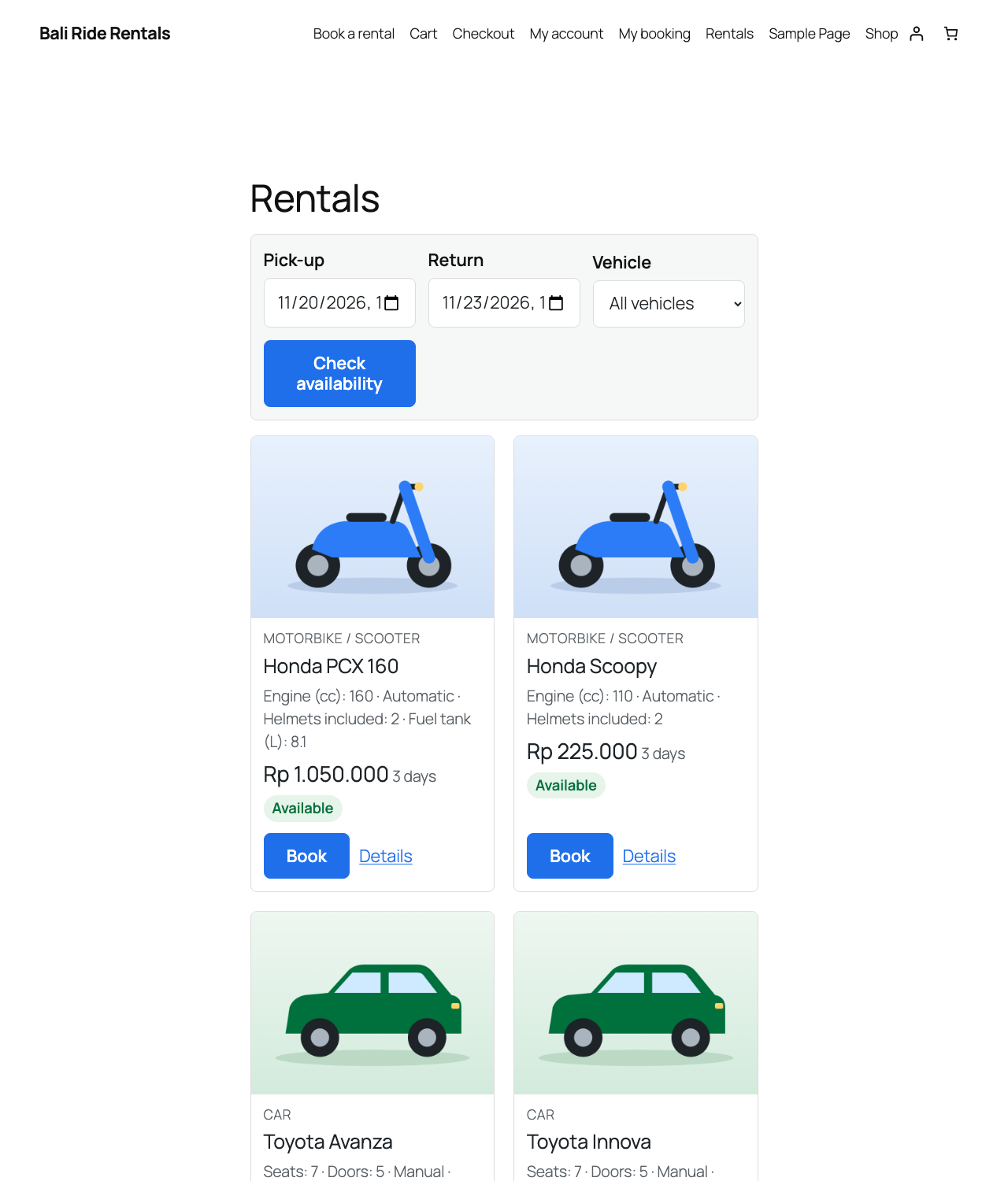
Rentals page: customers search by dates and see free vehicles with the total price.

Booking form for customers in three steps.

Setup wizard: your business, pick-up place, payments and first vehicles in a few minutes.


