
ReservePro Booking Widgets Wordpress Plugin - Rating, Reviews, Demo & Download

Plugin Description
Take bookings for classes, courses, camps, trips, events, courts and lessons right from your WordPress site. Visitors see your current offer, dates, prices and free places on your own pages, click “Sign up” and finish the booking and the online payment on your ReservePro booking site — no custom code and no page builder add-ons.
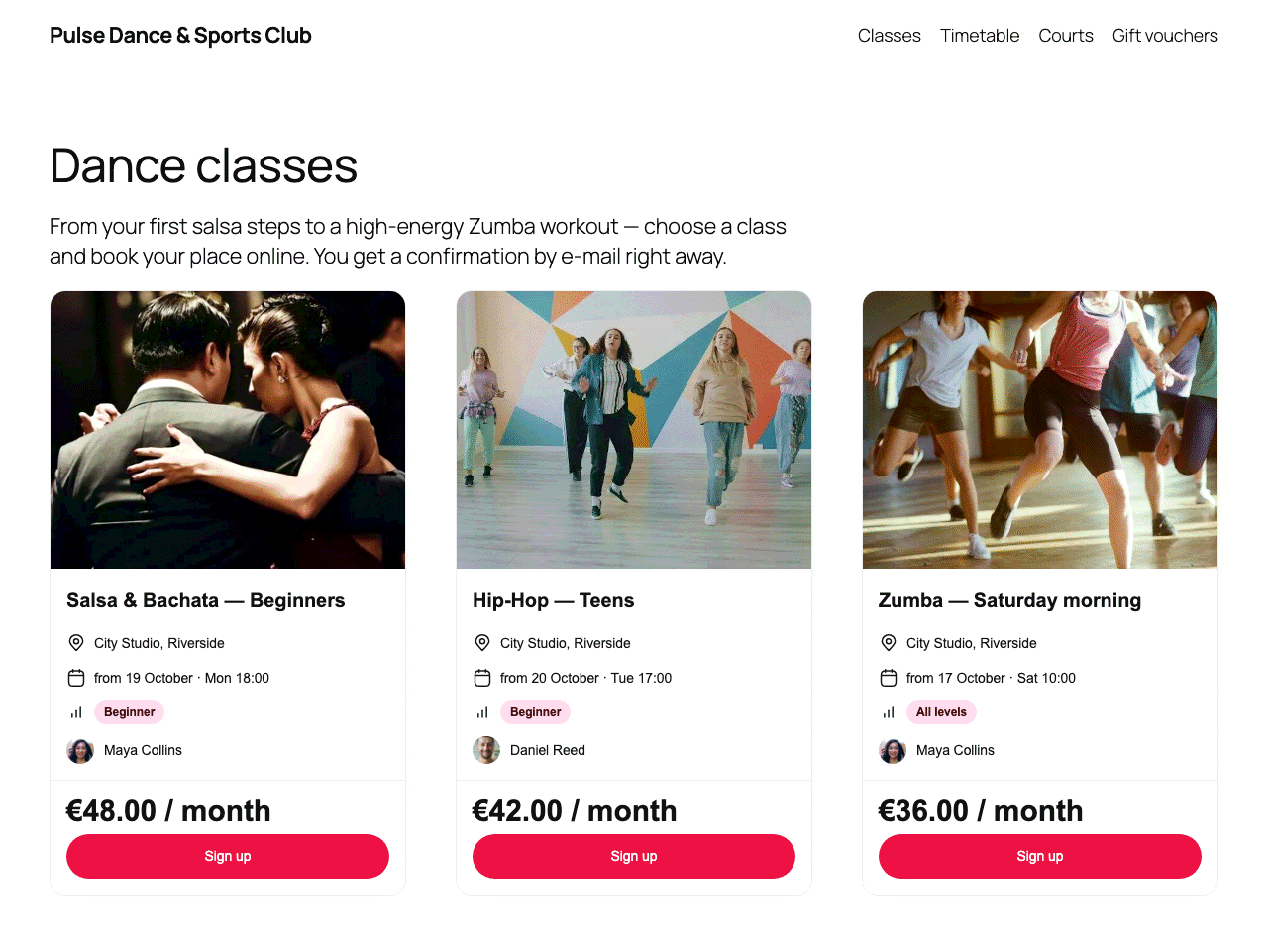
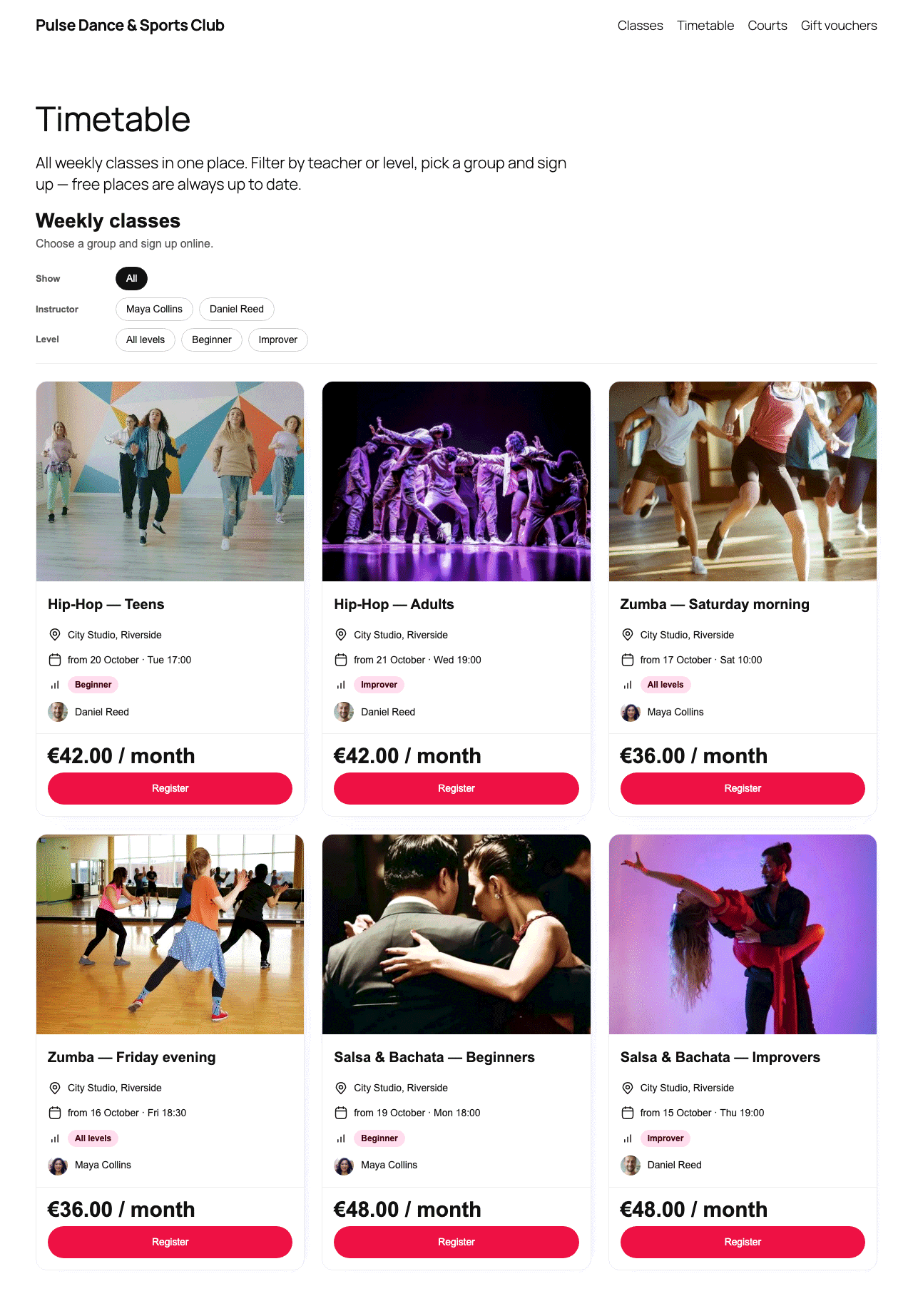
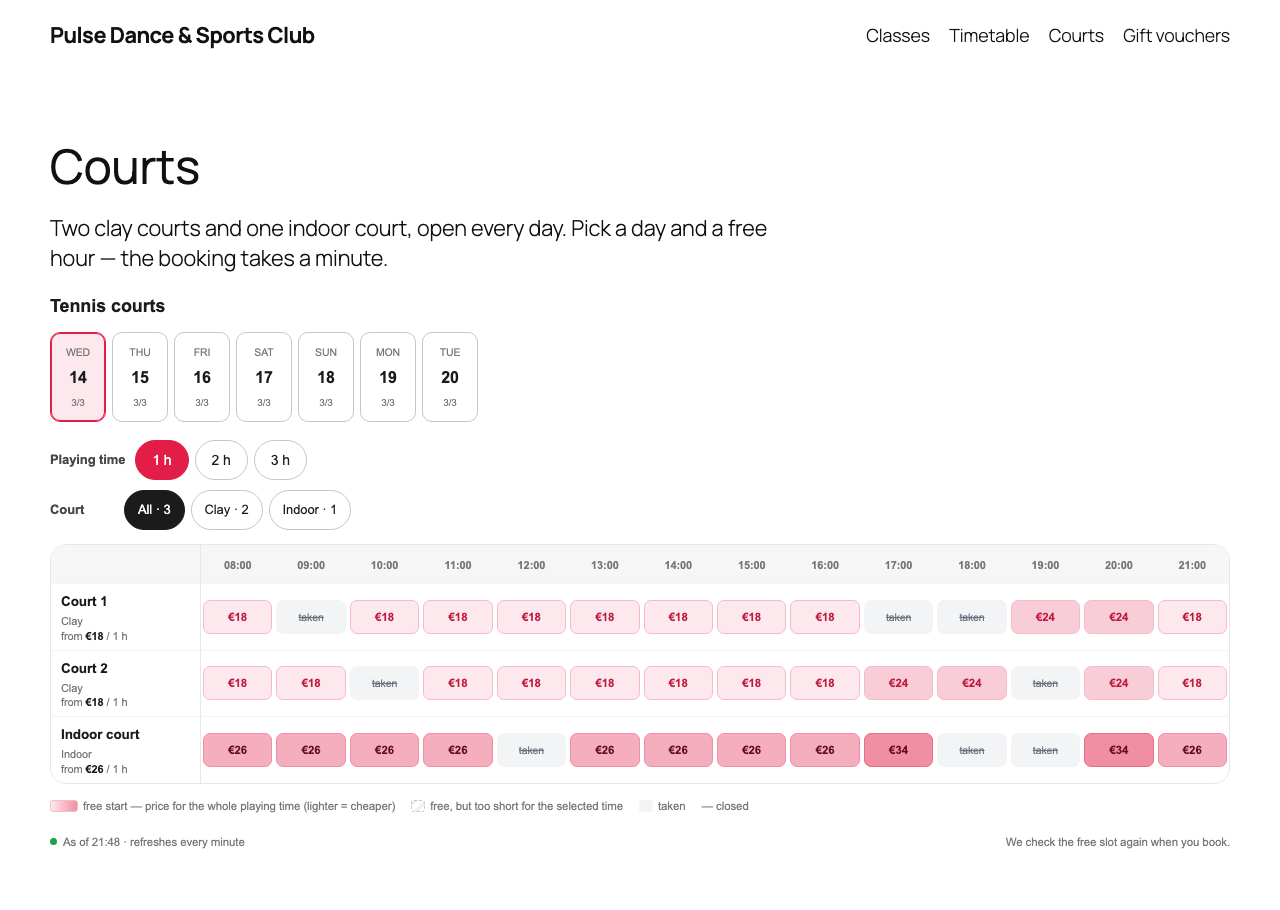
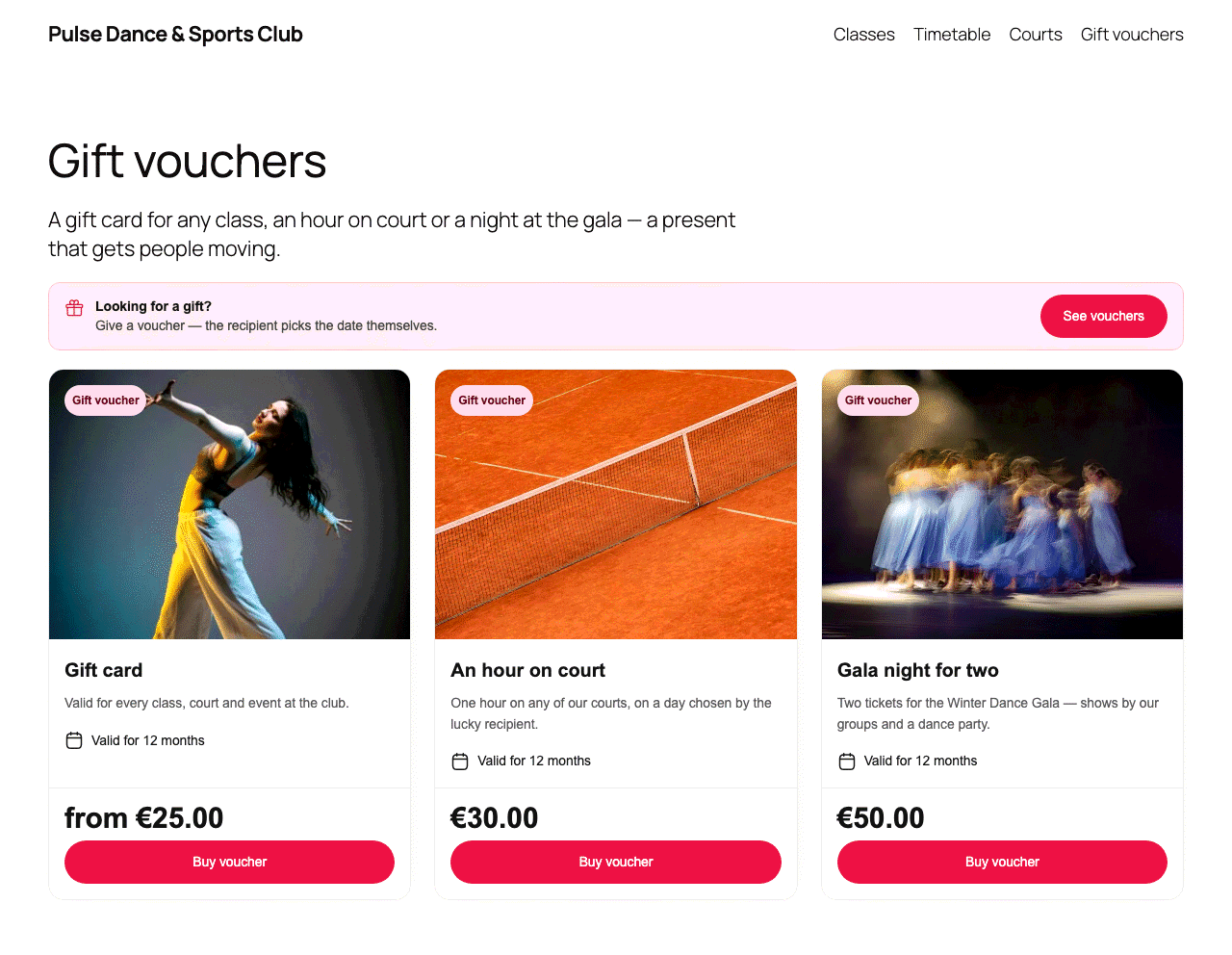
- Sell where your visitors already are — offer cards, a weekly schedule with filters, calendars, court availability, instructors with free hours and a “Looking for a gift?” banner for gift vouchers.
- Always up to date — free places, “sold out” and waiting-list states and court availability refresh by themselves; you never edit the page after a booking.
- Fast and visible to search engines — widgets are part of the page HTML, not an iframe and not a box that loads later.
- One click to connect — no API keys; choose the widget and the offer from a list in the block editor.
ReservePro is an online booking system for classes, courses, camps, trips, events, courts, rentals and lessons. This plugin embeds widgets of your ReservePro booking site into WordPress pages and posts with the “ReservePro widget” block or the [reservepro] shortcode.
The widget HTML is fetched by your WordPress server before the page is sent to the visitor, so it is:
- part of the page source — search engines see the real offer, not an empty placeholder;
- free of flicker — no empty box that pops in after the page has loaded;
- fully usable without JavaScript in the visitor’s browser.
Widgets whose state changes during the day — sign-up buttons that turn into “Notify me” when an offer sells out, free places, court availability, calendars — are kept up to date while the page is open: a small script that ships with the plugin fetches the current widget from your own WordPress site while the browser tab is visible (court availability every minute, sign-up buttons and free places every two minutes), keeping the visitor’s choices inside the widget. Without JavaScript the widget simply shows the state from when the page was loaded.
The plugin needs no API key and stores no secret: it only reads public offer data that is already visible on your booking site. Connecting takes one click — “Connect with ReservePro” opens your ReservePro panel, you confirm, and you are back in WordPress. Widget styles ship with the plugin and are scoped to the widgets, so your theme’s headings, buttons and form fields stay unchanged.
Available widgets: sign-up button (cta), offer card (course-card), card grid (grid), “Looking for a gift?” banner (gift-banner), schedule with filters (schedule), weekly calendar (calendar), offer hero (jambo), free places label (remaining), court availability (resources-availability), cabin calendar (stay-calendar), instructors with hours (instructor-hours), QR code (qrcode) and — for organisers who have it enabled in ReservePro — the AI assistant bubble (assistant).
AI assistant
[reservepro widget="assistant"] adds the ReservePro AI assistant bubble ("Have a question?") to the bottom right corner of the page: visitors ask about offers, dates, prices and free places, and get cards that lead to your booking site. The assistant is available only to organisers who have it enabled in ReservePro. Unlike the other widgets it is a small script from your booking site (there is nothing to render on the server): the visitor's browser loads it and sends the questions to your ReservePro booking site, together with the address of the page the bubble is on, so the assistant can recognise a course page (the page address entered as "Website" in the offer). Add `offer="offer-slug"` to start the conversation with a chosen course. Every answer is marked as coming from an AI assistant.
Fetched widgets are cached with the Transients API (5 minutes by default, configurable; widgets that refresh themselves are kept no longer than their refresh interval, for example one minute for court availability). If ReservePro is temporarily unreachable, the plugin shows the last copy of the widget it fetched successfully.
You need a ReservePro account to use this plugin. Support: support@reservepro.app.
Block
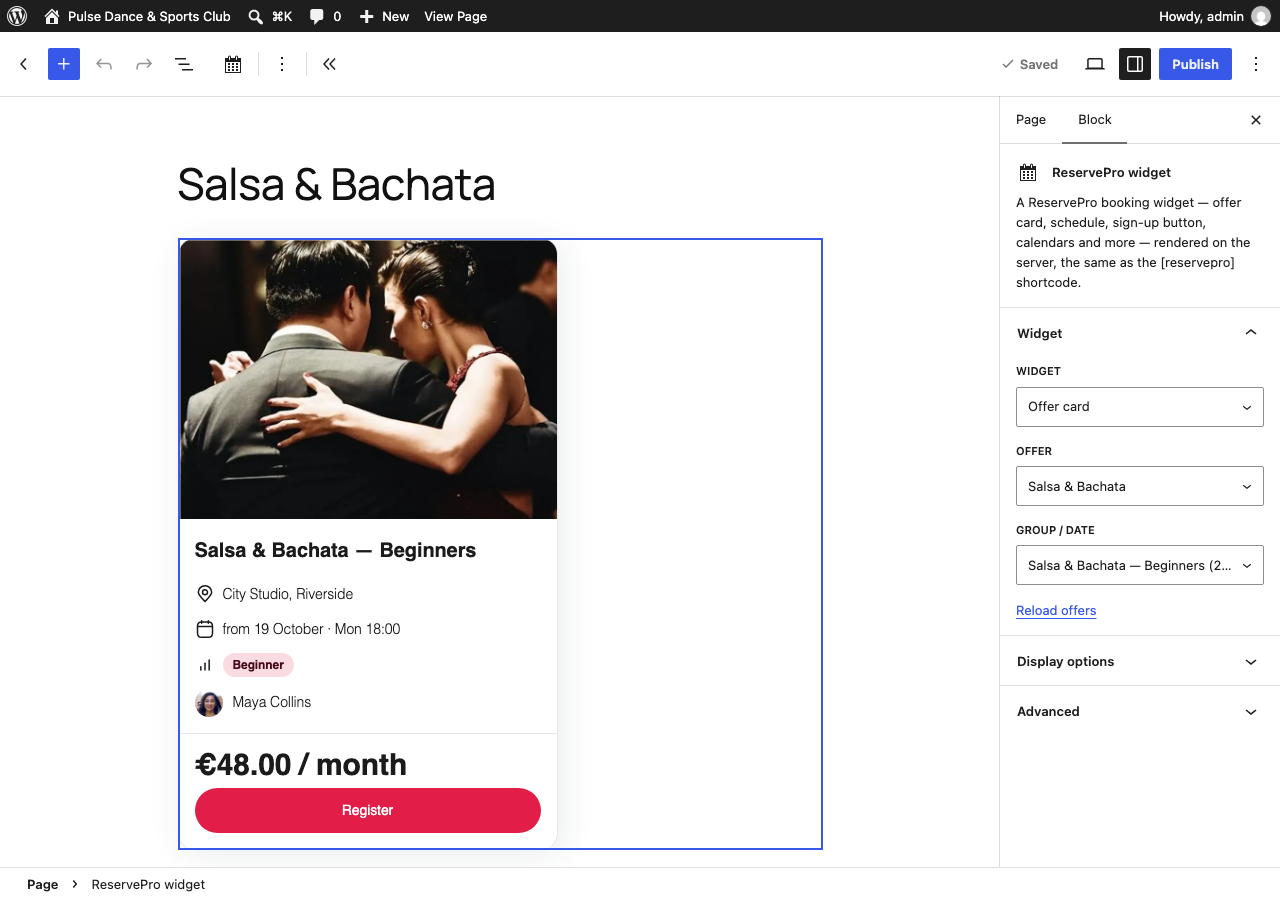
Add the “ReservePro widget” block in the block editor (search for “ReservePro”), choose the widget, then pick the offer and the group or date (or the gift voucher) from the lists in the block settings — no codes to copy. The editor shows a live preview of the widget, and the published page gets exactly the same server-rendered HTML as the shortcode. A [reservepro] shortcode in a Shortcode block can be turned into the block with the block toolbar (Transform).
Shortcode
[reservepro widget="course-card" offer="offer-slug"]
The ready-made shortcode for every widget and offer, with all options, can be copied from the widget studio in your ReservePro panel (Widgets “WordPress” tab).
Examples:
[reservepro widget="cta" offer="offer-slug" cta="Sign up"]
[reservepro widget="schedule" preset="classes"]
[reservepro widget="jambo" offer="offer-slug"]
[reservepro widget="grid" offers="offer-a,offer-b"]
[reservepro widget="grid" offers="offer-a,voucher-slug"]
[reservepro widget="gift-banner"]
[reservepro widget="gift-banner" voucher="voucher-slug"]
[reservepro widget="qrcode" offer="offer-slug"]
[reservepro widget="assistant" offer="offer-slug"]
External services
This plugin connects to ReservePro (https://reservepro.app), the booking service that provides the widgets. Without it the plugin has nothing to show. No request is made until an administrator clicks “Connect with ReservePro” or enters the booking site address in Settings ReservePro.
What is sent, when and where:
- Connect with ReservePro — when the administrator clicks this button, their browser is sent to the ReservePro panel (
https://reservepro.app/admin/connect/wordpress, or the panel of the booking site already entered) with the address of the plugin settings screen and a random one-time code. After the administrator logs in and confirms, the browser comes back with the public organiser identifier and booking site address, which the plugin then verifies with the connection check below. No password, key or token is exchanged or stored. - Connection check — when the administrator saves the settings, clicks “Test connection”, comes back from “Connect with ReservePro”, or (once) when settings saved by version 1.0 are upgraded: a request from your WordPress server to
<your booking site>/api/tenant(for examplehttps://yourname.reservepro.app/api/tenant). It returns the public name and identifier of the organiser. - Widget content — when a page with the
[reservepro]shortcode or the ReservePro block is displayed (or previewed in the block editor) and the cached copy is older than the cache lifetime: a request from your WordPress server tohttps://widgets.reservepro.app/api/<organiser identifier>/widgets/<widget>with the shortcode parameters (offer, group, date and display options) in the query string. - Widget refresh — while a page with a widget that changes (sign-up button, free places, court availability, calendars, cards) is open and the browser tab is visible, the plugin’s script in the visitor’s browser asks your WordPress site (REST route
/wp-json/reservepro/v1/widget) for the current widget; your WordPress server answers from its cache or, when the cached copy is older than the cache lifetime, makes the “Widget content” request above. The visitor’s browser does not contact ReservePro for this. - Offer list in the block editor — when an editor opens the settings of the ReservePro block and the cached list is older than the cache lifetime: a request from your WordPress server to
https://widgets.reservepro.app/api/offers?tenant=<organiser identifier>. It returns the public list of offers (names, booking types, groups and dates) shown in the block settings. Together with it: a request to<your booking site>/api/voucher-offers, which returns the public list of your published gift vouchers (the plugin keeps only their names and addresses) for the “Looking for a gift?” banner and the card grid. The lists are available only to logged-in users who can edit posts. - All server requests carry the IP address of your WordPress server and a User-Agent header with the plugin version and your site address. No data about your visitors is sent by these requests.
- QR code widget and images — the visitor’s browser loads the QR code image from
https://widgets.reservepro.appand the offer photos shown in widgets from your ReservePro booking site, which shares the visitor’s IP address and browser information with ReservePro as with any web resource. Links in widgets lead visitors to your ReservePro booking site. - AI assistant widget (only when you add
[reservepro widget="assistant"]or the block with “AI assistant”) — the visitor’s browser loads the script<your booking site>/widgets/assistant.jsand, when the visitor opens the bubble and asks a question, sends the question, the address of the current page and the optional offer context to<your booking site>/api/assistant/messages; the answer is streamed back. ReservePro processes the question with an AI model to answer it (see the ReservePro privacy policy) and keeps only statistics of the conversation (no message texts). Nothing is sent until the visitor types a question.
ReservePro terms of use: https://reservepro.pl/terms-of-use
ReservePro privacy policy: https://reservepro.pl/privacy-policy
Screenshots
Settings → ReservePro: “Connect with ReservePro”, booking site address, connection test and cache lifetime.
The “ReservePro widget” block in the editor: widget, offer and group chosen from lists, with a live preview.
An offer card and a sign-up button embedded in a page.
A schedule with filters embedded in a page.
Widget studio in the ReservePro panel with the “WordPress” tab.


