
Rounds – Website Care Wordpress Plugin - Rating, Reviews, Demo & Download

Plugin Description
Rounds is a website-care service for developers and agencies. Your client opens a small panel on their own site, points at a text, and asks for a change or makes it. You decide which texts they may touch, and every change can be undone.
This plugin connects a WordPress site to Rounds. It does nothing on its own: you need a Rounds account (free to start, paid plans for more sites) at rounds-for.dev.
What the plugin lets Rounds do, and nothing else:
- Read the editable texts of a page: Elementor text, heading, button and similar widgets; block editor paragraphs, headings, list items and buttons; headings, texts, buttons, alt texts, accordions and tabs made with WPBakery, Divi 4, Avada, Beaver Builder, Bricks, SiteOrigin Page Builder, Kadence Blocks, Spectra and GenerateBlocks; and a post’s title, excerpt and text custom fields (never one that holds a script link, a path or data).
- Prepare a change in the plugin’s own table. The page does not change yet.
- Put a change live in the page as its builder stores it, changing only that text, after a snapshot, with a revision that names the change where WordPress keeps one.
- Roll a change back from that snapshot.
- Report versions of WordPress, PHP, the database, the theme and the plugins, so you can see what needs updating, with the installed themes and how many administrators the site has (a number, never who).
Settings changes: off until you turn them on. Under Settings Rounds, an administrator can allow Rounds to change some of the site’s settings, group by group, each with its own checkbox:
- site identity (title, tagline, logo, site icon); menus (classic and block theme navigation); header and footer text in widgets and template parts; the homepage and the posts page; turning comments off on a page;
- contact forms’ recipient, subject and messages (Contact Form 7, WPForms, Gravity Forms, Fluent Forms, Elementor Pro), with an e-mail to the site’s admin address whenever a form’s recipient changes; a page’s SEO title and description (Yoast SEO, Rank Math, SEOPress, All in One SEO); 301 redirects (Redirection, Rank Math, Yoast SEO Premium), never from the login, wp-admin, the REST API, WordPress’s own files or the homepage;
- media: an image’s alt text, and replacing an image’s file with another from the media library (its old files, every size of it, are kept for 30 days in a folder of the plugin’s own, so it can be put back; the folder refuses web requests on servers that read
.htaccess, and deleting the plugin removes it); - WooCommerce: prices, stock, short descriptions and the store notice;
- the page cache: emptying it through your cache plugin’s own purge.
A setting is changed only from that fixed list, only in the groups you allow, and only after your developer approves the change in Rounds, having seen it before and after. Most can be undone. Unticking a group stops its changes at once. Who changed the choice and when is kept here and sent to Rounds (see External services).
What is kept, and for how long: who changed the choice and when, here and at Rounds, while the site is connected (Rounds keeps an older choice 24 months after it was replaced, to show what was allowed when, and deletes all of a removed site’s within 30 days); each change, here, for 12 months from its last step, which is also how long it can be undone; a replaced image’s old files for 30 days. Deleting the plugin removes all of it from the site.
What it can never do, by construction:
- Run code, SQL or commands sent from outside.
- Install or delete plugins or themes, or edit theme, plugin or any other code files. (The one file it ever writes is an image you replace from the media library, when you allow media changes.)
- Administer the site: create, invite or delete accounts, change anyone’s role, or switch plugin or WordPress updates on or off. Those stay with the site’s administrators, in WordPress.
- Read orders, form entries or comments, or delete posts.
Every request from Rounds is signed with a key made for your site alone and checked by the plugin. No WordPress password, Application Password or cookie ever leaves your site. Under Settings Rounds you can pause Rounds or disconnect it at any time, and see a log of everything it did.
The plugin adds nothing for your visitors: no script, no style and no request to Rounds, until you connect the site.
Source code
The plugin’s PHP is in this package, readable, and follows the WordPress coding standards; its translations come from translate.wordpress.org. assets/rounds.js, the panel your clients open, is the readable (not minified) build of the same Rounds widget code sites load, built from one entry with esbuild; it is the whole of that code, with nothing left out.
External services
This plugin connects your site to Rounds, a service run from rounds-for.dev (https://www.rounds-for.dev, or the address in the ROUNDS_CONNECTOR_API_URL constant). It needs Rounds to work. Every call below goes to Rounds and nowhere else, and none of them carries a WordPress password, an Application Password or a cookie. It does not contact Rounds or anyone else until an administrator connects the site.
From your server to Rounds:
/v1/wp/connect/start– when an administrator presses Connect to Rounds. Sends your site’s address, the address of its REST API and of the plugin’s screen, a public key the plugin has just made, the plugin’s version and the administrator’s language. Rounds answers with the one-time code the screen shows./v1/wp/connect/status– while a code waits to be entered in your Rounds account (fifteen minutes at most), each time an administrator opens the plugin’s screen or presses Check now. Sends the same public key and the language, and receives Rounds’ public key once the code is claimed.https://www.rounds-for.dev/v1/wp/pair– when you connect with a pairing code from your account instead. Sends the code, your site’s address and REST API address, the new public key and the versions of the plugin, WordPress and PHP./v1/wp/probe– once, right after connecting, signed with your site’s key. Asks Rounds to try to reach your site, so the plugin knows whether calls from outside get through./v1/wp/work– signed, once an hour, or every minute when your site blocks calls from outside (orROUNDS_CONNECTOR_POLLis set). Collects the requests Rounds has signed for your site and sends back their results, which can include the editable texts of the pages asked about, the result of a change, and the versions report./v1/wp/consent– signed, each time an administrator changes which settings changes are allowed (Settings Rounds). Sends the groups now allowed, who changed them asuser:and their WordPress user number (never a name or address), and when, so that Rounds offers only the changes you allow. Nothing is sent while Rounds is paused or the site is not connected; Rounds then learns the choice from the site’s next report.
From Rounds to your site: Rounds calls your REST API under /wp-json/rounds/v1/, signed, when you or the people you invited work on a page. Your site answers with the editable texts of that page, the settings Rounds may change with their values (among them the addresses your contact forms send to, which Rounds shows to your developer but never gives to its AI), the result of a change, or the versions of WordPress, PHP, the database, the theme and the plugins.
From the browser of somebody who opens the panel (you, your client, or a person you invited; never a visitor who does not):
/v1/wp/widget/<project>– the panel’s settings and words, and whether the site is in strict mode. Outside strict mode no code is loaded from Rounds./widget/v/1.2.1/strict.js– in strict mode only, which you turn on or off in your Rounds account: a small script from Rounds that draws the highlights and opens the panel in a frame on www.rounds-for.dev, where its sign-in and session stay. The plugin names this exact file and its SHA-384 hash, and the browser runs that file or nothing; a newer one comes only with a plugin update. It holds no password, session or cookie, and the frame hands the page only the ticket below./widget/edit-kit.js– in strict mode only, when somebody previews a formatted text or a photo on the page: the formatting and photo previews that strict.js loads, named and pinned by its own SHA-384 inside that file, so it too is that exact file or nothing./v1/wp/panel-ticket– a short-lived ticket that lets your site mark the editable texts on the page for that person./v1/content/<project>– reading the text they point at, and saving or asking for a change to it./v1/requests– a request for a change, with the words they typed and the page it is about./v1/panel/sessionand/v1/rounds/*– an invited person’s sign-in, and the round of changes they are putting together./signin/<project>– for an invited person only: a window on www.rounds-for.dev where they type their e-mail address and the six-digit code Rounds e-mails to them. It sets two cookies on rounds-for.dev, sent only to its sign-in pages and never to your site:rounds_signin(the sign-in in progress, ten minutes) androunds_panel_device(keeps them signed in on that device for 30 days, or until they or you sign them out)./v1/wp/approvals/<project>– for the person you allowed to approve changes (the client approver) only, outside strict mode: the changes waiting for them, with their text now and after as read from your site, their decisions, publishing what they approved, and preview links.
Rounds uses all of this only to show the texts, prepare and make the changes, and keep their history; the texts themselves stay on your site, in revisions and in the plugin’s own tables. When you pause or disconnect, the calls from your server stop and Rounds’ requests are refused. The privacy notice says what Rounds keeps and for how long.
The service is provided by Rounds: Terms of service, Privacy notice.
Screenshots
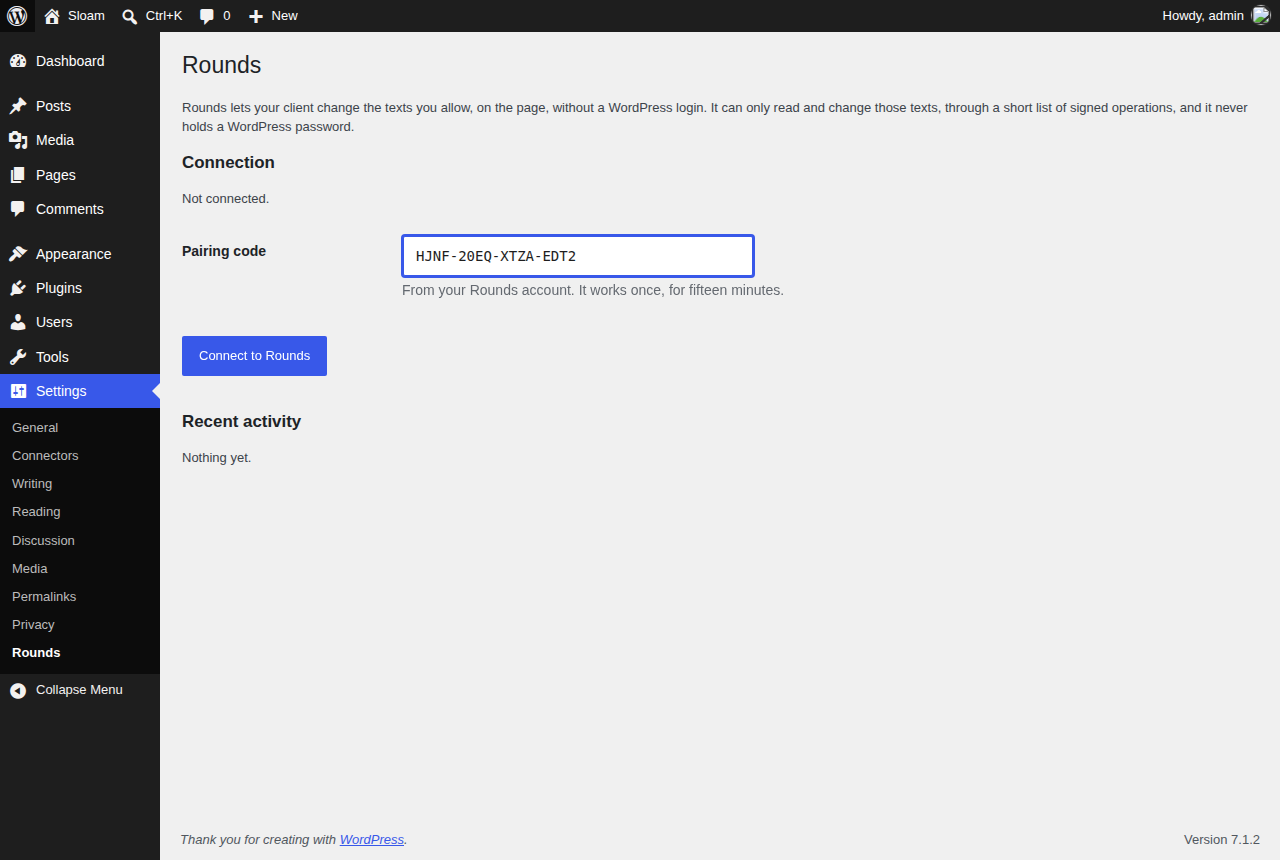
Settings → Rounds before the site is connected: paste the one-time code from your Rounds account.
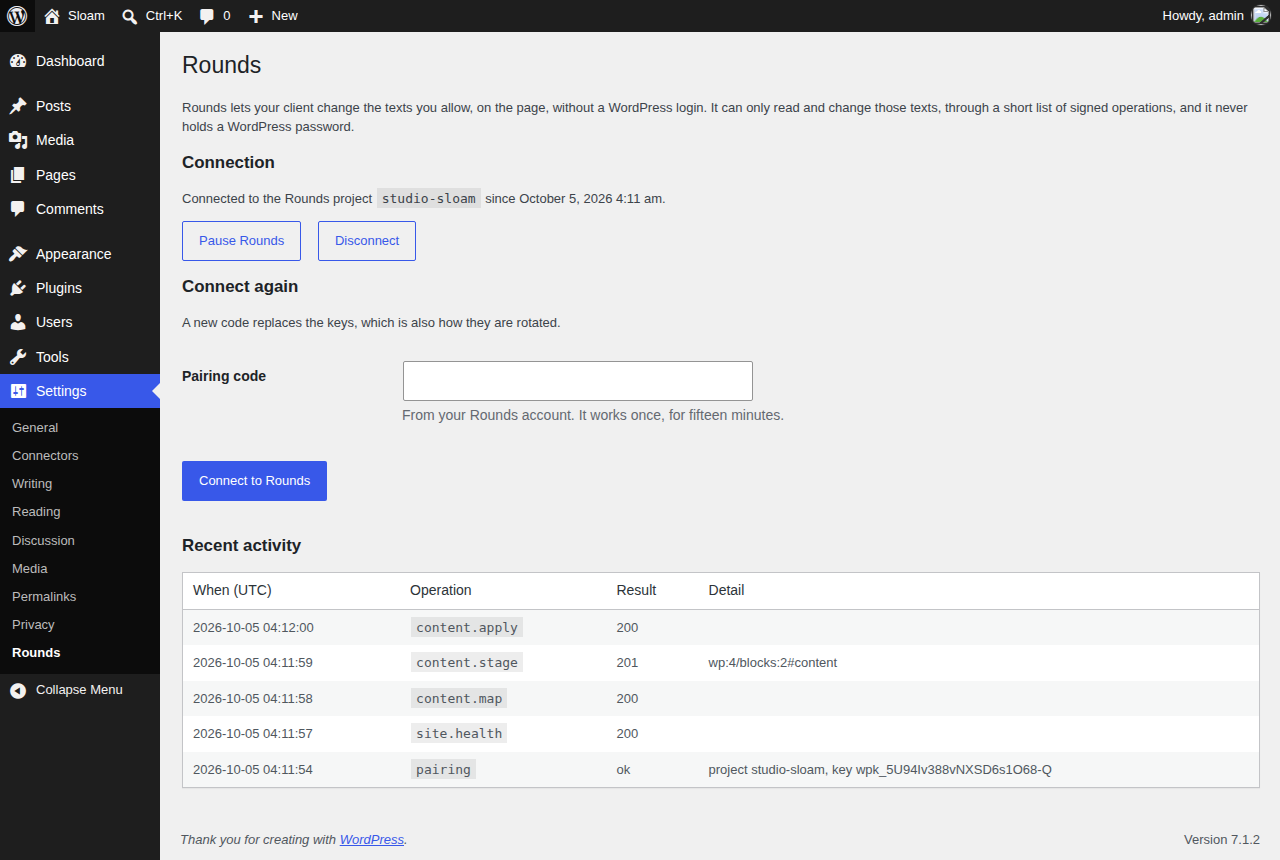
Connected: pause Rounds or disconnect at any time, and see everything Rounds did on this site.


