Sales Igniter Rentals & Bookings Lite Wordpress Plugin - Rating, Reviews, Demo & Download
Plugin Description
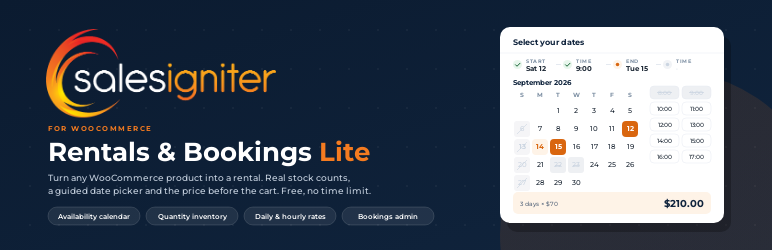
Rent anything out from the WooCommerce store you already have. Mark a product as rentable, set a daily or hourly rate, and customers pick their dates (or dates and times) in a guided popup calendar on the product page. The plugin checks the dates against your stock, prices the hire, and books it the moment the order is placed.
Everything in this plugin works with no time limit and no licence key. It is used for equipment and tool hire, camera and AV rental, bike hire, party and event rental, boat and kayak rental, costume hire, camping gear and medical equipment. You keep your theme, payment gateways, shipping, tax and customer accounts, and rentals sit in the same orders as anything else you sell.
What you get
The booking calendar
- Popup Range Picker on the product page: pick-up date, pick-up time, return date, return time, one step at a time, with a progress row so customers always know what to pick next
- Date rentals and date-and-time rentals, with time slots grouped by morning, afternoon and evening
- Stays by the night for holiday lets, rooms, cabins and campsites: customers pick a check-in and a check-out day, the check-out day stays free for the next guest, and prices, turnover and emails count nights
- Guests and party size: a cottage that sleeps 4, rooms for 2 (5 guests need 3 rooms) or seats on a tour where each guest takes a place; ask for a single count or for adults, children, infants and pets, with age notes, limits per product and infants on a lap or in a free seat
- Hours already booked, and the turnaround after them, are greyed out in the time grid
- The rental total appears as soon as the last step is done, before the customer reaches the cart
- Calendar Styler: four looks (Airy, Card, Bold, Classic), your own accent colour, corner radius, slot interval, editable labels, price per day and units left inside each day
- A global availability calendar shortcode for category pages and the homepage
- Follows the site language and start of week, right-to-left included
Real inventory
- Quantity-based inventory: a product with stock 5 can be hired five times on the same dates, and the sixth customer sees it sold out
- Bookings are the source of truth. Availability is worked out from the bookings table on every request, so two customers cannot both take the last unit
- Turnover time before and after every hire, so a unit that comes back Monday is not offered for Monday morning
- Store hours, closed days and holidays with a reason customers can read on the blocked day
- A hire may run through a closed day, it just cannot start or end on one
- Start-date padding, minimum and maximum hire length, and how far ahead customers may book
- Product pages served from a page cache (WP Rocket, LiteSpeed, Cloudflare and friends) refresh their availability in the background, so a cached page cannot offer a day that sold out an hour ago
Pricing
- Fixed, daily and hourly rates
- Modern Pricing layout: a pricing card under the title with a From price and the rate table
- Prices flow through the cart, checkout, order and emails as normal WooCommerce line items
Running the rentals
- Rentals menu in wp-admin with a Bookings list (upcoming, in progress, past) and a Bookings Calendar with day counts of what is going out and coming back
- Inventory Report: availability per product per day for the week ahead, with closed-day shading and totals
- Edit rental dates on the admin order screen with two calendars that grey out days other orders have sold out, re-check availability and re-price the line
- Manual bookings for phone and walk-in customers
- Pickup and return reminder emails on a schedule you set, in each customer’s language
- CSV and ICS calendar export
- Rental dates on every order, in the customer’s account and in the order emails
Separate paid plugins
Sales Igniter also sells separate add-on plugins for rental businesses that need more, sold and installed on their own; the Upgrade page under Rentals compares them. Everything described above is in this free plugin.
Who uses it
- Equipment and tool hire
- Camera, lens and AV rental
- Bikes, e-bikes and scooters
- Party, event and furniture rental
- Boats, kayaks and paddleboards
- Costumes, dresses and formal wear
- Camping and outdoor gear
- Medical and mobility equipment
- Construction and access equipment
- Tours, classes and experiences
Documentation, demo and support
- Documentation and setup guides
- Screencast training videos
- Try the live demo store
- Full feature list
- Changelog
- Feature requests and roadmap
- Pricing for the Regular and Pro editions
Support for Lite is on the WordPress.org forum.
Languages
The plugin is fully translatable, the calendar’s own texts and the reminder emails included, and lays the admin and the booking calendar out right to left for right-to-left languages. Translations come from translate.wordpress.org. Translation files made for the standalone Sales Igniter Bookings & Tours plugin (text domain sibooking) keep working.
External services
Google Maps: the “Map to the Store” link in reminder emails
The pick-up and return reminder emails can link your store address to Google Maps. The default email wording does this with the {map_link} merge tag, which the plugin fills with a Google Maps search address (https://www.google.com/maps/search/) built from the store address under WooCommerce > Settings > General: street, city, state, postcode and country.
- What is sent, and when: only your store address, and only if the customer clicks the link in the email.
- Service provider: Google LLC. Google Terms of Service, Google Maps Additional Terms of Service, Google Privacy Policy.
Sales Igniter mailing list: the sign-up form on the Upgrade page
Rentals > Upgrade (also the last tab of Rentals > Settings) has an optional form for joining the Sales Igniter mailing list, which sends how-to guides for this plugin and offers on the paid editions.
- What is sent, and when: the email address typed into the form, to rentalbookingsoftware.com (Sales Igniter), only when an administrator presses “Send me the tips”. The list is managed with Brevo, and every email has an unsubscribe link.
- Sales Igniter: Terms and conditions, Privacy policy. Brevo: Terms of use, Privacy policy.
Screenshots

The Popup Range Picker walks the customer through pick-up date, pick-up time, return date and return time, with booked hours greyed out and the hire total shown as soon as the last step is done.

The pricing card on the product page: a From price, the rate table and the per-day equivalent.

Quantity-based inventory: five units means five hires on the same dates, with turnover buffers and closed days applied per unit.

The Inventory Report shows availability per product per day for the week ahead, with closed-day shading and a totals row.

The Bookings list and Bookings Calendar in the Rentals admin menu, with day counts of what goes out and comes back.

Store rules: hours, closed days with a reason, buffers before and after each hire, minimum and maximum length, and how far ahead customers may book.

Works with Composite Products, Product Bundles, Dokan, Make an Offer, the Store API, HPOS, WPML and Polylang.

Time slots that know what is already out: booked hours and the turnaround after them are greyed out, and buffers keep a unit off the calendar until it is really back.

Closed days customers can understand: holidays and closures with a reason, weekly or yearly repeats, start-only or end-only rules, and a hire that may run through them.

Calendar Styler: four looks (Airy, Card, Bold, Classic), your accent colour and corner radius, the availability badge colours and low-stock threshold, slot interval, editable labels, price per day and units left in each day.

Change rental dates on the order itself: two calendars on the WooCommerce order screen, an availability re-check, an optional re-price and a note on the order.

Pickup and return reminder emails on the schedule you set, sent as normal WooCommerce emails.

CSV and ICS export for spreadsheets and calendar apps, and the global availability calendar shortcode for any page.

Cached product pages refresh their availability after the page loads, so a page stored hours ago cannot sell a day that is gone.

Manual bookings for phone and walk-in customers, and rental dates that travel with the order into the cart, My Account, the emails and the admin order.

Built for the way rental businesses work: equipment and tool hire, camera and AV, bikes, party and event, boats, costumes, camping, medical, construction, tours and classes.