
Shortcode For MobilizeAmerica API Wordpress Plugin - Rating, Reviews, Demo & Download

Plugin Description
The Mobilize America Events shortcode / widget will display a list of events from Mobilize America.
There are 2 layouts – Card & Default (List).
The elementor widget allows you to override the default styles.
External Services
This plugin connects to MobilizeAmerica’s API to pull in events for a specific organization.
The shortcode / elementor widget passes a specificed organization id, a start date and a variable about virtual events.
This service is provided by MobilizeAmerica – https://api.mobilize.us
API Documentation – https://github.com/mobilizeamerica/api
Terms of Use (https://join.mobilize.us/terms-of-service/)
Privacy Policy (https://join.mobilize.us/privacy-policy/)
Instructions for Shortcode for MobilizeAmerica API
This shortcode allows you to display events from Mobilize America on your WordPress site.
The Element widget outputs the code for the shortcode so you do not have to build it manually
Shortcode: [mobilize_america_events]
Attributes
The shortcode accepts the following attributes:
* organization_id (required): The ID of the organization whose events you want to display. You can find this ID on Mobilize America. https://www.mobilize.us/dashboard/YOUR-ORGANIZATION/settings/
* timeslot_start: (optional): Suggested: gte_now which is greater than now – Unix timestamp to filter events. Only shows events withtimeslots starting after this date.
* timeslot_end: (optional): Unix timestamp to filter events. Only shows events with timeslots starting before this date.
Note: For timeslot please use comparison text – The comparison operators are ≥ gte, > gt, ≤ lte, < lt
* event_type: (optional): Filters events by event type.
* zipcode: (optional): Filters events by zipcode.
* radius: (optional): Filters events by a radius around the zipcode.
* limit: (optional): The maximum number of events to display. Default is 10.
* template: (optional): The template to use for displaying events. Available options are:
** default: Displays events in a list format.
** card: Displays events in a card format.
* show_description: (optional): Show or hide the event description. Default is true. Options are:
** true: Show the description.
** false: Hide the description.
* is_virtual: (optional): Filters events by their virtual status. Options are:
** “”: Show all events (default).
** “true”: Show only virtual events.
** “false”: Show only in-person events.
* columns: (optional, only applies to the card template): The number of columns to use for the card layout. Options are 1, 2, 3, or 4. Default is 3.
Examples
Display 10 events for organization ID 1234:
[mobilize_america_events organization_id=”1234″]
Display 5 card formatted events for organization 1234, starting after 2024-01-01:
[mobilize_america_events organization_id=”1234″ template=”card” timeslot_start=”gte_1704137620″ limit=”5″]
Display virtual events in 2 columns:
[mobilize_america_events organization_id=”1234″ template=”card” is_virtual=”true” columns=”2″]
Planed Features
- Adjust CSS for Default Template vs Card Template
- Add / Fix Timezone offset
- Truncate Description for Card Template
- Fix Elementor Widget Style settings
- Single Event Display
- Block to output shortcode content
Screenshots
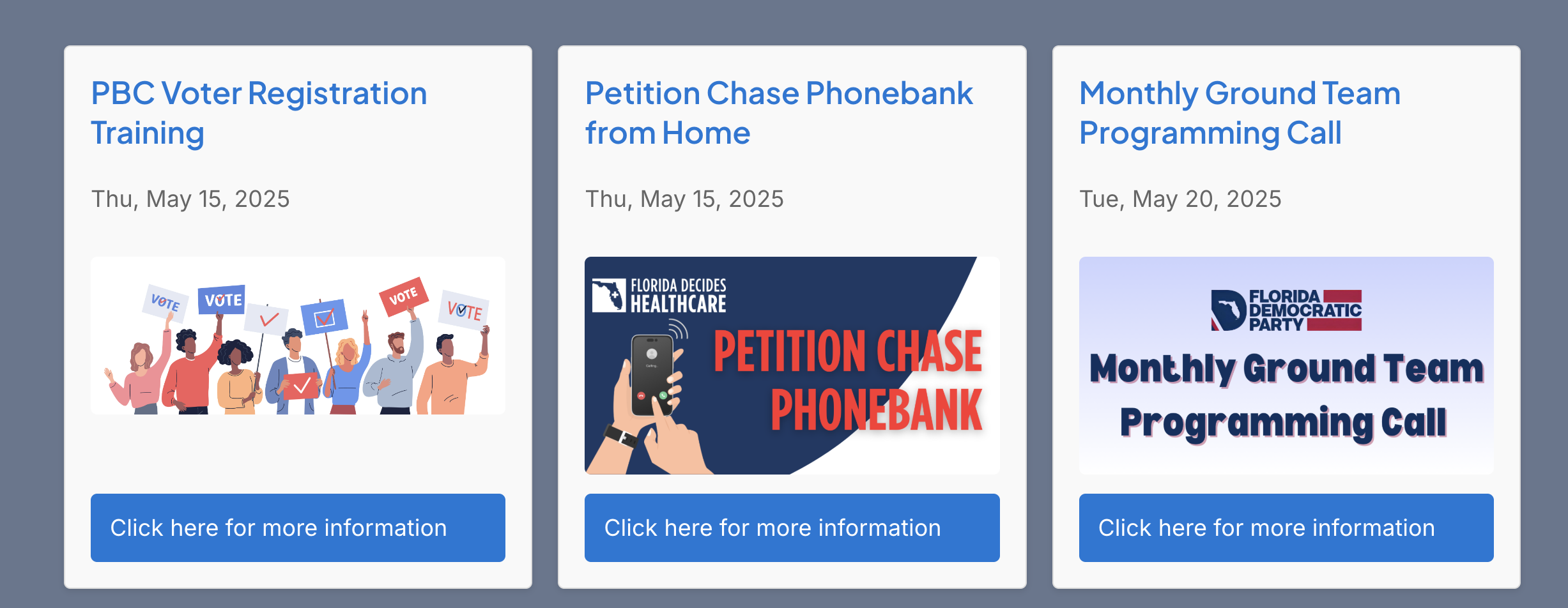
Sample Output of 3 Column Card Template without Descriptions


