
Silvertrail Wordpress Plugin - Rating, Reviews, Demo & Download
Plugin Description
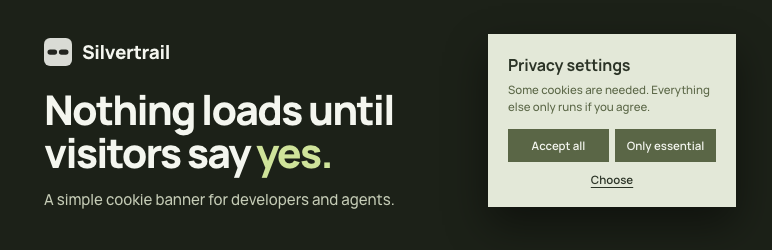
Nothing loads until visitors say yes. Silvertrail is a small cookie banner that blocks trackers and embeds until the visitor agrees, and saying no is as easy as saying yes. “Accept all” and “Only essential” sit side by side at the same size, and a third button opens the choice per group and per service, with the provider, the purpose and a link to its privacy policy.
The banner only appears when the site uses something that needs consent. A site whose only services are embeds, or whose services are all marked exempt, shows no banner at all.
Built for developers and their agents
Set everything in PHP and check it on the shell. The admin keeps only the decisions a site owner makes.
- Code wins over the admin. One filter sets any setting, and the settings page marks each field that code sets.
- Agents work on the shell.
wp silvertrail servicesandwp silvertrail settingsshow every service and each setting with its source, andwp silvertrail validatereports what is wrong, so an agent can check its own work. - Prompts are built in. The admin copies a prompt to style the banner, and the Leak check writes one for the services it finds.
One call turns on a preset, and the official tag waits for consent:
add_action( 'silvertrail_register', function () {
    silvertrail_register_service( 'google-tag-manager', array( 'tag_id' => 'GTM-XXXXXXX' ) );
} );
Any script you mark with type="text/plain" data-silvertrail="service" waits as well. Silvertrail runs it after consent and keeps the order of inline and external scripts. A script that a theme or plugin enqueues waits once you list its handle under a service.
The README on GitHub is the complete reference.
Styled by your theme, or by you
Out of the box, the banner looks like part of the site. Change a few values or replace the whole design, as far as the project needs.
- With no setup, the banner reads its colours, corners and buttons from the theme’s
theme.json. - The
silvertrail_designfilter changes single values, such as a colour, the corners or the buttons. - A
silvertrail/silvertrail.cssor your own templates in the theme replace the defaults. Settings › Silvertrail › Banner copies a prompt that has an AI assistant write that stylesheet.
Batteries included
The integrations most sites need are built in, so setting it up mostly means ticking boxes.
- It supports the WP Consent API, so plugins that read the API follow the visitor’s choice.
- It sets the Google Consent Mode v2 default before any Google tag, and every choice updates it. Google tags stay blocked until consent, and developers can switch to Advanced mode in code.
- YouTube, Vimeo and Google Maps embeds wait behind a placeholder from the moment the plugin is active, and so do embeds from every host you register. The placeholder asks in place, loads the embed once or remembers the service, and opens no banner.
- The Leak check, under Settings › Silvertrail › Tools, opens pages as a first-time visitor, declines, agrees to each service on its own and loads them again. It lists what runs without consent and what starts only after a reload, with what to do about each. It writes a prompt to paste into an AI assistant, which asks for the provider, purpose and privacy policy of each service. A Playwright helper in the plugin’s
testingfolder runs the same check in CI.
Also in the box
- Presets print the official tags of Google Tag Manager, Google Analytics, Google Ads, the LinkedIn Insight Tag and the Meta Pixel once you turn one on and enter its ID.
- It works behind any page cache, as the next section explains.
- A browser that sends Global Privacy Control gets “only essential” without a banner.
- It asks every visitor again when the set of services changes.
- It keeps optional records of each decision: a random consent ID, the choices and the time, with no IP address.
- A link, block or shortcode reopens the preferences, and an optional floating button does the same in a corner of the page.
- The preferences show the visitor what the current page held back and which other hosts it loaded from.
- Each site of a multisite network keeps its own cookie.
- The front end loads one script of 15 KB, under 5 KB compressed, and no jQuery.
Page caching
The server renders every gated script and embed blocked, whatever the visitor chose, and the browser activates them on each page view. So a cached page never hands one visitor’s consent to the next, and page caches need no extra configuration.
What it does not do
Silvertrail does not implement the IAB Transparency and Consent Framework, so an ad network that requires a TCF consent string needs a different banner. It does not detect countries either. A site that treats regions differently decides in the silvertrail:before-prompt hook, as the FAQ shows. It does not crawl the site for cookies. The Leak check looks at the pages you list and shows what they actually load.
Free, with an honour licence
Silvertrail is free. When you are paid to put it on a client’s site, consider supporting its development with a site licence at https://marcwieland.name/support/: 29 a year per site, or 199 a year for an agency with any number of sites, in dollars or euros. The licence works on your honour. It adds nothing and withholds nothing, and nothing checks whether you bought one. There is no pro version and no hosted service, and there will be none. The money pays for the upkeep.
Need something it does not do?
Marc Wieland, the developer of Silvertrail, builds new functionality for it as paid work on request. This is feature development, not technical support. Write to silvertrail@marcwieland.name with the site and what it should do. The code is not proprietary, and when most users would benefit from a feature, it goes into the free plugin. That way, the feature one site needs and can fund also helps every other site that runs Silvertrail and gives something back to the WordPress ecosystem.
Privacy
Silvertrail sets one first-party cookie, silvertrail (on the other sites of a multisite network silvertrail_ and the site ID), which holds the chosen services, the version of the settings and the time of the decision. It lasts six months by default, and a developer changes the lifetime with the silvertrail_settings filter. With records turned on, the cookie also holds a random consent ID, and each decision is stored in a database table with that ID, the choices and the time. Silvertrail never stores an IP address or browser details. The plugin itself contacts no outside service. The services a site turns on load from their providers only after the visitor agrees, as the next section lists.
External services
Each tracker preset below connects to its provider only when an admin turns it on, and only after the visitor agrees to that service. The provider then receives what a browser sends with every request, such as the IP address, the browser details and the address of the page, plus whatever its own code collects. In Consent Mode Advanced, which a developer turns on in code, the Google tags load before consent and send cookieless pings.
- Google Tag Manager, Google Analytics and Google Ads load the Google tag from googletagmanager.com with the ID entered in the settings. Provided by Google: terms, privacy policy.
- The LinkedIn Insight Tag loads from snap.licdn.com with the partner ID. Provided by LinkedIn: terms, privacy policy.
- The Meta Pixel loads from connect.facebook.net with the pixel ID. Provided by Meta: terms, privacy policy.
- The YouTube, Vimeo and Google Maps presets start switched on, but they load nothing themselves. They hold back embeds the site already contains and let the browser load them from youtube.com, vimeo.com or google.com once the visitor agrees. Provided by Google for YouTube (terms, privacy policy) and Google Maps (terms, privacy policy), and by Vimeo (terms, privacy policy).
Screenshots

The banner puts “Accept all” and “Only essential” side by side at the same size. Here it takes its colours and font from Twenty Twenty-Five.

“Choose” opens the choice per group and per service, with the provider, the purpose and a link to the privacy policy.

A YouTube video waits behind a placeholder. The visitor loads it once or allows YouTube for good, and no banner opens.

Under Settings › Silvertrail, the admin ticks the trackers the site uses and enters their IDs. The status panel counts what the banner asks about.

The banner takes its colours, corners and buttons from the theme’s
theme.json. The admin picks the position, the appearance and the floating button.
The Leak check opens each page as a first-time visitor, declines, agrees to each service on its own and loads the page again. A read-only preview shows each step.

The report says what runs without consent and what to do about it. A tracker that matches a preset gets a button that opens it under Services, ticked and ready to save. The table shows how each service behaved before a choice, after declining and after agreeing.

When nothing runs without consent and nothing waits for a reload, the report says so.


