
PublishPress Taxonomies – Tag, Category, And Taxonomy Manager – Autotagger Automatically Add Terms Wordpress Plugin - Rating, Reviews, Demo & Download



Plugin Description
PublishPress Taxonomies allows you to create and manage Tags, Categories, and all your WordPress taxonomy terms. PublishPress Taxonomies can help with all your WordPress content, from adding Tags and Categories to Pages, to managing WooCommerce Product Categories and bbPress Topic Tags.
PublishPress Taxonomies has integrations with AI tools including OpenAI. You can use these AI services to find the best taxonomy terms for your content.
With PublishPress Taxonomies, you can organize, optimize, and showcase all your WordPress content:
- Organize: In PublishPress Taxonomies, you can manage taxonomies, and also terms. There are tools for you to add, rename, remove, delete and even merge terms. You can add any term or taxonomy to any post type.
- Optimize: PublishPress Taxonomies can improve your SEO with automatic term management. PublishPress Taxonomies can automatically suggest relevant terms for your content and link those terms to the correct archive pages.
- Showcase: PublishPress Taxonomies allows you to use your terms for advanced features such as Related Posts and Tag Clouds.
PublishPress Taxonomies Pro
Upgrade to PublishPress Taxonomies Pro
This plugin is the free version of PublishPress Taxonomies. The Pro version of PublishPress Taxonomies has extra features and expert support. Get the PublishPress Taxonomies Pro plugin now!
10 Key Features in PublishPress Taxonomies
- Manage Terms and Taxonomies: You can create new taxonomies and edit all the settings for each taxonomy.
- Terms Display: This feature allows you to create a customizable display of all the terms in one taxonomy.
- Terms for Current Post: This enables you to create a customizable display of all the terms assigned to the current post.
- Related Posts: Shows lists of posts with similar tags and categories.
- Auto Links: If you have a term called “WordPress”, the Auto Links feature will find any instances of “WordPress” in your content and add links to the archive page for that tag.
- Auto Terms: If you have a term called “WordPress”, Auto Terms can analyze your posts, and when it finds the word “WordPress”, it can add that term to your post.
- Add Terms with AI: The Pro version of PublishPress Taxonomies has AI integrations with OpenAI, IBM Watson, and more. This makes it easier for you to find or create the best taxonomy terms for your content.
- Term Synonyms: This feature allows you to have multiple words associated with a single term.
- Linked Terms: You can connect terms. When the main term is added to a post, the linked terms will be added also.
- Manage Terms: Add, rename, merge, remove, delete and even delete unused terms.
Feature 1. Create and Manage Taxonomies
PublishPress Taxonomies can manage all the taxonomies created by WordPress and your plugins and themes. You can change the settings for each taxonomy. For example, you can change the visual labels, and control whether the taxonomy is organized in parent-child relationships. You can also assign your taxonomies to different post types. For example, you can use PublishPress Taxonomies to add Categories to Pages, or WooCommerce Tags to Posts.
Click here to read about managing taxonomies.
Feature 2. Terms Display
The Terms Display feature in PublishPress Taxonomies allows you to show a cloud or list of the terms used on your site. For example, you can create a “Tag Cloud” showing all your WooCommerce product categories, or you can create a list of all the tags on bbPress topics.
PublishPress Taxonomies makes it easy to customize the format of your terms, and add custom CSS styles. The terms can be shown in a shortcode, a widget, or PublishPress Taxonomies can try and automatically add the terms into your content.
Click here to read about Terms Display.
Feature 3. Terms for Current Post
The Terms for Current Post feature in PublishPress Taxonomies allows you to customize the displays of terms for single posts. This display is separate from any default display of terms in your theme, so you can use this feature to easily show terms anywhere on your site.
PublishPress Taxonomies makes it easy to customize the format of your terms, and add custom CSS styles. The terms can be shown in a shortcode, a widget, or PublishPress Taxonomies can try and automatically add the terms into your content.
Click here to read about Terms for Current Post.
Feature 4. Related Posts
PublishPress Taxonomies can display posts that are related to the current post. This feature works by checking for shared taxonomy terms. If your post has the terms “Vegetables” and “Food”, then this feature will likely display other posts that also have the terms “Vegetables” and “Food”. The more terms that are shared, the more likely a post is to show.
The Related Posts can be shown in a shortcode, a widget, or PublishPress Taxonomies can try and automatically add the related posts into your content.
Click here to read about Related Posts.
Feature 5. Auto Links
The Auto Links feature in PublishPress Taxonomies will automatically add links to your content. If you have a term called “WordPress”, the Auto Links feature will find any instances of “WordPress” in your content and add a link to the archive page for that tag. So any instances of “WordPress” will link to /tag/wordpress.
Click here to read about Auto Links.
Feature 6. Auto Terms
This feature allows WordPress to examine your post content and title for specified terms and automatically add those terms as Tags. Here’s an example of how it works:
- You add “WordPress” to the keywords list in PublishPress Taxonomies.
- If your post content or title contains the word “WordPress”, then PublishPress Taxonomies will automatically add “WordPress” as a term for this post.
Click here to read about automatically adding terms.
Feature 7. Add Terms with AI (Pro version)
This feature makes it easier for you to find or create the best taxonomy terms for your content. PublishPress Taxonomies AI can show a metabox on your post editing screen with all these options:.
- Manage Post Terms: This feature allows you to manage all the terms that are currently attached to a post.
- Suggest Existing Terms: This feature uses a tool in the PublishPress Taxonomies plugin that can scan your posts and suggest relevant terms that already exist on your site.
- Show All Existing Terms: This feature allows you to browse all the terms in a taxonomy.
- OpenAI: These integrations allow you to connect to external service. These services will scan your content and suggest relevant terms. They can suggest existing terms and also new terms.
Click here to read about PublishPress Taxonomies and AI.
Feature 8. Term Synonyms
Synonyms is a feature in PublishPress Taxonomies Pro that allows you to have multiple words associated with a single term. If PublishPress Taxonomies scans your content and finds a synonym, it will act as if it has found the main term.
Synonyms will be available on each term screen. For example, if your term is “Apple”, you can create synonyms such as “Apples”, “Golden Delicious”, “Granny Smith”, “Pink Lady”, “Honeycrisp”, “Red Delicious”, “Braeburn” and “Gravenstein”.
Click here to read about Term Synonyms.
Feature 9. Linked Terms
Linked Terms is a feature in PublishPress Taxonomies Pro that allows you to connect terms. When the main term is added to a post, the linked terms will be added also.
For sites with a lot of terms, this feature makes it easier and quicker for your users to add the correct terms. For example, if you add the term “WordPress” to your posts, PublishPress Taxonomies can automatically add Linked Terms that include “CMS”, “website”, and “website design”.
Click here to read about Linked Terms.
Feature 10. Manage Terms
The Manage Terms screen in PublishPress Taxonomies provides you with several useful tools to manage the terms on your site. These tools can be used with any taxonomy. Here are some of the tools on the Manage Terms screen:
- Add terms: Quickly add terms to your content.
- Rename terms: Change the name of your terms in bulk.
- Merge terms: Combine existing terms together. This is very useful for fixing typos in your terms.
- Delete unused terms: Delete any terms that are rarely used.
Click here to read about managing terms.
PublishPress Taxonomies Pro
Upgrade to PublishPress Taxonomies Pro
This plugin is the free version of PublishPress Taxonomies. The Pro version of PublishPress Taxonomies has extra features and expert support. Get the PublishPress Taxonomies Pro plugin now!
The PublishPress Taxonomies and Tag Groups plugins
PublishPress Taxonomies is developed by the same team that support the popular Tag Groups plugin. Together PublishPress Tag Groups and PublishPress Taxonomies are an excellent solution for organizing and displaying your site’s content.
PublishPress Taxonomies Bug Reports
Bug reports for PublishPress Taxonomies are welcomed in our repository on GitHub. Please note that GitHub is not a support forum, but a place to report bugs in the plugin that can be replicated outside of a single site.
Follow the PublishPress Taxonomies team
Follow the PublishPress team and find product news on the PublishPress website.
Screenshots
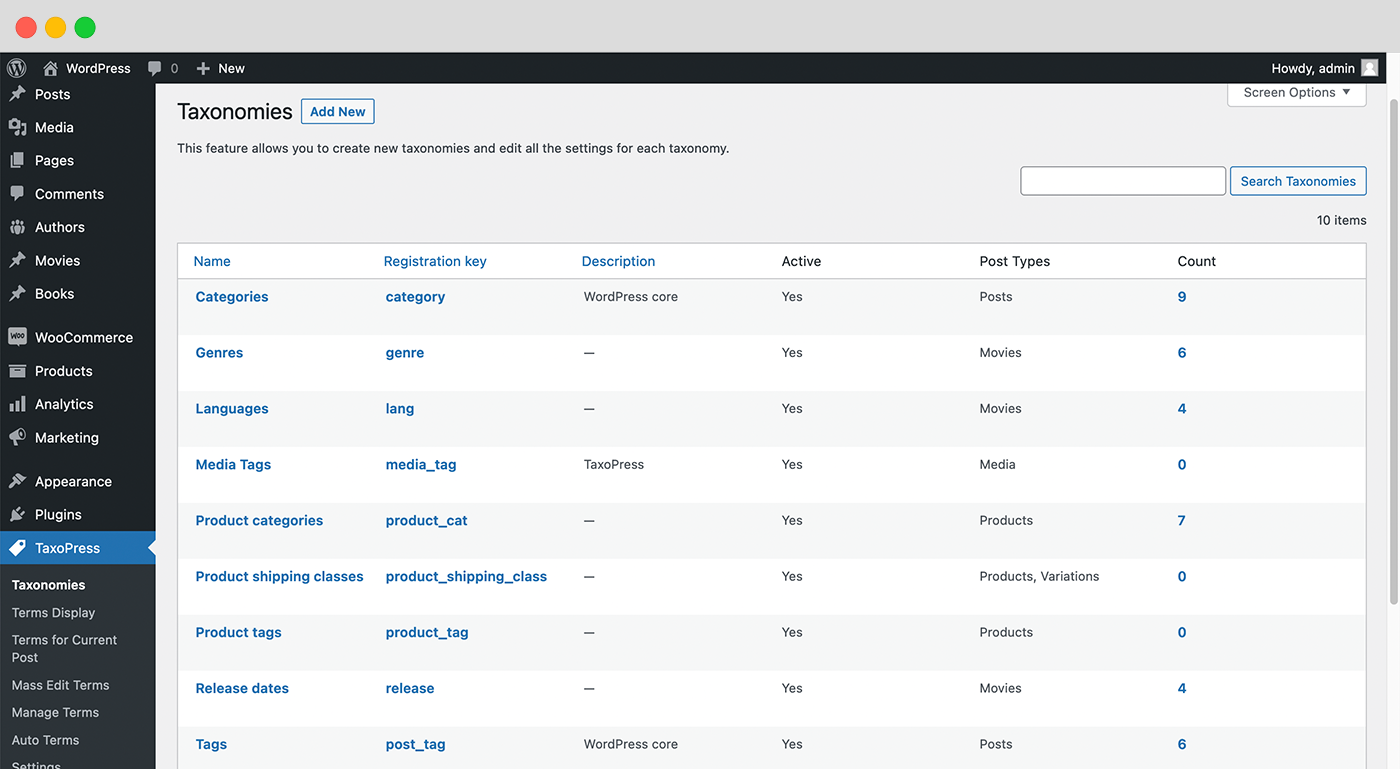
You can create new taxonomies and edit all the settings for each taxonomy.
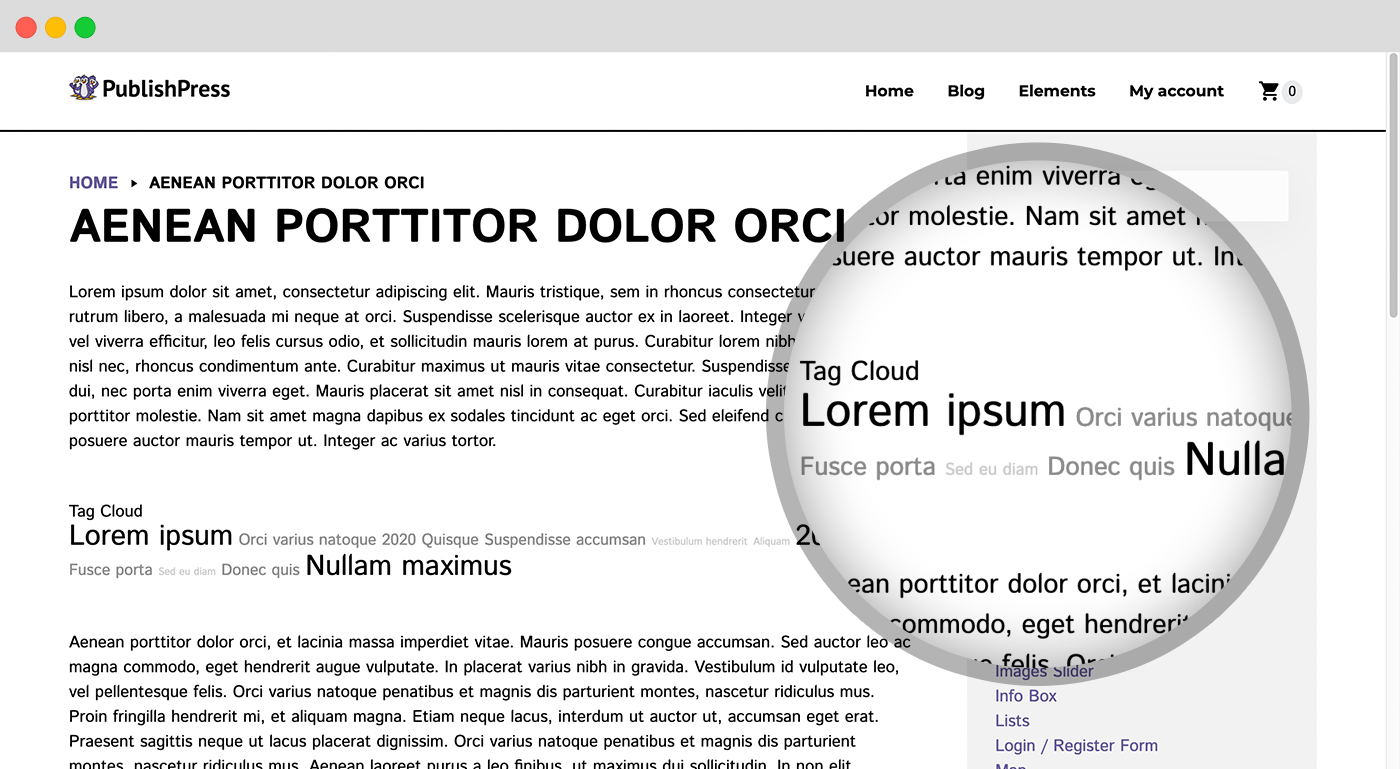
With PublishPress Taxonomies you can show all the terms in one taxonomy. You can build dynamic tag clouds and lists with many configuration options.
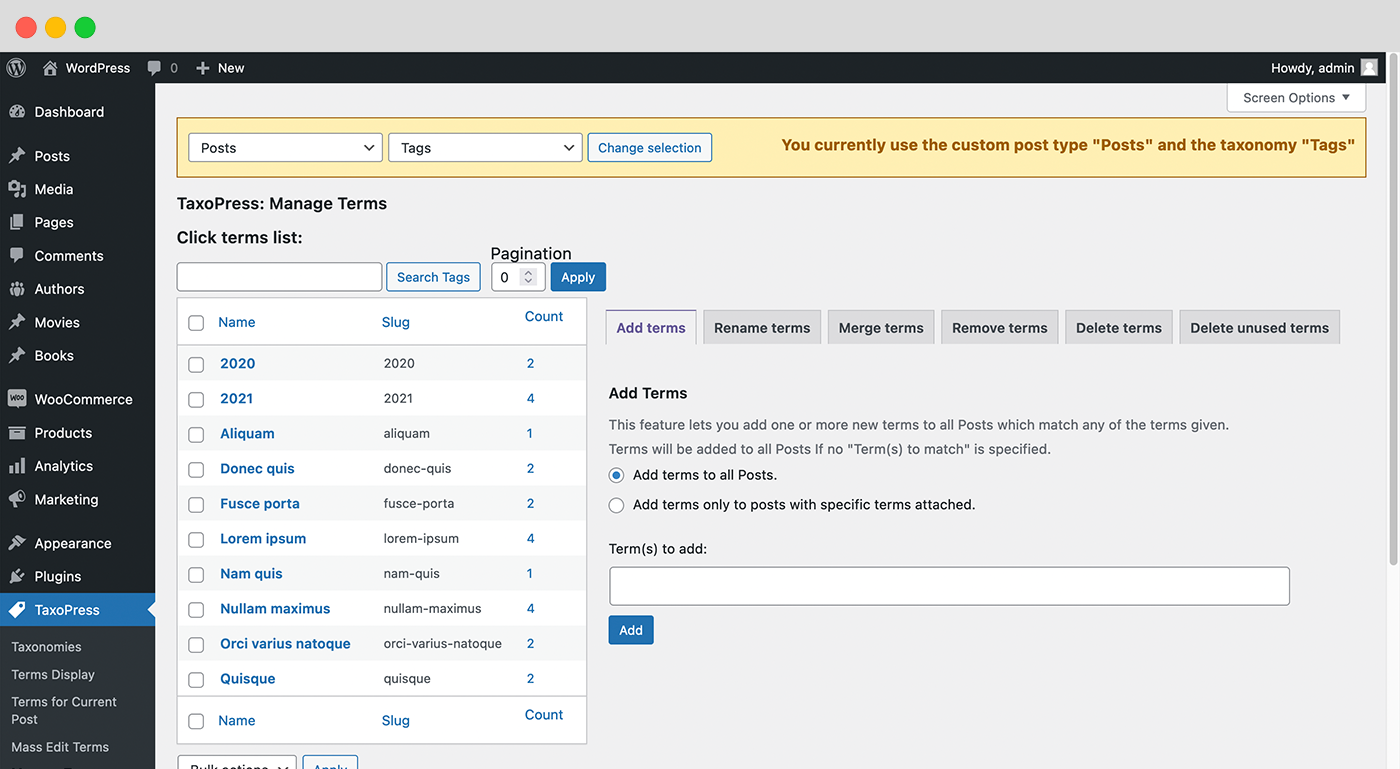
PublishPress Taxonomies has tools to help you manage terms on a busy site. You can quickly add, rename, remove, delete and even merge terms.
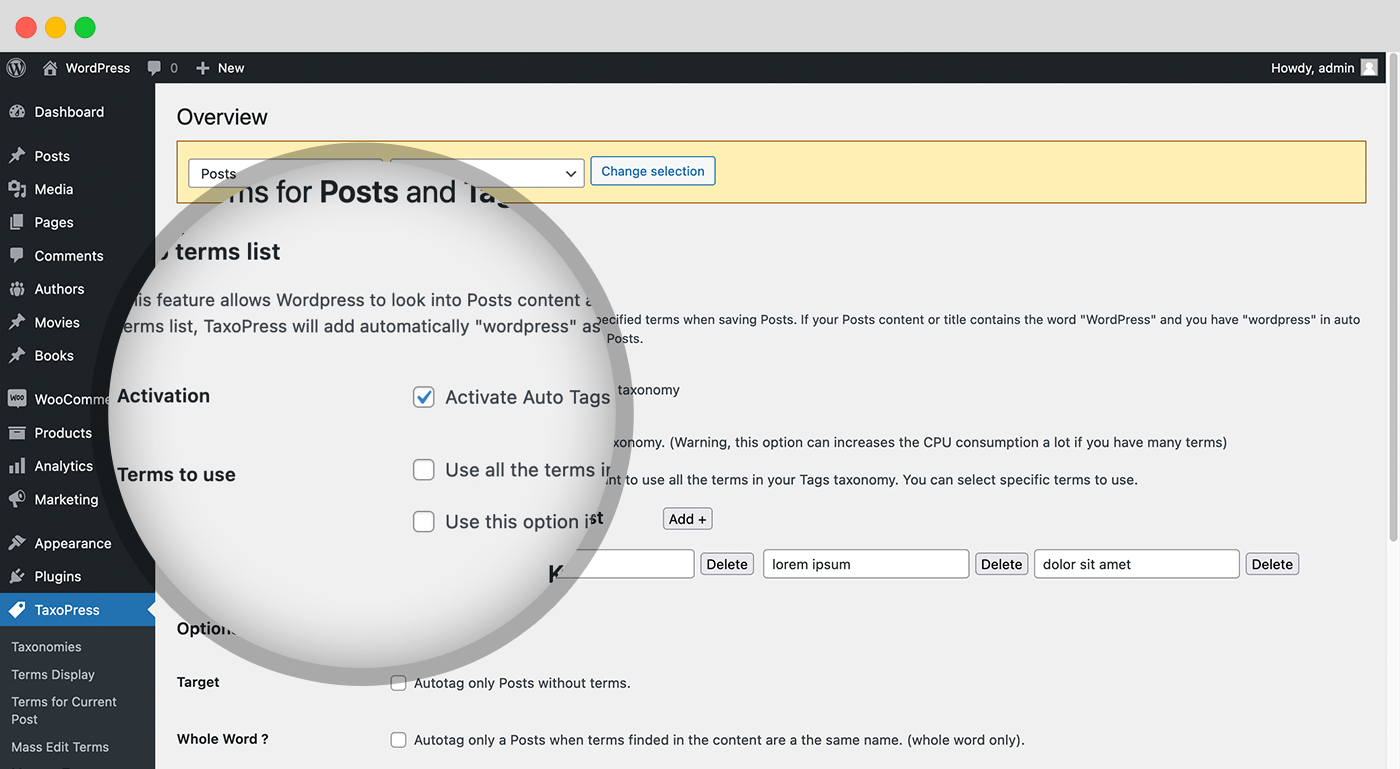
PublishPress Taxonomies can analyze your posts and automatically create relevant Tags and Categories.
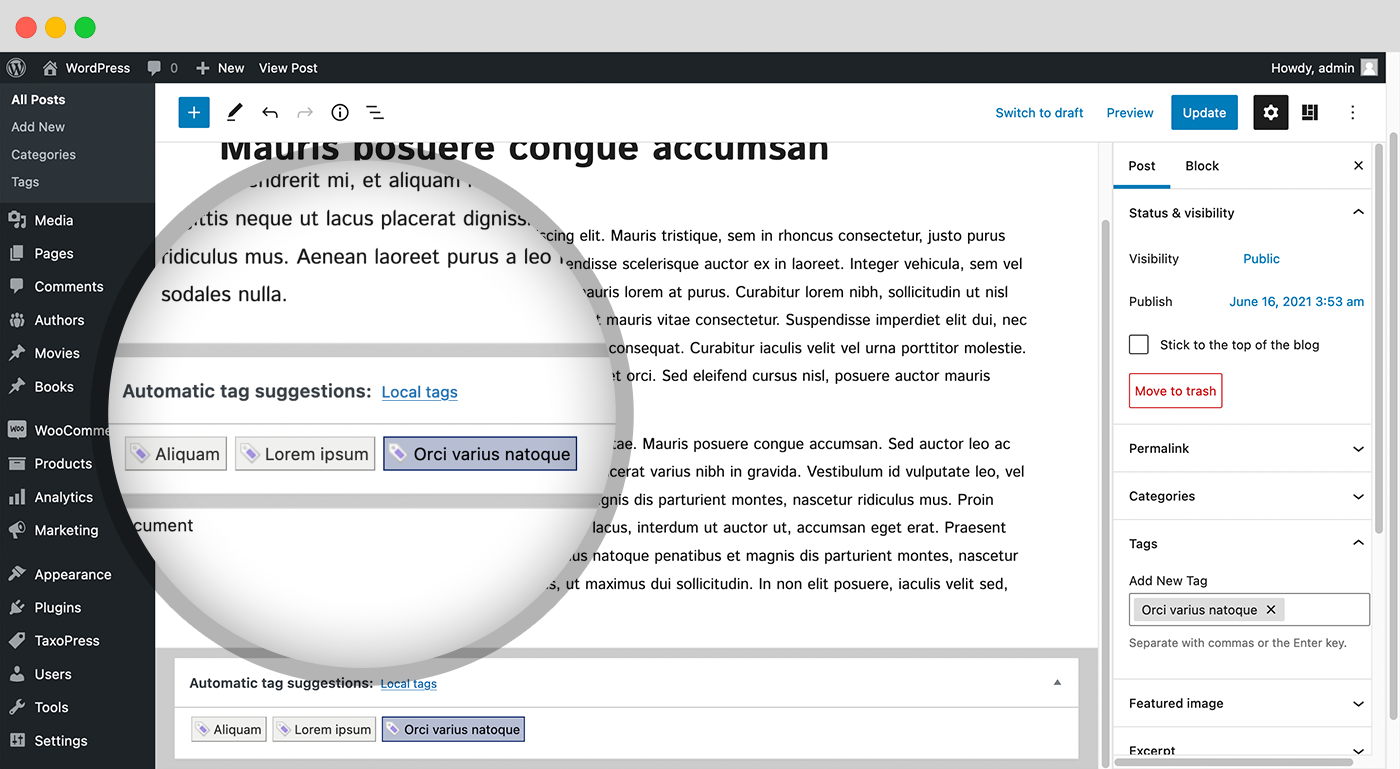
PublishPress Taxonomies can use the Dandelion API and OpenCalais APIs to analyze your WordPress content and suggest terms that you can add to your post.
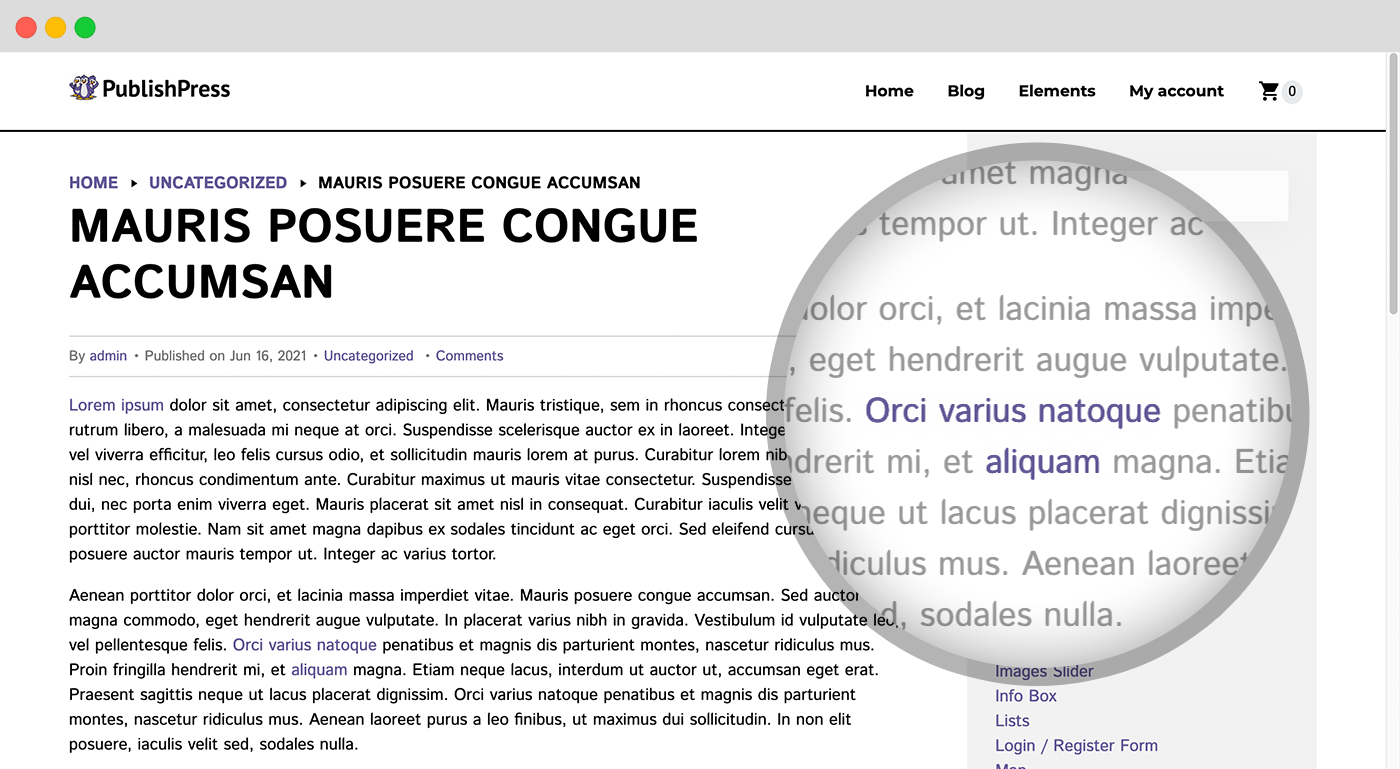
If you have a term called “WordPress”, the Auto Links feature will find any instances of “WordPress” in your content and add a link to the archive page for that tag.

