
Skurail For WooCommerce Wordpress Plugin - Rating, Reviews, Demo & Download

Plugin Description
Skurail connects your WooCommerce store to your eBay seller account and keeps the two in step, in both directions. Amazon is coming soon.
Most marketplace plugins only push out. Skurail also brings your existing marketplace business in: link your live eBay listings to the products you already have without relisting anything, or import them as real WooCommerce products, variations included.
What it does
- Link or import your eBay listings. Skurail matches each live listing to a WooCommerce product by SKU, GTIN, brand and part number, or title, and shows you a score and the reason for every match. Confirm a link and your eBay item IDs, sales history and search ranking stay exactly as they are. Listings with no product can be imported as WooCommerce products, created as drafts by default so you can review them first.
- List from WooCommerce to eBay. Publish products as new listings, with category and item-specific mappings you set up once and reuse across the catalogue.
- Two-way stock and price sync with oversell protection. One inventory ledger across your channels, with per-channel stock buffers, price rules and rounding. When the last unit sells on eBay, your storefront knows.
- Marketplace orders arrive in WooCommerce. eBay orders become real WooCommerce orders (HPOS supported), with shipping and marketplace tax recorded, so your existing fulfilment workflow keeps working.
- Tracking goes back automatically. Complete an order in WooCommerce with a carrier and tracking number and Skurail sends them to the marketplace.
- Try it without touching your live listings. Shadow mode connects your account and reports exactly what Skurail would change, without writing anything to the marketplace. Switch it to live when you are satisfied.
Built for WooCommerce
- High-Performance Order Storage and the Cart and Checkout blocks are supported; products and orders go through the WooCommerce CRUD layer.
- The plugin is a thin, signed bridge. The heavy work happens in Skurail Cloud, not in your store’s PHP, so it runs on ordinary shared hosting.
- Your orders live in WooCommerce. Marketplace buyer details are removed automatically on the schedule the marketplaces require.
Plans
Every plan has every feature. The only thing that changes is how many marketplace orders a month are included.
- Free: 50 marketplace orders a month, one seller account. No time limit.
- Starter: £29 a month (£290 a year), 200 orders a month, two seller accounts; extra orders £0.10 each, capped at £40 a month.
- Growth: £79 a month (£790 a year), 1,000 orders a month, unlimited seller accounts; extra orders £0.05 each, capped at £110 a month.
- Pro: £199 a month (£1,990 a year), 4,000 orders a month, unlimited seller accounts; extra orders £0.03 each, capped at £190 a month.
- Scale: from £399 a month, billed annually, for more than 4,000 orders a month.
- Max: no monthly fee. 1% of your marketplace sales through Skurail (the buyer’s total including shipping, excluding tax the marketplace collects), with unlimited orders and nothing to pay in a month with no sales.
Starter, Growth and Pro start with a 14-day trial. On the Free plan, orders past 50 in a month are held in Skurail, never lost, and sent to WooCommerce as soon as you upgrade or the month resets. Your own storefront orders never count, and on the order-based plans neither do marketplace-fulfilled or cancelled orders. Your current plan and this month’s usage are shown on the WooCommerce Skurail page.
Requires a Skurail account
This plugin is the on-store half of Skurail. All marketplace communication happens in Skurail Cloud, our hosted service; the plugin never talks to the marketplaces’ APIs. That is how the marketplaces require it: application keys may not be distributed inside software. You need a Skurail account, and the Free plan is enough to start.
The plugin does nothing until this store is linked to a Skurail account. Until then it syncs nothing, sends nothing, runs no background jobs and adds nothing to your product screens; its only screen is WooCommerce Skurail, where you create a free account or sign in without leaving WordPress. Signing out (WooCommerce Skurail Sign out and disconnect) closes it again.
External services
This plugin needs an account with Skurail Cloud, a hosted service operated by Bek Service Ltd (United Kingdom), which manages your marketplace listings. Until this store is linked to a Skurail account the plugin makes no call to Skurail and runs no background jobs. It sends no analytics or tracking data, and it loads no remote script on your storefront or on its own admin pages: the only remote content it shows is Skurail’s sign-in page, framed on WooCommerce Skurail while you use it.
Skurail Cloud: creating an account and signing in
Nothing is sent until you click Create a free Skurail account or Sign in to Skurail on WooCommerce Skurail.
- When you click either button: the plugin sends Skurail your site address, the address Skurail calls back to link the store, the plugin version, and a one-time pairing reference and secret. Your browser then shows Skurail’s sign-up and sign-in page (https://skurail-app.bekservice.uk) inside the WooCommerce page.
- On that page you type your email address and a password, and to create an account you confirm your store’s address and accept Skurail’s terms. These go from your browser straight to Skurail; WordPress never receives or stores your password. Skurail emails you a code to verify your address, and password resets work the same way.
- When you have signed in with a verified address: Skurail sends this store a connection id, a connection key and the email address of your account. The plugin keeps them in your WordPress database (the key encrypted where your server supports it, never shown) and shows the address on the Skurail page. Signing out deletes them.
Cloudflare Turnstile, on Skurail’s sign-in page only
Skurail’s sign-up, sign-in and password-reset forms are protected against automated abuse by Cloudflare Turnstile, a service of Cloudflare, Inc. Turnstile’s script is loaded from challenges.cloudflare.com by Skurail’s sign-in page inside the frame, only while that page is open, and never by this plugin’s own pages or your storefront. Cloudflare receives information about your browser and device that it needs to tell a person from an automated program; Skurail sends Cloudflare the resulting token, and your IP address, to check the result.
- Service: Cloudflare Turnstile, https://www.cloudflare.com/products/turnstile/
- Turnstile privacy addendum: https://www.cloudflare.com/turnstile-privacy-policy/
- Cloudflare terms: https://www.cloudflare.com/website-terms/
Skurail Cloud: once the store is linked
- When a product or its stock changes: the IDs of the changed products and the kind of change.
- When a marketplace order changes in WooCommerce (completed, cancelled, refunded, or given tracking): its status, carrier and tracking numbers, and any refund amounts.
- Once a day: a health report with your site address, the plugin, WordPress, WooCommerce and PHP versions, whether HPOS, WP-Cron and an object cache are in use, product and order counts, the sync queue length and the last connection error.
- When you open WooCommerce Skurail, at most once an hour and in the background: a signed request for your plan status (plan name, this month’s marketplace order count and any orders waiting). Nothing about your store or customers is sent with it.
- When you run a connection test: a signed test message.
- When you deactivate the plugin, sign out, or delete it: that the connection is paused or gone.
Product import is off until you switch it on (WooCommerce Skurail Product import). While it is on, Skurail can create and update products, attributes, categories and images in your store from the marketplace listings you confirm, and the plugin downloads those listings’ pictures over HTTPS from the marketplaces’ image servers (i.ebayimg.com, m.media-amazon.com, images-na.ssl-images-amazon.com, images-eu.ssl-images-amazon.com). Those downloads are plain image requests: nothing about your store or your customers is sent with them.
Skurail Cloud also calls into your store: it reads product data (SKU, title, description, prices, stock, attributes, categories, weight and dimensions, image URLs) to build your listings, reads the same health report, creates your marketplace orders (buyer names and addresses), and adjusts stock after marketplace sales. Once the store is linked, every request in either direction is signed with this store’s own key, and everything travels over HTTPS. Signing out (WooCommerce Skurail Sign out and disconnect) deletes the key from your store.
- Service: Skurail, https://bekservice.uk/skurail/
- Terms of use: https://bekservice.uk/skurail/terms/
- Privacy policy: https://bekservice.uk/skurail/privacy/
You connect your marketplace seller accounts to Skurail through the marketplaces’ own consent screens; Skurail never sees your marketplace password.
Screenshots
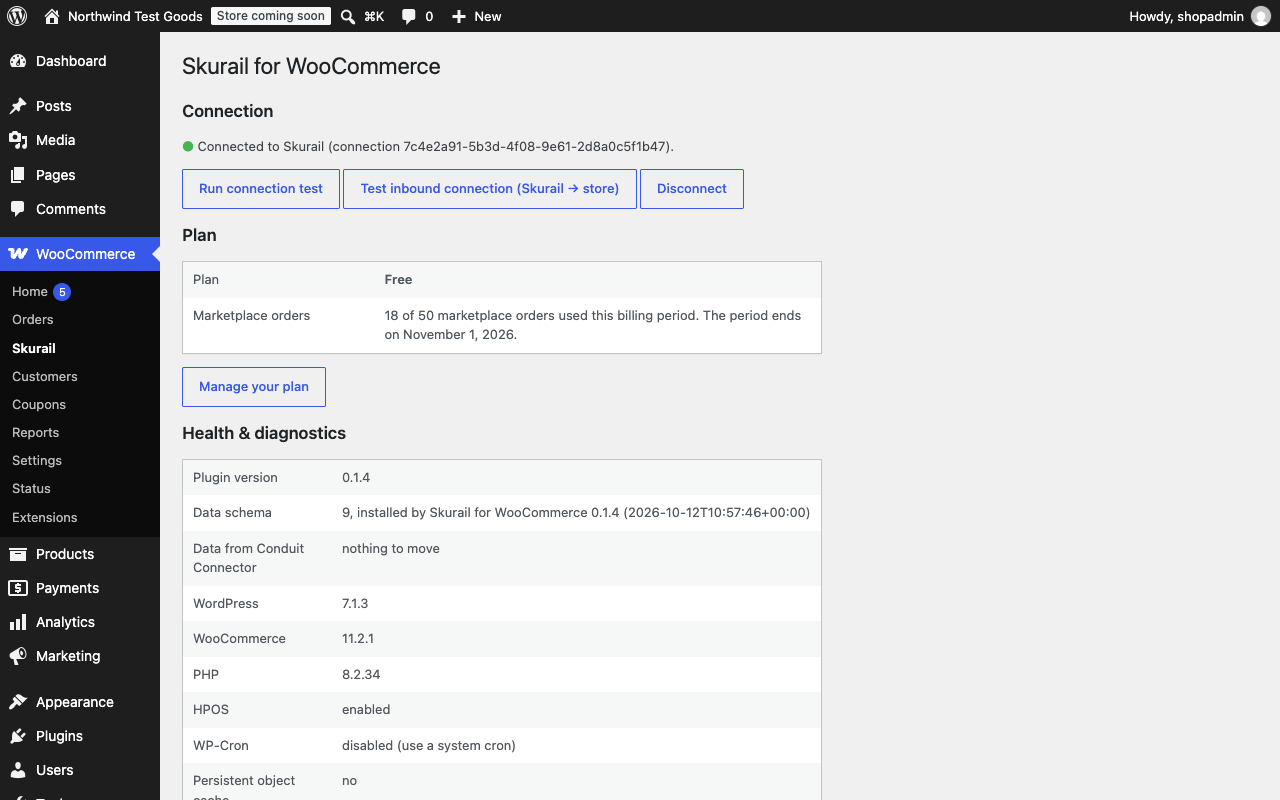
The Skurail page in WooCommerce: connection, plan and this month’s usage, and health at a glance.
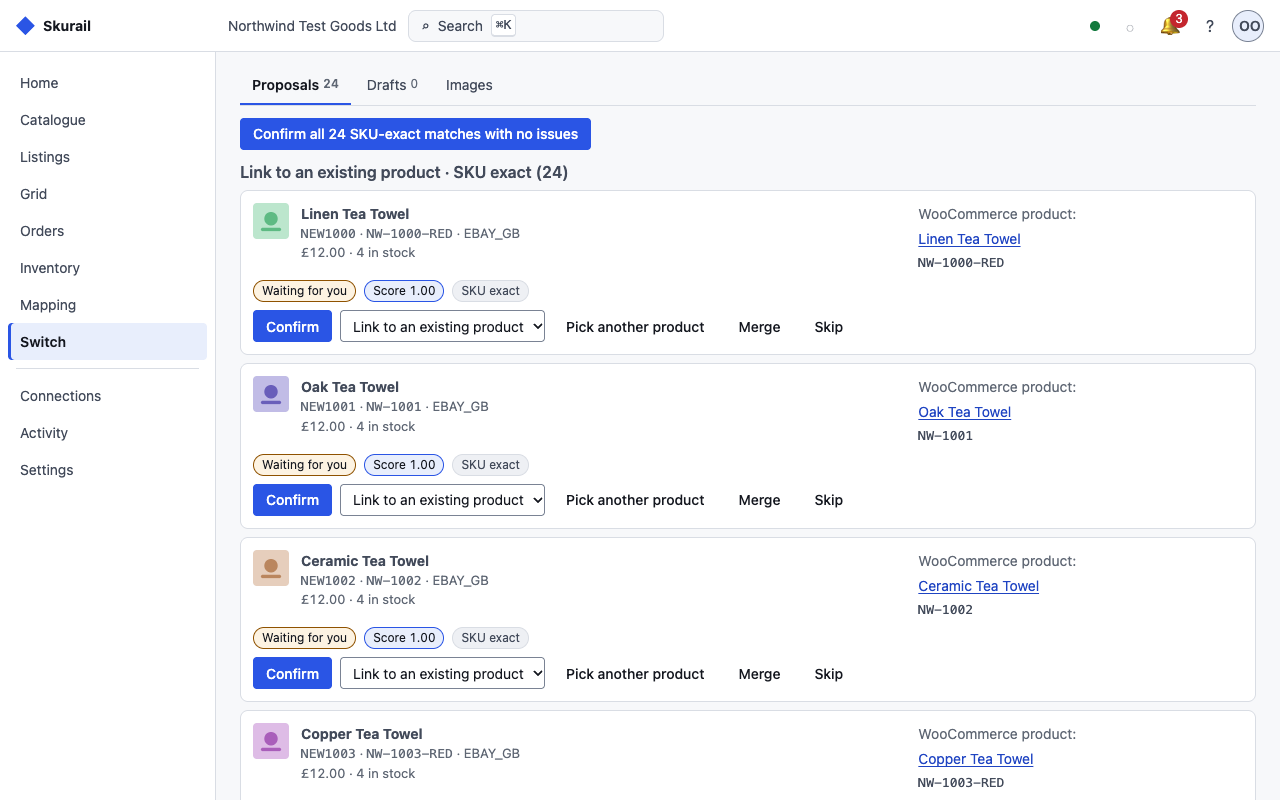
Link your live eBay listings to WooCommerce products, with a match score and reason for every proposal.
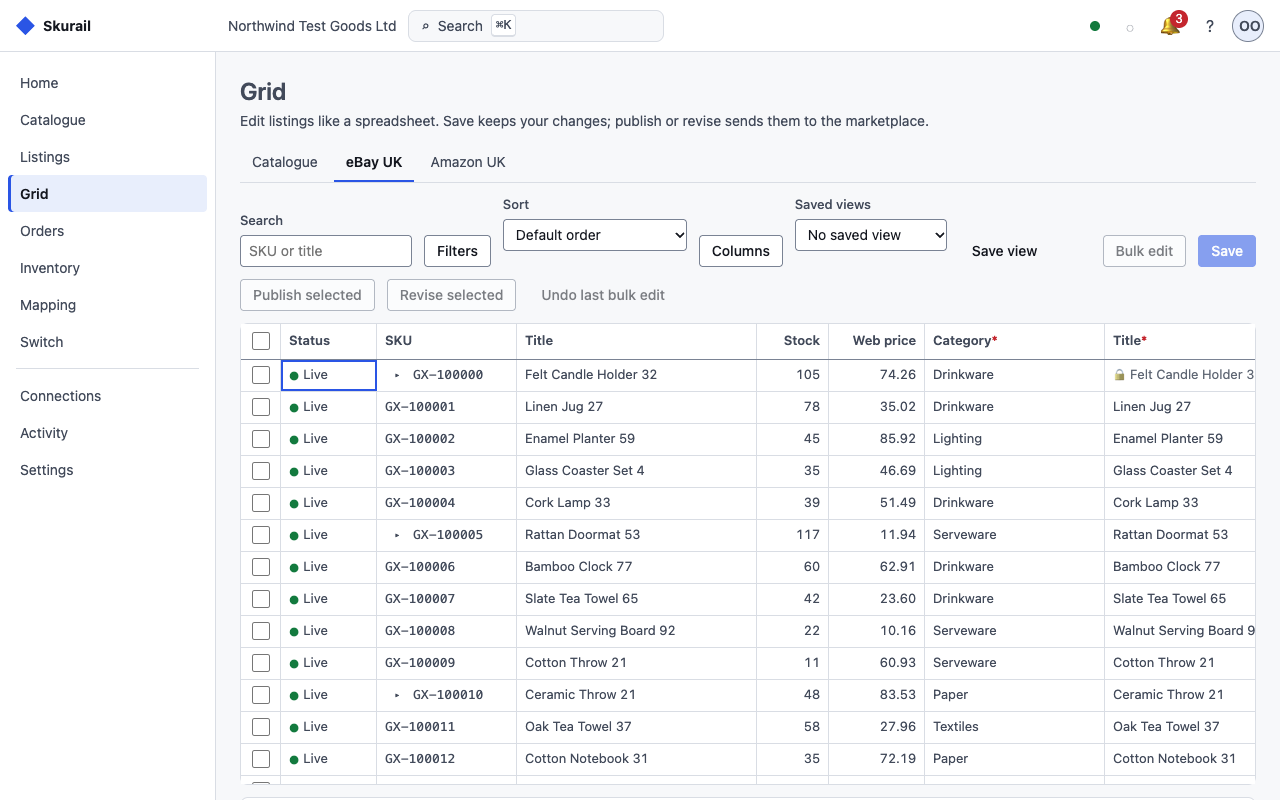
The bulk grid: edit stock, prices and categories across your listings, then publish or revise them together.
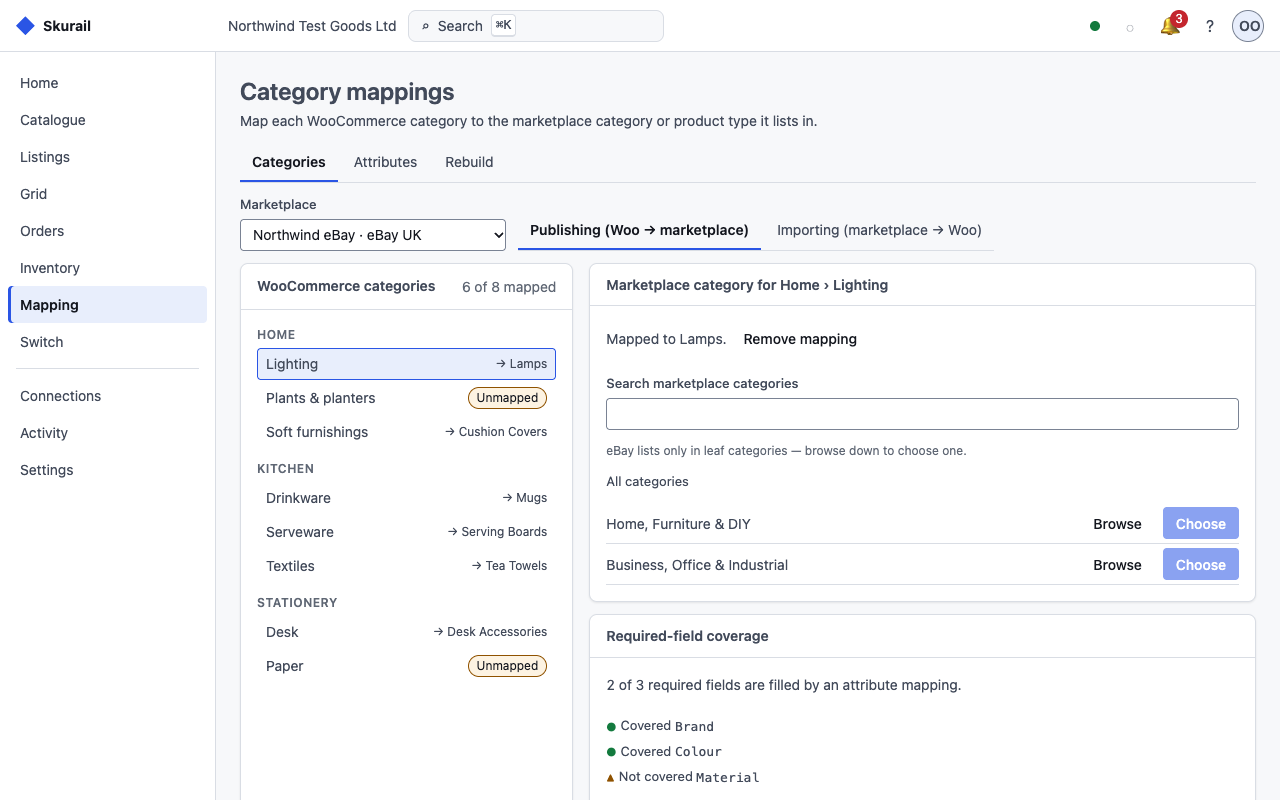
Category mapping: map WooCommerce categories to eBay categories once, with the required item specifics flagged.
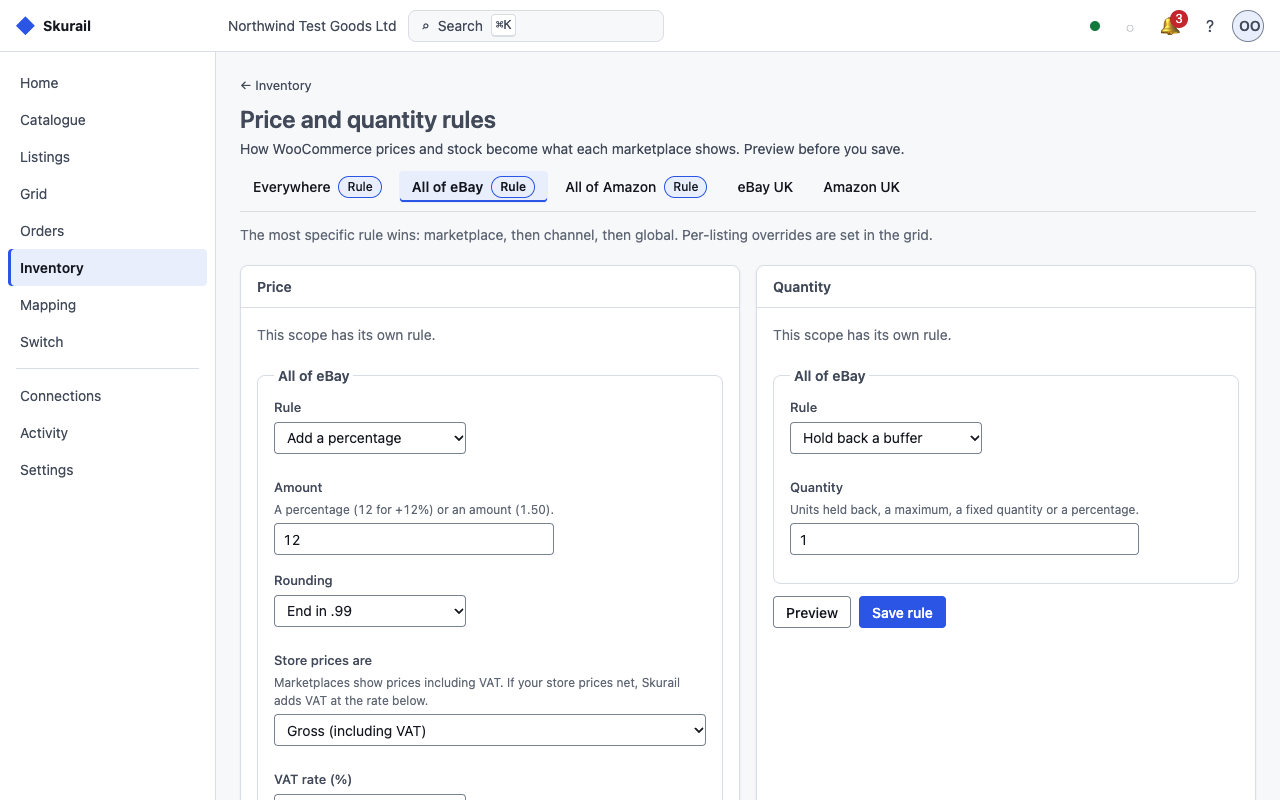
Per-channel price and quantity rules: a price adjustment with rounding, a stock buffer, and whether store prices include VAT.
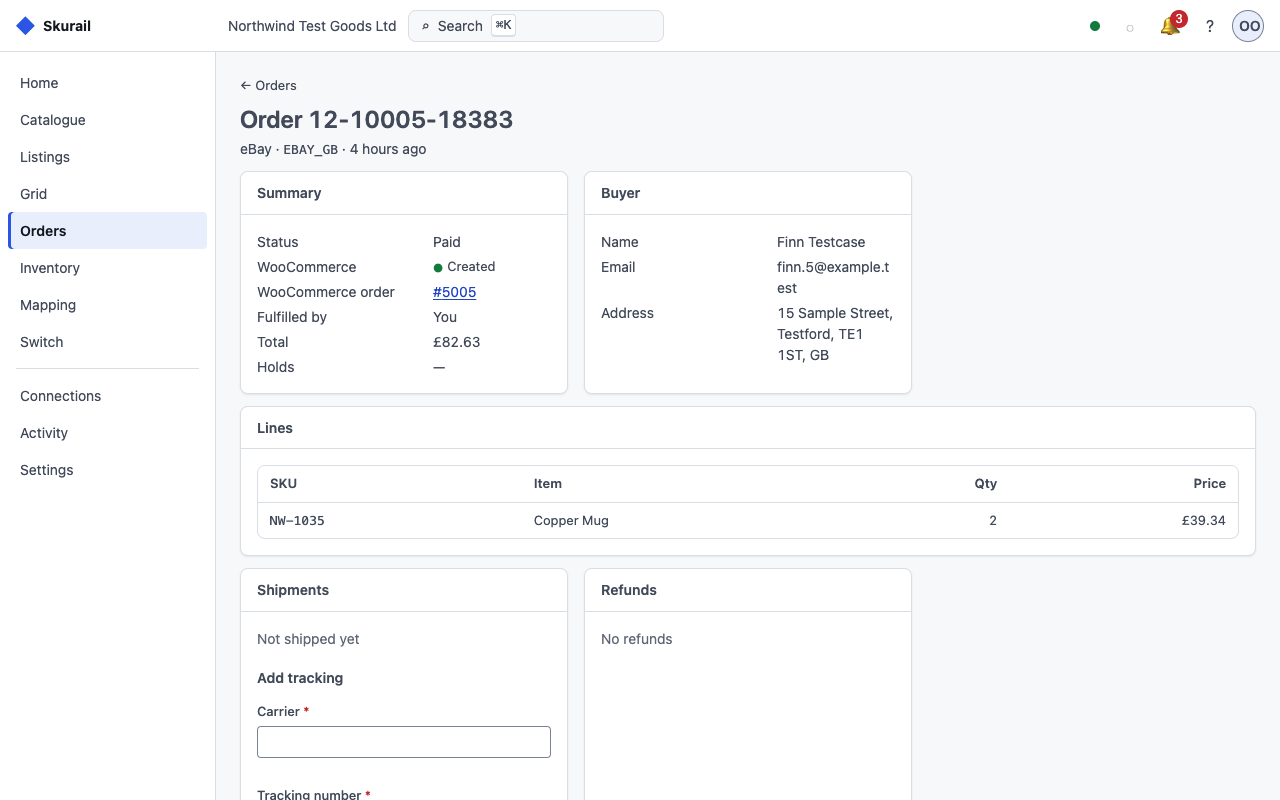
A marketplace order in Skurail, linked to the WooCommerce order it created, with its lines and tracking.
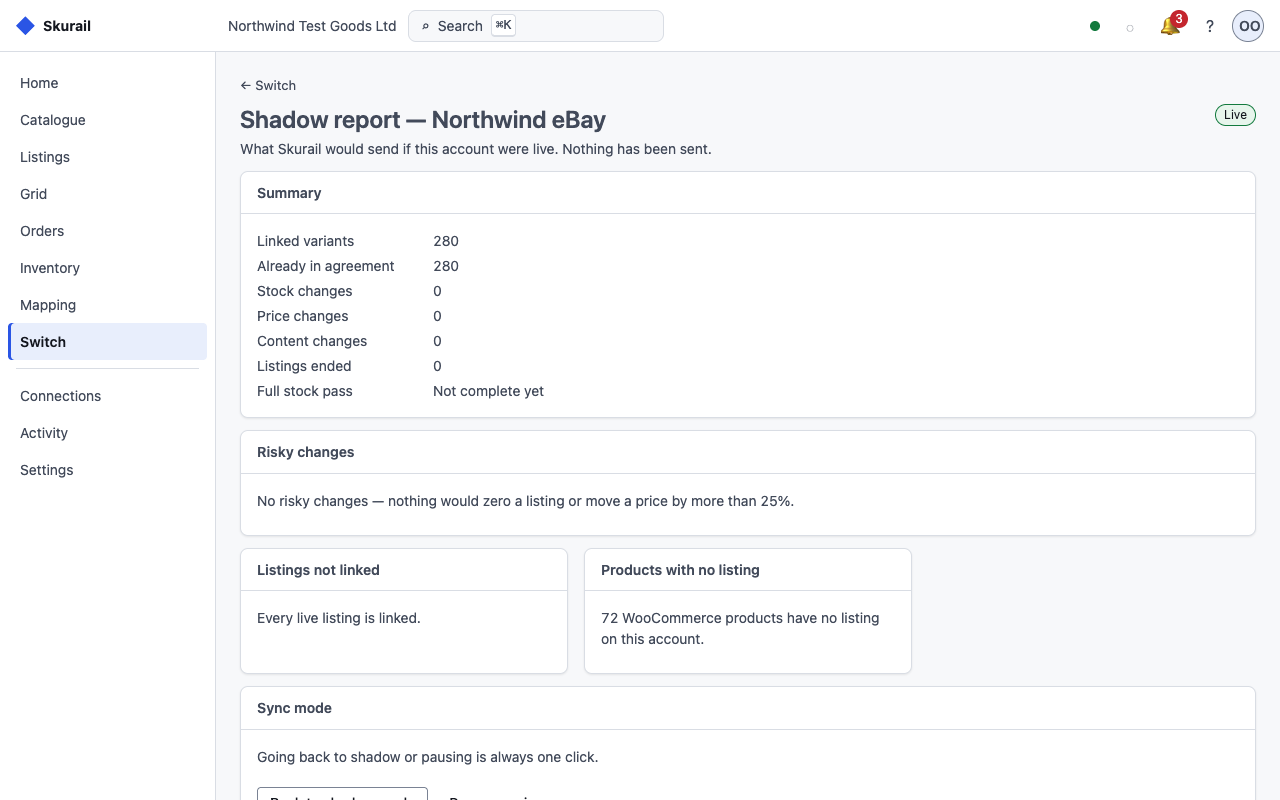
The shadow report: what Skurail would send to eBay, checked before an account goes live.


