SMSGELY – Order SMS Notification & Login OTP For WooCommerce Wordpress Plugin - Rating, Reviews, Demo & Download

Plugin Description
SMSGELY for WooCommerce sends text messages from your store through SMSGELY, a business SMS service and Bangladesh SMS gateway. It does two things:
- WooCommerce order SMS notifications — your customers (and, if you like, your team) get an SMS when an order is placed, paid, completed, cancelled or refunded.
- Login and registration with OTP — customers sign in or create an account on the My Account page or at checkout with their phone number and a one-time code (OTP) sent by SMS.
Everything is set up from one “SMSGELY” menu in your WordPress admin. No coding, shortcodes or theme changes are needed.
The plugin is designed for Bangladeshi mobile numbers. 01712345678, +8801712345678 and 8801712345678 are all understood as the same number.
This plugin is the SMSGELY integration for WooCommerce, published by the team behind SMSGELY. It needs an SMSGELY account to send messages. It is not part of WordPress or WooCommerce, and it is not affiliated with or endorsed by WordPress.org, WooCommerce or Automattic.
The plugin adds no credit, link or logo to your store. An optional “Powered by SMSGELY” line under the OTP login form appears only if you turn it on in SMSGELY Settings.
Choose the features you need
In SMSGELY Settings Choose Your SMSGELY Features, pick one of:
- Login & Registration OTP — phone login, registration and phone verification only.
- WooCommerce Order SMS — order status SMS only. Your store keeps the normal WooCommerce login.
- Both — everything (the default).
A feature you switch off is not loaded at all: it adds nothing to your store pages and sends no SMS. Switching never deletes settings, templates or logs, so you can switch back at any time.
WooCommerce order SMS notifications
- Turn each order event on or off.
- Choose who receives each message: the customer, up to five admin numbers, or both.
- Messages are sent in the background with WooCommerce’s Action Scheduler, so checkout is not slowed down.
- A failed SMS never changes or blocks the order. The result is added as a private order note with the number masked (you can turn this off).
- Works for registered customers and guest orders; the billing phone number is used.
Supported order events
- New order (when the customer places the order)
- Processing
- On hold
- Completed
- Cancelled
- Failed
- Refunded
“New order” and “Completed” are on by default. “Processing” is off by default, because most paid orders trigger both “New order” and “Processing”.
OTP login and registration for WooCommerce
- Works inside the WooCommerce My Account page, the classic checkout and the WooCommerce Checkout Block. Logging in at checkout keeps the cart.
- Choose the login screen: OTP with a “Continue with password” option (default), the normal WooCommerce form with an OTP option, or OTP only.
- Existing customers are found by their verified number or their WooCommerce billing phone, so nobody gets a second account. Tools Link existing customers prepares all existing accounts at once.
- New numbers continue to a short registration form. You decide whether email and password are required, optional or hidden.
- Existing passwords are never removed, and administrators and shop managers always log in with their password.
Phone number verification
Customers can add or change their mobile number in My Account Account details. A new number is saved only after it is confirmed with a code, and the verified number is also used as the WooCommerce billing phone.
Security and bot protection
- Codes are random, expire after a few minutes, work only once and are limited in attempts and resends. Only a keyed hash is stored, never the code itself.
- Rate limits per phone number and IP address, with temporary blocking of abusive traffic.
- Optional CAPTCHA: Cloudflare Turnstile, Google reCAPTCHA (v3 or v2) or a built-in math question, plus a hidden honeypot field. “Adaptive” mode only challenges suspicious requests. Every CAPTCHA token is checked on your server.
- Login responses do not reveal whether an account exists for a number.
- Optional daily and monthly SMS limits, a daily OTP limit and a monthly spending limit help protect your SMSGELY wallet.
- The API key and CAPTCHA secret keys are stored encrypted, are never sent to the browser, and can be defined in
wp-config.phpinstead.
These features are meant to help you run a safer store. They do not guarantee security or legal compliance.
English and Bangla SMS templates
Every message has an English and a Bangla template. Choose the SMS language once; edit the text with a live preview and insert placeholders with a click:
- Order SMS:
{customer_name},{first_name},{order_id},{order_total},{order_status},{order_date},{payment_method},{item_count},{billing_city},{phone},{site_name} - OTP:
{otp},{expiry_minutes},{site_name}
SMS length and segments
Long messages are sent as several SMS parts, and each part is billed. While you type, the editor shows the character count and the estimated number of parts: plain English text (GSM-7) fits 160 characters in one SMS, and Bangla (Unicode) fits 70. SMSGELY’s own count is the one that is billed.
Sender ID
Choose the SMS type — non-masking (default, recommended for OTP) or masking (your brand name). SMSGELY sends from your account’s Primary Sender ID for that type. Sender IDs are managed in your SMSGELY account and cannot be typed into the plugin.
SMS logs and delivery tracking
- Every message is listed in SMSGELY SMS Logs with filters for date, type, status, order, phone number and Sender ID. Phone numbers are masked, and OTP text is never stored.
- When your API key has the
sms:readpermission, the plugin checks SMSGELY a few times after sending and shows when a message is delivered. - Failed order messages can be retried with one click.
Duplicate-send protection
Each order event is sent only once per order and recipient, even if WooCommerce saves the same status several times. Temporary errors are retried automatically (up to three attempts) with the same request key, so SMSGELY does not send or charge twice.
Built for current WooCommerce
- Compatible with High-Performance Order Storage (HPOS), on or off.
- Works with the classic checkout and the WooCommerce Checkout Block.
- Pages that do not show a login form — home, shop, product and cart — load no plugin scripts, styles or CAPTCHA.
- Translation-ready (text domain
smsgely-order-sms-otp).
How the SMSGELY connection works
You create an API key in your SMSGELY account and paste it, with the API address shown in your SMSGELY dashboard, into SMSGELY Connection. The plugin then sends each message to the SMSGELY SMS API over HTTPS, and SMSGELY delivers it and bills your SMSGELY wallet. The API address must be on smsgely.com. See “External services” below for exactly what is sent.
Requirements
- WordPress 6.5 or later and PHP 7.4 or later.
- WooCommerce (the plugin stays inactive without it).
- An SMSGELY account with approved identity verification (KYC), wallet balance and an API key with the
sms:sendpermission (addsms:readfor delivery reports). - A server that can make outgoing HTTPS requests.
Support
- For help with the plugin, use the support forum here on WordPress.org.
- For your SMSGELY account, Sender IDs, balance or API keys, contact SMSGELY support.
- SMSGELY’s SMS API guide explains API keys and permissions.
Troubleshooting
- “Invalid API key” — copy the key again from SMSGELY and make sure it is still active.
- “Forbidden” or “insufficient scope” — the key needs the
sms:sendpermission, and if you restricted the key to certain IP addresses, your server’s IP must be one of them. - “Insufficient balance” — recharge your SMSGELY wallet, then retry failed messages from SMS Logs.
- “Masking not approved” — switch the SMS type to non-masking until your masking Sender ID is approved.
- Messages stay “Pending” — WordPress’s scheduled tasks may not be running. Check WooCommerce Status Scheduled Actions.
- Customers see “Too many requests” — review Security Rate limits, or use Tools Reset rate limits.
- The OTP form does not appear — check that Login & Registration OTP is chosen in Settings, that SMSGELY is connected, and that login or registration is turned on in OTP Login.
External services
The plugin connects to the services below only after you set them up. It does not collect analytics or telemetry and does not contact any other service.
SMSGELY (required)
SMSGELY delivers the SMS messages.
- When: when an enabled order event happens, when a customer requests an OTP, when you save the Connection settings or click “Check connection” or “Send real SMS”, and a few times after sending to check delivery status (only if your API key has the
sms:readpermission). Nothing is sent before you enter an API key, and nothing is sent while a page is being displayed. - What is sent: your API key (for authentication), the recipient’s phone number, the message text, the SMS type and a message reference number. Order messages contain what your templates include, such as order number, customer name, total and status; OTP messages contain the one-time code.
- Where: the SMSGELY API address you enter, which must be on smsgely.com.
- SMSGELY Terms and SMSGELY Privacy Policy.
Cloudflare Turnstile (optional)
Used only if you choose Turnstile as the CAPTCHA. Its script loads only on the OTP login and registration forms (in Adaptive mode, only when a check is needed). Cloudflare receives technical information from the visitor’s browser, and your server sends the check token and the visitor’s IP address to Cloudflare to verify it.
Google reCAPTCHA (optional)
Used only if you choose reCAPTCHA as the CAPTCHA, under the same conditions as Turnstile. Google receives technical information from the visitor’s browser, and your server sends the check token and the visitor’s IP address to Google to verify it.
Links in the admin screens
The SMSGELY admin pages contain links to your SMSGELY dashboard, API guide and support (smsgely.com). They open only when you click them; no data is sent to SMSGELY by showing them.
Privacy
The plugin stores, in your WordPress database:
- SMS log — reference, date, type, order number, recipient phone number (shown masked), status, part count and cost if SMSGELY reports it. The text of order messages is kept so you can review and retry them; OTP text is never stored. Entries are deleted after 90 days by default (you can change this).
- OTP checks — the phone number, keyed hashes of the code and of the visitor’s IP address, attempt counts and times. Deleted within a day.
- Rate-limit counters — keyed hashes only, deleted when they expire.
- Verified number — linked to the WordPress user and also saved as the WooCommerce billing phone.
The plugin works with WordPress’s personal data export and erase tools and suggests text for your privacy policy. Erasing removes or anonymizes only this plugin’s data — never WordPress users or WooCommerce orders. Deactivating the plugin keeps all data; deleting it removes the plugin’s data only if you turn on “Delete plugin data when uninstalling” in Settings.
Screenshots
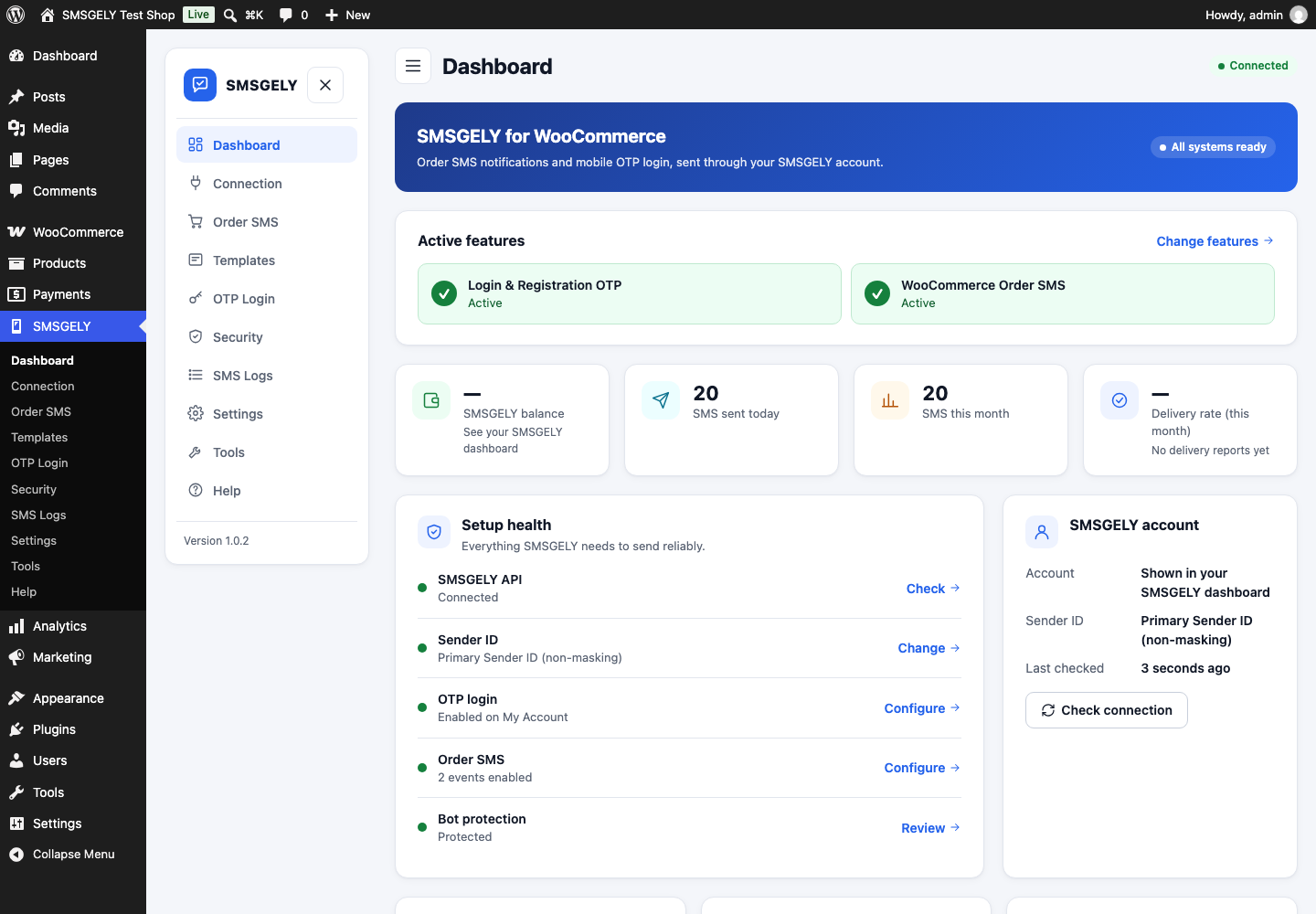
Dashboard with active features, SMS usage, setup health and shortcuts.
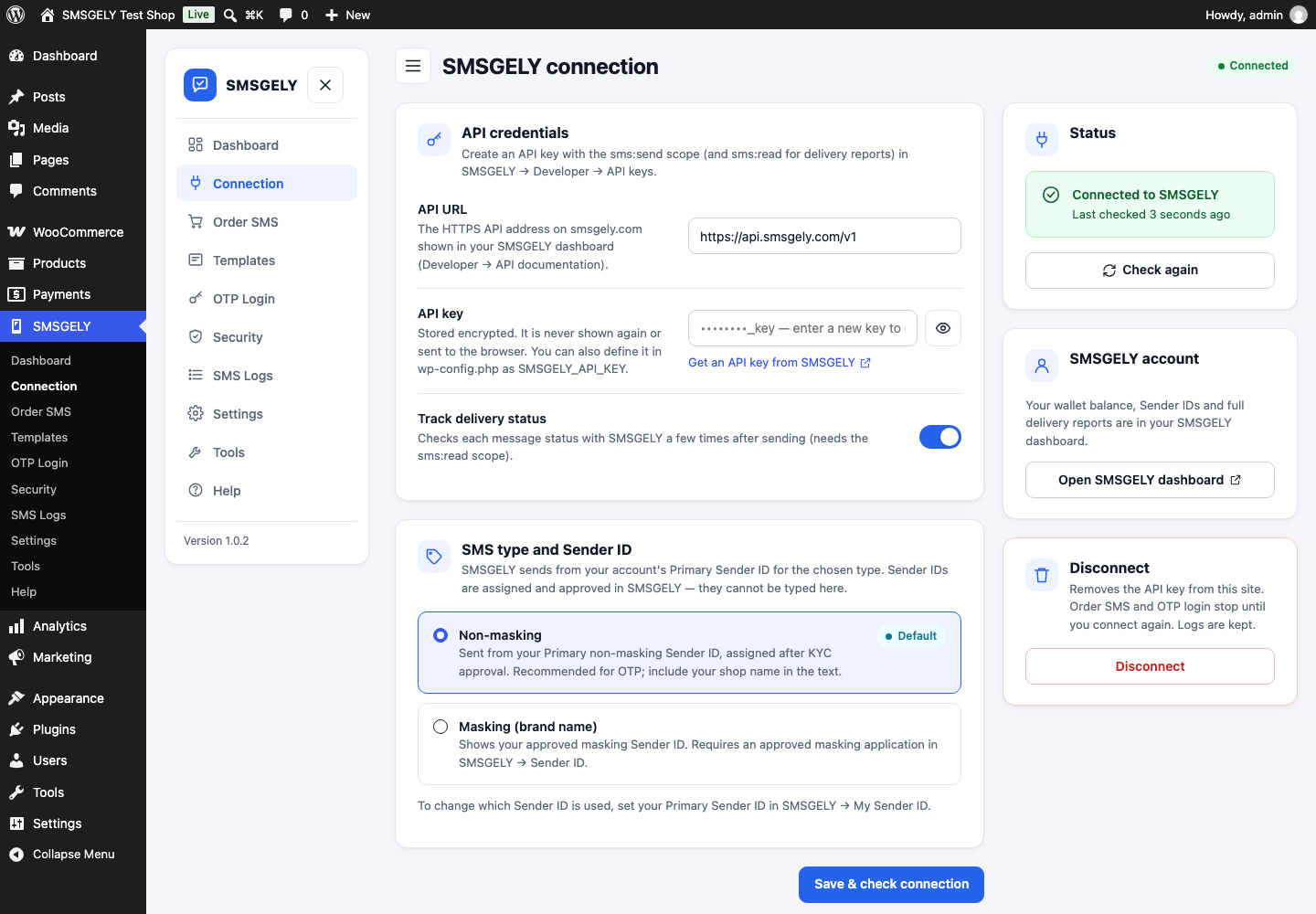
SMSGELY connection: API key, SMS type and Sender ID.
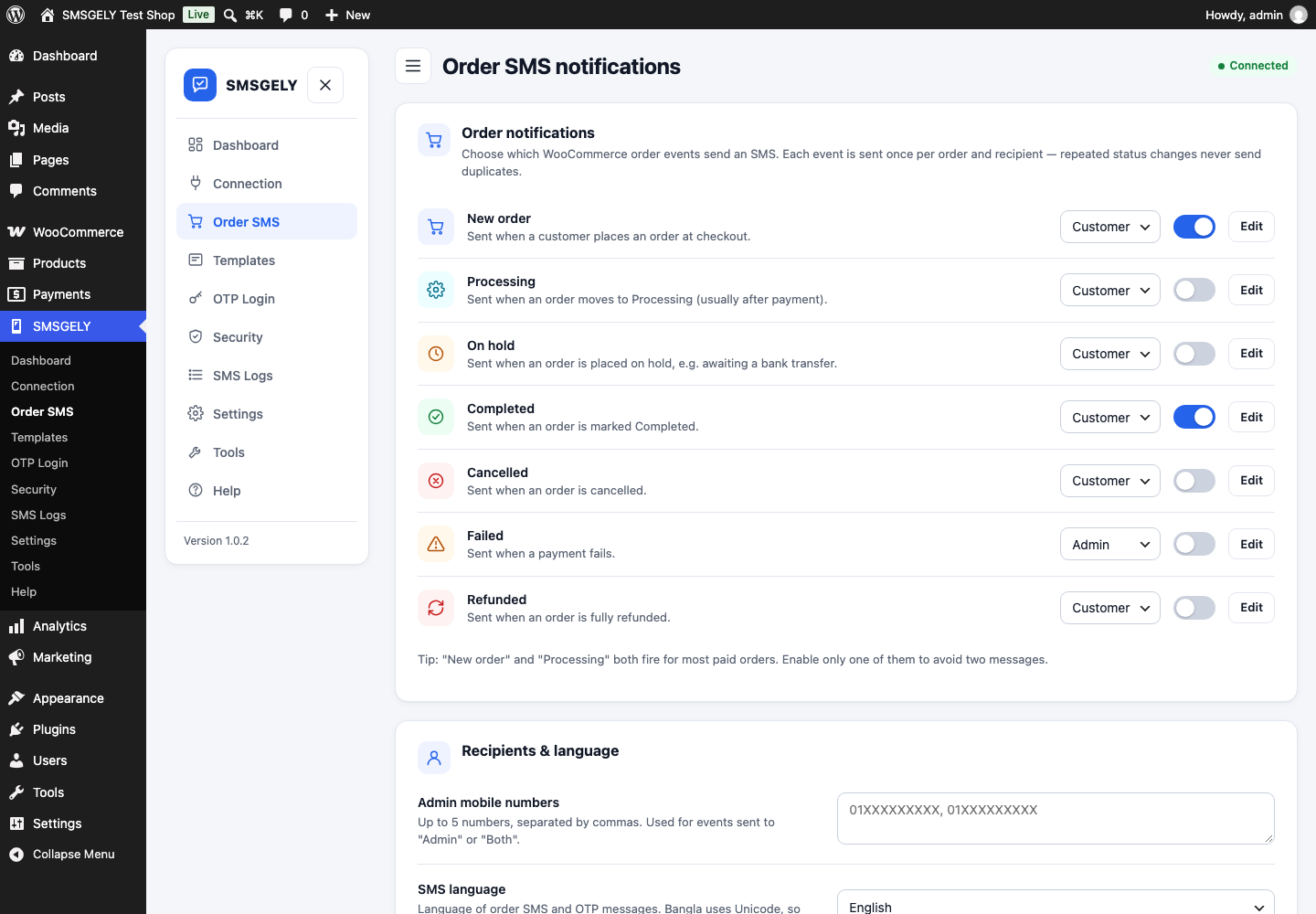
Order SMS events and recipients.

Template editor with English and Bangla messages, placeholders, preview and SMS part count.

OTP login on the WooCommerce My Account page.

Entering the verification code.
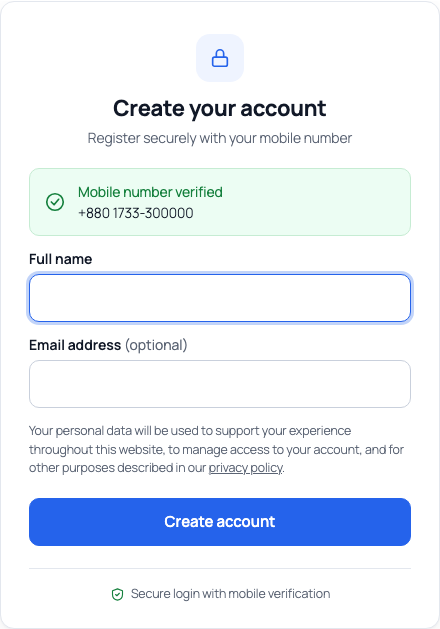
Completing registration after verifying the phone number.
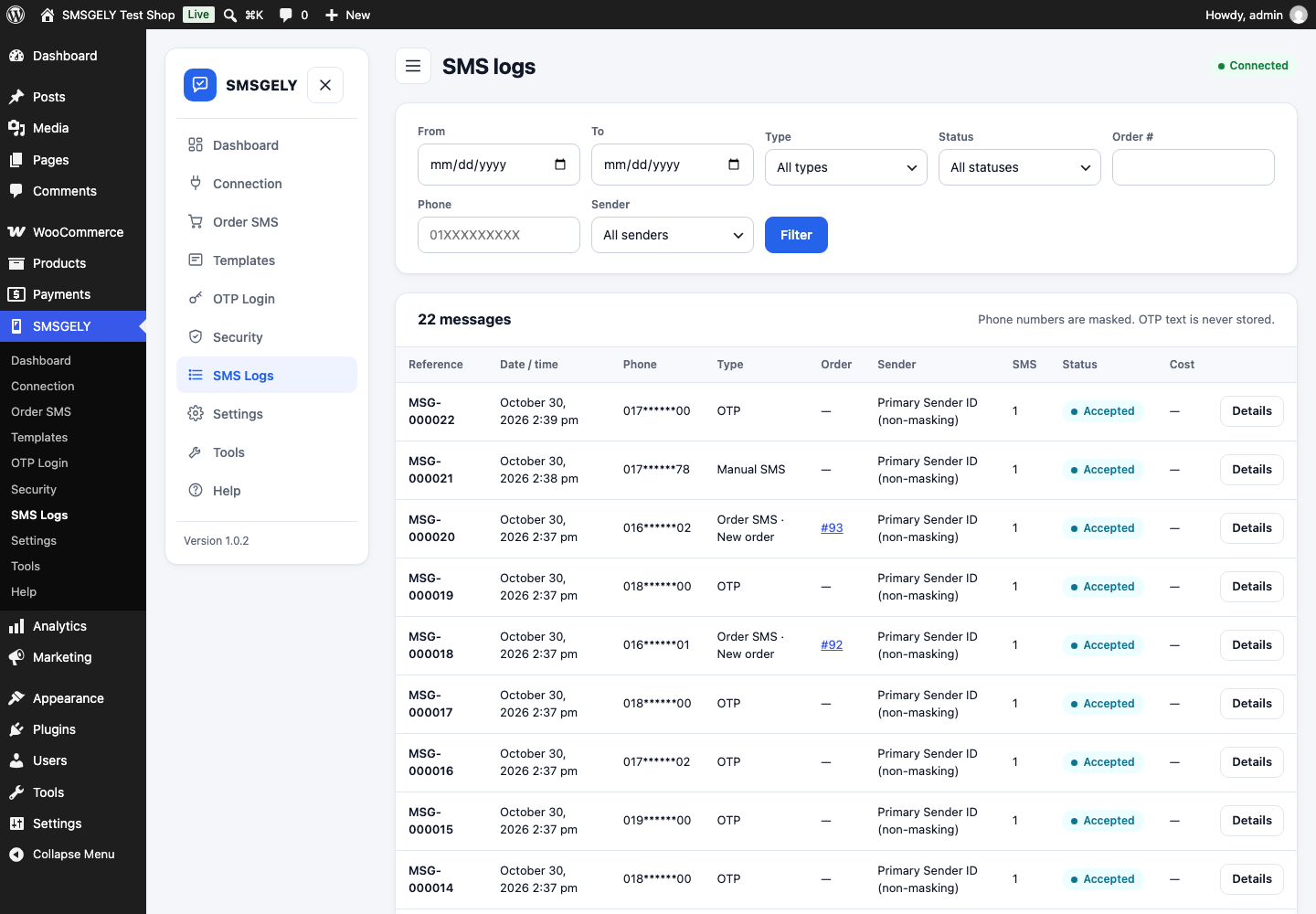
SMS logs with filters.

Security: bot protection, rate limits and spending limits.
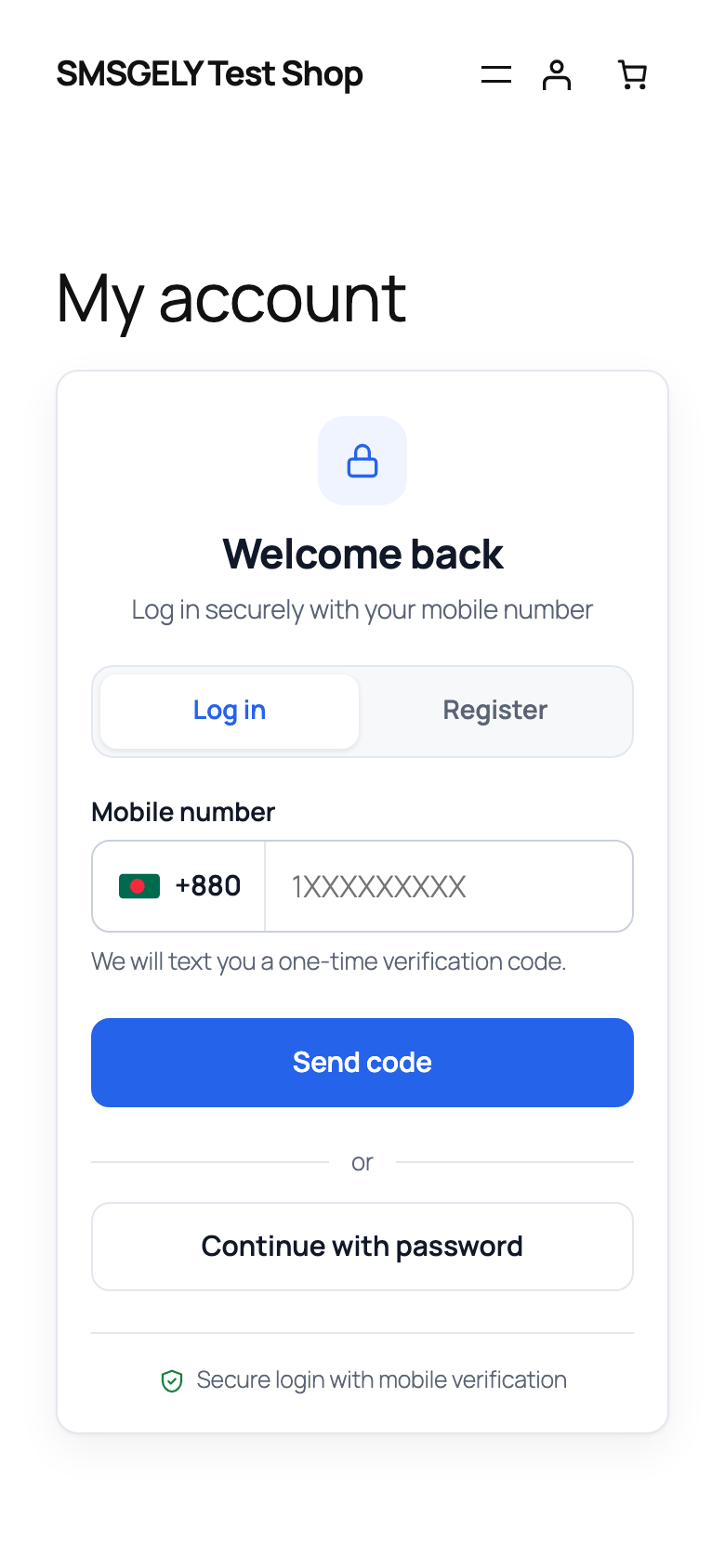
Mobile layout of the OTP login form.