
SOMNÉVORA LeadFlow Wordpress Plugin - Rating, Reviews, Demo & Download

Plugin Description
SOMNÉVORA LeadFlow is a lightweight, self-hosted lead management plugin for WordPress.
Its purpose is simple: help website owners keep track of enquiries after they arrive.
Instead of leaving leads scattered across form entries, email inboxes, or notes, LeadFlow stores and organizes them inside WordPress. A lead can be reviewed, updated, prioritized, assigned a follow-up date, contacted through the available contact actions, and moved through a simple sales pipeline.
LeadFlow is intentionally focused. It is not designed to be a large CRM, a form builder, an email marketing platform, or an external SaaS service.
The core workflow is:
Website enquiry Lead captured Organize Follow up Update status Won or Lost
Lead Management
LeadFlow provides a dedicated lead management area in WordPress.
A lead record can contain:
- First name
- Last name
- Email address
- Phone number
- Company
- Service or interest
- Enquiry message
- Lead source
- Lead status
- Priority
- Follow-up date
- Created date
- Last updated date
Administrators can add leads manually, view individual lead records, edit existing information, and securely delete leads.
Lead Statuses
Leads can move through the following pipeline statuses:
- New
- Contacted
- Qualified
- Proposal Sent
- Won
- Lost
This gives site owners a simple way to understand where each enquiry currently stands.
Lead Priorities
Each lead can be assigned a priority:
- Low
- Medium
- High
Priority can be used to identify enquiries that need more immediate attention.
Lead Sources
LeadFlow supports lead-source tracking with the following source options:
- Website
- Referral
- Other
Source information is also used by the Insights area to provide a basic view of where leads are coming from.
Lead List
The lead-management screen provides a central place to review stored leads.
The interface supports lead searching, filtering, sorting, and pagination so administrators can work with larger lead lists without having to inspect every record individually.
Individual Lead View
Each lead has a dedicated detail screen.
The screen displays contact information, enquiry details, the original message, current status, priority, follow-up information, and basic timeline information such as when the lead was created and last updated.
The same lead can be opened in Edit mode to update its information and management fields.
Dashboard
LeadFlow includes a dedicated admin dashboard that provides an overview of current lead activity.
The dashboard includes:
- Total Leads
- New Leads
- Qualified Leads
- Won Leads
- Follow-ups due today
- High-priority leads
- Recent leads
The dashboard also includes a follow-up overview so important follow-up work can be identified without opening the complete lead list.
Follow-up System
LeadFlow includes a built-in follow-up system.
Administrators can assign a follow-up date to a lead. LeadFlow organizes scheduled follow-ups into useful states such as:
- Overdue
- Due Today
- Upcoming
- Needs Attention
The dashboard can display relevant leads in these groups so follow-up work is easier to identify.
Follow-up dates remain attached to the lead record and can be changed from the lead editing screen.
Basic Insights
LeadFlow includes a lightweight Insights area for understanding stored lead data.
It provides basic lead statistics, source information, and conversion information using leads already stored in WordPress.
The Insights feature is intentionally lightweight and is not intended to replace a full analytics platform.
New Lead Email Notifications
When a new lead is successfully created through a supported capture workflow, LeadFlow can send a notification to the WordPress administrator email address.
The notification is presented as an HTML email and contains useful information about the new enquiry together with access to the corresponding lead in WordPress.
Email delivery uses WordPress’s wp_mail() system. Actual delivery therefore depends on the mail configuration of the WordPress installation and hosting environment.
WhatsApp Contact Action
When a lead contains a valid phone number, LeadFlow provides a WhatsApp contact action from the lead interface.
The action opens a WhatsApp conversation for that phone number so an administrator can continue the conversation through WhatsApp.
LeadFlow does not automatically send WhatsApp messages and does not require the WhatsApp Business API for this action.
Form Integrations
LeadFlow can automatically create lead records from successful submissions made through supported WordPress form plugins.
Supported integrations are:
- Elementor Forms
- WPForms
- Contact Form 7
- Forminator
- Gravity Forms
- Fluent Forms
- Formidable Forms
- JetFormBuilder
- SureForms
The integrations are optional. LeadFlow can still be used for manual lead management when none of these form plugins is installed.
When a supported form plugin is active, LeadFlow registers its integration and captures successful submissions through the appropriate form workflow.
Automatic Field Mapping
LeadFlow uses field matching to map common form fields to the lead record.
Commonly recognized information includes:
- First name
- Last name
- Full name
- Phone or mobile number
- Company or business name
- Service or interest
- Message, enquiry, requirements, or description
Because form plugins allow users to create their own field names, automatic mapping is based on recognizable field identifiers and labels.
Self-hosted Lead Data
LeadFlow’s core lead records are stored in the site’s WordPress database.
The plugin does not require a SOMNÉVORA cloud account or an external CRM to store and manage its core lead records.
Features
- Self-hosted WordPress lead management.
- Manual lead creation.
- Automatic lead capture from supported form plugins.
- Dedicated lead list.
- Search, filtering, sorting, and pagination.
- Individual lead detail pages.
- Lead editing.
- Secure lead deletion.
- Contact and enquiry information management.
- Lead statuses.
- Lead priorities.
- Follow-up dates.
- Overdue, due-today, upcoming, and attention follow-up views.
- Lead source tracking.
- Basic source, lead, and conversion insights.
- Dashboard overview cards.
- Recent lead activity.
- High-priority lead overview.
- New-lead administrator email notifications.
- WhatsApp contact action for leads with phone numbers.
- Automatic mapping of common form fields.
- Dedicated form integrations screen.
- Responsive WordPress admin interface.
- WordPress capability and nonce checks for protected administrative actions.
- Input validation and sanitization.
- Escaped administrative output.
- Privacy handling for stored lead data.
Supported Form Plugins
The current version includes integrations for:
- Elementor Forms
- WPForms
- Contact Form 7
- Forminator
- Gravity Forms
- Fluent Forms
- Formidable Forms
- JetFormBuilder
- SureForms
The third-party form plugins themselves are not bundled with SOMNÉVORA LeadFlow.
Privacy
SOMNÉVORA LeadFlow is designed to store and manage lead information inside the WordPress installation.
Depending on the forms and fields configured by a site owner, a lead record may contain personal information such as:
- Name
- Email address
- Phone number
- Company
- Service or interest
- Enquiry message
- Lead source
- Status
- Priority
- Follow-up date
- Record creation and update information
Website owners are responsible for deciding which information their forms collect and for providing any privacy notices, consent mechanisms, retention policies, or other disclosures required for their website and jurisdiction.
LeadFlow does not require lead records to be stored on SOMNÉVORA servers.
The new-lead notification feature uses the WordPress site’s email system. Email processing and delivery may therefore involve the hosting provider, SMTP provider, or other email service configured by the site owner.
When an administrator deliberately uses the WhatsApp contact action, WhatsApp is opened to continue communication using the relevant phone number. Use of WhatsApp is subject to WhatsApp’s own service and privacy practices.
Supported third-party form plugins operate under their own functionality and privacy practices. Site owners should review the privacy information for the form plugins and services they choose to use.
License
SOMNÉVORA LeadFlow is free software licensed under the GNU General Public License version 2 or later.
See LICENSE.txt for the complete license terms.
Screenshots
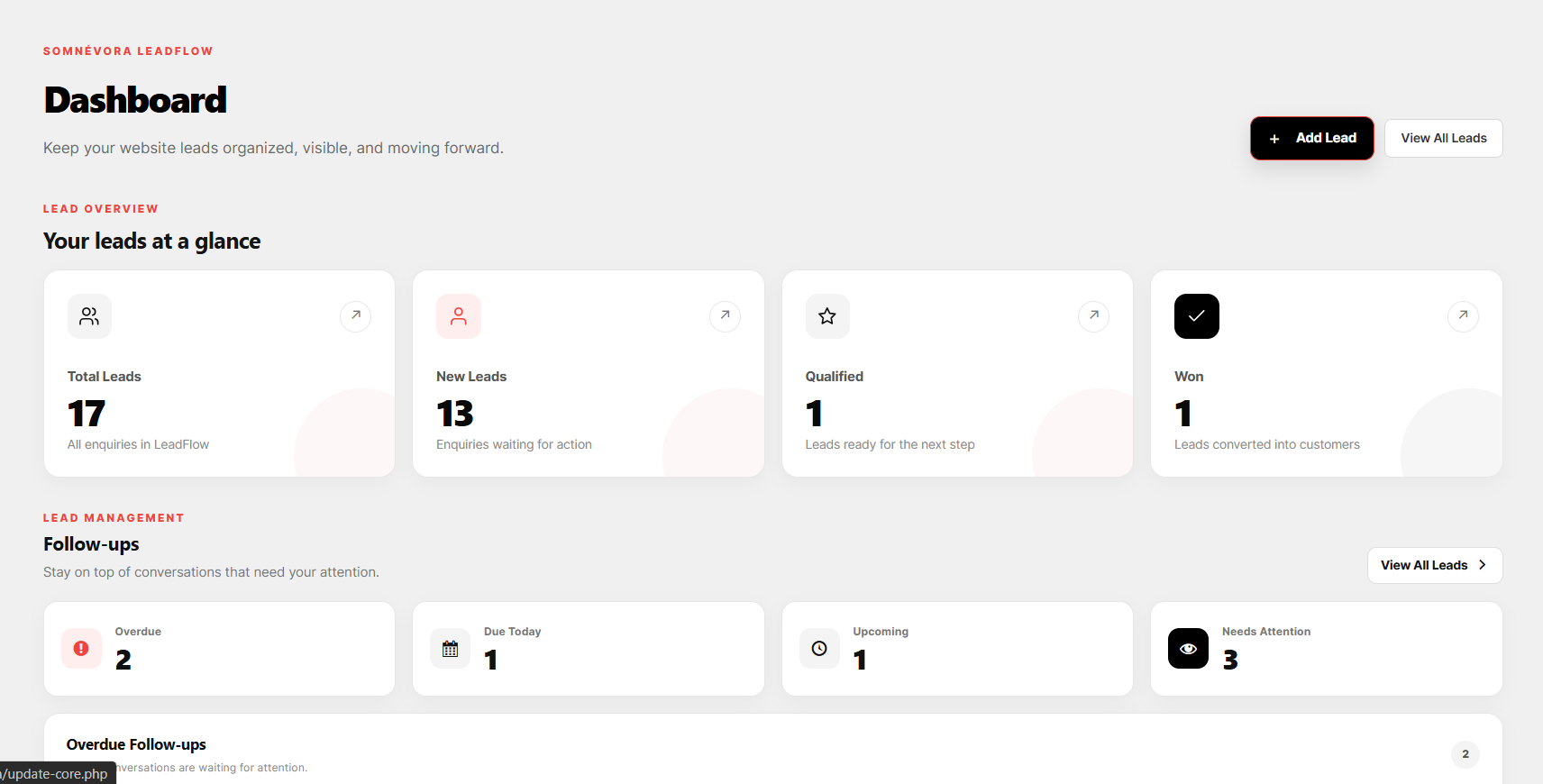
SOMNÉVORA LeadFlow dashboard with lead overview, follow-up management, and recent lead activity.
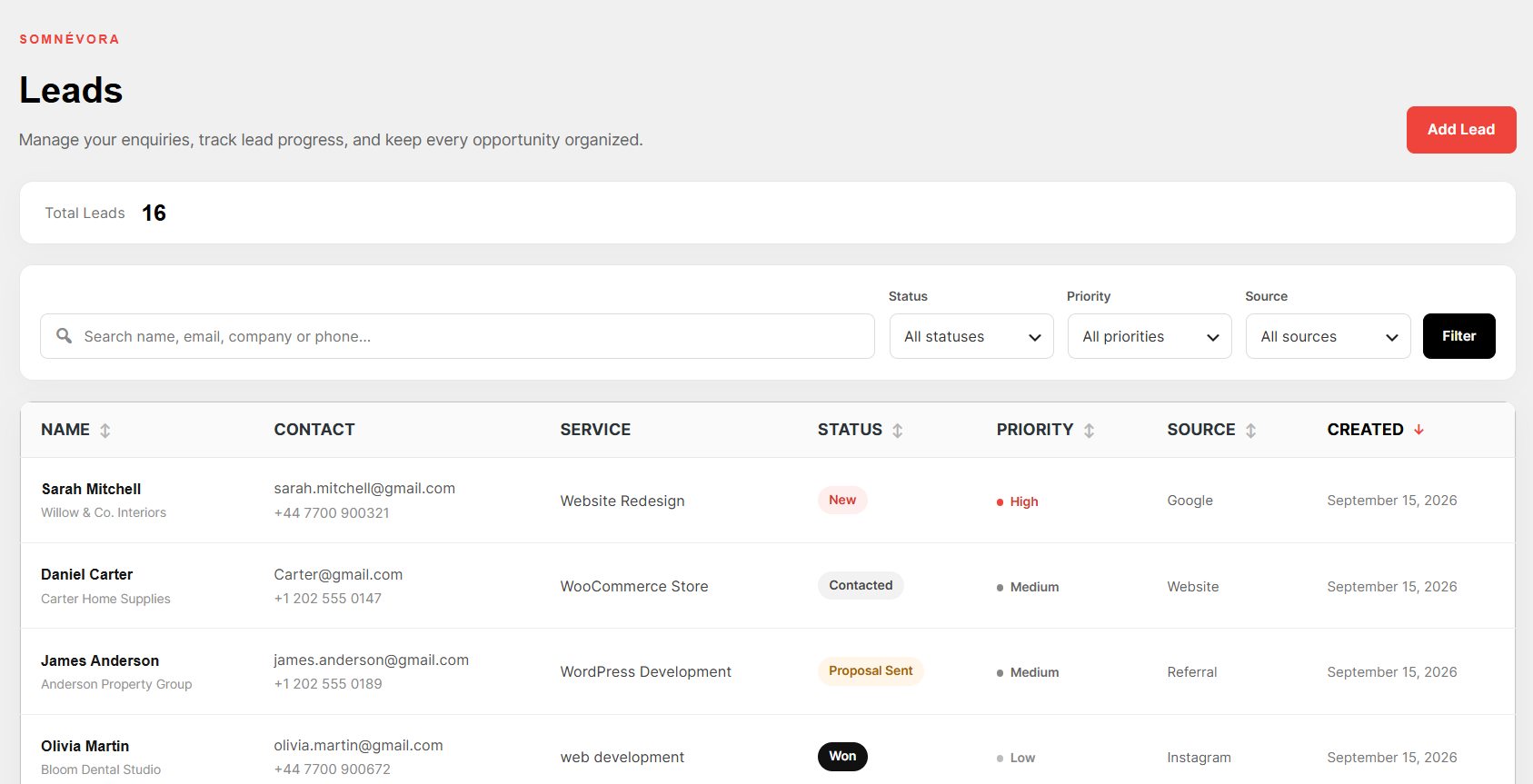
Lead management screen with search, filters, sorting, statuses, priorities, and lead information.
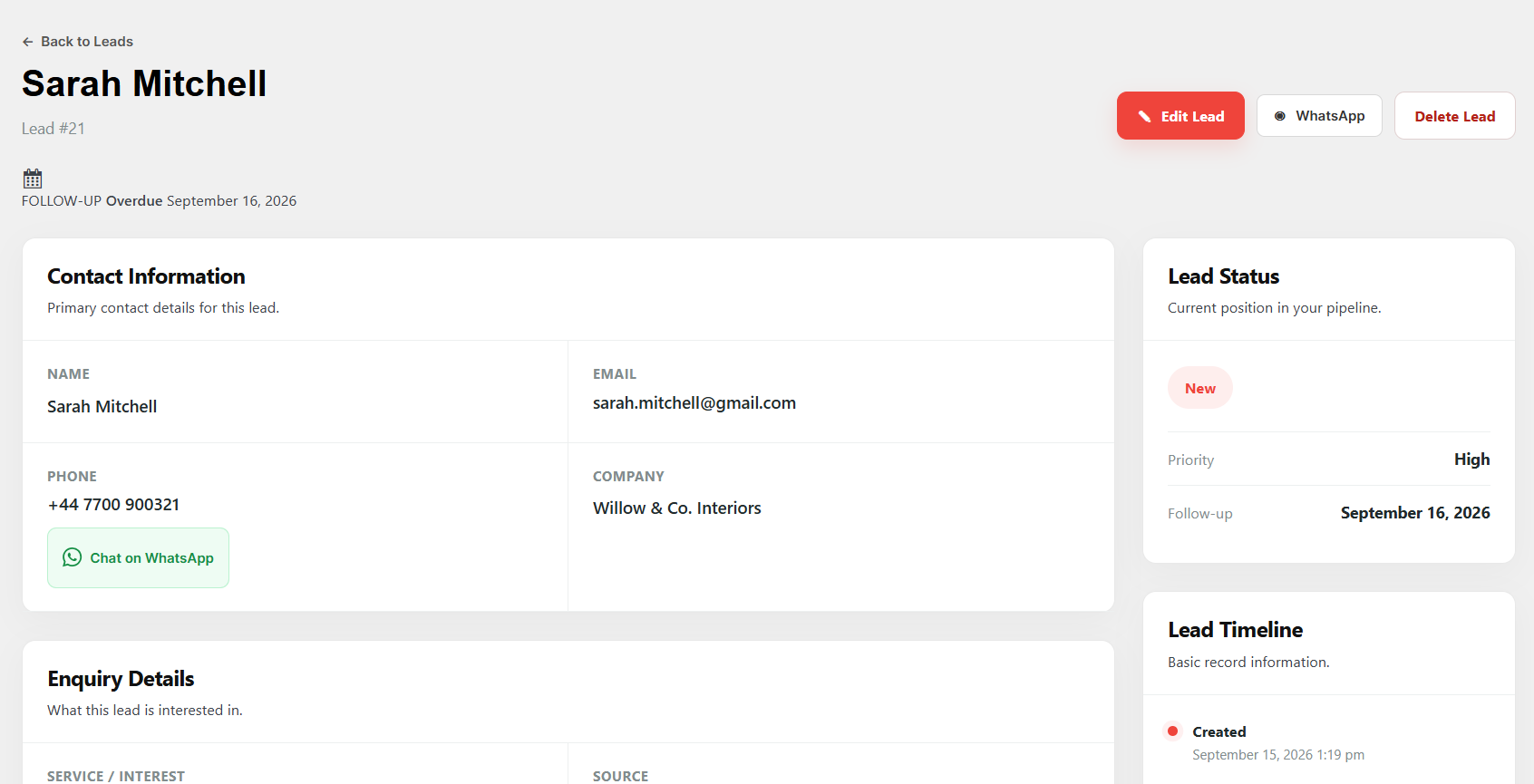
Individual lead view with contact information, enquiry details, status, follow-up information, and contact actions.
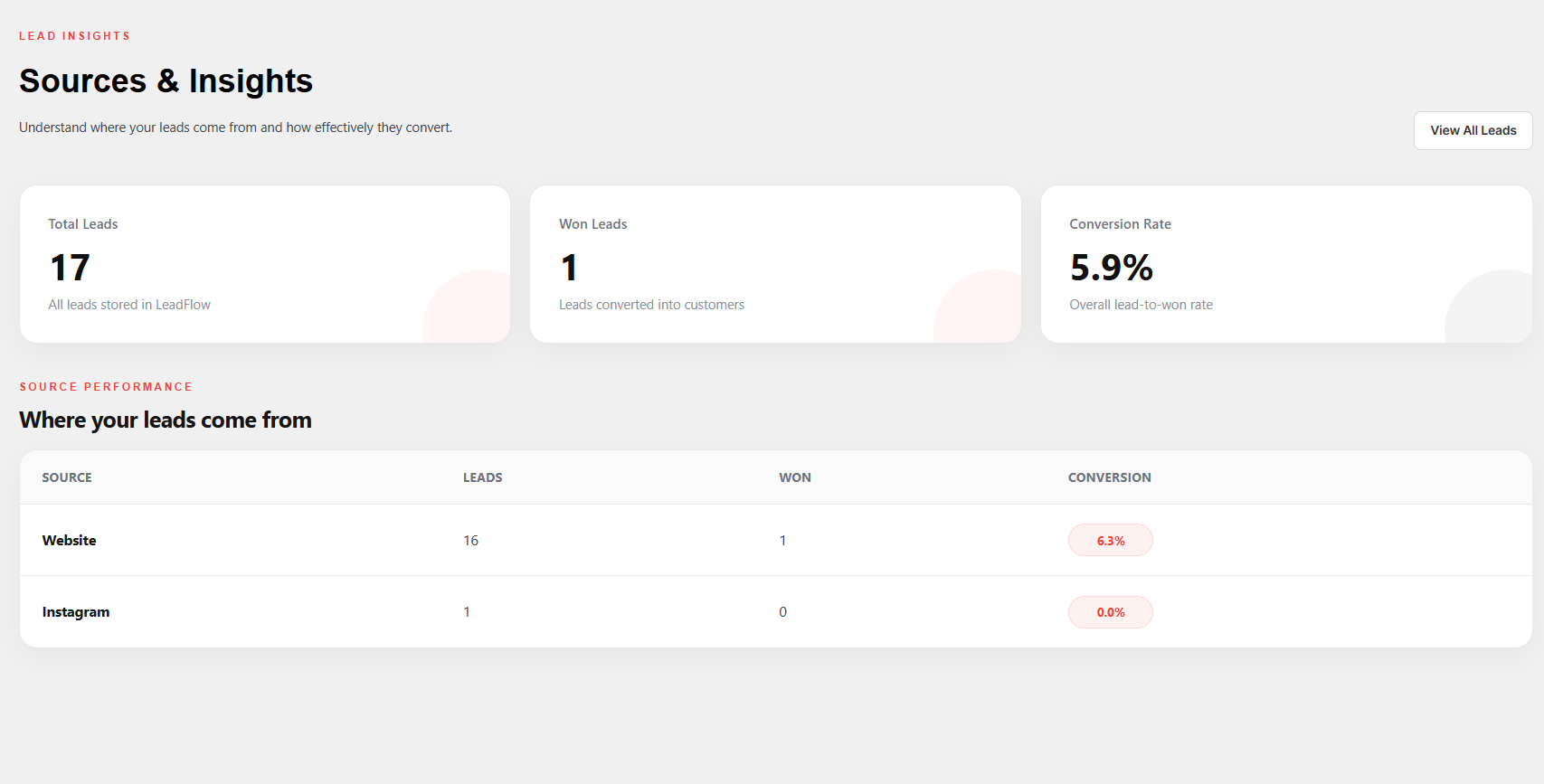
Insights screen with lead statistics, source performance, and conversion information.
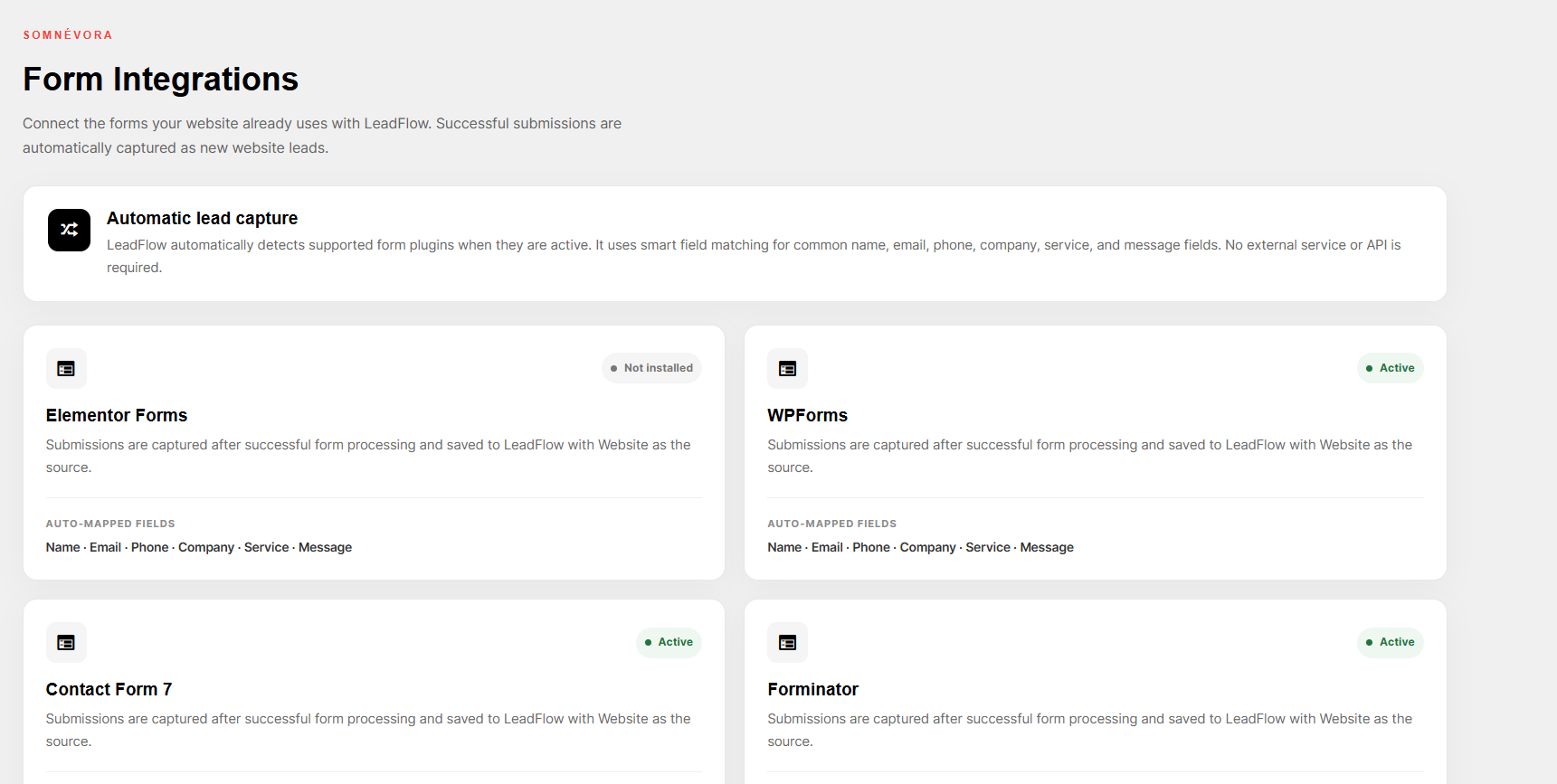
Form Integrations screen showing supported WordPress form plugins and their integration status.


