
Spicy Reviews Manager For Google Business Profile Wordpress Plugin - Rating, Reviews, Demo & Download

Plugin Description
Spicy Reviews Manager for Google Business Profile shows your Google reviews on your website and lets you manage them without leaving WordPress.
Show reviews
- Widget with a rating banner, in list, slider, grid or masonry layout, dark or light theme
- A full “all reviews” page with star filter, sorting, rating breakdown and pagination
- Shortcodes, Gutenberg blocks, block patterns and a classic widget
- Optional JSON-LD (schema.org) rating markup
- Owner replies are shown under each review (can be switched off)
Get reviews automatically
- “Connect with Google” sign-in inside the plugin (OAuth 2.0, tokens renew automatically)
- Scheduled incremental sync (twice daily, daily or weekly) that only fetches new and changed reviews
- Optional email notification when new reviews arrive
- Reviews are kept in your own database, so your site stays fast and nothing is fetched while visitors browse
Manage reviews
- Hide reviews you do not want to show, add reviews by hand
- Import from a Google Takeout export (JSON) or a CSV file, with duplicate detection
- Reply to reviews, edit or delete your reply, with a “Needs reply” counter and filter
- Optional reply suggestions through the WordPress AI Client (WordPress 7.0 or later, with an AI provider connected under Settings Connectors). A draft is only placed in the text box: nothing is posted until you press “Post reply”.
- Optional fallback to the Google Places API (newest 5 reviews only)
What you need
The Business Profile API is not open to everyone. You need a Google Cloud project that Google has approved for the Business Profile API (an application form, usually answered within days) and a Google account that owns or manages the Business Profile. Step-by-step instructions, with links, are built into the plugin settings page. Importing a Google Takeout file or CSV works without any API access.
Google and Google Business Profile are trademarks of Google LLC. This plugin is an independent project. It is not affiliated with, endorsed by or sponsored by Google.
External services
This plugin connects to Google services. Nothing is sent to the plugin author. Each connection only happens after you enter the matching credentials in the settings and only for the reasons below.
1. Google OAuth 2.0 (accounts.google.com, oauth2.googleapis.com)
Used when you click “Connect with Google” and whenever the access token has to be renewed. Sent: your OAuth client ID and secret, the authorization code or refresh token. Received: access and refresh tokens, which are stored in your WordPress database.
Google Terms of Service · Privacy Policy · API Services User Data Policy
2. Google Business Profile APIs (mybusinessaccountmanagement.googleapis.com, mybusinessbusinessinformation.googleapis.com, mybusiness.googleapis.com)
Used for the connection test, the location finder, each manual or scheduled sync, and when you post, edit or delete a reply. Sent: the access token, your account and location IDs and, for replies, the reply text. Received: your reviews (reviewer name, profile photo URL, star rating, text, dates, your reply), your business name, rating and review count.
Google Terms of Service · Privacy Policy · API Services User Data Policy
3. Google Places API (maps.googleapis.com), optional
Only if you enter a Places API key and Place ID as a fallback. Used during syncs only, never when a visitor loads a page. Sent: the API key and the Place ID. Received: the rating, review count and up to 5 recent reviews. Google’s Places terms limit how long this content may be stored, so please read them before relying on this fallback.
Google Maps Platform Terms of Service · Privacy Policy
4. AI provider of your choice, through the WordPress AI Client (optional)
This plugin makes no request to an AI service itself and has no AI key of its own. If you press “Suggest reply” on a review, the plugin hands the prompt to the WordPress AI Client (WordPress 7.0 or later), which sends it to the provider you connected under Settings Connectors. Sent: the review text (up to 1,500 characters), the star rating, the reviewer’s first name and your optional tone notes. Received: the draft reply text. Please read the terms and privacy policy of the provider you chose.
Data stored on your site
Reviews (reviewer names, photo URLs, ratings, text, dates, replies), your settings and, if you enable it, anonymous counters of widget impressions and clicks. The counters never leave your server. Deleting the plugin removes all of it.
Screenshots

The reviews widget in the dark theme, list layout.
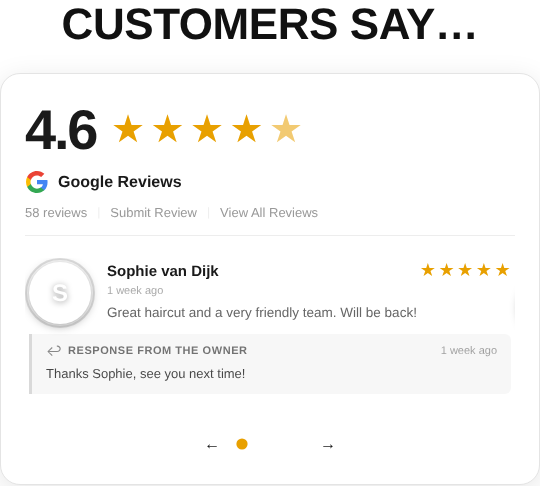
The light slider layout.

Manage Reviews: sync status, needs-reply counter, reply and edit-reply buttons.

Writing a reply with an AI-suggested draft.

Settings with step-by-step setup guides.


