
Synthocode AI For WooCommerce Wordpress Plugin - Rating, Reviews, Demo & Download
Plugin Description
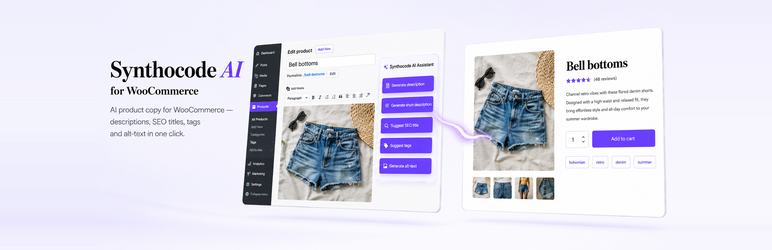
Synthocode AI for WooCommerce adds an AI side panel to every WooCommerce product edit screen. Generate:
- Long product descriptions
- Short descriptions / excerpts
- SEO-optimized titles
- Product tags suggestions
- Image alt-text
Pick a tone (neutral, luxury, casual, technical). The free version includes a monthly quota; a Pro license unlocks unlimited generations, bulk processing of your full catalogue, and multilingual translation.
Why this plugin
- Built specifically for WooCommerce stores
- No OpenAI / ChatGPT API key to manage — generations are proxied through synthocode.studio
- Respects WordPress coding standards
- Lightweight: no bloat on the front-end
- Works with any WooCommerce theme
Pro features
Available at https://synthocode-ai-for-woocommerce.synthocode.studio :
- Unlimited generations
- Bulk processing (entire catalogue in one click)
- Vision AI: write full product sheets by analysing your existing product photos
- Multilingual translation (WPML / Polylang)
- Tone templates
- Priority support
External Services
This plugin connects to one external service to generate AI text content. No service is contacted until you click a “Generate” button.
Synthocode AI for WooCommerce API (https://synthocode.studio/api/wcai/v1/generate)
- What is sent: the product title you entered, the selected task (
description,short_description,alt_text,seo_title, ortags), the selected tone (neutral,luxury,casual,tech), your site URL, and the plugin version. - What is NOT sent: customer data, order data, product images, prices, stock, payment details, or any personal information.
- When: only when you click a “Generate” button in the product editor.
- Service provider: Synthocode (Slim Belhadj, France).
- Terms of Service: https://synthocode.studio/cgu-cgv
- Privacy Policy: https://synthocode.studio/confidentialite
The Synthocode API then forwards your request to OpenAI (https://openai.com) using a server-side API key managed by Synthocode. You do not need an OpenAI / ChatGPT account.
- OpenAI Terms: https://openai.com/policies/terms-of-use
- OpenAI Privacy: https://openai.com/policies/privacy-policy
Screenshots

AI assistant panel on the product edit screen.

Settings page with quota usage.



