
Toolbox For Elementor Wordpress Plugin - Rating, Reviews, Demo & Download
Plugin Description
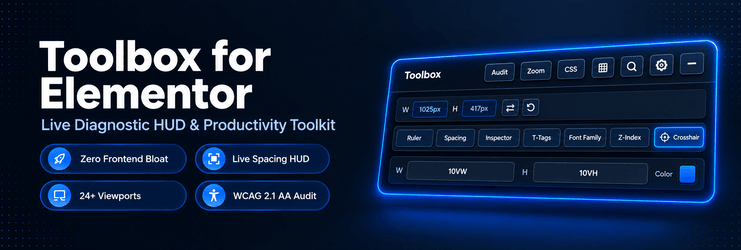
Toolbox for Elementor is an all-in-one diagnostic HUD (Heads-Up Display) and workflow productivity toolkit designed specifically for WordPress creators, UI/UX designers, and front-end developers building with Elementor.
Stop toggling between browser DevTools and the Elementor panel. Say goodbye to repetitive margin/padding calculations, unexpected Z-index stacking collisions, and responsive breakpoint guesswork. Toolbox for Elementor embeds professional design-system overlays, precision pixel rulers, computed spacing visualizers, typographic hierarchy checks, and WCAG accessibility audits right inside your active Elementor editor canvas.
Why Designers & Developers Choose Toolbox for Elementor
- Zero Frontend Bloat: Assets, scripts, and stylesheets load exclusively inside the active Elementor editing session. Live visitors experience zero impact on speed, Core Web Vitals, or page weight.
- Non-Destructive Workflow: Visual overlays, rulers, guides, crosshairs, and inspection badges are non-destructive visual guides. They never alter your DOM structure, post content, or database records.
- Modern Container Architecture: 100% compatible with modern Elementor Flexbox Containers, CSS Grid Containers, and classic Section/Column structures.
- Pixel-Perfect Precision: Build websites with the rigor of Figma or Sketch directly on live WordPress pages.
Core Diagnostic Tools & Features
- Global Class Crosshair: Hover over any container or widget to instantly detect and pulse-highlight every other element across the canvas sharing the identical custom CSS class. Ideal for micro-auditing custom design systems and utility classes.
- Live Alignment Grid Overlay: Display an adjustable layout grid on top of your live canvas. Freely customize column width (
vw,px), row/gutter height (vh,px), and grid line colors with real-time opacity control. - Precision Canvas Rulers & Drag Guidelines: Pull interactive horizontal and vertical guide lines from top and left pixel rulers. Measure distances with single-pixel accuracy and align disparate widgets effortlessly.
- Spacing Compare & Live Margin/Padding Inspector: Hover over any element to reveal real-time computed box model overlays (margins in orange, padding in green, exact content dimensions). Includes a detachable, draggable floating Spacing HUD.
- T-Tags Heading Structure Detector: Visualize your entire document heading hierarchy (H1, H2, H3, H4, H5, H6) with color-coded live badges. Catch missing H1 tags, multiple H1 tags, or skipped heading levels to ensure optimal on-page SEO and GEO (Generative Engine Optimization).
- Live Font Family Detector: Inspect rendered font families across all headings and text blocks with live badges. Rapidly discover accidental fallback fonts, inconsistent font assignments, or rogue typography styling.
- Live Z-Index Overlay & Stacking Map: Solve sticky header overlaps, dropdown menu stacking bugs, and misplaced modal backdrops with instant visual badges displaying computed
z-indexvalues for all positioned elements. - Live Element Inspector HUD: Inspect computed CSS rules, box dimensions, element tags, and classes directly on canvas without having to open the browser inspect panel.
- Device Responsive Breakpoint Simulator: Test layouts instantly across 24+ real-world mobile, tablet, and foldable device presets (iPhone 17/16/15 Pro Max, Galaxy S26/S25/S24 Ultra, Pixel 9 Pro XL, iPad Pro, Galaxy Z Fold 6) or enter custom viewport dimensions. Features a one-click ⇄ orientation swap button.
- Canvas Zoom & Extended Height Controls: Zoom canvas scale from 100vh up to 1000vh and 2000vh with smooth panning controls for effortless long-page layout reviews and sticky position debugging.
- Instant Custom CSS Jump: Jump directly into Elementor’s Custom CSS panel with a single click, saving hours of repetitive tab switching.
- Page Accessibility & Structure Audit (WCAG 2.1 AA): One-click accessibility scanner analyzing your page for color contrast ratios (4.5:1 text, 3:1 large text), missing or duplicate
<main>landmarks, header/footer landmarks, missing image ALT tags, non-modern image formats (PNG/JPEG vs WebP), heading level skips, and touch target minimum sizes (24x24px). Includes an interactive “Info & Fixes” drawer with step-by-step Elementor remediation instructions. - Quick Navigator & Search Drawer: Search and filter containers, sections, and widgets instantly via a fast slide-out drawer to jump to any element on heavy pages.
- Customizable Control Layer: Organize your workflow by showing or hiding individual tools, setting your default startup tool, and saving preferences per user account via user meta.
- Global Admin Control: Includes a clean WordPress dashboard settings screen with a master toggle switch to enable or disable editor HUD assets site-wide.
Screenshots

Floating Toolbox diagnostic HUD bar inside the active Elementor editor canvas.

Spacing Compare and live margin & padding box model visualizer HUD.

Live Alignment Grid overlay with configurable column widths, gutter heights, and colors.

WCAG 2.1 AA Page Accessibility & Structure Audit panel with interactive Info & Fixes guide.

Device Responsive Breakpoint Simulator with 24+ smartphone, tablet, and foldable presets.

Global Class Crosshair highlighting elements sharing identical custom CSS classes.


