Volixta Database Manager Wordpress Plugin - Rating, Reviews, Demo & Download
Plugin Description
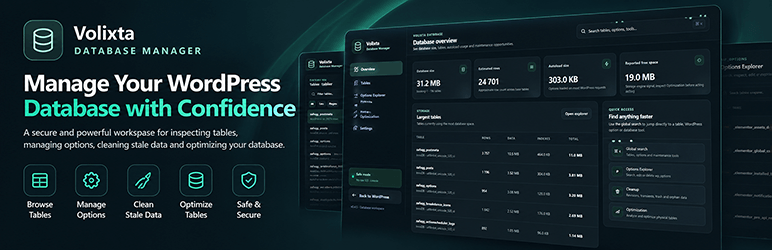
Volixta Database Manager is a WordPress database management plugin that helps you explore database tables, manage WordPress options, clean unnecessary data and optimize database performance directly from your WordPress dashboard.
Browse and search database tables, inspect stored data, remove expired transients, clean old revisions, detect orphaned metadata and maintain database tables using built-in diagnostic and optimization tools.
Designed with safety in mind, Volixta Database Manager includes protected WordPress core tables, confirmation for sensitive operations and controlled cleanup tools — without exposing an unrestricted SQL console.
Database overview
- View database size, estimated row count, autoload size, reported free space and the largest tables.
- See a WordPress Dashboard snapshot with database size, table count, autoload usage, reported overhead and largest-table information.
- Open dedicated Overview, Tables, Options, Cleanup, Optimization, Settings and Volixta Ecosystem workspaces.
- Use global search to quickly find tables, WordPress options and database tools.
- Choose between Immersive, Focus and Standard interface palettes.
Volixta Ecosystem
- Discover Volixta Analytics Lite, Volixta SSL & Security Headers and Volixta Booking.
- Show installed and active statuses for free plugins already on the site.
- Install and activate free plugins through the native WordPress permission-checked, nonce-protected workflows.
- Open active plugins or visit their official WordPress.org listings.
- Follow the current Immersive, Focus or Standard workspace design.
Table Explorer
- Browse and search database tables with Core / plugin-custom grouping.
- Search text columns, apply column-specific filters, sort rows and paginate large tables.
- Choose which columns are visible and store per-table visibility preferences in the browser.
- Edit or delete rows only in plugin/custom tables when a reliable primary key exists.
- Keep WordPress-managed core tables read-only in the generic explorer so direct row mutations cannot bypass WordPress APIs, caches or hooks.
Options Explorer
- Search options by name or value and filter by autoload state.
- Exclude WordPress Connector API credentials from browsing, searching, editing and deletion.
- Edit non-serialized options with server-side validation.
- Require exact-name confirmation before changing or deleting critical WordPress options.
- Protect serialized option values from direct editing.
- Allow explicit deletion only through guarded actions.
Database Cleanup
Cleanup actions are separated into Safe, Review and Advanced risk levels so potentially destructive operations are never mixed with routine maintenance.
- Keep the newest post revisions per post and apply a minimum age.
- Remove expired transients safely.
- Clean old auto-drafts, trash, spam and trashed comments using retention rules.
- Review old unapproved comments, approved pingbacks and approved trackbacks before cleanup.
- Detect and clean orphaned post, comment and user metadata.
- Detect attachment posts whose referenced parent no longer exists; attachment files are removed through WordPress APIs.
- Detect broken taxonomy relationships.
- Process cleanup in batches with live progress feedback.
- Require server-side confirmation for Review and Advanced cleanup categories.
- Optionally schedule Daily, Weekly or Monthly automatic cleanup for Safe categories only.
- Continue very large scheduled cleanup jobs through bounded WP-Cron continuation runs.
Table maintenance and optimization
Logical cleanup and physical table maintenance are intentionally kept separate.
- Inspect MySQL, MariaDB and Percona table/storage-engine information.
- Use conservative reported-free-space recommendations, including stricter handling for InnoDB.
- Run CHECK TABLE and ANALYZE TABLE diagnostics.
- Run guarded REPAIR TABLE only for supported storage engines.
- Run guarded OPTIMIZE TABLE with explicit confirmation and per-table feedback.
Safety by design
Volixta Database Manager is intentionally restrictive around destructive operations.
- Single-site access requires the WordPress
manage_optionscapability. - On Multisite, database-wide access requires a Super Administrator with
manage_network_options. - REST requests use the authenticated wp-admin session plus the WordPress
wp_restnonce. - Dynamic identifiers and values are validated/prepared before database execution.
- Critical option changes, Review/Advanced cleanup, REPAIR TABLE and OPTIMIZE TABLE require server-side confirmation.
- WordPress core tables remain read-only in the generic Table Explorer.
- Serialized options cannot be directly edited.
- WordPress-managed Connector API credentials are excluded from the Options and Table explorers.
- The plugin does not expose an arbitrary SQL console.
- The plugin does not make background telemetry or tracking requests.
Review prompt and interface
- Optionally displays a dismissible WordPress.org review reminder after the plugin has been in use for a while.
- Choose between Immersive, Focus and Standard interface palettes across the Volixta workspace and Dashboard integration.
Security and uninstall
- Single-site access requires the WordPress
manage_optionscapability. - On Multisite, database-wide access is restricted to Super Administrators with
manage_network_options. - REST requests use WordPress REST cookie authentication plus the
wp_restnonce. - Uninstall removes only Volixta Database Manager settings, review state, transients and scheduled cleanup events.
- Uninstall never deletes WordPress tables, content, or options belonging to WordPress or other plugins.
- On Multisite uninstall, Volixta-owned settings and scheduled events are removed per site.
Localization
Text domain: volixta-database-manager
Load path: /languages
What’s Next
If you like this plugin, check out our other tools:
-
VOLIXTA Booking – The All-in-One WordPress Booking Plugin
Manage unlimited staff, services, clients, payments, and locations in one powerful system.
Screenshots

Database Overview — Inspect database size, estimated rows, autoload usage, reported free space and the largest tables from a focused overview with quick access to maintenance tools.

Table Explorer — Browse and search database tables, inspect rows, choose visible columns, apply advanced filters, sort results and paginate large datasets. WordPress-managed core tables remain read-only, while eligible plugin/custom tables with a reliable primary key can be edited or deleted.

Options Explorer — Search WordPress options by name or value, filter by autoload state, inspect option size and safely manage values. Serialized options are protected from direct editing.

Database Cleanup — Preview stale WordPress data and clean it using configurable retention rules. Cleanup actions are separated into Safe, Review and Advanced categories, with automatic scheduling available only for Safe categories.

Table Optimization — Inspect table engines, reported free-space signals and server capabilities, analyze table health and run guarded physical optimization only when appropriate.

Settings — Choose between Immersive, Focus and Standard Volixta workspace styles, configure Table Explorer pagination and reopen the setup wizard at any time.

Volixta Ecosystem — Discover compatible Volixta products and use native WordPress installation or activation links where available.