Volixta Task Manager Lite Wordpress Plugin - Rating, Reviews, Demo & Download
Plugin Description
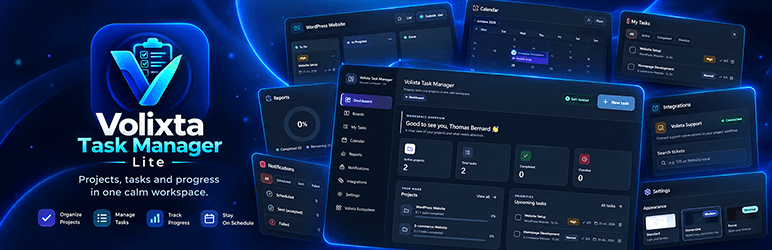
Volixta Task Manager Lite brings project and task management directly into your WordPress dashboard. Organize projects, manage tasks, plan deadlines, and track progress in one intuitive, self-hosted workspace.
From customer requests to actionable tasks. With the optional Volixta Support integration, turn support tickets into linked project tasks and manage customer requests alongside your everyday work.
Your workspace, your data. No external account or subscription is required. Your projects and tasks stay on your WordPress site.
Designed for freelancers, developers, and website owners, the Lite edition provides a personal workspace for one WordPress administrator, without multi-user collaboration.
Organize projects with Kanban boards
- Create unlimited personal projects and tasks.
- Start with To Do, In Progress and Done, then rename, reorder or add your own Kanban stages.
- Drag tasks between stages to update their progress.
- Switch between board, list and calendar views within a project.
- Search tasks and filter work by status.
- Duplicate projects or tasks and archive work you no longer need on your active boards.
- Assign custom colors to projects for easier identification.
Keep all your tasks in one place
- Give each task a title, description, priority, start date and due date.
- Add labels and checklists to break larger tasks into smaller steps.
- Review task activity and mark work as completed.
- Use My Tasks to see work across your projects, including active, completed and overdue tasks.
- Open a task to edit its details, checklist and attachments without losing your place.
Calendar, deadlines and reminders
- See scheduled tasks in a monthly calendar.
- Identify calendar tasks by their project’s color, with a project color legend.
- Check upcoming and overdue tasks from the Task Manager dashboard.
- Add an optional WordPress Dashboard widget that groups unfinished work into overdue, today, tomorrow, the next seven days, later and tasks without a due date.
- Follow tasks directly from the WordPress Dashboard widget to their details.
- Enable optional on-screen deadline reminders and email reminders.
- Review scheduled, accepted and failed email attempts in Notifications, with manual sending or resending where available.
Email reminders are off by default. When enabled, they use WordPress wp_mail() and WP-Cron. Send times can vary depending on site traffic and your WordPress mail setup. A message accepted by WordPress is not necessarily delivered to the inbox.
Reports and exports
- View totals for all tasks, completed tasks and open tasks.
- Check overall completion and progress for each project.
- Export task information in CSV or JSON format.
Exports do not include an automatic backup of encrypted attachment files. Keep your usual WordPress site backups.
Private, encrypted attachments
Add supported files to tasks, up to 10 MB per file or your site’s lower upload limit. Private attachments are encrypted using AES-256-GCM and downloaded through an authenticated WordPress endpoint. Project and task information is stored in dedicated tables in your own WordPress database.
Private attachments require OpenSSL support and a writable WordPress uploads directory. Do not change the WordPress authentication salts without planning for the encrypted files, as doing so can prevent their decryption.
Choose the interface that suits you
Choose between three interface modes:
- Standard: a light, familiar interface.
- Immersive: a dark workspace with clear navigation.
- Focus: a minimal layout with fewer distractions.
A six-step setup wizard helps you choose an appearance, create your first project, adjust your workflow and set reminder preferences. You can skip the wizard or change your settings later.
Optional Volixta Support integration
Volixta Task Manager Lite includes an optional integration with Volixta Support, allowing you to turn customer support requests into manageable tasks.
When both plugins are installed and active, you can:
- Search existing support tickets by ticket number or subject.
- Create a task directly from a support ticket.
- Automatically use the ticket subject as the task title.
- Carry over the ticket priority to the new task.
- Link the task to its original support ticket.
- Choose a project for the task or use an existing project automatically.
- Reopen previously linked tasks without creating duplicates.
- Navigate between linked tickets and tasks.
- Access Task Manager actions from the Volixta Support admin interface.
For example, when a customer submits a support ticket requesting a website correction, you can create a linked task in Volixta Task Manager Lite, organize it on your Kanban board and track its progress.
The original ticket remains in Volixta Support, while the related task is managed in Task Manager Lite. The integration creates a link between the two records; it does not automatically synchronize their statuses, comments or attachments.
This integration is available to the authorized WordPress administrator.
Volixta Support is optional. Volixta Task Manager Lite works independently without it.
Discover more plugins with Volixta Ecosystem
The Volixta Ecosystem page lets you discover and manage other Volixta WordPress plugins directly from the Task Manager interface.
From this page, you can:
- Browse other Volixta plugins and their descriptions.
- Check whether a listed plugin is active, installed or available.
- Install supported plugins from the WordPress.org directory when you have the required permissions.
- Activate plugins that are already installed.
- Open active plugins or access their management pages.
- Visit external product websites when direct installation is unavailable.
For supported plugins hosted on WordPress.org, click Install plugin to start the standard WordPress installation process. Once installed, return to the Ecosystem page and click Activate plugin if activation is required.
You can also install plugins manually from Plugins > Add New Plugin in WordPress.
Available Volixta plugins include:
- Volixta Support – Manage customer support tickets and link support requests to Task Manager tasks.
- Volixta Analytics Lite – Track website visitors and traffic directly from WordPress.
- Volixta SSL & Security Headers – Manage SSL and HTTP security headers for WordPress.
- Volixta Database Manager – Explore database tables, review options and clean up unnecessary data.
- Volixta Booking – Appointment scheduling and booking management.
Volixta Booking is linked to its external website and is not installed automatically from the Ecosystem page.
All additional Volixta plugins are optional. You can use Volixta Task Manager Lite without installing any of them.
Who is this plugin for?
Volixta Task Manager Lite is useful if you want to manage your own WordPress website projects, development work, content plans, maintenance checklists or personal deadlines without switching to a separate task management service.
Please note: The Lite workspace belongs to one WordPress administrator. It does not provide multi-user collaboration, team roles or frontend task submission.
Security and Uninstall
Task Manager Lite uses private, owner-restricted WordPress endpoints and dedicated database tables. Private attachments are encrypted with AES-256-GCM and require authenticated downloads. The plugin does not need an external task management account to store its core project and task data.
Email reminders are optional and use your site’s WordPress mail system and WP-Cron. Data shared with an optional Volixta Support integration is subject to that plugin’s permissions.
Important: Deactivation keeps your project data. Uninstallation permanently deletes plugin-specific data, database tables, settings, notification history and encrypted attachments. Make a full backup before uninstalling. Preserve WordPress authentication salts to keep existing encrypted files readable.
Localization
Text domain: volixta-task-manager-lite
Language directory: /languages
What’s Next
Other tools from Volixta:
- Volixta Booking — Booking, services, staff, customers, payments and locations for WordPress.
- Volixta Analytics Lite — Privacy-focused visitor and traffic insights.
- Volixta SSL & Security Headers — SSL and essential HTTP security headers.
- Volixta Database Manager — Browse tables, maintain options and clean up database records.
- Volixta Support — Manage customer support tickets, conversations and requests directly from WordPress.
Screenshots
No screenshots provided