
WoAssistCart AI Wordpress Plugin - Rating, Reviews, Demo & Download
Plugin Description
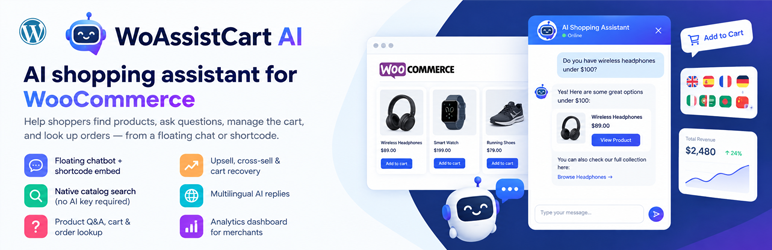
WoAssistCart AI turns your WooCommerce store into a guided shopping experience. Shoppers chat in plain language, discover the right products, get answers from your catalog, and update their cart — without leaving the page.
You bring your own OpenAI or Google Gemini API key. There is no licence server, no forced cloud account, and no phone-home to the plugin author. Catalog facts (prices, stock, variations, carts, and orders) always come from WooCommerce. The AI never invents a price or stock number.
Place the assistant with the floating widget, or embed it anywhere using [woassistcart-ai] or [woassistcart_ai_chat].
Free features (included)
Everything you need to run a useful AI shopping assistant on your store:
- Storefront chat — Floating widget plus shortcodes for pages, posts, and builders.
- Bring your own AI — OpenAI and Google Gemini. Keys are encrypted at rest and never exposed to JavaScript.
- Catalog search — Keyword product search powered by WooCommerce, with live price and stock from your store.
- Product Q&A — Answers from product descriptions, attributes, variations, and availability.
- Cart assistant — View, add, update, and remove items. Mutations require shopper confirmation.
- Order lookup — Status and details for logged-in customers; guests verify with order number and billing email.
- Smart suggestions — Rule-based recommendations from WooCommerce related, upsell, and cross-sell products.
- Product compare — Side-by-side comparison of two products from the conversation.
- Quick actions — Up to three preset buttons (search, recommend, compare, Q&A, and more).
- Appearance controls — Title, greeting, colours, avatar, and launcher position.
- Multilingual replies — Auto Detect plus English, Spanish, French, German, and Arabic (more languages in Pro).
- Conversation memory — Follow-up questions stay grounded in the current session.
- Spend control — Optional daily token budget on your own API key, with catalog fallback when the cap is reached.
- Privacy ready — Export, erase, retention settings, and clean uninstall options.
- Security basics — Nonces, rate limiting, and WooCommerce-compatible logging.
Pro features (upgrade)
When you are ready for more growth tools, upgrade this plugin to WoAssistCart AI Pro at wooassistant.com. Pro unlocks advanced modules inside the same product — not a second plugin to install side by side.
-
Abandoned cart recovery
- Detect carts that were started but never checked out.
- Send timed recovery emails (including optional multi-step follow-ups).
- Use AI-assisted email copy, or your own subject, header, body, CTA, and footer.
- Brand the emails with logo and colour; choose redirect to cart, checkout, or a custom URL.
- Set idle threshold, minimum cart value, campaign window, and marketing-consent rules.
- Control retention and scheduled sending from the admin.
-
Semantic / AI product search
- Go beyond keyword match with meaning-based discovery (AI / hybrid search modes).
- Help shoppers who describe needs in natural language (“lightweight laptop for travel”) instead of exact product titles.
- Keep WooCommerce as the source of truth for price, stock, and purchasability.
-
Sales agent & playbooks
- Guided selling behaviour that asks clarifying questions when the request is broad.
- Keep recommendations and cart actions grounded in products already shown in the conversation.
- Steer the assistant toward helpful discovery instead of random upsells.
-
Back-in-stock alerts
- Let shoppers request an email when an out-of-stock product returns.
- Capture interest from chat without inventing availability.
- Notify customers automatically when inventory is available again.
-
Analytics & attribution
- See how the assistant contributes to engagement and orders.
- Review conversation and commerce metrics with configurable attribution windows.
- Retain analytics data on a schedule you control for reporting and cleanup.
Free remains complete for day-to-day shopping assistance. Upgrade only when you need recovery, deeper search, sales guidance, stock alerts, or analytics. Shoppers never see a “Pro” upsell on the storefront.
How it works
- Activate WoAssistCart AI (WooCommerce required).
- Choose OpenAI or Gemini and save your API key under WooCommerce WoAssistCart AI.
- Enable the widget (or add a shortcode) and customise greeting and colours.
- Shoppers chat; the assistant calls approved tools; WooCommerce remains the source of truth.
External services
This plugin does not phone home to the plugin author and does not require a licence server. It only contacts a third-party AI API after a store administrator chooses a provider and saves that provider’s own API key. Catalog facts (prices, stock, carts, and orders) are read from WooCommerce on your site; tool results may be included in the prompt sent to the selected AI provider so the assistant can answer accurately.
OpenAI
This service is provided by OpenAI. It is used to generate chat replies when OpenAI is selected as the AI provider.
What data is sent and when: shopper chat messages, the assistant system prompt, and short product or cart excerpts needed to answer are sent to https://api.openai.com on each model-powered conversation turn. The same request pattern is used when an administrator runs the connection test in settings. Your OpenAI API key is sent for authentication. No data is sent to OpenAI until a key is saved and a chat turn (or connection test) runs.
- Terms of use: https://openai.com/policies/terms-of-use/
- Privacy policy: https://openai.com/policies/privacy-policy/
Google Gemini
This service is provided by Google. It is used to generate chat replies when Google Gemini is selected as the AI provider.
What data is sent and when: shopper chat messages, the assistant system prompt, and short product or cart excerpts needed to answer are sent to https://generativelanguage.googleapis.com on each model-powered conversation turn. The same request pattern is used when an administrator runs the connection test in settings. Your Google AI / Gemini API key is sent for authentication. No data is sent to Google until a key is saved and a chat turn (or connection test) runs.
- Terms of use: https://ai.google.dev/gemini-api/terms
- Privacy policy: https://policies.google.com/privacy
Screenshots

Storefront chat widget with product cards.

Plugin settings for the AI provider and widget.




