Wonderful Fixed Gross Prices For WooCommerce Wordpress Plugin - Rating, Reviews, Demo & Download

Plugin Description
You advertise a product at 149.00. A customer from another EU country opens the same page and sees 152.73, because WooCommerce recalculated the price for their VAT rate. Your campaigns, price lists, and printed material no longer match your shop.
Wonderful Fixed Gross Prices turns that around: the gross price you entered is the price everyone pays. WooCommerce keeps calculating the correct tax for each customer — but it does so inside your price instead of on top of it. That is the pricing model most EU shops actually want after the One-Stop-Shop (OSS) rules made foreign VAT rates a daily occurrence.
What the plugin does
- Fixed gross prices — WooCommerce no longer adjusts a product’s gross price for customers outside your tax region. The amount on the product page, in the cart, and on the invoice stays the number you entered.
- A tax notice that stays true — with a fixed gross price the percentage differs per customer, so printing “incl. 20% VAT” next to the price is misleading and printing “incl. 0% VAT” is alarming. The notice can be reduced to a neutral “incl. VAT”, or to any wording you prefer.
- German Market integration — if the German Market plugin is active, its own tax notice is replaced the same way. Detected automatically, switchable, and completely ignored when German Market is not installed.
- Net revenue preview — a fixed gross price means your net revenue moves with every rate. The settings page turns your own configured WooCommerce tax rates into a table: what each country’s customers pay, how much of it is tax, and what is left for you.
Safety rails
The plugin only works under a specific WooCommerce tax configuration, and it tells you when that configuration is missing instead of silently doing nothing:
- Taxes must be enabled in WooCommerce.
- Product prices must be entered inclusive of tax — that entered gross amount is what gets kept fixed.
- Tax must be calculated on the customer address, not on the shop base address (otherwise every customer already gets your base rate and there is nothing to fix).
- Other plugins, themes, or snippets hooking the same WooCommerce filter are detected and reported, so a conflict does not go unnoticed.
If a blocking condition applies, the feature switches itself off and an admin notice points to the details. Nothing breaks, nothing is priced wrongly.
For developers
Three filters let you adapt the behaviour:
wonderful_fixed_gross_prices_enabled— whether gross prices are kept fixed.wonderful_fixed_gross_prices_show_tax_notice— whether the tax notice is replaced for a given product.wonderful_fixed_gross_prices_tax_notice_text— the notice text itself.
The plugin adds no front-end scripts, creates no database tables, runs no background tasks, and never contacts an external service.
Screenshots
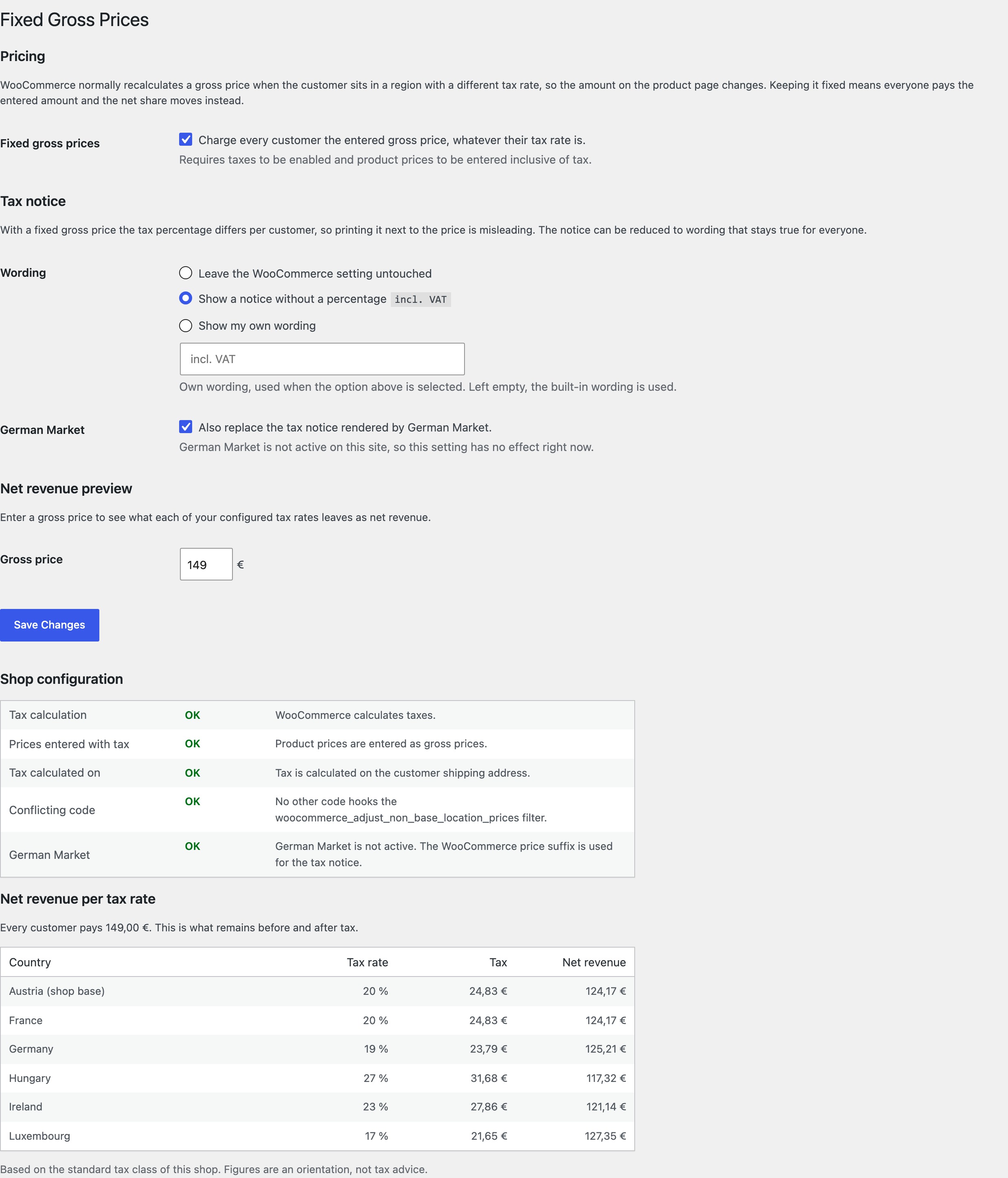
The Fixed Gross Prices settings page: pricing and tax notice options, the shop configuration check, and the net revenue preview per tax rate.