Wonderful Repeated Hit Blocker For Wordfence Wordpress Plugin - Rating, Reviews, Demo & Download

Plugin Description
Wordfence records every request its firewall classifies as an attack. A single
attack rarely justifies a block — but the same address showing up again and
again within a few minutes almost always does.
Wonderful Repeated Hit Blocker watches that attack log and blocks the repeat
offenders for you. You decide how many logged attacks within how many minutes
are enough, and how long the resulting block lasts.
How the blocks are created
Blocks are created through Wordfence’s own public blocking API
(wfBlock::createIP()), not by writing into its database tables. That matters:
- Wordfence’s allowlist is always honoured — allowlisted addresses are never blocked.
- The block shows up in the normal Wordfence Blocking screen and can be removed there.
- The Wordfence firewall is synchronised the same way it is for a manual block.
- Wordfence’s own block counters stay correct.
- Schema changes in future Wordfence releases cannot corrupt your block table.
Safety rails
- Only requests Wordfence flagged as attacks are counted. Ordinary traffic — visitors, crawlers, your own browsing — is never part of the calculation.
- Your own IP address is added to the plugin’s allowlist when you activate it, and the settings screen tells you if it is not covered.
- Wordfence’s allowlist is respected in addition to the plugin’s own list.
- Addresses that already carry an active Wordfence block are skipped, so blocks are never silently extended and alerts are never repeated.
- Without Wordfence the plugin does nothing at all and says so with an admin notice.
Optional alerts
Set a webhook URL (Slack, Discord, Mattermost, or your own endpoint) and you
get a message for every new block. Leave the field empty and the plugin makes
no outbound connections whatsoever.
External services
This plugin contacts no external service by default.
If — and only if — you enter a webhook URL on the settings screen, the plugin
sends one HTTP POST request to exactly that URL each time it creates a new
block. The endpoint is chosen by you; this plugin is not affiliated with any
particular provider.
Data transmitted with each request:
- the URL of your site,
- the IP address that was blocked,
- the number of attacks Wordfence logged for it,
- the length of the time window in minutes.
Nothing else leaves your server. No data is transmitted while the webhook field
is empty, and the plugin never contacts wonderfulplugins.eu or any other
service of ours.
If you use a hosted service such as Slack or Discord as the endpoint, their
terms and privacy policies apply to the data you forward to them — for example
Slack (https://slack.com/terms-of-service, https://slack.com/trust/privacy/privacy-policy)
or Discord (https://discord.com/terms, https://discord.com/privacy).
Screenshots
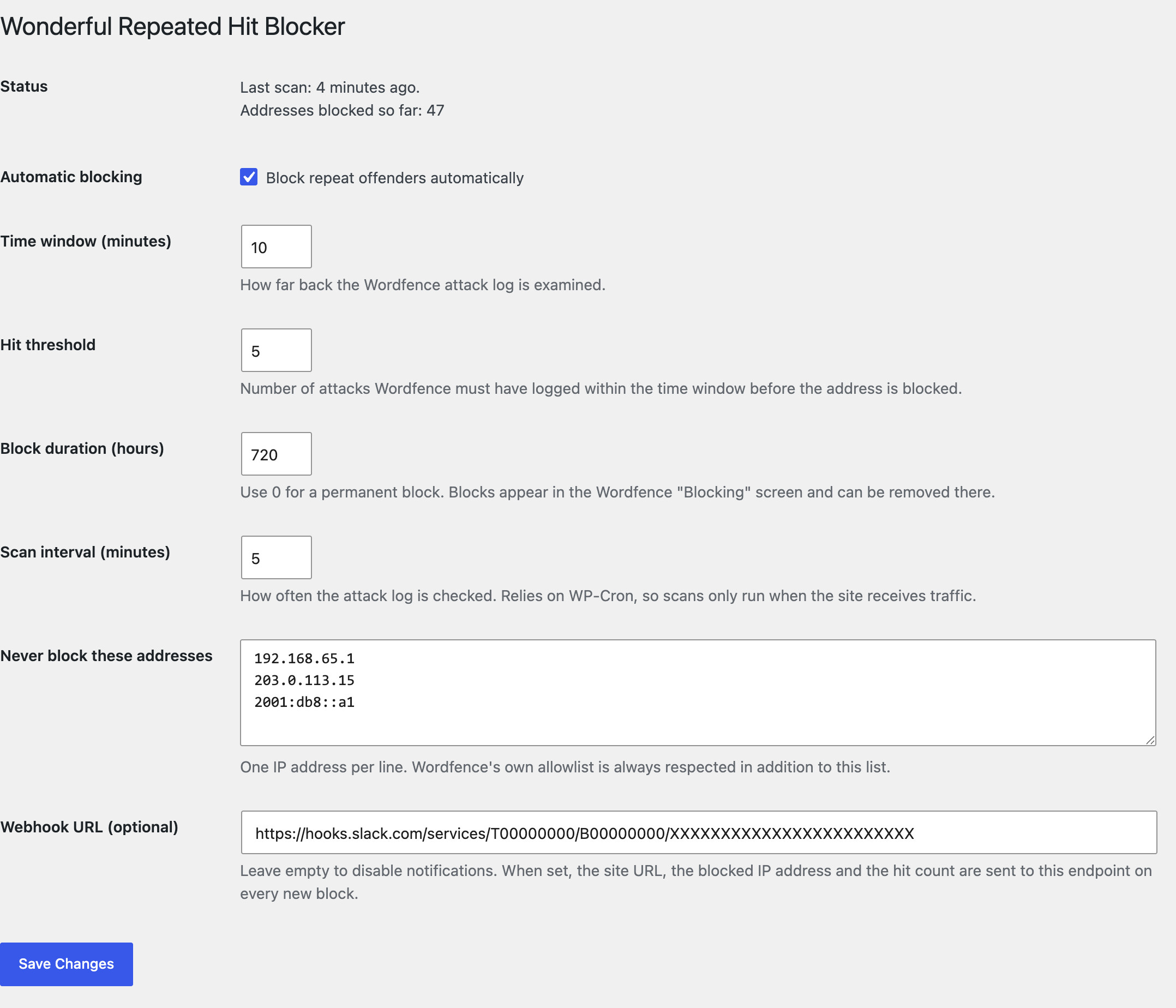
The settings screen with the time window, hit threshold, block duration and allowlist.