
Agentprose Wordpress Plugin - Rating, Reviews, Demo & Download

Plugin Description
WebMCP is a W3C Community Group draft that lets a web page hand tools to the AI agent running in the visitor’s browser. Instead of scraping your theme’s HTML, the agent calls a tool and gets clean, structured content back.
agentprose registers a set of read-only tools for your content:
get_current_article: the post being viewed, as clean Markdown with author, dates, tags and outlinesearch_posts: full-text search through your site’s REST APIlist_posts: newest posts, filterable by tag, category, author and dateget_post: any post as Markdown, paged for long posts (never silently truncated)get_sectionandget_table_of_contents: read one section of a long postget_citation: checks a quote against the post and returns a link that scrolls to and highlights it (#:~:text=)list_taxonomies,get_related_posts,get_site_info,get_subscribe_link,get_comments_linknavigate_to(optional): open another page of the site
How it works:
- The script loads deferred (about 9 KB gzipped) and does nothing until an agent calls a tool.
- The tools read this site’s public WordPress REST API from the visitor’s browser. No new endpoints, no database tables, no server load until an agent asks.
- Every tool is read-only and marks post content as untrusted, so agents treat it as data, not as instructions.
- In browsers without built-in WebMCP, the plugin loads the bundled MCP-B WebMCP polyfill from your own site after the page has loaded, so agents that use it (for example the MCP-B browser extension) can see the tools. You can switch this off.
- Administrators get a small 🔌 inspector on the front end to list and try every tool.
The same library works on any site, not only WordPress (Ghost, Sanity, Contentful, Strapi, Storyblok, Enonic, static sites): see the agentprose repository.
Optional: agentprose Cloud. Enter a site key from agentprose Cloud to see which agents used which tools and what they searched for, and to answer agent searches from a hosted index. It is off by default; see “External services” below.
Source code
The JavaScript files in js/ are the browser build of the agentprose npm release named in the changelog, unchanged. They are built from the TypeScript source at github.com/webmaxru/agentprose (MIT licence); npm ci && npm run build rebuilds them, and node wordpress-plugin/sync.mjs <version> copies a release into the plugin. The bundled WebMCP polyfill in js/vendor/ is @mcp-b/webmcp-polyfill 6.0.3 (MIT), unchanged.
External services
This plugin connects to one external service, agentprose Cloud (https://agentprose.cloud), and only if the site owner enters a Cloud site key under Settings agentprose. Without a key nothing is sent anywhere except requests from the visitor’s browser to your own site’s REST API.
When a site key is set:
- Usage analytics. Each time an AI agent calls one of the tools, the visitor’s browser sends one message to
https://agentprose.cloud/v1/collect: the site key, the tool name, whether it succeeded, how long it took, the page address, the search query (if any, up to 200 characters), the number of results, the post address the agent asked for, a short error text on failure, and a random identifier for that page load. Post content is never sent. Nothing is stored in the browser and no cookies are set. Nothing is sent on ordinary page views, only when an agent uses a tool. - Hosted search (on by default when a key is set, can be switched off). When an agent calls
search_posts, the query and site key are sent tohttps://agentprose.cloud/v1/search, which returns matching posts from the Cloud’s index of your public pages. If the request fails, WordPress search is used.
Like any web request, these requests reveal the visitor’s IP address to the service.
- Terms of service: https://agentprose.cloud/terms
- Privacy policy: https://agentprose.cloud/privacy
You can also send the same per-call message to an endpoint of your own instead (“Own analytics endpoint”); then that endpoint is the only place it goes.
The plugin does not load anything from CDNs: all scripts, including the WebMCP polyfill, are served from your site.
Screenshots
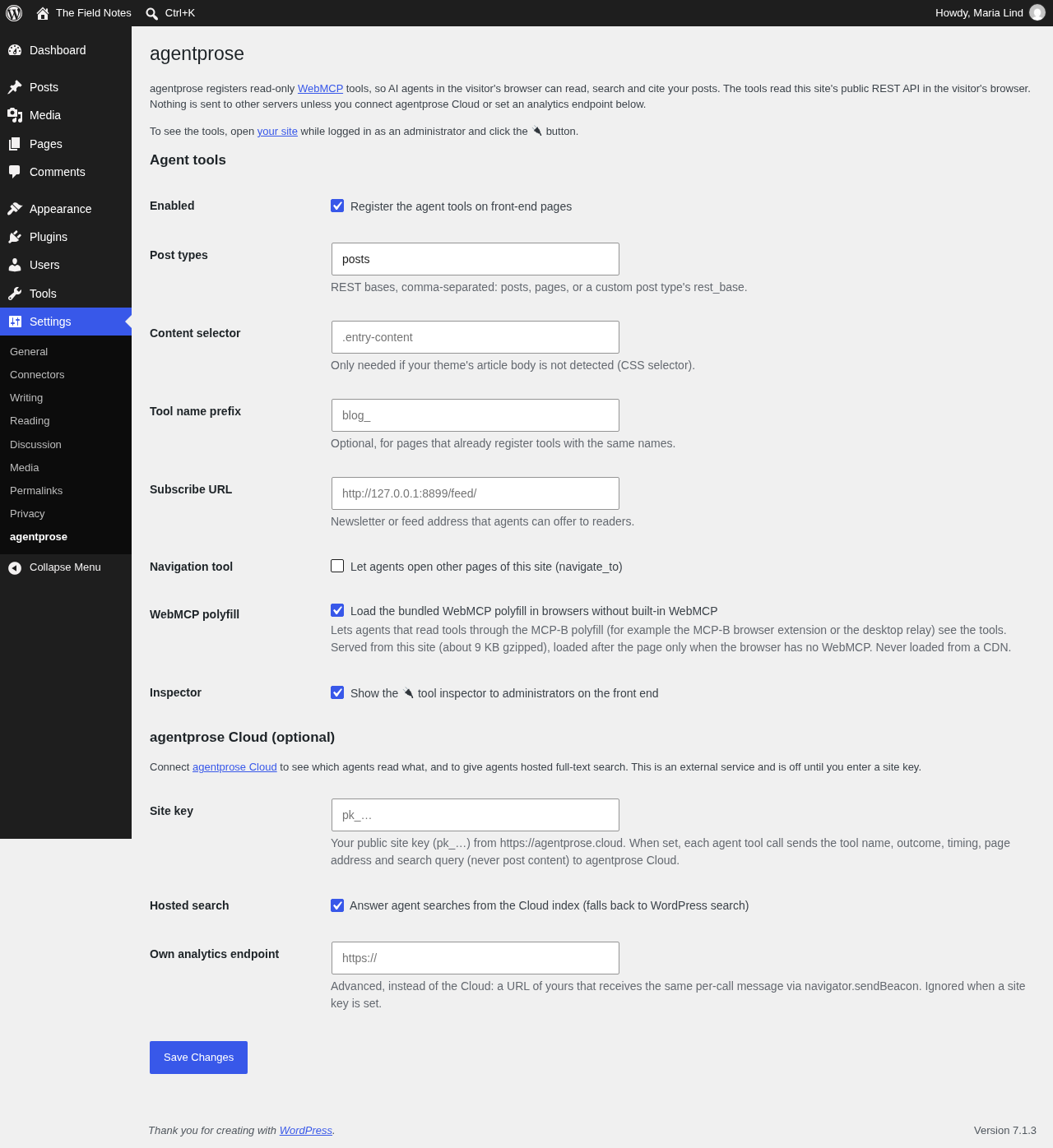
Settings → agentprose: post types, the WebMCP polyfill and the optional agentprose Cloud connection.

The 🔌 inspector on a post (administrators only), listing the tools an agent sees.


