WingPilot – Your AI Site Consultant & Security Expert Wordpress Plugin - Rating, Reviews, Demo & Download

Plugin Description
WingPilot is the WordPress plugin half of WPPilot, an AI site manager that actually knows your site.
On the two names: WingPilot is this plugin — the name in the WordPress.org directory, the folder it installs to, and its text domain. WPPilot is the service it connects to, and the name you’ll see in your wp-admin menu and at getwppilot.com. Everything below that says “WPPilot” is describing the service.
WPPilot reads every page, post, and plugin on your site, builds a structured model of what your site is and who it’s for, then writes you a Briefing — a magazine-quality assessment of what’s working, what isn’t, and where to start.
What WPPilot does once connected:
- The Briefing — A deep, editorial-quality analysis of your site delivered in the first 90 seconds. Not a checklist. Not a score. A real assessment written in clear language, with specific recommendations you can act on immediately.
- Conversational actions — Ask WPPilot to rewrite a post title, improve an excerpt, update a meta description, fix typos in body content, or unpublish stale content. Every change shows you a preview first (current vs. proposed, with rationale), and every change can be rolled back with one click. Nothing happens without your approval.
- Multi-site cockpit — Manage your WordPress sites from a single WPPilot account. The cockpit at app.getwppilot.com shows each site’s status, recent findings, and Briefing insights at a glance. The Free and Starter plans include WPPilot’s AI on one site; Pro and Agency include more.
- Watchtower monitoring — WPPilot watches your site for security issues, content drift, and structural problems. Findings surface in the cockpit with severity indicators and timestamps. On the Free plan, Watchtower scans weekly; paid plans scan more often.
- Activity feed — Every action WPPilot takes is logged with timestamps in the cockpit. Roll back any change. Full transparency, full reversibility.
- Safe by design — The plugin changes your site only when you approve a change in WPPilot. It sends site data (content, metadata, plugin list) to the WPPilot service for analysis, and every change goes through preview approve execute, with a one-click undo. You approve every change individually.
What the plugin does locally:
The plugin registers your site’s REST API endpoints so the WPPilot service can read content and, when you approve an action, write changes. It maintains the secure connection (per-site cryptographic secret + JWT authentication) and provides the settings page where you manage the connection.
What is free. The Free plan connects one site, writes your Briefing, shows what needs attention, answers your questions about your site, and completes a limited number of real, approved improvements each month — no credit card required. Paid plans (Starter, Pro, Agency) add more usage and daily monitoring; Pro adds improvements WPPilot finds and prepares for you, and WooCommerce store insights. The plugin itself has no locked features: the limits are those of the WPPilot service, listed at getwppilot.com/pricing.
External Services
This plugin requires a connection to the WPPilot service to function. The plugin’s core value (the Briefing, conversational actions, AI analysis, Watchtower monitoring) is provided by that external service. Without a connection, the plugin provides no standalone functionality other than displaying and receiving the lead forms already placed on your pages; messages sent through those forms stay on your site and are never sent to the WPPilot service.
Below is every service this plugin, or a request it makes, communicates with, what is sent, and when.
1. WPPilot service — api.getwppilot.com
Operated by WPPilot. Your site sends requests to it, and it reads from and (with your approval) writes to your site through the plugin’s REST API (/wp-json/wppilot/v1/), authenticated by a per-site secret and a short-lived token.
What is sent:
- Site URL, WordPress and PHP versions, timezone, active plugins and themes with their versions and available updates.
- Post and page content (titles, excerpts, body text, page-builder data, metadata, publish date and author display name), menus, theme styles, Site Health facts and scheduled-task names — when the service requests them, for example to build the Briefing or preview a change.
- Where a piece of text you ask about appears on your site, when you use WPPilot’s site-wide find: the posts, menus and widgets it appears in with a short surrounding snippet, and the names (never the values) of settings, theme settings and custom fields that contain it, with counts.
- A list of your posts, pages or products of one type, when you ask about all of them: each item’s title, status, dates, lengths of its text and SEO description (not the text itself), whether it has a featured image, its language and translation group, and for WooCommerce products the SKU, stock status and price. Order, coupon, subscription, form-entry and lead records are never listed.
- Comments waiting for moderation, when you use comment moderation: each commenter’s name and website URL, the domain of their email address (never the full address), the comment text, and the post it was left on. Commenters’ IP addresses and browser details are not sent.
- The HTML of one of your public pages, when the service asks for it because a CDN or firewall in front of your site turned its own request away — the plugin requests that page from your site as an anonymous visitor (no login, no cookies), so it is only what any visitor already receives.
- Site activity events as they happen, so the service can show you an activity feed: logins (username and role), failed login attempts (the username or email address that was typed), user and role changes (username), new comments (the commenter’s name) and comment moderation, plugin and theme changes, post edits, uploads, and changes to a few security-relevant settings such as the site address or the default user role (the setting’s name only).
- Security scanning data: a list of scannable files with their sizes, timestamps and fingerprints, and the contents of files that are new or have changed since the previous scan, so malware detection can run on the service (see “What is NOT sent” below).
- Your WordPress admin email address, in the body of the request your site makes each time you click Connect, Finish connecting or Open WPPilot. WPPilot uses it only to propose your account address while no WPPilot account owns the site; you can change it before confirming. It is never put in a web address.
When data is sent:
- When you click Connect, Reconnect, Finish connecting or Open WPPilot in wp-admin.
- While the WPPilot admin page is open (connection status, recent activity, Briefing summary).
- Continuously, as activity events occur on your site while it is connected.
- During periodic heartbeats and scheduled security scans (approximately daily).
- When the WPPilot service requests content through the plugin’s REST API.
- When you approve a change in WPPilot (the service sends the change to the plugin’s REST API).
- When you delete the plugin: a one-time notice that the connection has ended.
Terms of Use: https://getwppilot.com/terms — Privacy Policy: https://getwppilot.com/privacy
2. WPPilot web app — app.getwppilot.com
When you click Connect, Finish connecting or Open WPPilot, your browser opens the WPPilot app. The address carries your site’s URL, a single-use sign-in token that expires after a few minutes, and the WPPilot page to open. Your site’s server sends nothing to the app itself. Same Terms of Use and Privacy Policy as above.
3. Image sources — Pexels and Openverse
When you approve a new page or post that WPPilot illustrated with a stock photograph, your site downloads that image from where it is hosted and adds it to your own media library, so your page does not depend on someone else’s server. WPPilot chooses images from Pexels (hosted at images.pexels.com) and from Openverse, a WordPress.org project that indexes openly licensed images hosted elsewhere (for example Flickr and Wikimedia Commons); the download goes to the host the image came from, over https only. The plugin accepts only https image addresses and keeps only image files, through WordPress’s own media functions. Nothing about your site is sent other than what any image download reveals: your server’s IP address and WordPress’s standard user agent, which includes your site’s address. Nothing is downloaded until you approve the content.
- Pexels: Terms — Privacy Policy
- Openverse: Terms — Privacy Policy; each image’s original host has its own terms, linked from the image’s Openverse page.
4. Your own site
Two features make requests to your own site, not to a third party: after a change, the plugin requests the changed page once to see whether a cache in front of your site still serves the old copy; and the public-page read described above fetches one of your published pages as an anonymous visitor.
What is NOT sent
File contents are transmitted only from the directories that hold distributed software — WordPress core, plugins, themes and must-use plugins — and only for code files. This is a property of where a file lives, not a guess about what is inside it, which is what makes it dependable.
Everything else is inspected on your server, and only the finding is reported. That includes:
wp-config.phpand any other configuration file — still checked for injected or malicious code, because that is exactly where such code hides; its contents are never sent, so your database credentials and WordPress security keys never leave your server..htaccess,.user.iniand similar server configuration.- Everything in your uploads directory.
- Every data file —
.json,.xml,.txt— wherever it lives, since these are where exported settings, service-account keys and pasted credentials collect. - Private keys, certificates and key stores; database dumps, SQL files and archives;
.env,.htpasswdand similar credential stores. These are never read for content at all.
For those files, what travels is a statement rather than the file: for example “this file contains two eval() calls, the first on line 14″. No file content, no values, no credentials.
Also never sent: WordPress user passwords or password hashes, commenters’ full email and IP addresses, messages received through WPPilot forms or through Elementor forms (WPPilot reads only how many each Elementor form has kept, never what visitors wrote), and the contents of your database’s options table.
Files whose contents stay on your server are still fingerprinted, so if one is added or altered you are still told.
An honest limitation. Within plugin and theme source code, which is transmitted, a developer who stored a credential directly in their own PHP file may have that line sent. WPPilot removes the ones it can recognise, but it cannot promise to recognise every name a developer might choose. Configuration files — where credentials actually belong, and where yours are — are covered by the boundary above rather than by that recognition.
A free account is required at app.getwppilot.com to use this plugin. Accounts are created during the connect flow, proposing your WordPress admin email address, which you can change before confirming.
Screenshots

The WPPilot page in wp-admin: connection status, recent activity and what WPPilot is watching.

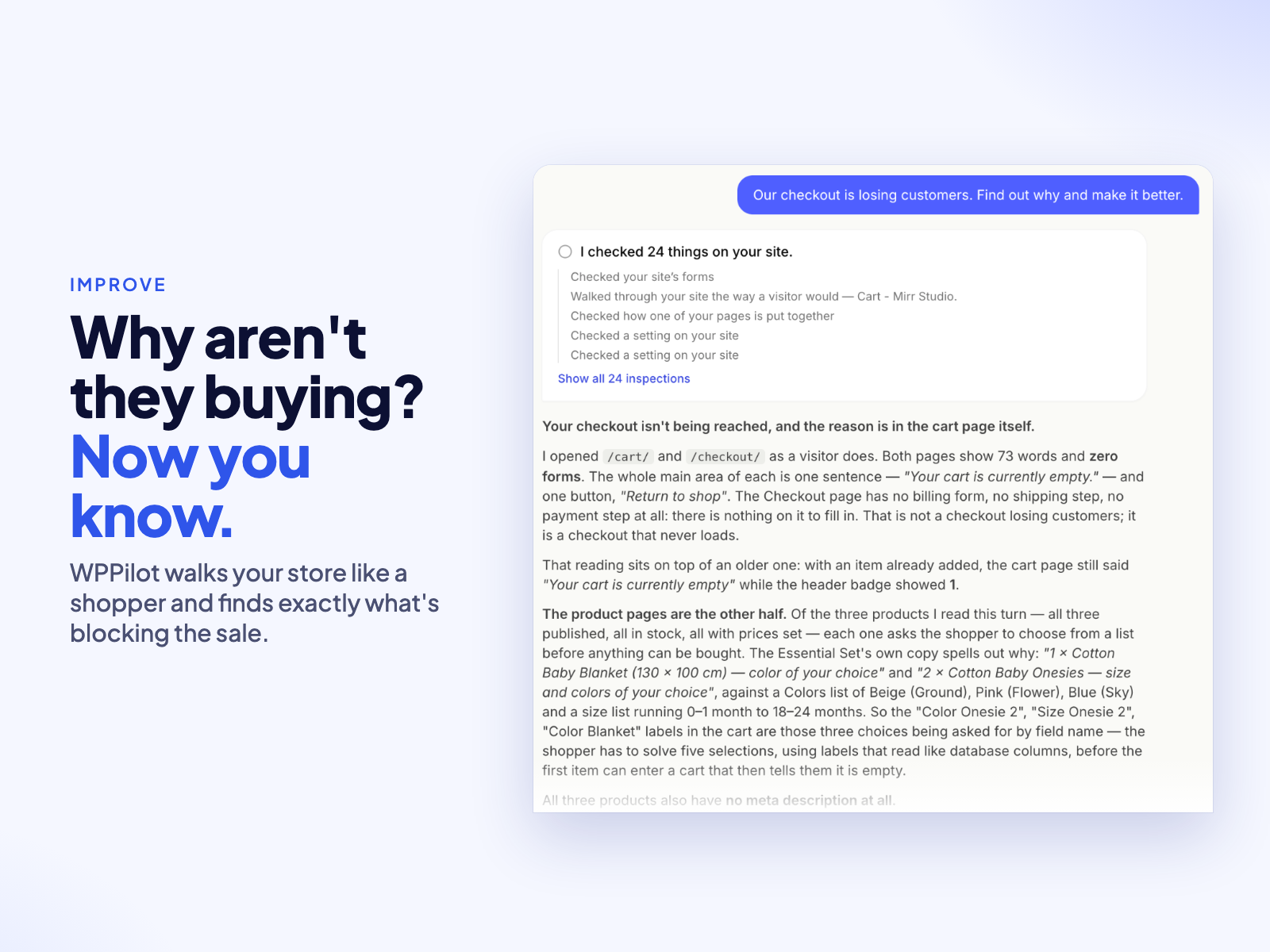
Your Briefing: what WPPilot understood about your site, what is already working and what is worth your attention.
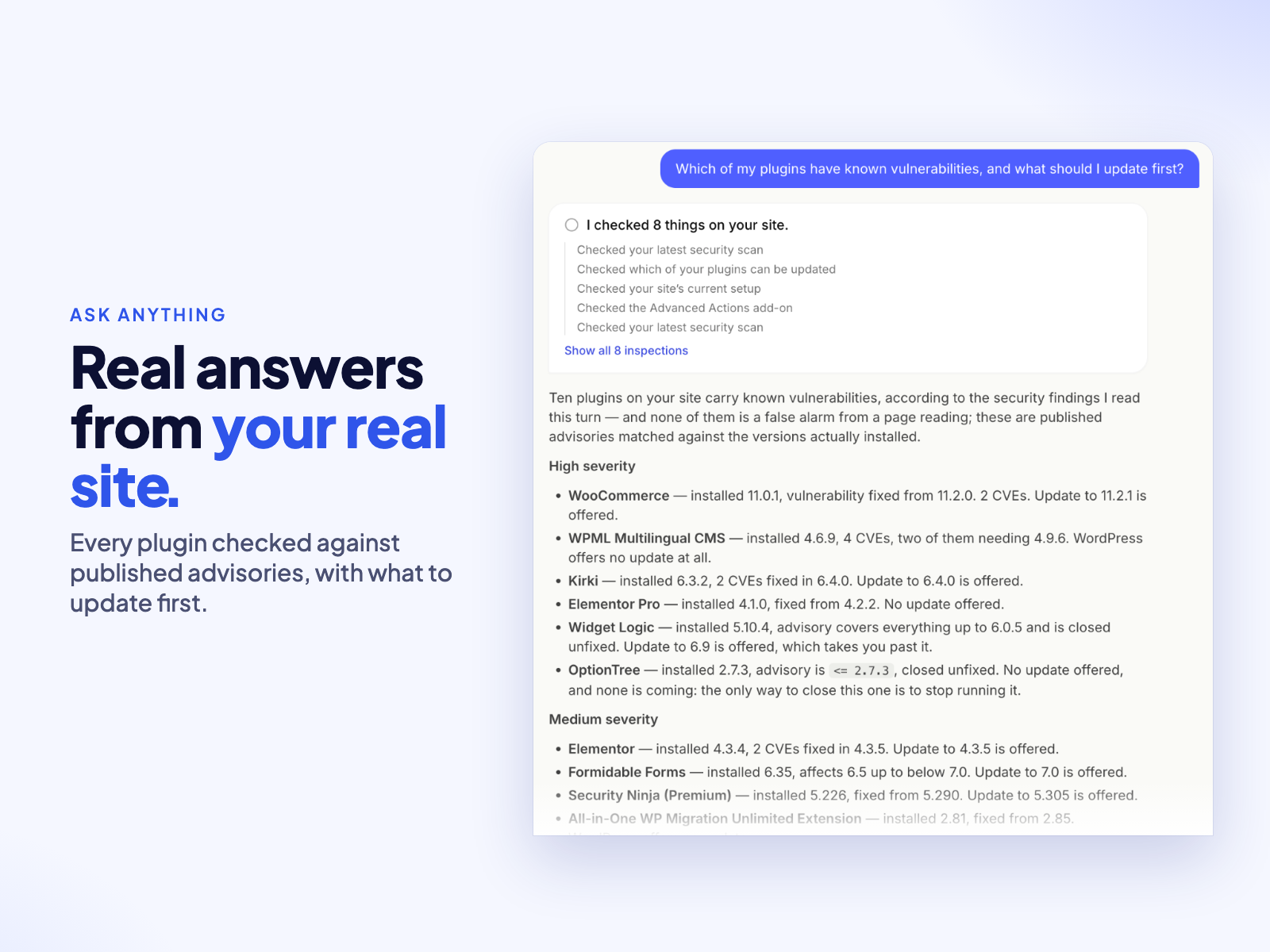
Ask anything: which plugins have known vulnerabilities, which version fixes each one, and what to update first.
A prepared change: the proposed value, exactly how Undo puts it back, and Approve or Reject.

The cockpit: every connected site, its latest Briefing and the work waiting for your review.