ArciCode Page Guard Wordpress Plugin - Rating, Reviews, Demo & Download
Plugin Description
ArciCode Page Guard keeps an eye on your most important pages. After every plugin, theme or WordPress update,
on a schedule or when you press “Check now”, the pages are opened on a computer and a phone screen, compared with
the last good version and checked for problems:
- page errors (500, 404, PHP and “critical error” messages, blank pages)
- missing header, menu, footer, “Add to cart” button or contact form
- styles or scripts that failed to load, broken images, content wider than a phone screen
- pages hidden from search engines by mistake (noindex), “lorem ipsum” text, HTML code shown as text
- SSL certificate that is about to expire
A page that looks wrong is opened again several times over a few minutes before anything is reported, so a cache
that is still rebuilding after an update does not raise an alarm. Normal content changes (new posts, prices,
banners) are told apart from breakage.
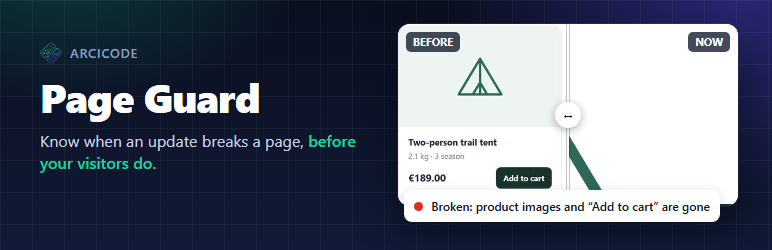
The panel shows first what needs a look: a short explanation and a before / now slider of the place that changed.
Pages that are fine are folded away. When you changed a page on purpose, “This is fine” makes its new look the
reference. The update log shows which plugin, theme or WordPress version changed, from which version to which.
You get an e-mail when something breaks and another one when everything is fine again.
Checking service
The pages are opened and compared by the ArciCode Page Guard checking service, not on your server, so the checks do
not slow your site down. This plugin is the part that runs on your site: it tells the service which pages to check,
asks for a check after updates and shows the results. Without the service the plugin still keeps the update log,
but makes no checks.
To connect a site, open Page Guard Settings, enter your e-mail address (or the connection code of a paid plan)
and press “Connect”. The free plan covers one site and 5 pages, checked after updates and once a week; paid plans
cover more pages and sites and check daily. Nothing is sent anywhere until you press “Connect”.
External services
This plugin relies on the ArciCode Page Guard checking service, run by ArciCode (https://arcicode.dev/).
What the plugin sends, and when. Only after you press “Connect” in Page Guard Settings: the address of
your site, the e-mail address you entered (or your connection code), the plugin version, the site language and the
site’s connection key, which lets the service read the page list and deliver results. While the site is connected,
opening the plugin’s settings asks the service for the state of the connection (the site address and the key are
sent). This happens at most every ten minutes; right after “Connect” it is asked every few seconds for up to two
minutes, until the service has verified the site, and when the service did not answer it is asked again two
minutes later. “Disconnect”, and deleting the plugin, tell the service to forget the site.
What the service reads from your site. Once connected, the service calls your site every few minutes with the
connection key and reads:
- the address of your site, the plugin version, the site language and time zone
- the list of public page addresses to check and your Page Guard settings (pinned pages, areas to ignore, page
limit, how often to check) - whether a check was requested, and why (for example “plugin update: Example Plugin 1.2 1.3”), and which
pages you marked “This is fine”
The service then opens your public pages the way a visitor does (its User-Agent contains “ArciCodePageGuard”) and
takes screenshots of them. Pages behind a login, the checkout and account pages are not opened.
What the service sends back. The result of each check: page addresses, the problems found and small copies of
the screenshots. They are stored on your site in the uploads folder (arcicode-page-guard/), closed to visitors;
the plugin shows the pictures in its panel to administrators only. The 15 latest checks are kept and everything is
removed when the plugin is deleted.
Where the screenshots go. The service keeps the reference screenshot of each checked page and the pictures of
recent checks on its server in the European Union. When a page changed, a crop of the changed area of the
screenshot, together with the page address, is sent to Anthropic’s Claude model for a verdict (broken or just
changed content): terms,
privacy policy.
Only public pages are involved; anything a visitor can see on them (for example names in public reviews) can
appear in a screenshot.
To stop all of this, press “Disconnect” in Page Guard Settings or delete the plugin. Creating a new connection key
also cuts the service off at once.
Service terms: https://arcicode.dev/page-guard/terms/ · Privacy policy: https://arcicode.dev/page-guard/privacy/
Screenshots

A page that needs a look: a short explanation and a before / now slider of the place that changed.

When everything is fine, the pages are folded away and the update log shows what changed.

Settings: connect the site to the checking service with an e-mail address or a connection code.