
BackBurner Post Archiver Wordpress Plugin - Rating, Reviews, Demo & Download

Plugin Description
BackBurner Post Archiver quietly retires old content from the parts of your site where “latest” matters — the homepage, category and tag archives, search results, and your RSS feed — once it passes an age threshold you choose. Nothing is deleted. Anyone with a direct link, a bookmark, or an existing search ranking can still open an archived post exactly as before; it simply stops surfacing in listings of your newest content.
This is useful for sites that accumulate a lot of time-sensitive posts (news, deals, version-specific tutorials, event write-ups) where old items cluttering the homepage and archives hurts the reading experience, without wanting to actually remove any of that content or its SEO value.
Key features:
- Set a single site-wide age threshold (in months) after which content is archived
- Choose exactly which post types are included (Posts, Pages, Media, Products, and any other public custom post type)
- Restrict archiving to specific categories and/or tags, or run it site-wide
- Mark any individual post “Never auto-archive this post” to permanently exempt it, regardless of age
- Archived content is moved to a dedicated “Archived” status — never trashed or deleted
- Archived posts are automatically excluded from the homepage, category/tag archives, internal search, and the RSS feed
- Archived posts keep their original permalink and load normally (no redirects, no 404s) for anyone visiting directly
- Un-archive any post at any time from the normal status dropdown in the post editor
- Built-in Dry Run mode — preview exactly which posts would be archived before changing anything live
- Runs automatically once a day via WP-Cron, or on demand with a “Run now” button
- A master Enabled switch so the whole feature can be turned off instantly without losing your configuration
- Clear “Last run” status shown right on the settings screen
Recommended workflow
- Install and activate the plugin — it does nothing until you turn it on.
- Use Dry Run first, ideally scoped to a single small category, to see exactly what the plugin would archive.
- Review the Dry Run results and mark any posts that should never be archived.
- When you’re confident, turn off Dry Run for a normal, real run.
Screenshots
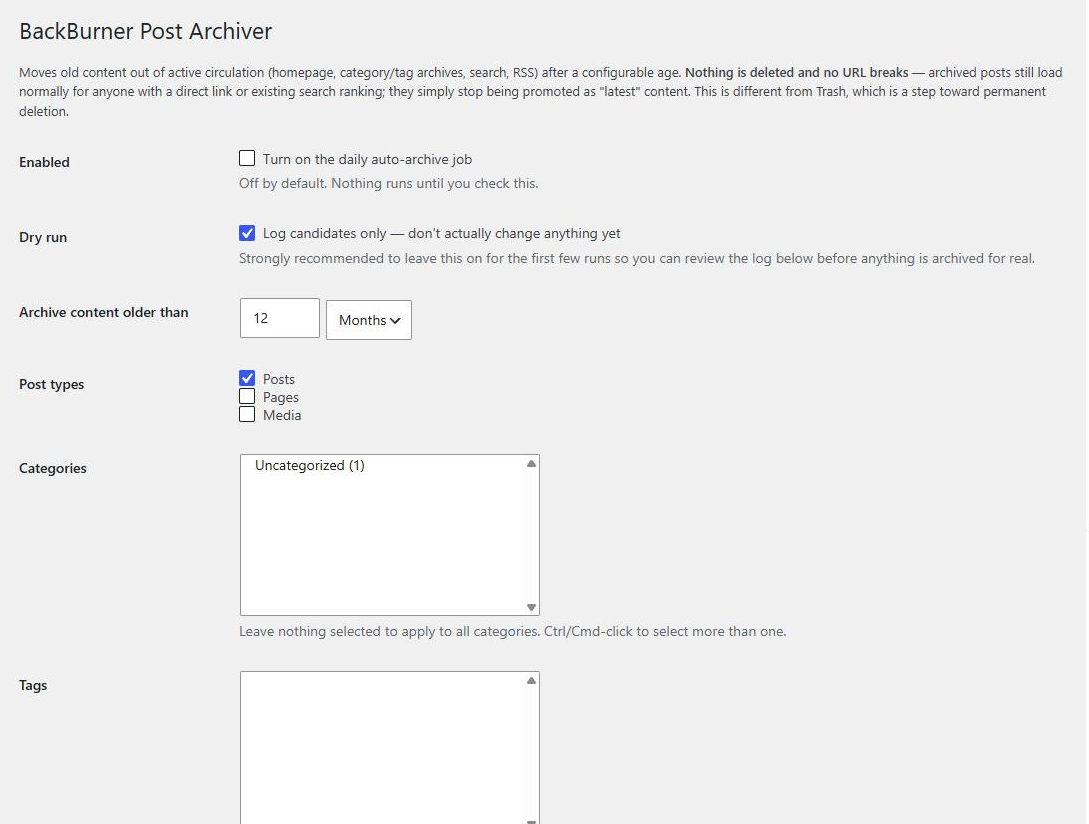
The BackBurner settings screen — age threshold, post type selection, category/tag scope, and Run now.


