StudioCount Bookings Wordpress Plugin - Rating, Reviews, Demo & Download

Plugin Description
StudioCount Bookings is the official WordPress plugin for StudioCount, a product owned and operated by Sanctabase Ltd. It lets studios display their current StudioCount classes and products on an existing WordPress website.
Use the StudioCount Bookings block or the [studiocount_bookings] shortcode. Each embed can show:
- Classes
- Products
- Classes and products together
Visitors see current information from StudioCount and continue through the normal StudioCount booking, waitlist and secure Stripe-hosted payment flows. The plugin does not copy availability, prices, booking rules or payment logic into WordPress.
The plugin supports multiple embeds on one page and adapts to phone, tablet and desktop layouts. Visitors can reload the WordPress page whenever they want fresh information; a contextual retry is shown if information fails to load.
External services
This plugin requires the external services described below. It does not send data to them until an administrator connects or checks a StudioCount connection, or a visitor loads or uses an embedded booking page.
StudioCount and Supabase
This plugin requires a StudioCount studio account and connects to the external StudioCount service at https://www.studiocount.com.
The studio’s StudioCount booking page must remain live while the plugin is in use. The plugin displays the same published classes, availability and products on WordPress; it does not create a separate booking channel.
The WordPress administrator connects the site through the authenticated Studio Portal. StudioCount binds one revocable public display identifier to the exact studio and WordPress origin. Copying the identifier to another website does not authorize the embed, and the identifier grants no Owner, Member, Supabase or Stripe authority.
When a site owner places the block or shortcode on a public page, the visitor’s browser requests the connected studio’s public classes, availability, class presentation and products from StudioCount.
If a visitor starts a booking, joins a waitlist or chooses a product, the information they enter is sent directly from the hosted StudioCount frame to StudioCount. If the studio offers online payment, the visitor continues to Stripe’s hosted Checkout. WordPress does not receive or store the visitor’s booking details, StudioCount credentials, card details, Supabase credentials or Stripe credentials.
When a WordPress administrator explicitly chooses Check connection, the plugin sends the public connection identifier, studio slug, exact WordPress site origin, WordPress home URL and plugin version to the StudioCount connection-validation endpoint at https://qjpftwpnlewwqlodyeff.supabase.co/functions/v1/validate-wordpress-embed-connection. The endpoint is operated by StudioCount and hosted by Supabase. This information is used only to confirm that the identifier is bound to that studio and WordPress origin. No check runs automatically.
StudioCount Terms: https://www.studiocount.com/terms
StudioCount Privacy Policy: https://www.studiocount.com/privacy
Supabase Terms: https://supabase.com/terms
Supabase Privacy Policy: https://supabase.com/privacy
Stripe
If a studio offers online payment and a visitor chooses a paid booking or product, StudioCount sends the transaction details required to create a Stripe-hosted Checkout session. The visitor then supplies payment and billing information directly to Stripe. The WordPress plugin and WordPress website do not receive or store card details.
Stripe Services Agreement: https://stripe.com/legal/ssa
Stripe Privacy Policy: https://stripe.com/gb/privacy
Screenshots
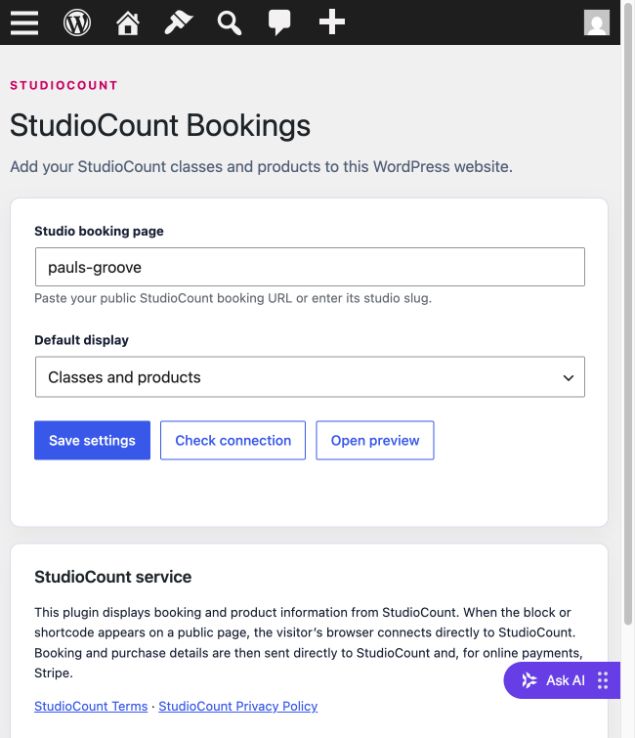
Connect the exact WordPress website to a studio and choose the default display.
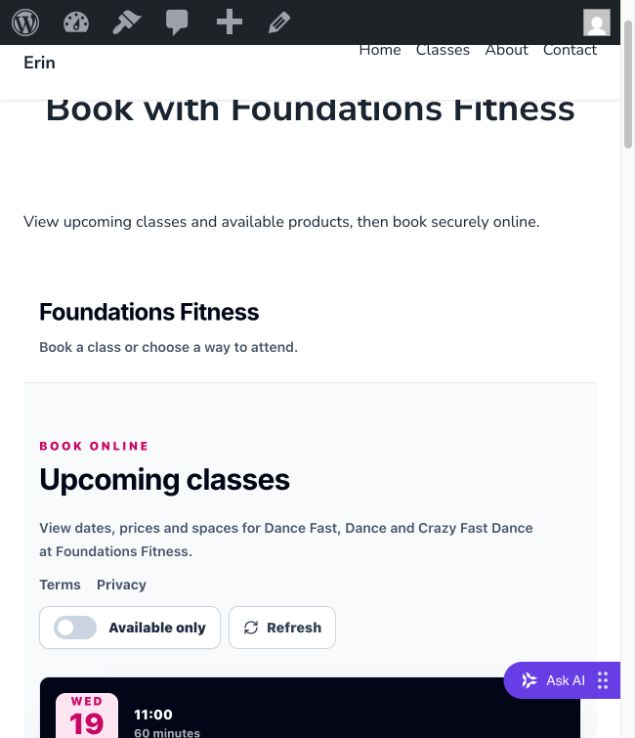
Display responsive StudioCount classes on a WordPress page.
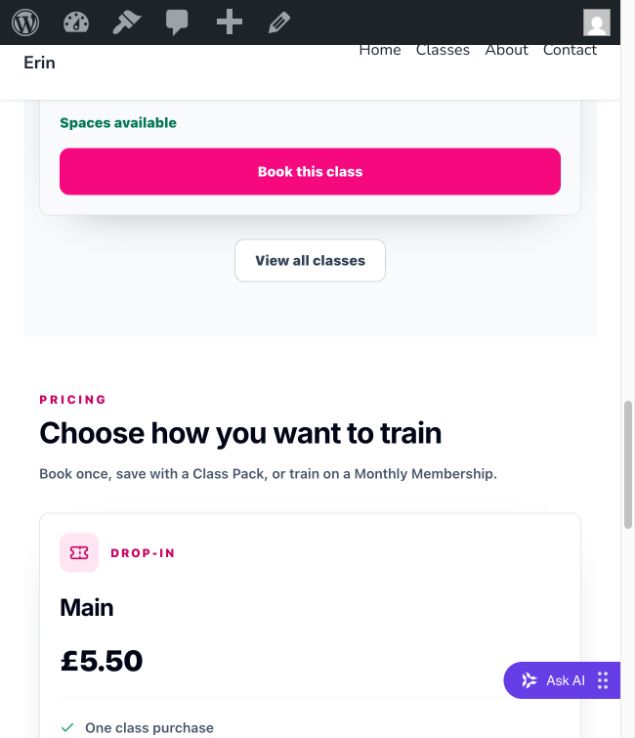
Display StudioCount products alongside the studio’s classes.