
Code And Core Headless Fast API – Standalone, Cacheable REST Endpoints That Skip The Core Load Cycle Wordpress Plugin - Rating, Reviews, Demo & Download
Plugin Description
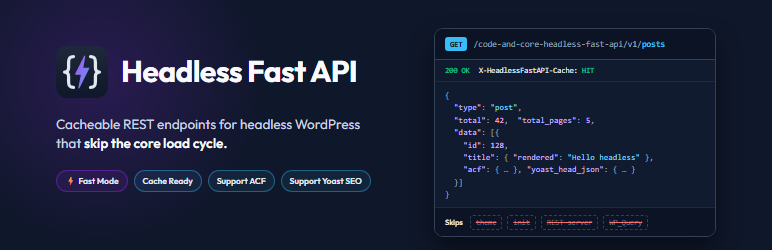
Your headless front end is only as fast as the API behind it. Code and Core Headless Fast API gives your Next.js, Nuxt, Astro, Gatsby, SvelteKit, React Native or Flutter app a WordPress API built for speed. It does not run the whole of WordPress on every request.
Each request to the built-in WordPress REST API starts the full WordPress stack: every active plugin, the theme, init, the REST server, its controllers and WP_Query. On a typical site with 20 to 40 plugins, most of that work has nothing to do with the JSON you asked for. This plugin cuts that work out:
- It answers before the theme,
init, the REST API andWP_Queryload. - In Fast Mode, it answers before any regular plugin loads.
- It builds each response with a small number of batched, prepared SQL queries.
- It can serve repeat requests from one cached JSON file on disk.
Your front end gets the familiar REST-style data, including ACF fields, Yoast SEO metadata and resolved relationships, with far less work on the server. The result is lower response times, less CPU and database load, and quicker static builds and server-side rendering.
The built-in REST API is not changed or disabled. This plugin adds its own read-only namespace, /code-and-core-headless-fast-api/v1/, next to it, so you can switch over one endpoint at a time.
Why choose Headless Fast API?
- Built for headless. Every design decision serves one job: getting content to a decoupled front end as quickly as possible.
- Faster, especially on busy sites. Response time no longer grows with each plugin you install (Fast Mode).
- Lighter payloads. Remove every field your front end does not use. Smaller JSON means faster transfers, faster parsing and faster pages.
- Fewer round trips. Resolve ACF relationships, images, terms and users inside one response, so you don’t need ten follow-up requests.
- Easy to adopt. Items use the REST API’s field names (
title.rendered,content.rendered,featured_media, …), so existing front-end code needs only small changes. - No setup. No server rules, no extra entry point, no Node.js service, no GraphQL schema to maintain. Activate, choose your content, copy the URLs.
- Safe by design. Read-only,
GETonly, prepared SQL, an allowlist of entities, and capability and nonce checks on every admin action. - Clean to remove. Deactivating removes the Fast Mode file. Deleting removes every option and data file the plugin created.
Built-in REST API compared with Headless Fast API
- Plugins loaded per request: REST API: all of them. Headless Fast API: all of them, or none in Fast Mode.
- Theme and
init: REST API: loaded. Headless Fast API: skipped. - Query engine: REST API:
WP_Queryand REST controllers. Headless Fast API: direct, batched, prepared SQL. - Response cache: REST API: none built in. Headless Fast API: optional disk cache, with a
HIT/MISSheader. - Removing fields: REST API:
_fieldson each request. Headless Fast API: saved per endpoint in the admin, including nested ACF fields and flexible-content layouts. - ACF relationships: REST API: IDs only, so you need extra requests. Headless Fast API: resolved into full objects in the same response.
- Yoast SEO head: REST API: provided by Yoast. Headless Fast API: built from Yoast’s own indexable data, without loading Yoast.
- List totals: REST API:
X-WP-Totalheaders. Headless Fast API:totalandtotal_pagesin the JSON body. - Server configuration: neither needs any.
Perfect for
- Next.js, Nuxt, Remix and SvelteKit sites that use server-side rendering or incremental static regeneration.
- Static builds with Astro, Gatsby, Eleventy or Hugo, where builds that fetch thousands of pages finish sooner.
- React Native and Flutter apps that need small, predictable JSON.
- Agencies running content-heavy WordPress back ends with many plugins.
- Any site where the REST API has become the slowest part of the stack.
Quick start in 60 seconds
- Install and activate the plugin.
- In the popup, click Enable Fast Mode (recommended).
- Under Entities, choose your post types and taxonomies, then click Save & Sync Schemas.
- Open the Dashboard, copy an endpoint URL, and fetch it from your front end.
Key features
- Early answer. API requests are answered on
plugins_loaded, before the theme,init, the REST API andWP_Queryrun. - Fast Mode (optional). A small must-use loader answers API requests before any regular plugin loads, so response time does not grow with the number of plugins installed.
- Direct SQL. Posts, pages, media, custom post types, taxonomies, users and ACF options pages are read with prepared queries. Meta, terms, authors, featured media and images are loaded in batches, not one query per item.
- REST-compatible items. Each item follows the WordPress REST API format (
id,title.rendered,content.rendered,excerpt.rendered,featured_media,_linksand so on), so existing front-end code needs few changes. - Disk cache. Finished JSON responses can be written to disk and served with a single file read.
- Field exclusion. Choose, per endpoint and per context (list or single), exactly which fields to remove from the response, down to individual ACF sub-fields and flexible-content layouts. Smaller payloads, faster pages.
- Relationship resolving. Turn ACF post, term, media and user IDs into full objects inside the same response, so the front end does not need to make extra requests.
- Append rules. Add extra data, such as the latest posts, to a field of a response.
- Advanced Custom Fields. ACF fields are included under
acf, including repeaters, groups, flexible content and image fields. ACF options pages get their own endpoint. - Yoast SEO.
yoast_headandyoast_head_jsonare built from Yoast’s own indexable data, ready for your front end’s<head>. - Custom meta. Expose any post meta key, typed as string, integer, boolean or JSON.
- Live schema builder. Send a request from the admin screen, see the live response as a tree, and switch fields on or off with a preview before saving.
- API explorer. The Dashboard lists every active endpoint with Copy and “Execute Request” buttons.
- Import, export and reset. Back up the whole configuration as JSON and restore it on another site.
- No server configuration. Works on Apache, Nginx, LiteSpeed and IIS through WordPress’s normal
index.php. No rewrite rules, no separate entry point. - Light and dark admin theme. The admin screens are self-contained and load no third-party assets.
How the speed is achieved
- Short request path. A request to
/code-and-core-headless-fast-api/v1/...is recognised from the URL with a simple string check. All other requests continue as normal and pay almost nothing. - No WP_Query and no REST server. The router reads a static JSON schema file, builds SQL directly, shapes the result like the REST API, prints JSON and stops.
- Batched queries. Meta, terms, authors, attachments and Yoast data for every item on a page are fetched together. Relationship fields are resolved in one query per object type.
- Fewer option reads. The site options the API needs are fetched in one query per request.
- Disk cache. With caching on, a repeat request is served from one JSON file.
- Fast Mode. Skips loading all regular plugins and the theme on API requests.
Fast Mode (optional)
On sites with many plugins, most of a request’s time is spent loading those plugins. Fast Mode answers API requests before any regular plugin loads.
Fast Mode is off until an administrator turns it on. After activation the plugin asks once, in a popup on its Dashboard screen, and nothing is installed unless the administrator clicks “Enable Fast Mode”. It can be turned on or off at any time under Advanced.
Turning it on writes one small file, wp-content/mu-plugins/0-cachfa-fast-path.php, using the WordPress filesystem API. That file:
- acts only on requests to
/code-and-core-headless-fast-api/v1/...and does nothing on any other request; - does nothing if this plugin is deactivated or deleted;
- is removed when Fast Mode is turned off or this plugin is deactivated;
- is rewritten automatically after a plugin update;
- is never written over or deleted if a file of the same name was not created by this plugin.
Because other plugins do not run on API requests in Fast Mode, output they add through filters at runtime is not included in API responses. Data they save to the database is included.
Endpoints
All endpoints are GET only and start with:
https://example.com/code-and-core-headless-fast-api/v1/
home: the static front page (Settings > Reading), or the latest posts if the front page shows posts.posts,posts/{id_or_slug}: posts.pages,pages/{id_or_slug}: pages.media,media/{id_or_slug}: attachments.{post_type}s,{post_type}s/{id_or_slug}: any public custom post type you enable (for exampleproducts,products/blue-shirt).categories,categories/{id_or_slug}: categories.tags,tags/{id_or_slug}: tags.{taxonomy}s,{taxonomy}s/{id_or_slug}: any public custom taxonomy you enable.users,users/{id_or_slug}: users (can be turned off under Entities).options/{options_page_slug}: fields from an ACF options page (needs ACF with options pages).
The Dashboard screen lists the exact URL of every active endpoint on your site.
Endpoints are available only for the post types and taxonomies you enable under Entities. Any other type returns a 404 with a JSON error.
Query parameters
Posts, pages, media and custom post types
page: page number (default1).per_page: items per page,1to100(default10). Other values return400 rest_invalid_param, as in the REST API.offset: number of items to skip; overridespage.search: search title, content and excerpt.slug: one or more slugs, comma-separated.include,exclude: IDs, comma-separated.author,author_exclude: author IDs, comma-separated.parent,parent_exclude: parent IDs, comma-separated.menu_order: exact menu order.after,before: published after or before a date (any formatstrtotime()accepts, for example2026-01-01T00:00:00).modified_after,modified_before: modified after or before a date.sticky:truefor only sticky posts,falseto leave them out.categories,categories_exclude,tags,tags_exclude: term IDs, comma-separated.{taxonomy},{taxonomy}_exclude: term IDs for any enabled custom taxonomy.tax_relation:AND(default) orORbetween taxonomy filters.media_type:image,video,audio,application, … (media only).mime_type: exact MIME type, for exampleimage/png(media only).password: password for a password-protected post. Without it, content and excerpt are empty.orderby:date(default),title,id,modified,author,parent,slug,menu_order,include(the order ofinclude) orinclude_slugs(the order ofslug).order:DESC(default) orASC.
Categories, tags and custom taxonomies
page,per_page,search,slug,include,exclude.parent: parent term ID (0for top-level terms).hide_empty:1to leave out terms with no posts.post: only terms assigned to this post ID.orderby:name(default),id,countorslug.order:ASC(default) orDESC.
Users
page,per_page(1to100),offset,search,slug,include,exclude.roles,capabilities: comma-separated.who=authors: only users with published posts.has_published_posts:1, or a comma-separated list of post types.orderby:name(default),id,registered_date,slug,urlorinclude.order:ASC(default) orDESC.
Array values such as include[]=1&include[]=2 are accepted and treated as include=1,2.
Response format
A single item (/posts/hello-world) returns the item object, in the WordPress REST API format. Single posts also contain pagination.previous_post and pagination.next_post (id, title, slug) to make “previous / next” links easy.
A list (/posts?per_page=5) returns a wrapper object instead of a bare array, so you get the totals without reading headers:
{ "type": "post", "count": 5, "total": 42, "total_pages": 9, "data": [ ... ] }
Errors are JSON with the matching HTTP status, for example { "code": "rest_post_invalid_id", "message": "Invalid post ID.", "data": { "status": 404 } }.
Every response includes:
Content-Type: application/json; charset=UTF-8Access-Control-Allow-Origin: *andAccess-Control-Allow-Methods: GET, OPTIONS, so the API can be called from a browser on any domain.OPTIONSpreflight requests are answered straight away.X-HeadlessFastAPI-Cache: HITorMISS, to show whether the disk cache was used.
Example: fetching from a front end
const res  = await fetch('https://example.com/code-and-core-headless-fast-api/v1/posts?per_page=6&categories=3');
const json = await res.json();
json.data.forEach(post => console.log(post.title.rendered));

const page = await fetch('https://example.com/code-and-core-headless-fast-api/v1/pages/about').then(r => r.json());

// Next.js (App Router): revalidate every 60 seconds
const API = 'https://example.com/code-and-core-headless-fast-api/v1';
const posts = await fetch(API + '/posts?per_page=10', { next: { revalidate: 60 } }).then(r => r.json());
Performance tips
- Turn on Fast Mode. It has the biggest effect on sites with many plugins.
- Remove fields you don’t use on the Schema screen, for example
contenton list endpoints that only show cards. - Use resolve rules instead of requesting related posts, images or terms one at a time.
- Turn on disk caching for content that doesn’t change every minute.
- Put a CDN in front of the API. The responses are public, cookie-free
GETrequests, so they cache well at the edge. - Keep
per_pagesmall and paginate withpageandtotal_pages. - Check the
X-HeadlessFastAPI-Cacheheader in your browser’s network tab to see whether the disk cache answered.
Admin screens
The plugin adds a Code and Core Headless Fast API menu with five screens:
- Dashboard: every active endpoint with its full URL, a Copy button and a built-in request tester with parameter fields and a live response viewer.
- Entities: switch post types, taxonomies and the Users endpoint on or off.
- Schema: the live response builder. Pick an endpoint, add query parameters, press Send, then switch individual fields off in the response tree. Settings are stored per endpoint and per context (list, single, or options page). You can also add custom meta fields, resolve rules and append rules here.
- Integrations: turn the Yoast SEO and ACF integrations on or off, enable “Strict REST API Parity” for ACF, and force a resync of the ACF field map.
- Advanced: disk cache, clear cache, Fast Mode, and import / export / factory reset of the configuration.
Press Save & Sync Schemas to save. Saving also scans for new post types, taxonomies and ACF fields again.
Caching
When Enable Disk Caching is on (Advanced screen), each response is stored as a JSON file. The key is the full request URL, so every combination of path and query string is cached separately.
- Cached responses are kept for 1 hour, then built again on the next request.
- The cache is not cleared automatically when content changes. To show changes at once, turn on Clear Cache on Save and save the settings, or wait for the hour to pass.
- For busy sites, put a CDN or reverse proxy in front of the API as well. It is a public, read-only, cookie-free
GETAPI, which makes it easy to cache at the edge.
Advanced Custom Fields
With the ACF integration on, each item has an acf object built from the stored field values and a field map generated from your field groups. The map is rebuilt when you save the settings, when you press Force Sync, and whenever an ACF …
Screenshots

Dashboard: API endpoints reference. Every active endpoint (home, posts, pages, media, custom post types, taxonomies, users and ACF options pages) with its full URL and a one-click Copy button.

Dashboard: built-in request tester. Open any endpoint, fill in path and query parameters (page, per_page, search, include, exclude, order, orderby), press “Execute Request” and see the status, request URL and live JSON response.

Fast Mode popup. Shown once after activation. Fast Mode is only turned on if you click “Enable Fast Mode”, and it can be changed later under Advanced.

Entities. Switch each public post type, taxonomy and the Users endpoint on or off with one click.

Schema: live response builder. Pick an endpoint from the dropdown, add an ID or slug, and press Send to load a live sample of the real response.

Schema: field exclusion tree. Switch any field off, including nested ACF repeaters, groups and flexible-content layouts. Turning off a parent turns off all of its children.

Schema: query parameters and custom fields. Add, reorder and reset query parameters, and expose post meta keys as string, integer, boolean or JSON values.

Integrations. Status cards and switches for Yoast SEO and Advanced Custom Fields, with Strict REST API Parity and Force Sync for the ACF field map.

Advanced: performance and Fast Mode. Disk caching, Clear Cache on Save, and Fast Mode status with an enable or disable button.

Advanced: import, export and reset. Download a JSON backup of the whole configuration, restore it on any site, or reset to factory defaults.

Dark and light theme. Switch the admin screens between dark and light with the toggle on the Dashboard.

JSON response. A sample
/postsresponse showing REST-style fields, theacfobject,yoast_head_jsonand thecount,totalandtotal_pagestotals.


