Dynamic Elementor ACF Repeater Wordpress Plugin - Rating, Reviews, Demo & Download
Plugin Description
Dynamic Elementor ACF Repeater is a powerful plugin that bridges the gap between Advanced Custom Fields (ACF) repeater fields and Elementor’s dynamic content capabilities. It allows you to use ACF repeater field values directly in Elementor loop items and templates through custom Dynamic Tags.
Requirements
This plugin requires the following:
- WordPress 5.8 or higher
- PHP 7.4 or higher
- Elementor Pro
- Advanced Custom Fields Pro (ACF Pro)
Please ensure you have these plugins installed and activated before using Dynamic Elementor ACF Repeater.
Free vs Pro Features
Dynamic Elementor ACF Repeater comes in two versions: Free and Pro. Here’s a breakdown of what each version offers:
Free Version
The free version of Dynamic Elementor ACF Repeater provides essential functionality for integrating ACF repeater fields with Elementor:
- Basic integration with Elementor Pro and ACF Pro
- Support for image and text repeater fields in Elementor dynamic tags for loop items and loop grid
- Support for adding repeater images to background image in loop item! Game changer!
- ACF Repeater Text, ACF Repeater Image dynamic tags
- Loop Grid widget integration
Pro Version
The Pro version includes everything in the free version, plus a host of advanced features for power users:
- Support for more ACF field types within repeaters (file, gallery, relationship, more coming soon…)
- Advanced dynamic tags (e.g., ACF Repeater File, ACF Repeater Gallery, ACF Repeater Relationship)
- Lightbox functionality on the loop grid widget
- Swiper integration when loop grid lightbox is enabled
- Advanced filtering capabilities for Loop Grid items
- Lightbox visibility control for individual elements (show or hide individual items in the lightbox vs the grid)
- ACF Relationship field support for dynamic content associations across posts
Upgrade to Pro to unlock the full potential of Dynamic Elementor ACF Repeater and take your dynamic content creation to the next level!
The Pro version comes with a 3-day free trial. You can cancel anytime before the trial ends to avoid being charged. We’ll send you an email reminder before the trial expires.
To upgrade to the Pro version:
1. Click the “Start Your Free Trial” link above
2. Complete the checkout process
3. Install and activate the Pro version of the plugin
After the trial period, if you choose to continue, your account will be automatically charged for the Pro license. You can manage your subscription and billing information from your WordPress dashboard.
Instructions
Follow these steps to use the Dynamic Elementor ACF Repeater plugin:
-
Create an ACF Repeater Field:
- Go to Custom Fields > Add New
- Create a new field group
- Add a Repeater field to the group
- Add sub-fields to the repeater (e.g., text, image, etc.)
- Set the location rules for where this field group should appear
-
Populate the Repeater Fields:
- Edit a post or custom post type where your ACF Repeater field is available
- Locate the ACF Repeater field in the editor
- Add entries to the repeater, filling out the sub-fields as needed
- Update or publish the post to save your changes
-
Create a Loop Item Template:
- In Elementor, go to Templates > Add New > Loop Item
- Important: Before adding dynamic content, you must select the ACF Repeater field in the Elementor Loop Item Page Settings:
- Open the Elementor Page Settings panel
- Look for the “ACF Repeater” section
- Select the ACF Repeater field you want to use (Note: You can only select one repeater field group per template)
- Design your loop item template using Elementor widgets
- For dynamic content, use the ACF Repeater Dynamic Tags:
- Edit a widget’s settings
- In the Dynamic Tags menu, look for the “ACF Repeater” section
- Choose the appropriate tag (e.g., ACF Repeater Text, ACF Repeater Image)
- Select the specific sub-field (tag) you want to display from the chosen repeater
-
Set Up the Loop Grid Widget:
- In your Elementor template, add the Loop Grid widget
- In the Layout section, select your Loop Item template created in step 3
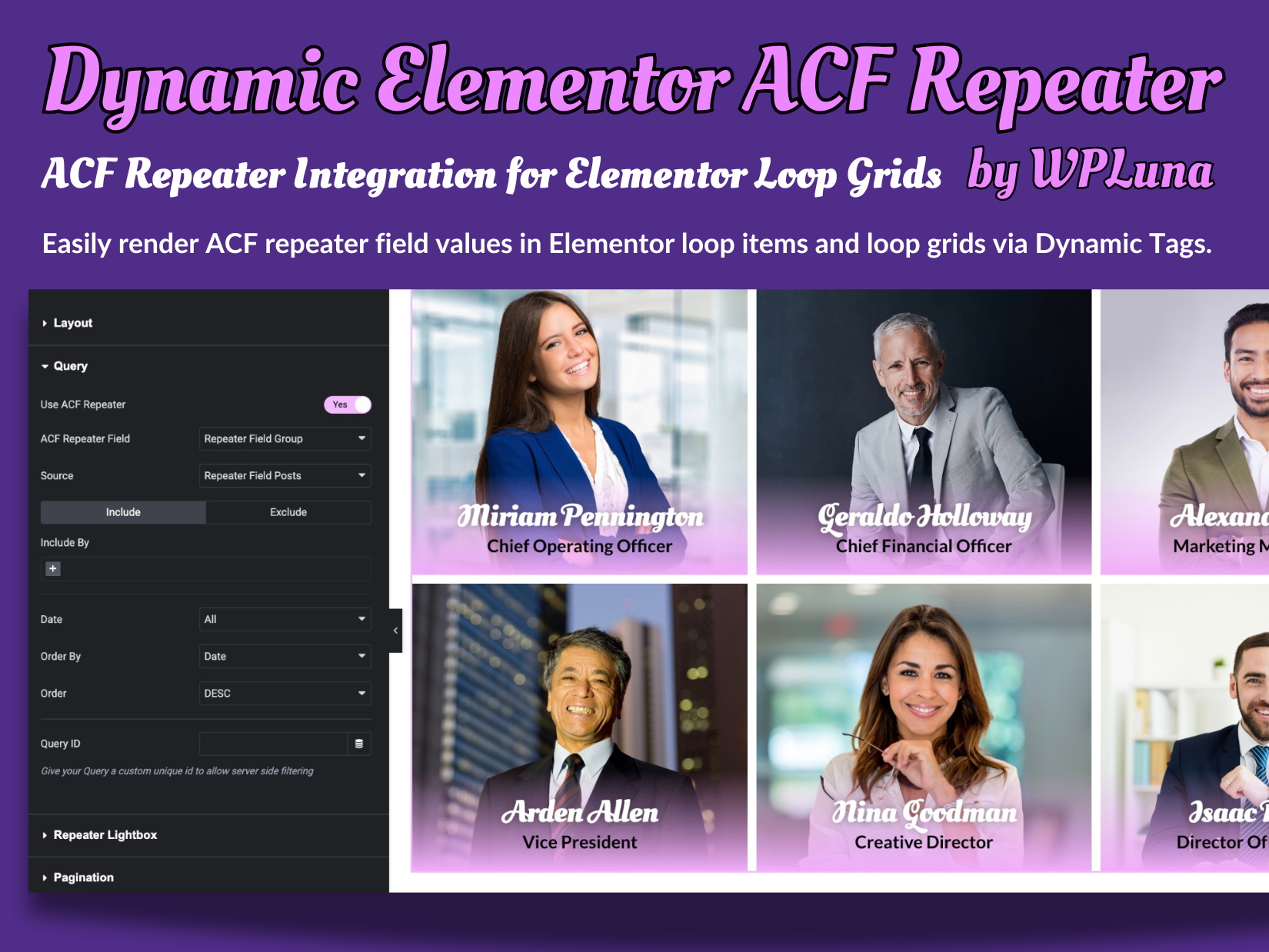
- In the widget’s Query settings, toggle on “Use ACF Repeater”
- Select the ACF Repeater field you created in step 1
- Choose the post type that contains your repeater fields as the source
-
Use ACF Relationship (PRO ONLY):
- In the Loop Grid widget settings, find the “ACF Relationship” section
- Enable the ACF Relationship feature
- Select the ACF Relationship field to use
- Choose how to display related content in your loop items
- Customize the query to filter or sort related posts as needed
-
Lightbox Setup (PRO ONLY):
- In the Loop Grid widget settings, find the “Lightbox” section
- Enable the lightbox feature
- Customize lightbox settings as needed
-
Lightbox Visibility Control (PRO ONLY):
- For elements with ACF Repeater Dynamic Tags, a “Lightbox Visibility” control is available
- Options include:
- Default: Element is visible in both loop and lightbox
- Hide in Lightbox: Element is hidden when viewed in the lightbox
- Show Only in Lightbox: Element is hidden in the loop but visible in the lightbox
- Use this feature to create different layouts for loop items and lightbox views
-
Swiper Integration (PRO ONLY):
- In the Loop Grid widget settings, locate the “Slider” section
- Enable the slider feature
- Adjust slider settings to your preferences
-
Filtering Setup (PRO ONLY):
- In the Loop Grid widget settings, find the “Filter” section
- Enable filtering
- Choose the ACF field to use for filtering
- Customize filter appearance and behavior
-
Preview and Publish:
- Preview your template to ensure the ACF Repeater data is displaying correctly
- Make any necessary adjustments to your Loop Item template or Loop Grid widget settings
- Publish your template when you’re satisfied with the results
Tips:
* Ensure that your ACF Repeater field is populated with data before previewing in Elementor
* You can use multiple ACF Repeater Dynamic Tags within a single Loop Item template
* For image fields, use the ACF Repeater Image tag in Image widgets for best results
* Remember to update your Loop Item template if you make changes to your ACF Repeater field structure
* Use the new Lightbox Visibility Control to create dynamic layouts that change between loop and lightbox views
By following these steps, you’ll be able to dynamically display your ACF Repeater field data using Elementor’s Loop Grid widget and custom Dynamic Tags provided by this plugin.
Which ACF field types are supported?
The plugin supports various field types within repeaters, including text, textarea, image, file, and more. Check the plugin’s documentation for a full list of supported field types.
Screenshots
Choose your repeater for loop item – Set up your ACF Repeater field in the Loop Item Settings panel to begin using dynamic content.
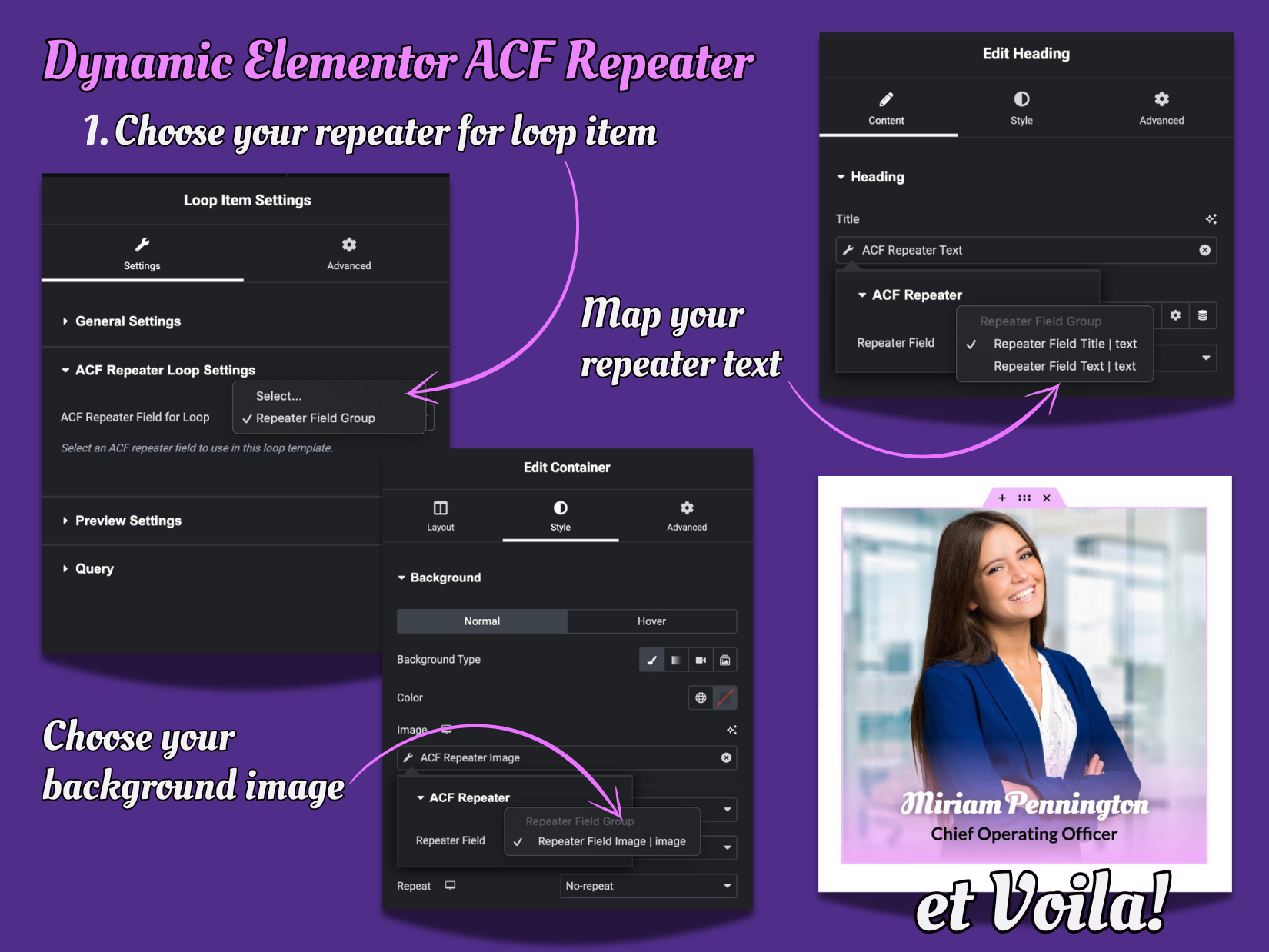
Map your repeater text – Use ACF Repeater dynamic tags to display your repeater field content in Elementor widgets.
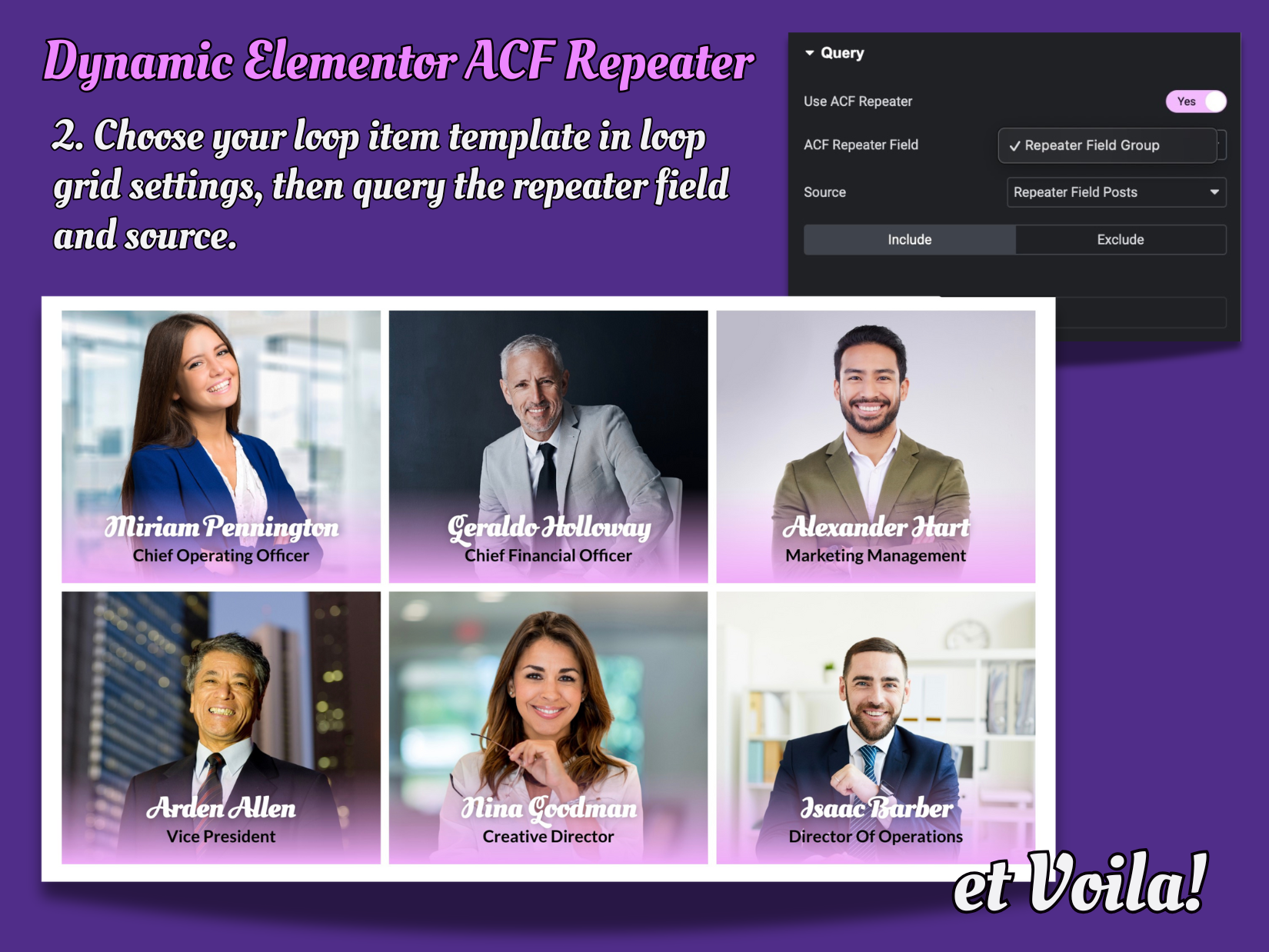
Et Voila! – See your dynamic ACF Repeater content beautifully displayed in an Elementor Loop Grid.