Keel Defaults Wordpress Plugin - Rating, Reviews, Demo & Download
Plugin Description
Keel flips a menu of sensible defaults onto any WordPress install, each one a switch under Settings Keel. Nothing is hidden and nothing is all-or-nothing — you can see exactly what the plugin does to your site and turn any piece off.
All 39 defaults are declared in a single schema array that drives both the settings screen and the code that wires them to WordPress. A default is an opinionated filter behind a control.
Disabling something means it is actually disabled. When you switch comments off, they are off below the presentation layer, not merely hidden by the theme template and the REST route — ask the database directly with get_comments() and there is nothing to hand back. The same care runs through the rest: closing the REST API also removes the link advertising it, and disabling comments also stops the comment feed answering.
Site Health shows you the whole posture, read-only: every default and its current state on one screen, so you can see what the site is actually doing without clicking through tabs. It also reports when another plugin is controlling the same settings, which otherwise fails silently.
Outgoing email stops at the edge of production. A database copied down from production carries real customer addresses and whatever mail service production was using, so a cron run or a bulk action can email real people from a staging site or a laptop. Keel suppresses outgoing mail on any environment that is not production — on by default, does nothing on production, and says so in an admin notice so nobody is left wondering why a password reset never arrived.
It works the same on a network. Activated across multisite, Keel seeds every existing site and every site created afterwards, so a later change to a default cannot move some sites and not others. A Super Admin can decide any setting for the whole network under Network Admin Settings Keel Defaults; sites see those settings as locked, with their own saved values untouched underneath, so lifting a policy returns each site to exactly what it had.
External services
When the Require strong passwords default is enabled, Keel screens new passwords against the Have I Been Pwned Pwned Passwords range API (https://api.pwnedpasswords.com) to reject passwords found in known breaches. This uses k-anonymity: only the first five characters of the password’s SHA-1 hash are ever sent — never the password, and never the full hash. No personal data is transmitted. The check runs only when a password is being set or changed and the default is on. It can be disabled with define( 'KEEL_DISABLE_HIBP', true ); in wp-config.php, with the keel_disable_hibp filter, or by turning off the strong-password default. If the API is unreachable, or answers with a truncated or malformed response, the check is skipped and the password is allowed — a breach-data outage never blocks a password change. It is not skipped silently: the failure is recorded and reported under Site Health, so a site whose screening has stopped working can tell. Only the kind of failure and when it happened are stored — never the password, and never the hash prefix. Have I Been Pwned is operated by Troy Hunt; see https://haveibeenpwned.com/Privacy and https://haveibeenpwned.com/API/v3 for its terms and privacy policy.
Recommended wp-config.php hardening
A few defences live best in wp-config.php, outside any plugin: they apply before plugins load and cannot be switched off from the dashboard. These are optional and independent of Keel — add the ones that fit your site.
define( 'DISALLOW_FILE_EDIT', true ); — removes the built-in plugin and theme code editors, so a compromised admin account cannot edit PHP from the dashboard.

define( 'WP_POST_REVISIONS', 10 ); — caps stored post revisions so the database does not grow without bound. Keel's **Post Revision Retention** control can govern the same policy after plugins load; a numeric or false constant remains the higher-level operator choice and locks that control.

define( 'AUTOSAVE_INTERVAL', 120 ); — lengthens the editor autosave interval. This is independent of Keel's Heartbeat throttle: both influence how often the editor saves in the background, but neither replaces or overrides the other.<h3>Credits</h3>
Keel is a de-branded evolution of Better by Default, the WordPress defaults plugin by WPYEG (the Edmonton WordPress meetup): https://github.com/WPYEG/Better-by-Default
Better by Default is published under the GPL-3.0-or-later; its sole author, who also wrote Keel, additionally licenses the portions carried over here under the GPL-2.0-or-later. Keel keeps Better by Default’s core architecture — a single schema array that drives both the settings screen and the bootstrap, where each default is one array entry plus one hook — and adds further hardening and admin defaults adapted from the Pixel Managed Platform plugin (GPL-2.0-or-later).
Pixel Managed Platform is itself a hard fork of the 10up Experience plugin by 10up (GPL-2.0-or-later): https://github.com/10up/10up-experience — so several of Keel’s adapted defaults ultimately descend from code first written for 10up Experience. Copyright in that work is retained by 10up and its contributors, and 10up retains its marks; Keel is not affiliated with or endorsed by 10up. See LICENSE for the full GPL-2.0 text.
Support This Plugin
Keel is free and stays free. If it saves you an afternoon of hardening a new site, or keeps a staging server from emailing your client’s customers, you can support its maintenance through GitHub Sponsors.
Bug reports and feature requests are welcome on the issue tracker: https://github.com/dknauss/keel/issues. If you have found a security problem, please report it privately rather than in a public issue — SECURITY.md ships with the plugin and says how.
Screenshots
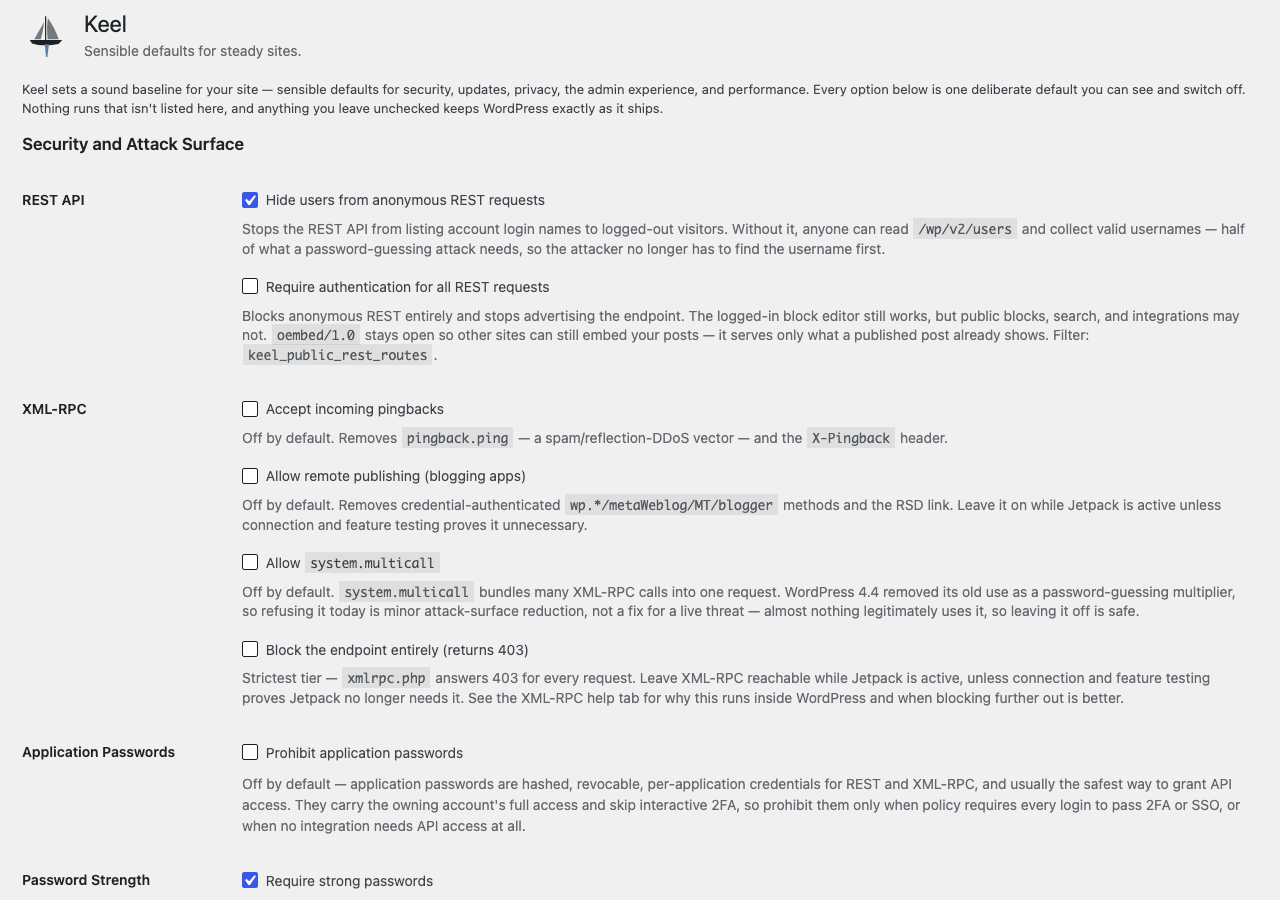
Settings → Keel. Every default is one switch with the reason it exists written beside it, so nothing the plugin does is hidden behind a name you have to guess at.
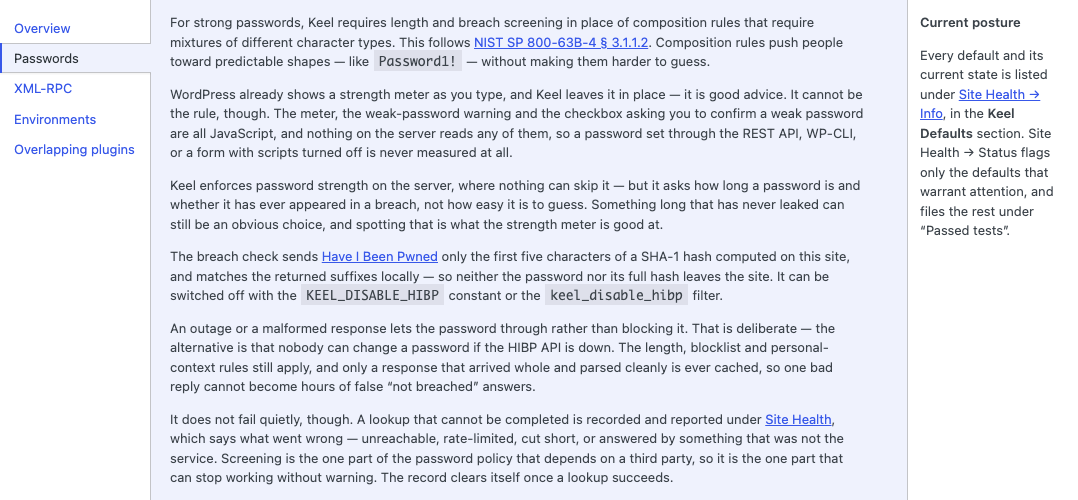
The Passwords help tab. Length and breach screening in place of composition rules, with what the breach check actually sends spelled out — five characters of a hash, never the password.
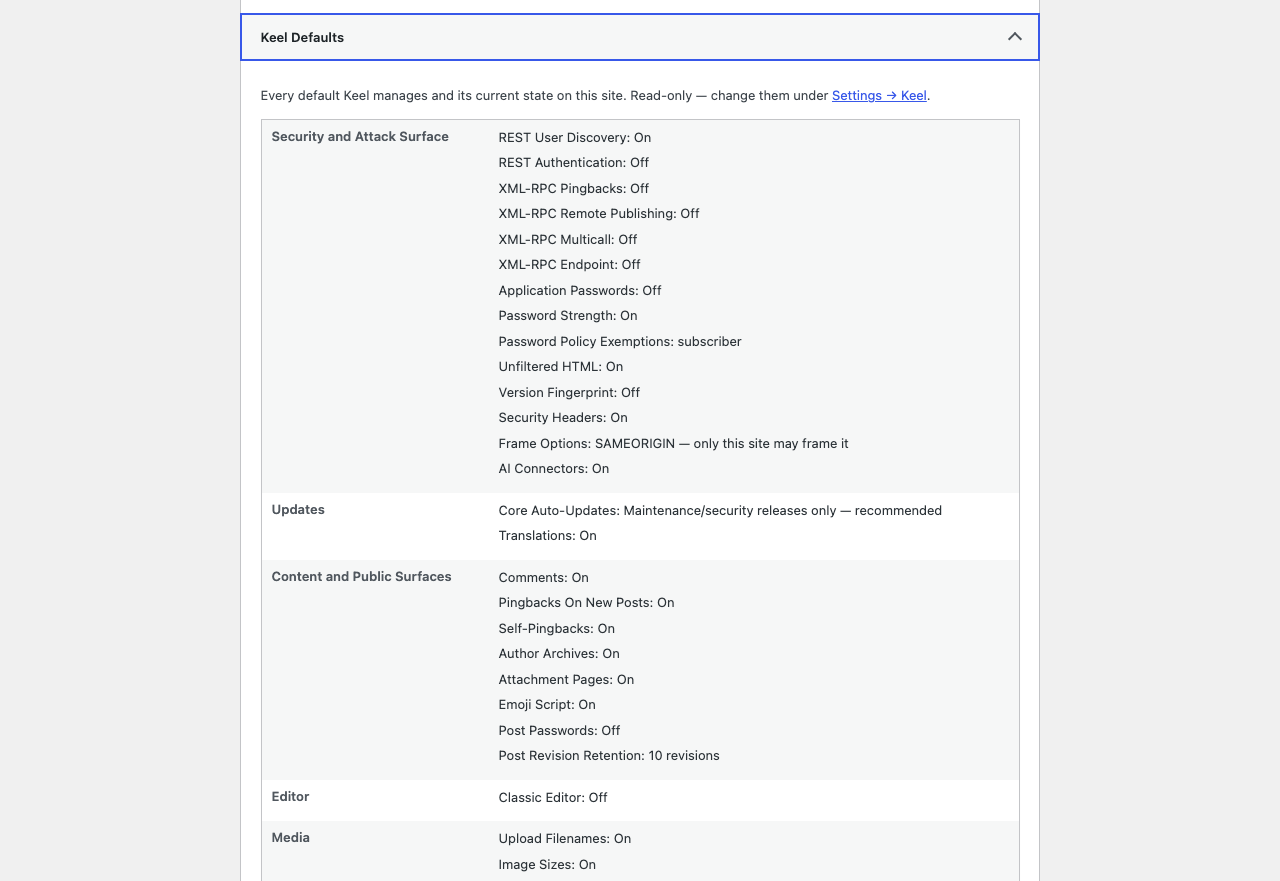
Site Health → Info. Every default and its current state on one read-only screen, so you can answer “what is this plugin doing to my site?” without opening the settings and reading checkboxes.