Kitestring Analytics For Umami Wordpress Plugin - Rating, Reviews, Demo & Download

Plugin Description
An independent integration maintained by Ashraf Ali. This plugin is not affiliated with, endorsed by, or supported by Umami.
Kitestring Analytics for Umami adds your configured Umami tracking script to public WordPress pages. Tracking is disabled until you configure a script URL and Website ID and explicitly enable it.
Features:
- All Umami v3.4 tracker attributes, including performance, separate automatic pageview control, distinct IDs, and fetch credentials.
- Optional exclusion of signed-in administrators.
- Optional comment submit-button click events, without sending comment text.
- Dashboard pageviews, visitors, visits, bounces, and active visitors using an optional API connection.
- Self-hosted username/password authentication or Umami Cloud API keys.
- Migration from Integrate Umami settings.
- Settings remain saved when the plugin is deactivated.
- Opt-in recorder.js loading for heatmaps and session replay, with an optional custom recorder URL.
- Native custom events, event data, identity/session data, and revenue events through the official Umami tracker APIs.
- WordPress filters for page/consent gating, dynamic visitor IDs, future tracker attributes, and recorder exclusions.
Based on Integrate Umami by Ancocodet. Original authorship and GPL licensing are retained. Source and development: GitHub.
External services and privacy
This plugin integrates with Umami Analytics. When you enable tracking, visitors’ browsers load executable JavaScript from the script URL you configure and send analytics to its collection endpoint or the collection host you explicitly select. Umami Cloud normally uses https://cloud.umami.is/script.js. Self-hosted installations use your own server.
The tracker sends page URLs, page titles, referrers, browser language, screen dimensions, and configured event data. The collection server receives visitors’ network requests. Exclude Search and Exclude Hash omit query strings and URL fragments from tracked URLs. A Before Send function, which you must supply separately on your site, can further modify or suppress tracking.
Performance collection and fixed or dynamic distinct IDs are optional. Distinct IDs can identify visitors across sessions; do not use names, email addresses, or patient identifiers. Fetch Credentials defaults to Omit; selecting Include or Same Origin changes the browser credentials sent with tracker requests.
If you explicitly enable the recorder, visitors also load recorder.js and request recording configuration from the collection server. Depending on the Umami website settings, it can send DOM snapshots, page content, clicks, scrolling, input interactions, and full URLs. Umami controls replay/heatmap enablement, sampling, masking, blocking, and duration. Tracker query/hash exclusions and Before Send do not sanitize recorder payloads. Recording is disabled by default and must not be enabled on sensitive pages without an appropriate privacy and consent assessment.
When optional API credentials are configured, WordPress requests aggregate analytics for the configured Website ID. Self-hosted credentials are sent to your configured server for authentication. Umami Cloud API keys are sent to https://api.umami.is/v1. These credentials are saved in the WordPress options database and are not added to the public tracking script. Dashboard statistics are cached for five minutes.
The plugin does not provide a consent banner or guarantee legal compliance. Site owners are responsible for notices, consent where required, and appropriate service agreements. Do not put personal information, patient information, or other sensitive data in tracked URLs, titles, referrers, or events. Cookie-free analytics does not by itself establish HIPAA compliance.
Umami Cloud: Privacy policy and Terms. For self-hosted Umami, the operator’s policies apply.
Heatmaps and session replay
- Enable the desired heatmap/replay features in your Umami website settings. Configure sampling, strict masking, block selectors, and maximum duration there.
- In WordPress, expand Heatmaps and Session Replay and explicitly opt in to Load Recorder.
- Leave Recorder URL blank to use recorder.js beside your Script URL, or provide the exact recorder URL from your Umami installation. Umami Cloud uses https://cloud.umami.is/recorder.js.
- If assets use a CDN or separate host, configure the shared collection-host override.
- Save, purge page caches, and verify recorder.js and successful /api/record requests as an anonymous visitor. Loading recorder.js alone is not proof of collection. A tracked session is required.
Umami Cloud availability depends on your subscription and service configuration. The plugin does not bypass plan limits. Analytics reports, funnels, goals, journeys, retention, attribution, boards, and recording playback remain in the Umami application; their data is supplied by the native tracker and recorder, not a replacement reporting engine in WordPress.
Custom events and extensions
Use Umami’s native data-umami-event attributes or umami.track() for custom events and data. Revenue events use event data containing revenue and currency. Use umami.identify() for pseudonymous visitor/session data. These APIs are available after the tracker loads.
The kitestring_umami_tracker_attributes filter accepts the data-attribute array and saved options. It supports dynamic distinct IDs and new data attributes without editing the plugin. The kitestring_umami_tracking_allowed filter can prevent both scripts from being emitted on a page; the kitestring_umami_recorder_enabled filter can selectively exclude pages from recording. See the development README for examples. These server-side filters do not replace a browser consent manager.
Screenshots
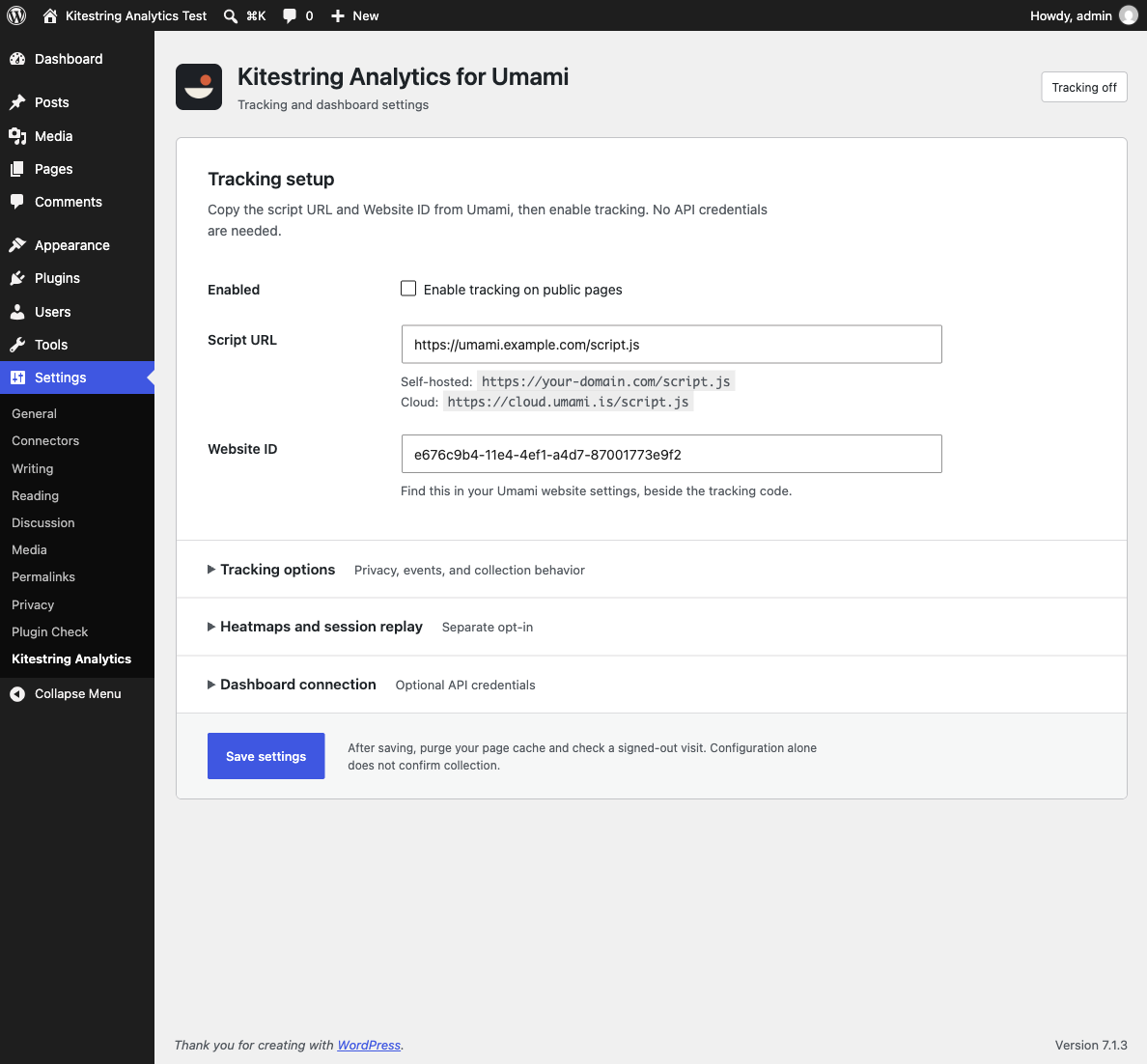
Tracking setup, saved configuration status, and keyboard-accessible optional sections on a synthetic test site.
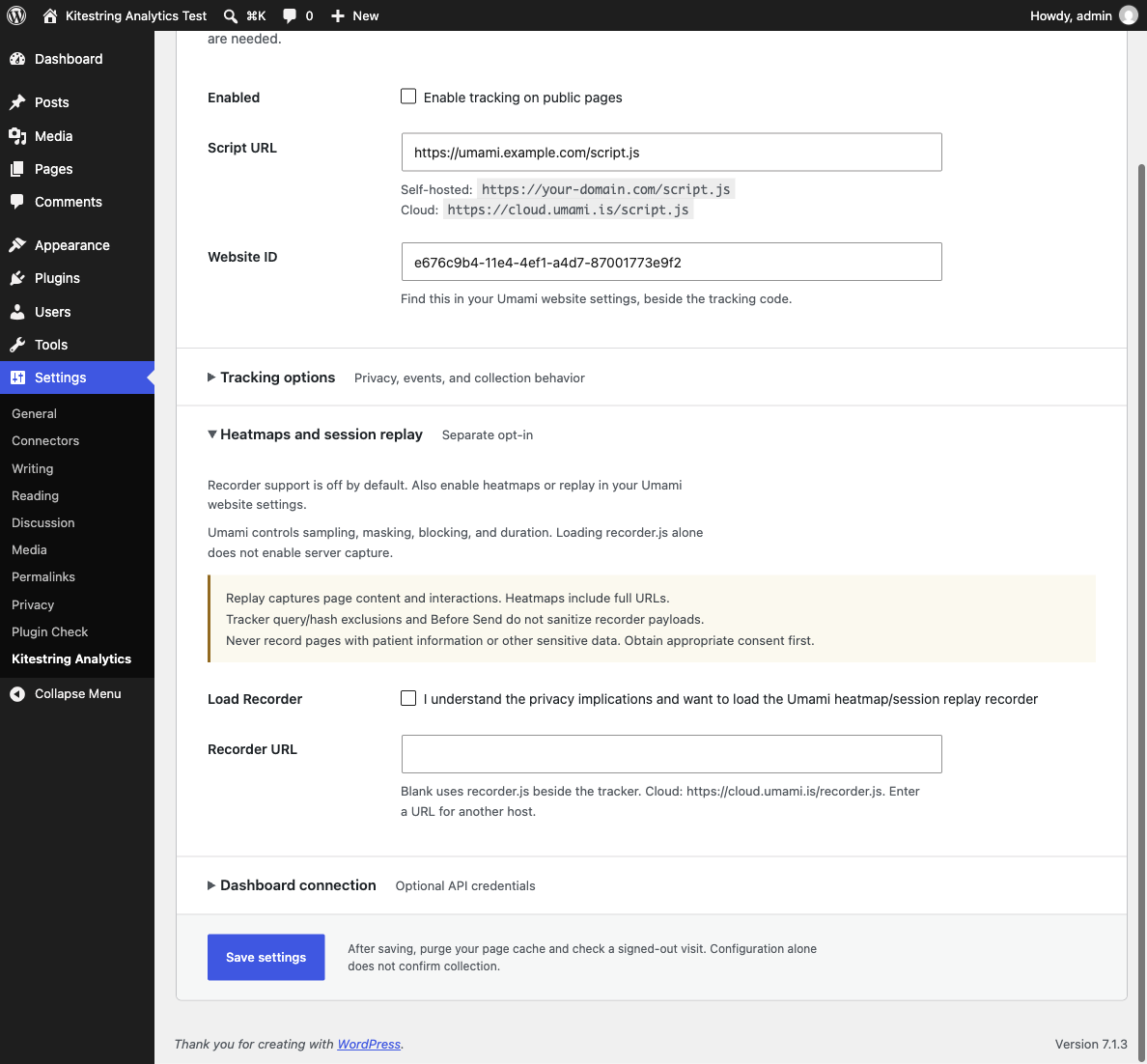
Recorder opt-in, server requirements, and sensitive-data warnings in the redesigned settings page.