Optcatch – Lead Capture, Email Campaigns & Newsletter For Any Form Wordpress Plugin - Rating, Reviews, Demo & Download

Plugin Description
Optcatch: lead capture, email campaigns and multi-SMTP sending in one WordPress plugin. It turns the forms you already run into an email list with a consent record for every contact, then sends newsletters and email campaigns from your own Gmail, Microsoft 365, SendGrid or SMTP account — with multi-SMTP sender rotation across every account you connect. Optcatch Pro adds drip autoresponders, re-engagement campaigns and automated email warm-up, so a new sending domain is far less likely to be flagged.
No list scraping, no third-party CRM, no per-subscriber fees. Every contact comes from a form submission on your own site or from a list you have confirmed permission to email, each stored with the consent basis, wording version and timestamp, and every send is checked against that record first. By default only visitors who tick a consent checkbox are stored (strict consent); you can instead choose to capture every form submission, and those contacts are recorded as captured under that policy, not as a ticked checkbox.
Lead capture from any form on your site
It doesn’t matter which form plugin, theme or page builder you use. Universal auto-detect is on by default and picks up any form with an email field – contact forms, newsletter boxes, popups, theme and page-builder forms, or hand-written HTML. Login, password, search and payment forms are ignored. You don’t need any code or a specific form plugin.
- Any form, zero setup – Divi, Bricks, Beaver Builder, theme footers, popup builders, custom HTML: if it has an email field, it’s captured. Your form already has its own marketing opt-in checkbox? Add the class
lcc-consentto it and the plugin reuses it as the consent gate. - Deeper integration with popular form plugins – on top of universal capture, Contact Form 7, WPForms, Elementor Pro Forms, Gravity Forms, Fluent Forms and Ninja Forms are also captured server-side, with their native consent/acceptance fields recognised and the form name recorded as the contact’s source.
- WooCommerce – opt-in customers at checkout or account registration.
- Webhooks & REST API (Pro) – send leads from external tools (Zapier, Make, Typeform, landing-page builders) to a secure endpoint protected by a secret key.
- Shortcode form – no form yet?
[optcatch_form]drops a clean, mobile-friendly signup form anywhere. It replaces the older shortcode names, which were removed in 0.9.20.
Multi-SMTP sender rotation, and automated SMTP warm-up in Pro
- Daily limit and sending speed – every sending account has a daily limit and a per-minute speed you set yourself, so a campaign is spread out instead of going in one burst.
- Email warm-up (Pro) – a new Gmail, Outlook or SMTP account starts at a safe daily volume (for example 50/day) and ramps up automatically as reputation builds. You set the start, growth and ceiling, and the next day’s higher limit only unlocks once a day has really used its allowance.
- Multi-SMTP rotation – pool several sending accounts; campaigns rotate across them so no single account hits its provider limit.
- Daily caps, pacing and a circuit breaker – hard per-account caps, paced dispatch over a sending window, and automatic pauses when a provider starts rejecting mail.
- Gmail / Google Workspace OAuth2, Microsoft 365 / Outlook OAuth2, SendGrid API and any SMTP server – connect without storing raw passwords for Google and Microsoft.
Email marketing campaigns and newsletters
- Campaign builder – branded newsletters with header, buttons, social links and simple formatting.
- Templates – six starter designs (welcome, newsletter, product launch, follow-up, re-engagement, personal note) plus a drag-and-drop studio to save as many of your own as you like. Pro adds six more ready-made designs: event / webinar invitation, flash sale with coupon code, lead-magnet delivery, customer story, appointment confirmation & reminder, and a review request with one-click rating buttons.
- Segments – filter by the form a contact came from, tag, signup date or consent status.
- CSV import and export – bring existing subscribers in with tags and a recorded permission statement.
- Delivery dashboard – live sent/failed/skipped counts per campaign and per sending account.
Wake-up follow-ups, drip autoresponders and re-engagement (Pro)
- Wake-up follow-up (Pro) – every new contact is emailed automatically minutes, hours or days after they are captured. Drip / welcome sequences (Pro) – scheduled automation campaigns after capture.
- Re-engagement (Pro) – the second touch for leads who never replied: weeks or months after capture, each quiet contact gets one win-back email with a reason to come back, recovering leads you already paid for without buying new traffic.
- Reliable background delivery – a heartbeat, a token-protected tick URL for server cron, and a reconciler that unsticks any campaign.
GDPR consent engine
- Consent audit trail – exact wording shown, wording version, UTC timestamp and source page per contact.
- Explicit opt-in by default – a consent checkbox is added to captured forms (or your existing marketing opt-in checkbox is reused; a privacy-policy or terms box never counts as marketing consent); unticked submissions are not stored. An optional “Automatic Consent on Submission” policy captures every submission and records that policy as the consent basis.
- Allowlist sending – the send query intersects a positive-consent allowlist and excludes unsubscribed contacts, always.
- One-click unsubscribe – compliant link and List-Unsubscribe headers in every email.
Free vs Pro
The free version is complete on its own and has no usage limits: form auto-capture, CSV import (up to 5,000 rows per file), unlimited contacts, unlimited saved segments, unlimited custom templates, the starter templates, immediate sends, and as many sending accounts (Gmail, Microsoft 365, SendGrid or SMTP) as you like, each with its own daily limit, sending speed and automatic rotation. Optcatch Pro (a separate plugin from optcatch.com) adds features, not bigger numbers: automated mailbox warm-up, scheduled and delayed/automation sends, wake-up and re-engagement emails, the Pro template library (six extra ready-made designs), file attachments and hosted download links, webhooks & REST API ingestion from external tools (Zapier, Make, Typeform), and multisite licensing.
Optcatch Pro is a separate plugin, available from optcatch.com and not hosted on WordPress.org. It is installed on its own and keeps your contacts, campaigns and settings. This free plugin contains no Pro code and no license checks: nothing in it is locked or waits for a key, and no license key can unlock anything inside it. The Pro features exist only in Optcatch Pro.
External services
This plugin connects to the following third-party services. None of these connections
happen unless you actively opt in or configure the feature described.
- Freemius — used for the optional opt-in and for Pro licenses. Nothing is sent to
Freemius unless you choose to: (1) if you click “Allow & Continue” on the plugin’s opt-in
screen, your name and email, the site URL, WordPress/PHP/plugin versions and this plugin’s
activation/deactivation events are sent (the list of other plugins and themes too, unless
you switch it off on that screen); (2) if you use Optcatch Pro (a separate plugin), its license key
and site URL are sent to validate it; (3) if you fill in the optional feedback form when
deactivating, the reason you choose is sent anonymously. If you skip the opt-in, nothing is
sent. The free version receives its updates from WordPress.org.
Freemius Terms of Service |
Freemius Privacy Policy - SendGrid — only if you choose SendGrid as your sending provider in Settings. Each
campaign/wake-up email (recipient address, subject, body, and any attachment) is sent via
SendGrid’s Mail Send API instead of your server’s own mail transport.
SendGrid Terms of Service |
SendGrid Privacy Policy - Google (Gmail) — only if you connect a Google account for sending. The plugin uses
Google’s OAuth2 flow to obtain and refresh a token used solely to authenticate outgoing
mail via Gmail’s SMTP/API; your Google account email address is read to confirm which
account is connected.
Google Terms of Service |
Google Privacy Policy - Microsoft 365 / Outlook — only if you connect a Microsoft account for sending. The
plugin uses Microsoft’s OAuth2 flow and the Microsoft Graph API in the same way as the
Google integration above, solely to authenticate and send outgoing mail.
Microsoft Services Agreement |
Microsoft Privacy Statement
Data this plugin collects, and when
Per WordPress.org Plugin Guideline 7, here is exactly what is stored and when.
From your visitors (only when they tick the consent box on one of your forms):
- Email address, and any of: phone, first name, last name, company — read from your form’s
own fields at the moment of submission. - The URL of the page the form was on (
source_page). - Consent evidence:
consent_status = opted_in, the exact consent wording shown, a wording
version id, and a UTC timestamp.
If the visitor does not tick the box, nothing is sent or stored — the form submits
normally and the plugin ignores it. This is the default.
Optional “Automatic Consent on Submission” policy: if you switch to it under Settings, every
form submission is stored as above without a checkbox, and the consent evidence records that the
contact was captured under this policy (no checkbox wording is attached). You are responsible for
having a legal basis to email these contacts.
From you, the site owner (only when you import):
- The contact fields you provide (email, phone, names, company, tags).
- Consent evidence:
consent_status = customer_declared, the permission statement you affirmed,
and a UTC timestamp. The plugin also records that you checked the “I confirm I have permission
to email these contacts” box, with a timestamp and your user id.
Sending / operational data:
- Per-recipient send records (which campaign, which contact, sent/failed/skipped, timestamp).
- Unsubscribe events (status set to
unsubscribedwith a UTC timestamp).
The plugin does NOT collect passwords, payment/card data, or other sensitive fields from
your forms — those field types are explicitly excluded from capture. By default, email is
delivered through your own site’s wp_mail() and no lead/contact data leaves your site. If
you choose to configure SendGrid, Gmail, Microsoft 365 or an SMTP server as your sending
provider, the recipient address and email content are sent to that provider to deliver the
message — see “External services” above for details.
Sample privacy-policy clause
You are responsible for your own privacy policy. You may adapt the following:
Marketing contact data. When you submit a form on this site and tick the marketing
consent box, we store the contact details you entered (such as your email address and name),
the page you submitted from, and a record of the consent wording you agreed to together with
the date and time. We use this to send you marketing emails you have consented to. You can
withdraw consent at any time using the unsubscribe link in any email, after which we will not
email you again. We do not sell this data or share it with third parties for their own
marketing. To request access to, or deletion of, your data, contact us at [your address].
Screenshots
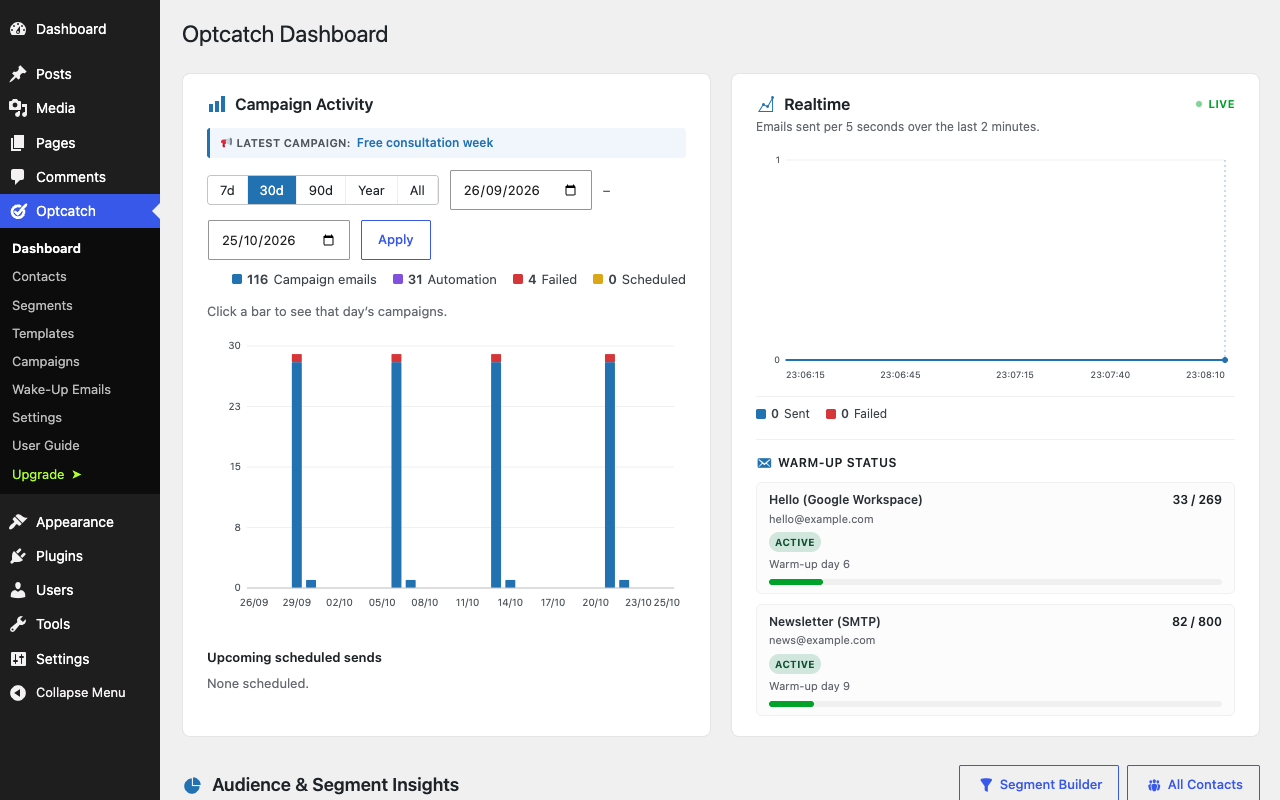
Dashboard – campaign activity chart, live sending feed, per-account sending status and recent campaigns.
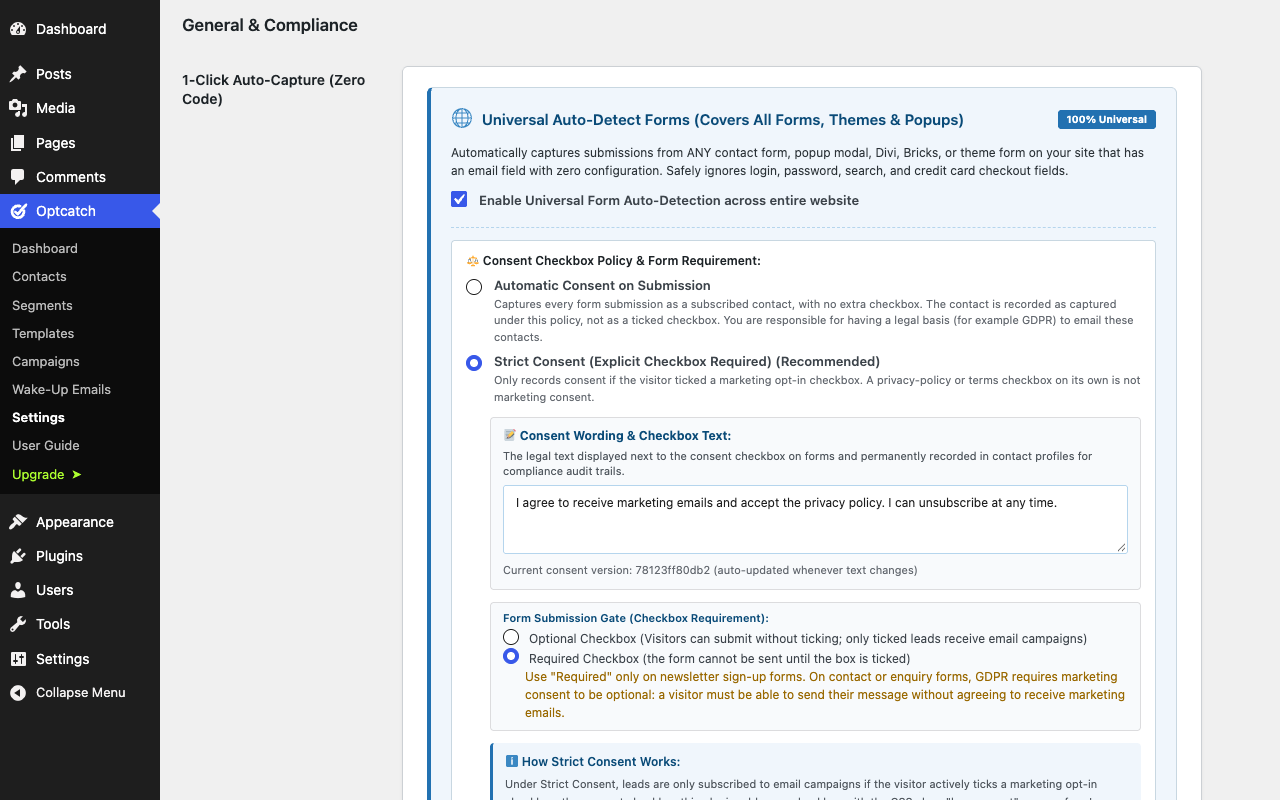
Settings → General & Compliance – universal auto-capture for any form on your site (form plugins, page builders, theme and popup forms), consent policy and the consent wording recorded with every contact.
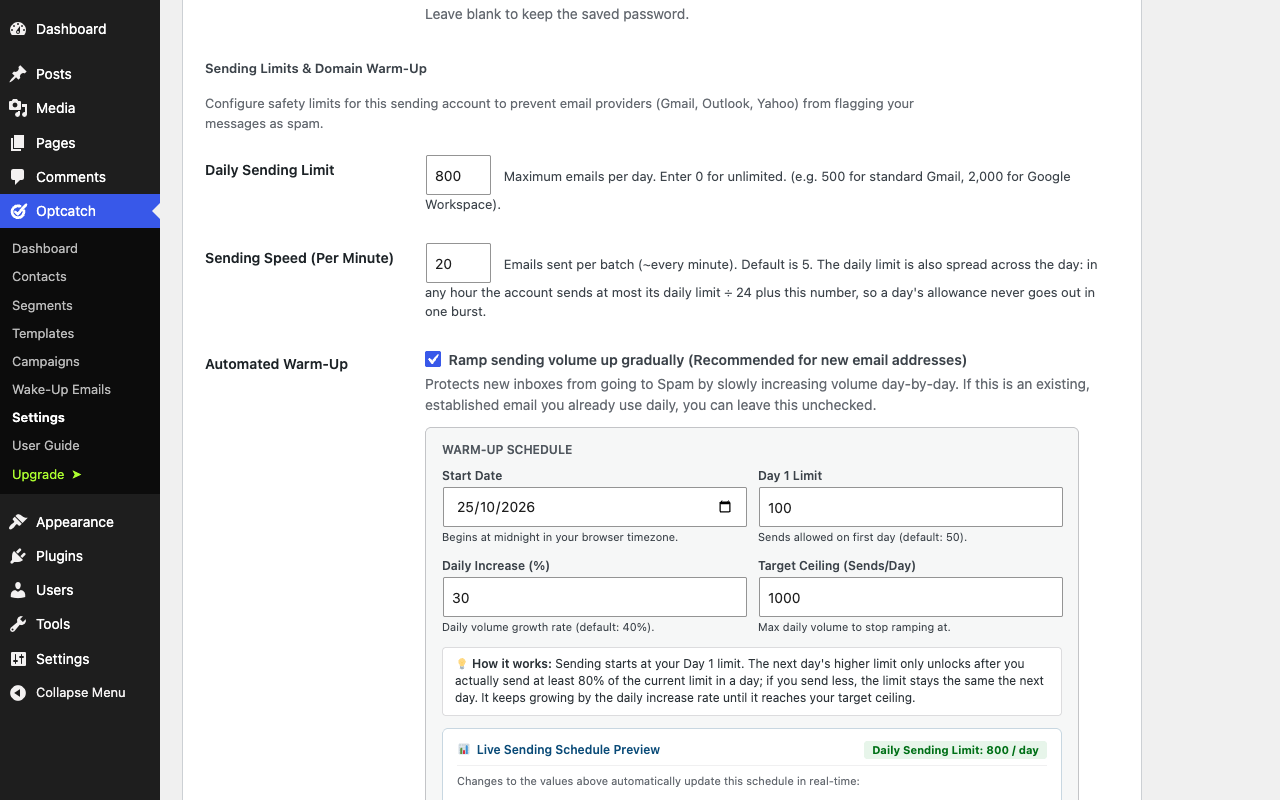
Settings → Sending account – daily limit and sending speed (Pro adds the automated warm-up schedule with today’s allowance).
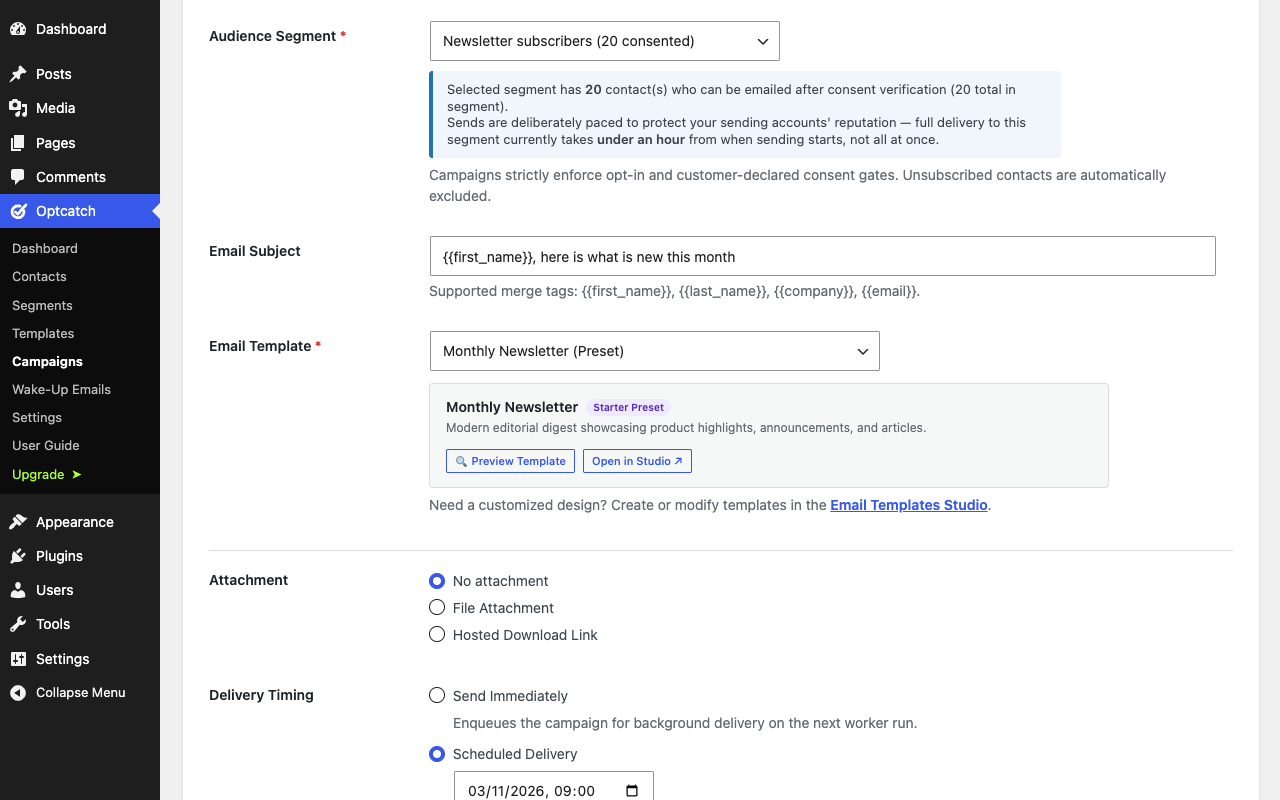
Campaigns – new campaign: audience segment with its consent-verified recipient count, email template, attachment and delivery timing (scheduled delivery and attachments are Pro).
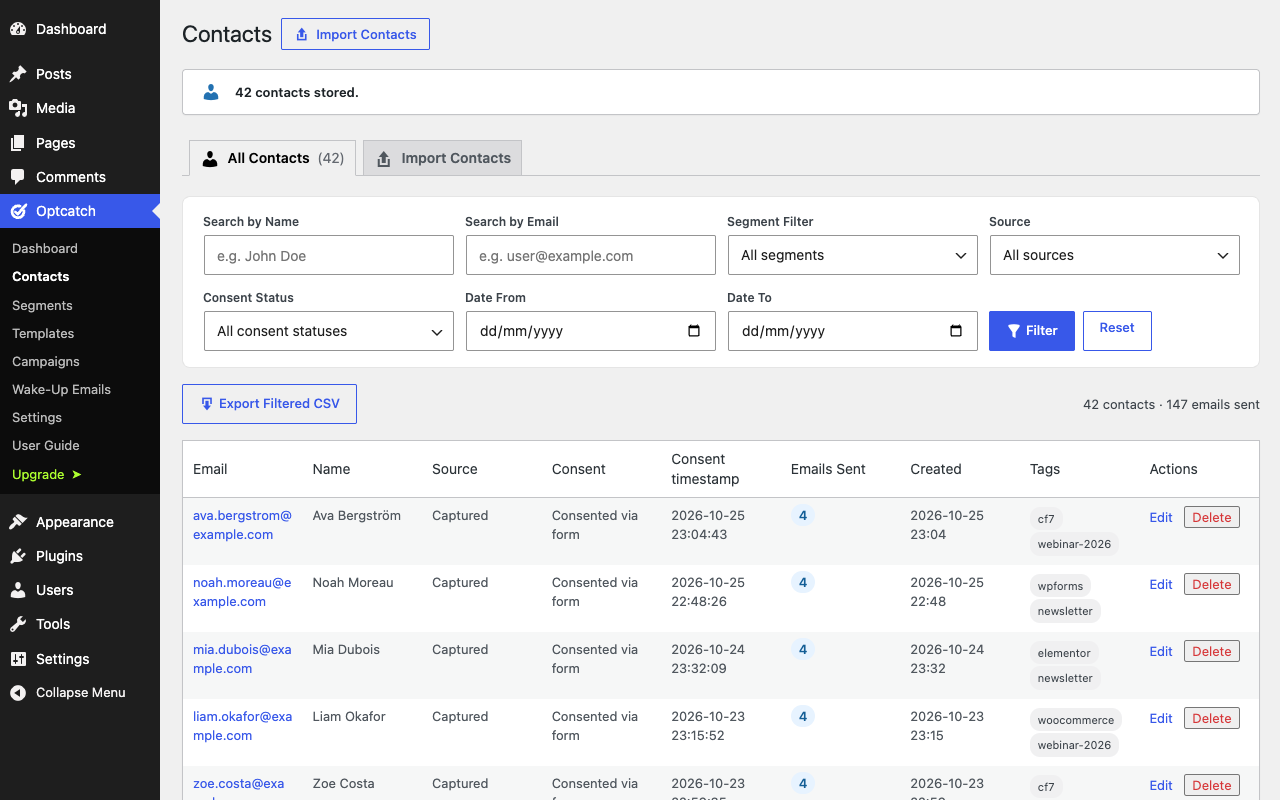
Contacts – consent status, consent timestamp, source, emails sent and tags for every contact, with filters by segment, source and consent.
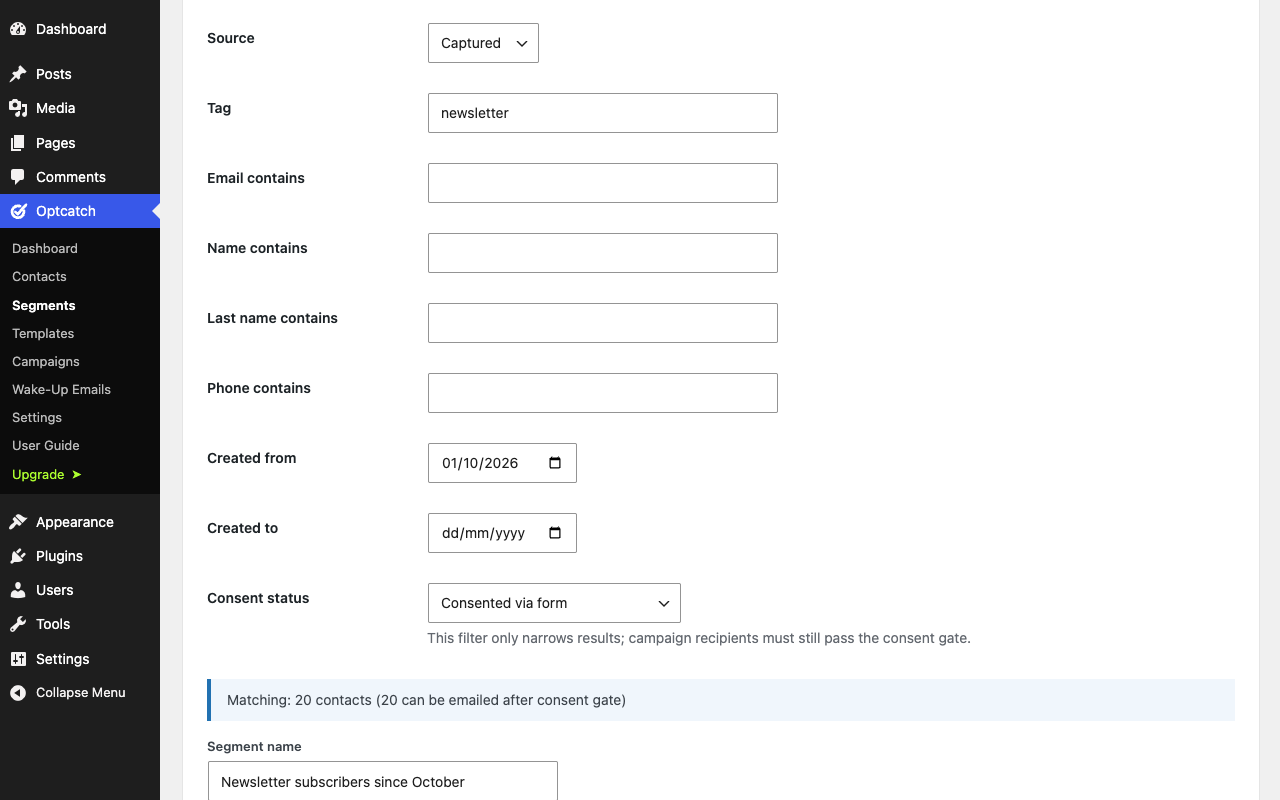
Segments – live filter by source, tag, signup date and consent status, with a matching-contacts count before you save.