LBC Optimize Images Wordpress Plugin - Rating, Reviews, Demo & Download

Plugin Description
LBC Optimize Images is a highly efficient, lightweight WordPress plugin designed to automatically optimize your images by converting them to next-generation formats: AVIF and WebP.
Instead of replacing or permanently altering your original images, this plugin creates optimized copies and seamlessly serves them to your visitors. This drastically reduces page load times and improves your Google PageSpeed Insights and Core Web Vitals scores without any risk to your original media.
Features
- Next-Gen Formats: Automatically converts JPEG and PNG images to AVIF (primary) and WebP (fallback).
- Dual Delivery System: Uses both
.htaccessrewrite rules and HTML Output Buffering to guarantee the images are served across all server types. - 100% Server Compatibility: Works flawlessly on Apache, LiteSpeed, Nginx, and IIS, as well as localhost environments (like WAMP/XAMPP).
- Zero Risk to Originals: Your original images are completely untouched. Optimized copies are safely stored in a separate
wp-content/uploads-lbcimg/directory. - Bulk Optimization: A built-in 1-click bulk optimizer allows you to process all your existing media library images seamlessly in the background.
- Customizable Quality: Easily adjust the compression quality for both AVIF and WebP formats directly from the settings page.
- Block Theme Compatible: Works perfectly with classic themes and modern Full Site Editing (FSE) block themes.
- Clean Uninstall: If you ever uninstall the plugin, it completely cleans up after itself by deleting all optimized images and removing its configuration options.
How it Works
- When you upload a new image (or run the Bulk Optimizer), the plugin creates optimized
.avifand.webpcopies of the image using your server’s native Imagick or GD libraries. - These copies are stored in a dedicated folder (
uploads-lbcimg/uploads/) mirroring your media library structure. - When a visitor loads a page, the plugin intercepts the HTML before it is sent to the browser and automatically changes the image URLs to point to the new
.avifor.webpfiles. - For servers running Apache or LiteSpeed, it also generates
.htaccessrewrite rules as a secondary fallback.
Backup Methods
Since LBC Optimize Images never alters or deletes your original uploaded images, no special backup methods are required! Your original files remain exactly where they are in the wp-content/uploads/ directory. If you ever deactivate the plugin, WordPress will immediately revert to serving your original images.
Screenshots
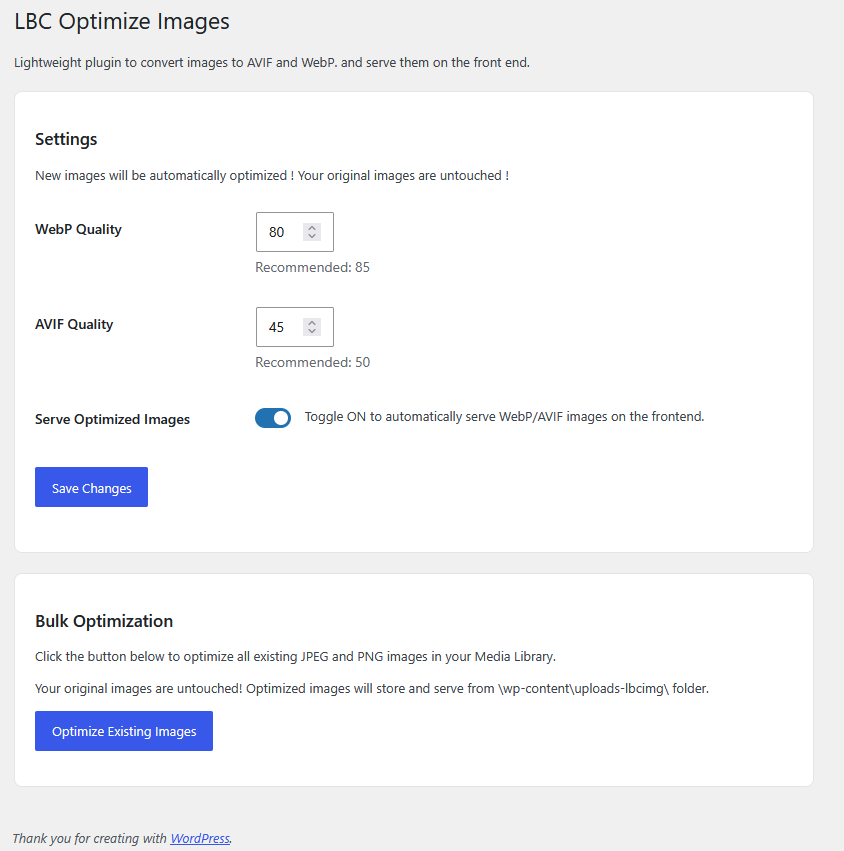
The LBC Optimize Images settings and Bulk Optimization dashboard.