ProdTabs: Multilingual Product Tabs For WooCommerce Wordpress Plugin - Rating, Reviews, Demo & Download

Plugin Description
ProdTabs adds tabs to your WooCommerce product pages: shipping, size guide, ingredients, warranty, questions and answers, anything your customers ask about. It uses the tabs of your theme, so your product pages keep their look. On phones, the tabs become an accordion that opens on a tap.
Every feature described here is in this free plugin.
Tabs for each product
- Add as many tabs as you need to a product, with the WordPress editor: text, images, embeds, shortcodes.
- Put all the tabs of a product in the order you want, WooCommerce tabs included, by drag and drop or with the arrow buttons.
- Hide a tab on one product without deleting it.
- Link straight to a tab:
#tab-shippingat the end of the product address opens the tab.
Shared tabs
- Write a tab once (shipping, returns, warranty) and add it to as many products as you like.
- Or show it on all your products in one setting. A product can still hide it, or move it.
- Edit it once, with the block editor: every product that uses it is updated.
- Give it a title for the shop and keep another name for yourself.
- Customize a shared tab on one product, and go back to the shared version whenever you want.
- See which products use each shared tab.
The WooCommerce tabs, your way
- Rename, hide or reorder Description, Additional information and Reviews for the whole shop.
- Show or hide the heading that repeats the tab title at the top of each tab.
- With the accordion of the Product Details block (block themes), your titles, order and hidden tabs apply too.
Made for phones, search engines and AI assistants
- On phones, the tabs become an accordion: each section opens on a tap and several can stay open. You choose the screen width where it starts, or keep the tabs everywhere.
- Headings and buttons that screen readers and keyboards understand, following the accordion pattern of the W3C.
- Every tab is in the HTML of the page, nothing loads on a click: search engines and AI assistants read all of it. In browsers that support it, a closed section opens when a visitor searches the page for a word it holds.
- A tab with a title and nothing in it is left out of the page.
Multilingual for real
ProdTabs is built for shops in several languages.
- WPML and WooCommerce Multilingual: a
wpml-config.xmlfile is included. The list of tabs is copied to every language; the titles and texts of the tabs are what you translate, tab by tab. Texts are stored by tab, not by position, so reordering tabs does not change them. Tested with WPML 5.2, String Translation and WooCommerce Multilingual 5.7. - Polylang: Polylang reads the same file. The list of tabs stays the same in every language, wherever you change it, and each language keeps its own texts. Tested with Polylang 3.8.
- Shared tabs are translated like your posts. A translated product shows the translated shared tab, or the original one until it is translated.
- A text not translated yet shows in the original language instead of disappearing, or stays hidden until it is translated if you prefer. The overview counts the tabs left to translate in each language.
- Links to a tab (
#tab-shipping) are the same in every language. - The titles you give to the WooCommerce tabs are translated in WPML String Translation or in Polylang’s Translations screen.
- TranslatePress and Weglot translate tabs on the page, like the rest of your content: everything is in the page, nothing is loaded later. Tested with TranslatePress 3.3 and Weglot 6.4.
Moving from Custom Product Tabs (YIKES)
- ProdTabs finds the tabs of Custom Product Tabs for WooCommerce and imports them: the tabs of each product, and the saved tabs, which become shared tabs.
- An analysis and a preview come first, then the import runs in batches and resumes if you close the page. A report lists what to check.
- Your products keep their look: same tabs, same order, same links to tabs. Tabs that YIKES did not show (two tabs with the same title, tabs without a title) are imported hidden, so that you can check them.
- On a multilingual site, a product and its translations are imported together, and saved tabs written once per language become one shared tab with its translations.
- Customizations made for YIKES in your theme keep working: ProdTabs applies its filters and classes to the imported tabs.
- YIKES can stay active during the move: once a product is imported, its YIKES tabs are no longer shown, so nothing appears twice.
- The data of Custom Product Tabs is never changed or deleted, and the import can be run again.
- Changed your mind? Undo the import in one click: the imported products get back what they had before, and show the YIKES tabs again while YIKES is active.
Tabs anywhere
- The
[prodtabs]shortcode shows the tabs of a product where you want them: in a theme or a page builder that does not show the WooCommerce tabs, or on another page with[prodtabs product="123"]. - One tab on its own, without the tab titles:
[prodtabs tab="shipping"](the anchor of the tab, #tab-shipping), for a size guide in a page or shipping terms next to the price.title="no"leaves its heading out. - A shared tab on its own, on any page and in the language of the page:
[prodtabs shared="45"]. - No guessing: each tab shows its shortcode, ready to copy, in the Tabs panel of the product, and each shared tab on its own screen. The overview sums it up.
- The same in the block editor with the “Product tabs (ProdTabs)” block, previewed as the shop shows it. In a product template, a Single Product block or a product list, it takes the product from there.
Moving to another site
- The product CSV export and import of WooCommerce keep your tabs, and the links to shared tabs hold from one site to another (staging to production): each shared tab goes out with a reference and comes back pointing to the same shared tab on the other site.
- The WordPress export and import (Tools > Export, then Tools > Import > WordPress) carry the shared tabs, and the imported products are pointed to them, whatever the order of the files.
- A shared tab that cannot be found on the new site is left out of the product, never replaced by another one, and a notice tells you to import the shared tabs first.
Works with your setup
- Classic themes and block themes, including the Product Details block of WooCommerce. Tested with Storefront and Twenty Twenty-Five.
- Elementor: a product whose description is built with Elementor keeps its tabs, in the shop and in the Elementor editor.
- Compatible with High-Performance Order Storage (HPOS) and the cart and checkout blocks.
- Accessible: tabs can be reordered with the keyboard, screen readers announce the changes, right-to-left languages are supported.
- Ready for translation: the admin screens are translated on translate.wordpress.org and delivered as language packs.
- WP-CLI commands for large shops:
wp prodtabs import-yikesandwp prodtabs list. - Cache plugins: when a shared tab or the settings change, the product pages concerned are purged in LiteSpeed Cache, WP Rocket, W3 Total Cache, WP Super Cache and WP Fastest Cache.
- Your tabs survive the product CSV export and import of WooCommerce: check “Export custom meta” when exporting, and they come back as they were.
- An overview of your shop: WooCommerce tabs, shared tabs, products with tabs, languages, and what Custom Product Tabs left behind. A support report, ready to copy, lists versions, settings and active plugins when you ask for help.
- No ads in your dashboard, no tracking.
ProdTabs Premium
A separate plugin, sold on refficience.com, adds FAQ tabs with FAQPage structured data, shared tabs by category, tag or brand, bulk actions in the product list, tab texts in a spreadsheet (one column per language), tab layouts, product search that finds words in tabs, and the text of your tabs in the content analysis of Yoast SEO and Rank Math. This free plugin works on its own and nothing in it is locked.
Support
Ask in the support forum of this plugin, or use the support form.
Privacy
ProdTabs does not track you, shows no ads and contacts no server by itself. The support links of the overview open the support form on refficience.com with the ProdTabs versions and, with the “Contact support with this report” button, a technical report: versions, settings, theme, active plugins and the address of the site, never customer data. Both are written after the # of the address, a part your browser does not send to any server. The form shows you the report and lets you leave it out; refficience.com receives them only when you send your message.
Screenshots
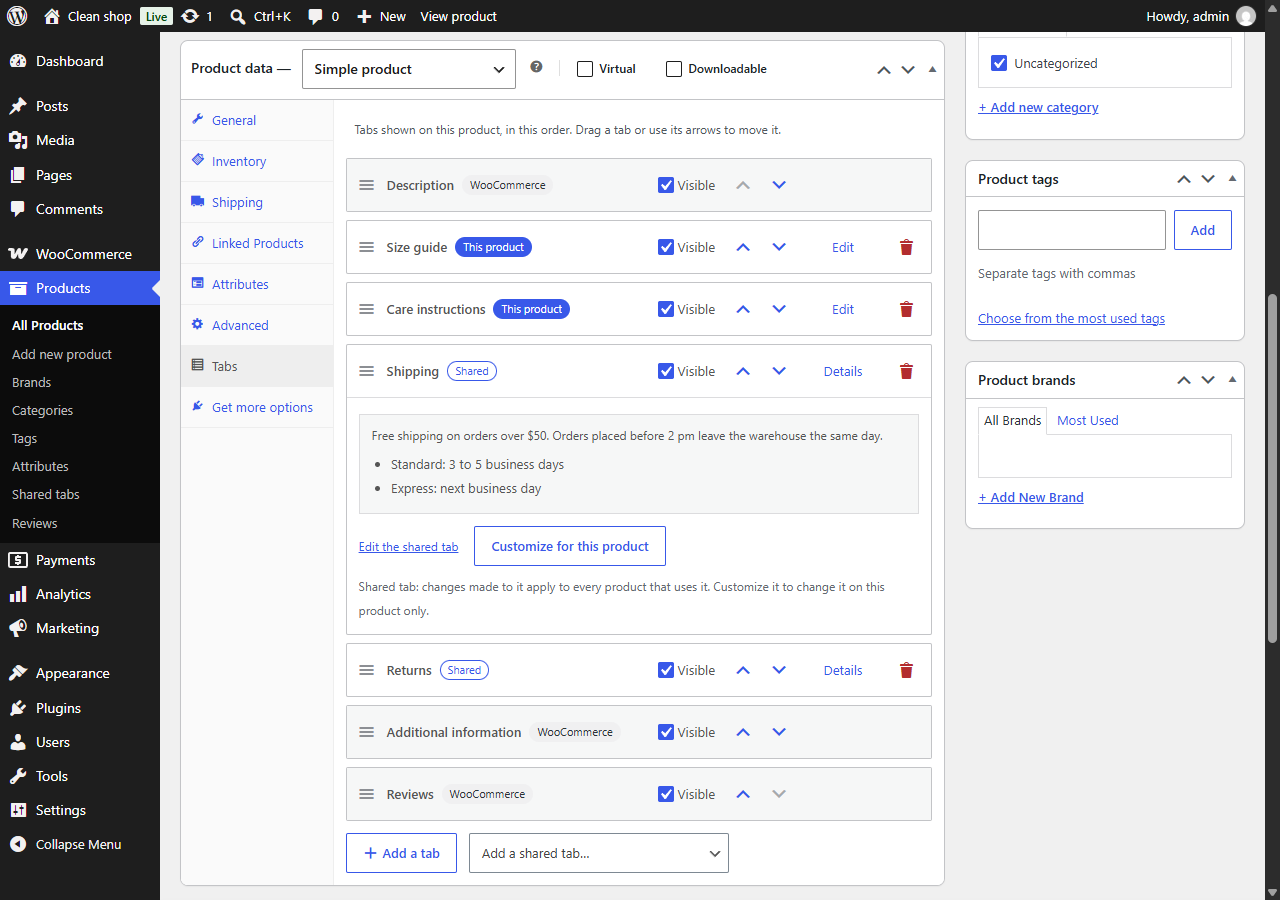
The Tabs panel of a product: WooCommerce tabs, tabs of the product and shared tabs, in one list.
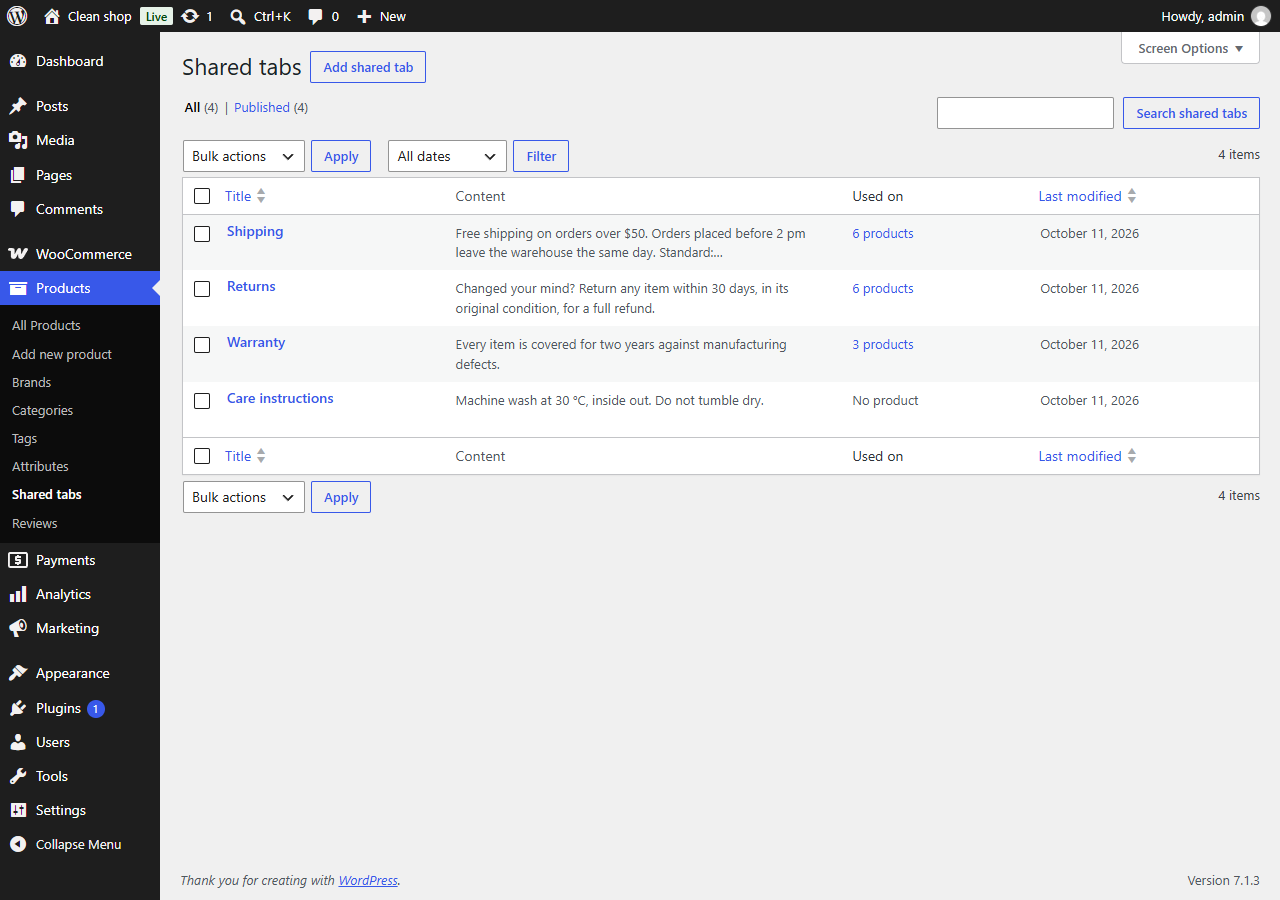
The shared tabs.
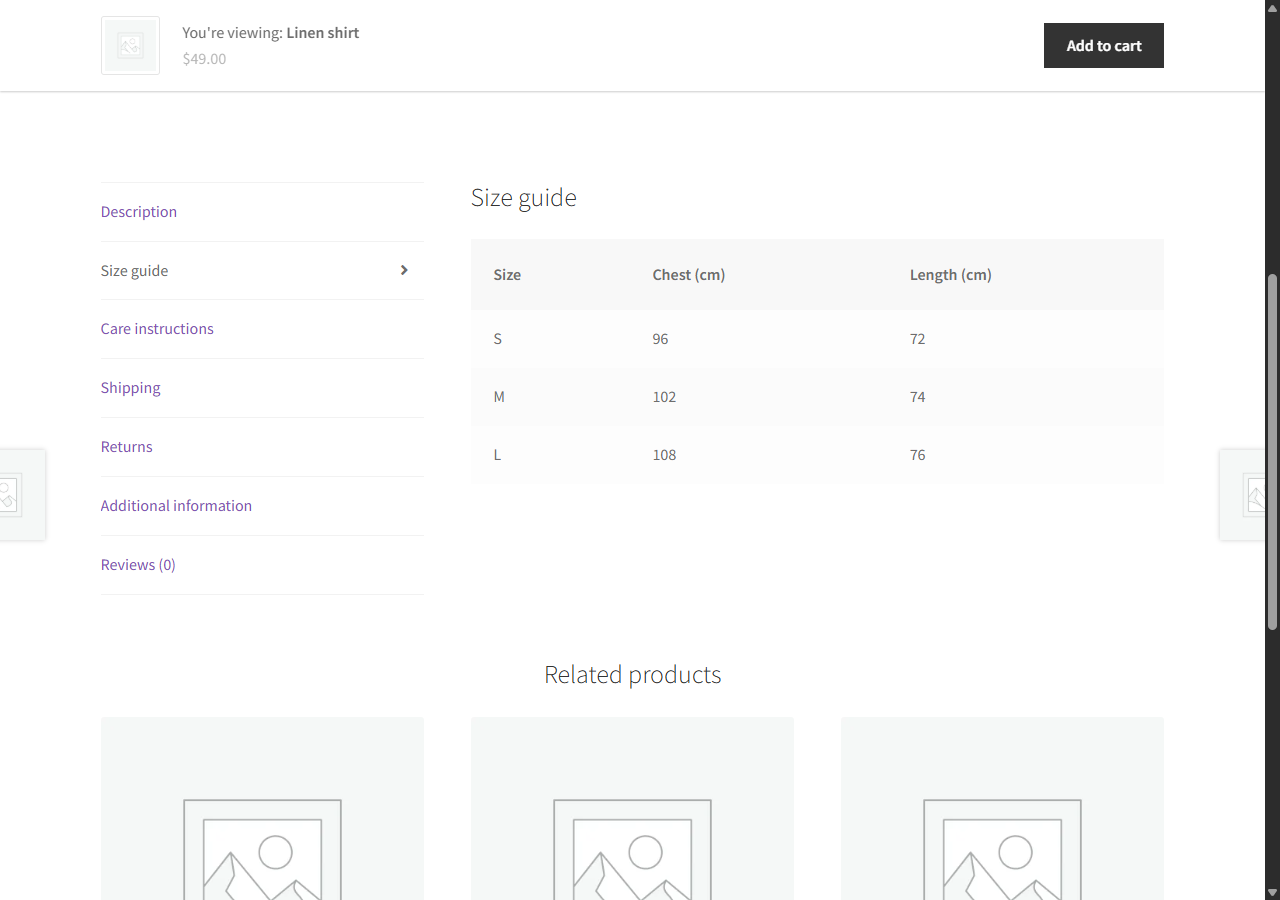
Tabs on a product page.
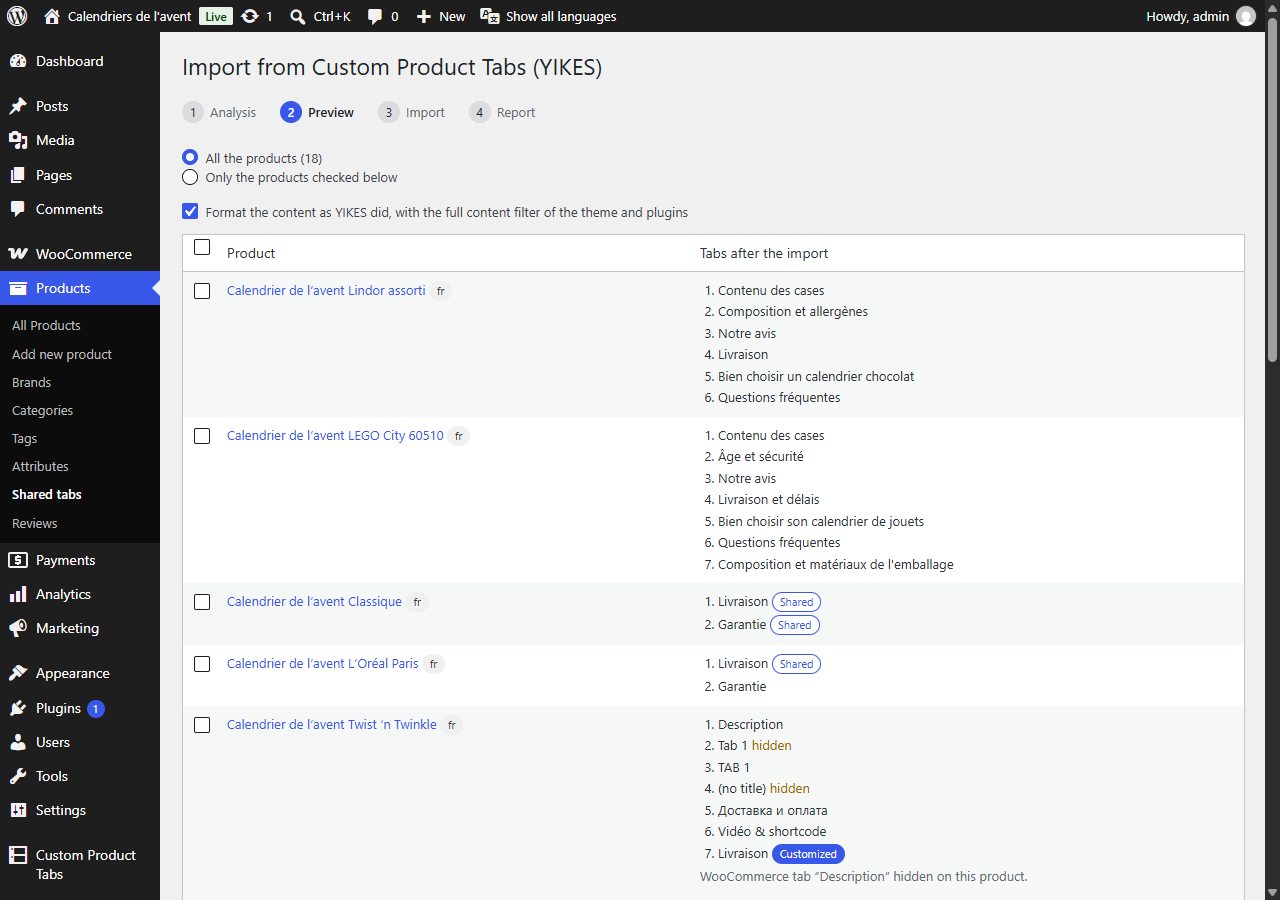
The import from Custom Product Tabs (YIKES): analysis and preview.
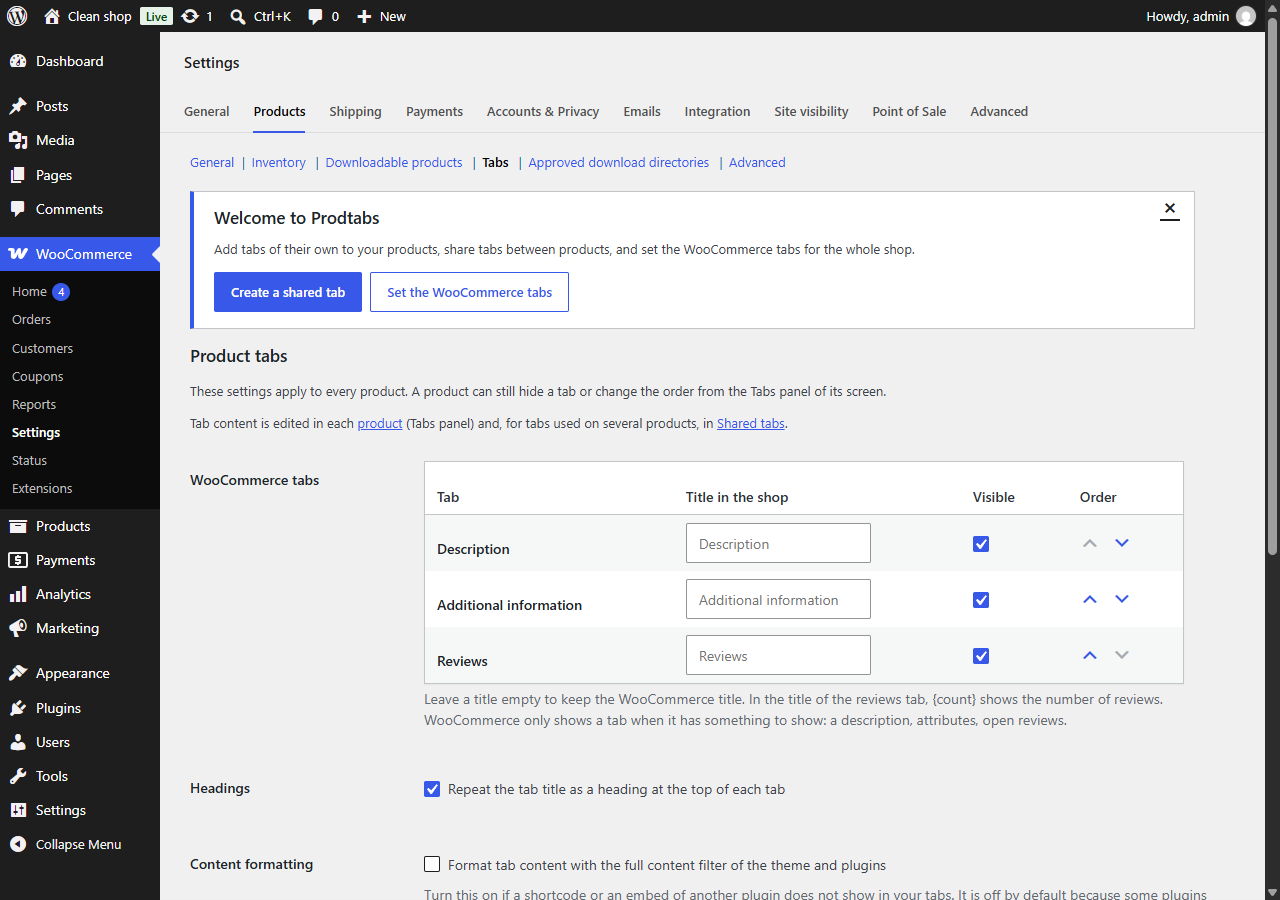
The settings of the WooCommerce tabs.
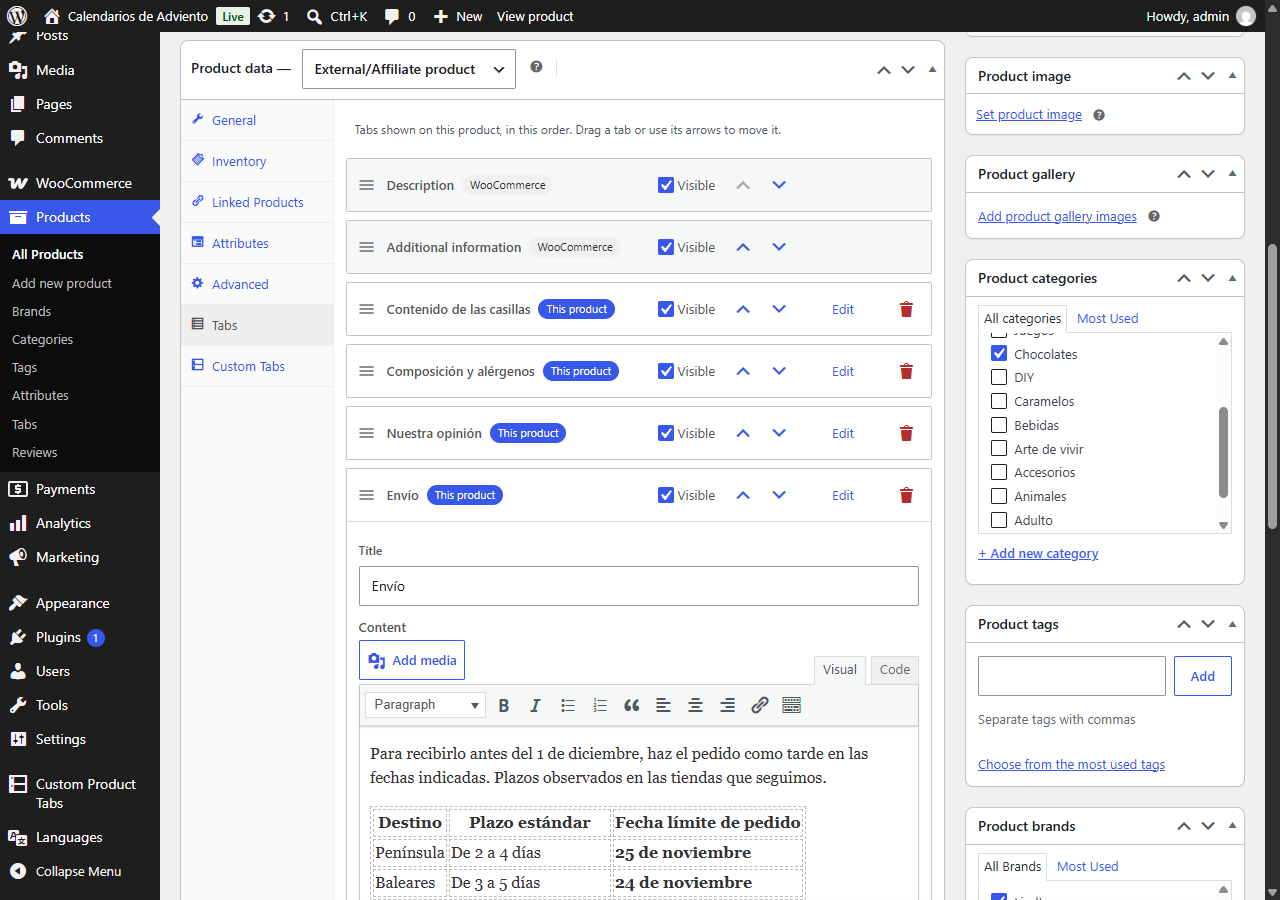
A translated product: the same tabs, with the texts of its language.