Reinvent Database Cleaner Wordpress Plugin - Rating, Reviews, Demo & Download
Plugin Description
Old revisions, spam, expired temporary data and leftovers from plugins you deleted long ago all slow your site down. Reinvent Database Cleaner finds them, tells you in plain words what each one is, and removes them safely.
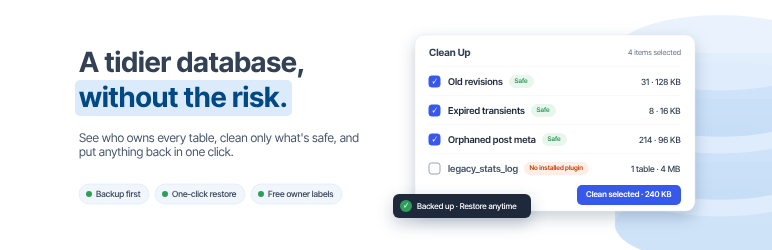
One click, nothing to fear. The home screen shows how much can be cleaned safely. Click Clean now. Everything removed is first copied to a private backup on your server, so you can put it back from History with one click.
Who owns this table? We check the code of WordPress, your plugins and your themes on your own server, and label every table, option and scheduled task:
- WordPress: never offered for removal.
- Used by an active plugin: never offered for removal.
- Inactive plugin: you decide; keep it if you’ll use that plugin again.
- No installed plugin: most likely left by a plugin you deleted.
Faster pages with autoload. WordPress loads some options on every page view. We show the total against the limit Site Health warns about, the biggest ones and who they belong to, and let you stop autoloading them in one click. You can undo that too.
Automatic cleanup. Clean the safe items weekly or monthly, in the background.
What it cleans
- Old revisions (keeps the last 5 of each post by default)
- Auto-drafts and posts in the trash, with everything attached to them, so no orphaned data is left
- Spam and trashed comments
- Embed (oEmbed) caches
- Orphaned post, comment, term and user data, and orphaned category links
- Duplicate post data (review first)
- Expired transients
- Finished Action Scheduler tasks and their logs (WooCommerce and others)
- Expired WooCommerce sessions
- Leftover tables, options and scheduled tasks (Advanced mode)
Everything is free
- Preview what will be removed before you clean
- Backups and one-click restore for every cleanup, table, option and scheduled task
- Ownership labels for tables, options and cron jobs
- Optimize tables
- Autoload size meter, with “stop autoloading” and undo
- Weekly or monthly automatic cleanup
- Simple and Advanced modes, plus a settings search that understands plain words
- WP-CLI:
wp db-cleaner status,clean,index,tables,drop-table,restore
Safe by design
- Backup first, always. If the backup can’t be written, nothing is removed.
- WordPress tables, options and tasks, and anything used by an active plugin, are never offered for removal.
- Leftovers are only removed when you choose them.
- Only this site’s tables (its table prefix) are listed or changed.
- Work runs in small, timed batches, so big sites don’t time out.
Tip: keep a recent full backup of your site too, like with any tool that changes the database.
External services
Database Cleaner works on your server. Your database is never sent anywhere. The admin pages connect to one service, operated by us:
Reinvent WP services (https://services.reinventwp.com)
- Settings search: when you type in the settings search box, the text you type, the plugin name and version are sent to find matching settings. Nothing is sent until you search.
- Error reporting: only after you click “I Agree” on the privacy notice in the plugin’s admin page. When that page hits an error, the error message, the page URL, your browser’s user agent and the plugin version are sent so we can fix the problem. Before you agree, errors are only saved in the plugin’s own log on your site.
- Site report: to improve the plugin and help us debug when you report an error, the plugin’s admin page sends your site address, the admin email, the plugin version and the plugin’s settings (no passwords or keys) when the page loads and when you save the settings.
- The list of Reinvent WP apps on the Reinvent WP Dashboard page. When an administrator opens that page, your site downloads the current list at most once a day and keeps a copy. Nothing about your site or you is sent.
- The assistant (the Describe a problem with your site field) on the Reinvent WP Dashboard page and on this plugin’s page. When you send a question, it is sent with any screenshots or text files you attach to it (of a file, only its newest part, with emails, IP addresses, passwords and keys hidden by your browser first), the last few messages of the conversation and the list of Reinvent WP plugins on your site (whether each is active, inactive or not installed, and its version), so the answer can point to the right plugin and setting. Nothing is stored; the conversation stays in your browser tab. If you send feedback from the assistant’s form, your email, site address and message go to the Reinvent WP team, like the feedback form.
Terms of Service | Privacy Policy
Source Code
The admin screen is built with React and TypeScript. The compiled files in public/js are generated with webpack from the human-readable source code included in the plugin at source/admin.
The Reinvent WP Dashboard page and the assistant (public/hub) are built from https://github.com/reinventwp/reinventwp-apps.
Screenshots

Home: what can be cleaned safely, database size and autoload.

Clean Up: every item explained, with a preview.

Tables with their owners.

Options and autoload.

History with one-click restore.