Sofrah Order Board Wordpress Plugin - Rating, Reviews, Demo & Download
Plugin Description
With WooCommerce on its own, a pickup order looks agreed the moment it is placed: the diner gets a “Thank you for your order” email before anyone in the kitchen has seen it. Sofrah Order Board adds the missing step.
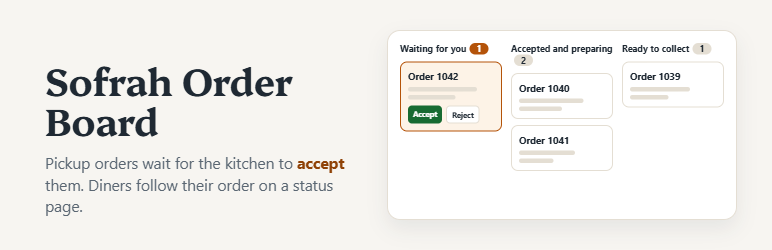
- The restaurant accepts or rejects each order. A new pay-at-pickup order waits on the order board. Staff accept it with a pickup time, or reject it with a reason the diner sees.
- One order board. Orders waiting for you come first, then those being prepared, then those ready to collect. It refreshes by itself, shows a clear alert while an order is waiting, and can play a sound.
- The diner always knows where the order stands. Emails at each step (received but not accepted yet, accepted with a pickup time, ready, not accepted, cancelled) and a private status page that updates by itself. Until the restaurant accepts, the diner can cancel from that page.
- Honest confirmation. After checkout the diner reads “Order sent to the restaurant. It is not accepted yet.”
- Payment at pickup is recorded separately. Mark an order paid when the money is taken. Marking it collected never marks it paid, and the other way round.
- One order per checkout. A slow connection, a double tap or two open tabs do not create two orders (block checkout).
- Changes only through the board. While an order is open, WooCommerce’s own order screen, bulk actions, its REST API and mobile app, refunds and trash are refused for it, with a message saying why, and each attempt is written to the order’s history.
- Opening hours and pause. Set your hours (including closing after midnight), closure dates and when online orders stop. Pickup orders are refused outside them, and staff can pause ordering from the board in one tap when the kitchen is overwhelmed.
- A working site in one click. Import the restaurant or cafe demo: sample menu, venue, hours, Pay at pickup and the Home, About and Contact pages. Your own dishes and pages are never touched.
- Checkout asks only for name, email and phone by default, because the diner collects the order.
- For themes: shortcodes for the menu ([sofrah_menu]), the live ordering status ([sofrah_ordering_status]), opening hours ([sofrah_hours]) and venue details ([sofrah_venue field=”address|street|phone”]). The free Sofrah theme is built on them.
- No order note by default. A free-text note such as an allergy request can be missed by a busy kitchen, so it is removed from checkout and not stored for pickup orders. You can switch this off.
What it does not do
- Alerts only while the board is open. Keep the order board open in a browser on a device in the kitchen during ordering hours. There are no push notifications, SMS or WhatsApp alerts.
- No automatic expiry yet. An order nobody answers stays waiting. Check the board.
- WooCommerce’s sales reports count completed orders as sales. They do not show what was actually paid at pickup; the order board does.
- A direct edit of the database cannot be blocked. If it happens, the order board flags the order.
- It does not take payments, print tickets or handle delivery.
Privacy
The plugin sends nothing to its author or to anyone else: no tracking, no usage reports, no remote requests. Orders, names, phone numbers and emails stay in your own WordPress database, as with any WooCommerce order. Emails go through your site’s own mail service. WordPress itself tells wordpress.org which plugins are installed when it checks for updates; that is WordPress’s behaviour, not this plugin’s.
Screenshots
No screenshots provided